Question

Is there a way to do this?

  • April 26, 2018
  • 9 replies
  • 48 views

Forum|alt.badge.img+6

I need to check all machines to see if they have a specific plugin(s) installed before they receive a policy. Is there a way to do that? For instance, I want to install google hangouts plugin for safari. I created a policy that uses a DMG file that I created in composer. I want that policy to run after the computer has been checked for the plugin.

9 replies

Forum|alt.badge.img+4
  • Contributor
  • April 26, 2018

you could use the extension attribute and create a smart group for any devices that don't have the extension. Scope the policy to that group

https://www.jamf.com/jamf-nation/third-party-products/files/859/google-chrome-extensions

edit: oops, just noticed you said for safari


Forum|alt.badge.img+6
  • Author
  • Contributor
  • April 26, 2018

Yeah there is a reason I said safari lol. We are creating a work around for another issue going on in chrome.


Forum|alt.badge.img+11
  • Valued Contributor
  • April 26, 2018

Are you capturing plugins during recon? (Settings > Computer Management > Inventory Collection > Software > Plugins)

I just did a quick test with that setting enabled. I installed the google hangouts plugin for safari. I did a recon of my system. I was then able to create a smart group around it.

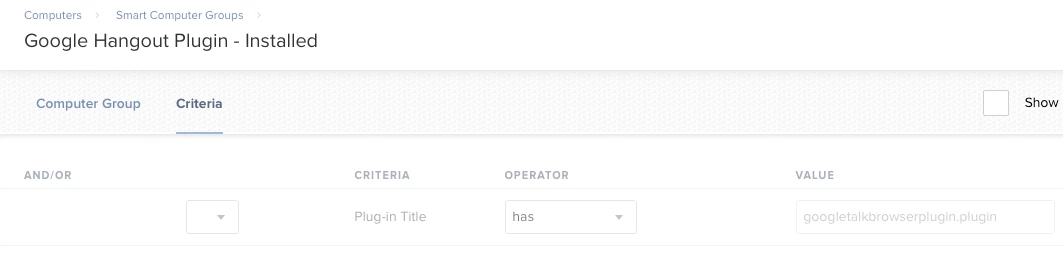
I would probably create two smart groups Google Hangout Plugins - Installed and Google Hangout Plugins - Not Installed. That way you can also monitor your progress. Then can scope the policy accordingly or flip it around and exclude the smart group you don't want to get the policy.


Forum|alt.badge.img+6
  • Author
  • Contributor
  • April 26, 2018

Recon does pick up internet plugins. How do I create a smart group around this? I tried but the plugin isnt listed in JSS


Forum|alt.badge.img+11
  • Valued Contributor
  • April 26, 2018

I would install the plugin manually on one "test" system and recon it.

Then you can build a SG. Below is how I setup my SG.

Then I can clone the SG and flip the "has" to "does not have" for my Google Hangout Plugin - Not Installed.

I could also add plug-in version if that was important. This was a quick test to confirm so I didn't add that.


Forum|alt.badge.img+6
  • Author
  • Contributor
  • April 26, 2018

Its not working out for me properly. Maybe im doing something wrong? When I create the smart group, It asks for criteria. When I click add, theres tons of other options besides safari hangouts plugin.


Forum|alt.badge.img+6
  • Author
  • Contributor
  • April 26, 2018

Nevermind, i think i've figured it out.


Forum|alt.badge.img+11
  • Valued Contributor
  • April 26, 2018

Right, that makes sense because the plugins are captured during inventory. Which would hit every system so I would except a long list of plugins.

A point of consideration is the plug-in inventory is only looking at /Library/Internet Plug-Ins by default.

Which means if you're dropping the plugin in another location. Then of course it wouldn't be picked up by recon. You technically can add other locations for plugins to be captured during recon but consider it will be run during recon aka on every system you have. Which means the plugin list may grow very quickly. In your OP you mentioned your using a dmg made with composer. Is there and special reason why?

I used the package here: https://tools.google.com/dlpage/hangoutplugin. Which does put the plugin in that path.


mm2270
Forum|alt.badge.img+24
  • Legendary Contributor
  • April 26, 2018

While not completely accurate, you could also create a group on the Jamf package receipt. Anything that gets installed via Jamf (as well as regular "installer" installations) drop a receipt on the system. So you could create a group looking for the receipt of the package that deploys the plug-in.
The only issue with that is, if the plug-in later gets deleted, say by a user, it will no longer be accurate. The receipt will remain, but the plug-in is now gone.

But it's an option.