Solved

Is there a way to enable reasonable security audit log retention via script to comply with CIS Level

  • May 2, 2023
  • 4 replies
  • 100 views

Forum|alt.badge.img+4

Is there a way to enable reasonable security audit log retention via script to comply with CIS Level 1 requirements? Thank in advance

Best answer by YanW

I am login as a root user but still not able to edit.
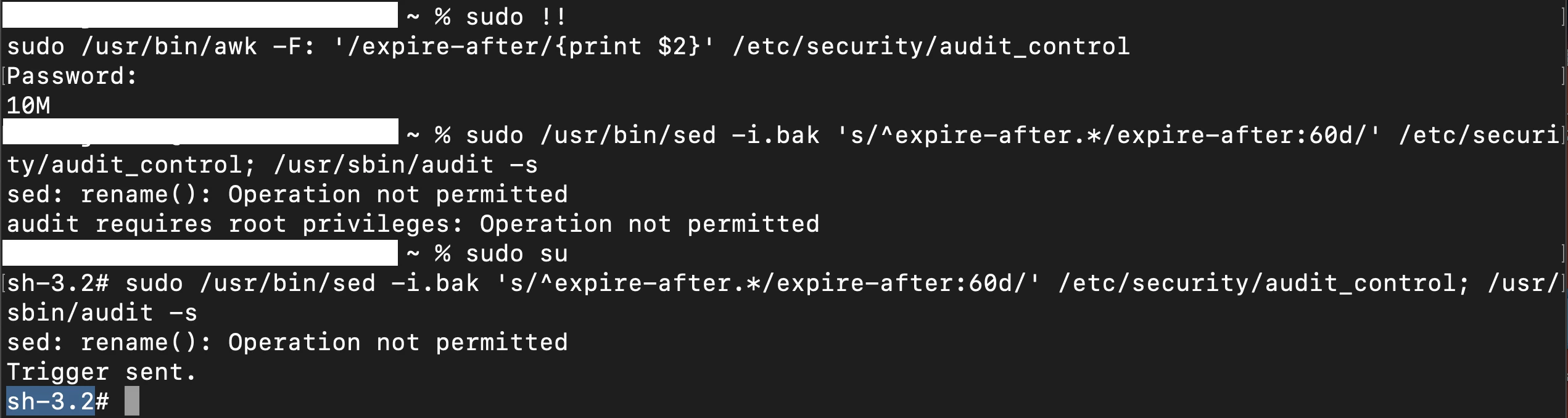

For Ventura, try this

chflags nouchg /etc/security/audit_control; sleep 2; /usr/bin/sed -i.bak 's/^expire-after.*/expire-after:60d OR 1G/' /etc/security/audit_control; /usr/sbin/audit -s

 

4 replies

ThijsX
Forum|alt.badge.img+19
  • Employee
  • May 2, 2023

Hey @deep786 

Yes this can be achieve with the following where $ODV is the organisational defined value.

/usr/bin/sed -i.bak 's/^expire-after.*/expire-after:$ODV/' /etc/security/audit_control; /usr/sbin/audit -s

 

To check the current set value


/usr/bin/awk -F: '/expire-after/{print $2}' /etc/security/audit_control


Hopefully this is helpful!


Cheers,

Thijs


Forum|alt.badge.img+4
  • Author
  • New Contributor
  • May 2, 2023

Hey @deep786 

Yes this can be achieve with the following where $ODV is the organisational defined value.

/usr/bin/sed -i.bak 's/^expire-after.*/expire-after:$ODV/' /etc/security/audit_control; /usr/sbin/audit -s


To check the current set value


/usr/bin/awk -F: '/expire-after/{print $2}' /etc/security/audit_control


Hopefully this is helpful!


Cheers,

Thijs


not able to edit "audit_control" file , Error permission denied


Forum|alt.badge.img+4
  • Author
  • New Contributor
  • May 2, 2023

I am login as a root user but still not able to edit.


YanW
Forum|alt.badge.img+11
  • Contributor
  • Answer
  • May 2, 2023

I am login as a root user but still not able to edit.


For Ventura, try this

chflags nouchg /etc/security/audit_control; sleep 2; /usr/bin/sed -i.bak 's/^expire-after.*/expire-after:60d OR 1G/' /etc/security/audit_control; /usr/sbin/audit -s