Question

Jamf And Intune integration

  • February 6, 2018
  • 11 replies
  • 46 views

Forum|alt.badge.img+3

Hello

We recently followed the guidelines to integrate JAMF and Intune.
It’s working fine, we are now able to apply conditional access policies that require MAC to be compliant.

But the user experience on the register process is a pain, to many inputs needed;
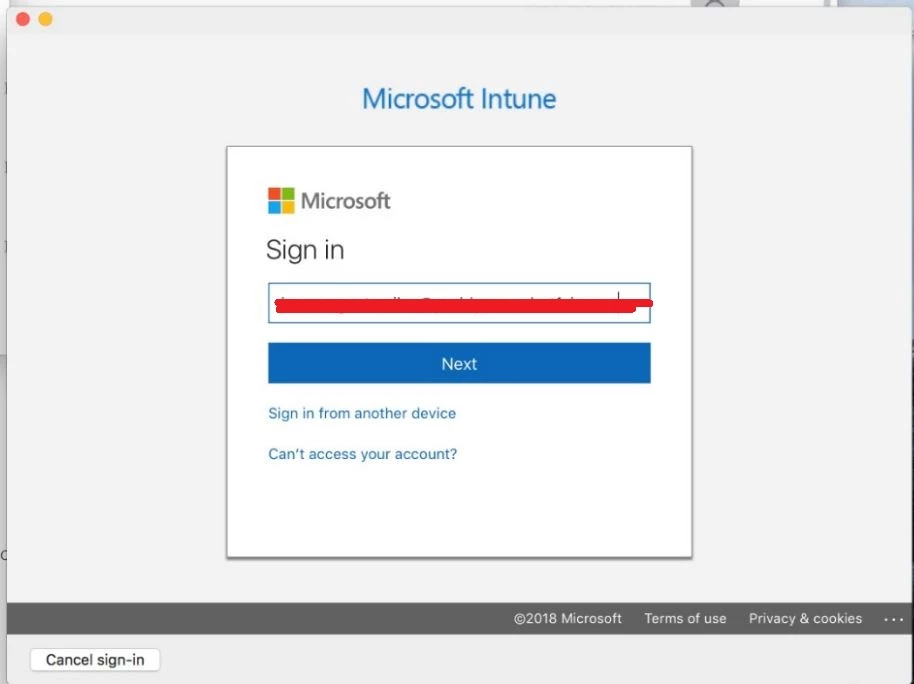
1- Azure/ADFS Sign in. To setup the company portal and register the MAC.
2- Second Azure Sign in (Myapps portal popup) – no password required, just email. (SSO doing its work here it seems)
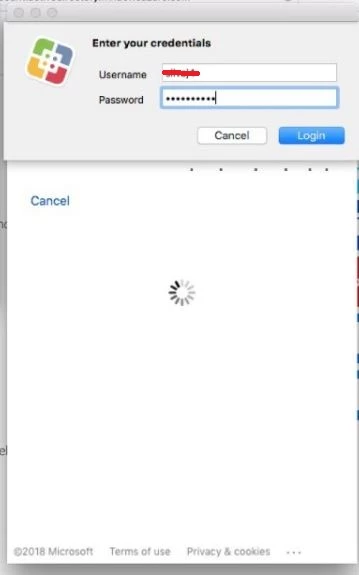
3- Popup asking for JAMF/user credentials (Self Service icon displayed here).
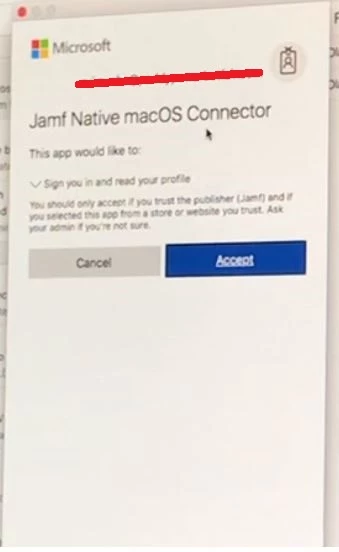
4- Popup asking to accept publisher “JAMF Native MacOS connector”, or cancel.
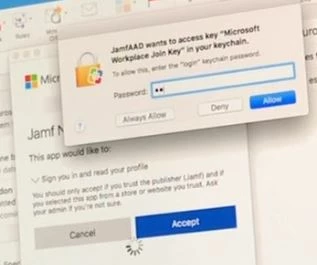
5- Popup for key-chain password.

An example can be seen under this link. Not exactly the same experience, this one has less popups.
https://deploywindows.com/2018/01/04/curious-about-experience-with-jamf-integration/

Is there a way to fine-tune and automate, as much as possible, the above procedure?

Thank you

Screenshots attached
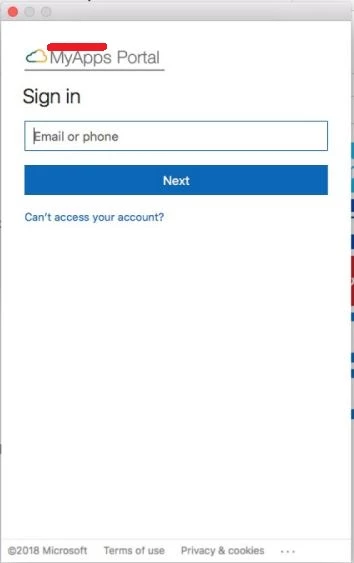


11 replies

ThijsX
Forum|alt.badge.img+20
  • Employee
  • February 6, 2018

Hmm very curious, this year we are going to introduce the intergration between our JSS and SCCM environment.
If you have any tips, pro-tips.

I am in!

Cheers,
Thijs - bol.com


Forum|alt.badge.img
  • New Contributor
  • January 22, 2019

Any update on this post ?


Forum|alt.badge.img+8
  • Valued Contributor
  • January 31, 2019

I'm just testing integration however having issues where the JSS isn't sending machine data to Intune...


Forum|alt.badge.img+6
  • Contributor
  • February 1, 2019

I am also having an issue with JAMF sending machine data to Intune. I see the mac in Azure but it never gets to Intune....


ThijsX
Forum|alt.badge.img+20
  • Employee
  • February 1, 2019

@simonep go to Azure AD -> MAM / MDM and add there Microsoft Intune and make sure your users are allowed to enroll


Forum|alt.badge.img+1
  • New Contributor
  • March 25, 2019

Hi,

We have just started configuring JAMF/Intune and we have this exact same issue.

The device registers with Azure but never shows in Intune. when we check the logs we see an error message.


(50097 - Device Authentication Required - DeviceId -DeviceAltSecId claims are null OR no device corresponding to the device identifier exists. )

Does anyone have any idea what this could mean?

thanks in advance


Forum|alt.badge.img+4
  • Contributor
  • April 5, 2019

Getting this same error, were you able to figure it out @MacLover ?


Forum|alt.badge.img+10
  • Contributor
  • May 15, 2019

Yes this error also are on our side on some clients

The clients are registered in azure but still the error appear in the log

(50097 - Device Authentication Required - DeviceId -DeviceAltSecId claims are null OR no device corresponding to the device identifier exists. )


Forum|alt.badge.img+1
  • New Contributor
  • May 23, 2019

@friveraLC we have managed to fix the issue by doing everything from scratch with the help of our support (jigsaw24) and they found that we were missing permissions on the Azure Jamf apps and also our Backend team only configured one of the Azure Jamf app. So it was caused by us missing few steps on the guide.


Forum|alt.badge.img+1
  • New Contributor
  • May 29, 2019

@MacLover Can you be more clear on what it was you found and subsequently fixed? We were working just fine for over a week and then came back from holiday and found some of us weren't able to get in with same error. Now two of the four of us can get in. I wouldn't think permissions is the issue since some devices are found as compliant, but looking for any help we may find!


Forum|alt.badge.img+11
  • Contributor
  • May 29, 2019

+1 too many logins