Question

Jamf Connect 1.6.0 General Availability

  • July 25, 2019
  • 4 replies
  • 27 views

Forum|alt.badge.img+10

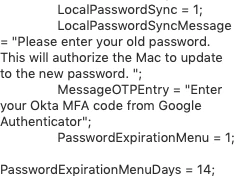
Jamf Connect Login 1.3.1 Enhancements: If using a one-time password (OTP) as a multi-factor authentication (MFA) method, you can now customize the text shown to users when they are prompted for an OTP with the MessageOTPEntry preference key. To use this setting, you must have multi-factor authentication via OTP enabled for your cloud identity provider (IdP).

Jamf Connect Sync 1.0.5 Bug Fix: [PI-006721] Fixed an issue that sometimes prevented password synchronization in certain user environments.

Jamf Connect Verify 1.1.2: N/A

Product Documentation
For more information, including Release Notes, please see the Jamf Connect Administrator Guide.

4 replies

Forum|alt.badge.img+5
  • New Contributor
  • July 25, 2019

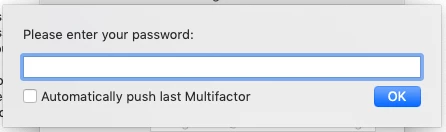
I installed 1.0.5 of JAMF Connect Sync and here is a screenshot of the configuration profile with the new MessageOTPEntry and it still says "Please enter your password" at the MFA screen.


Forum|alt.badge.img+5
  • New Contributor
  • July 26, 2019

The place where MessageOTPEntry was sorely needed was in Jamf Connect Sync where the messaging is just flat-out wrong as shown by HBPAlex. But instead we got the key in Jamf Connect Login. Yay?


Forum|alt.badge.img+5
  • New Contributor
  • July 26, 2019

@crystallized

ohhh bummer. I actually thought it was in JCS for some reason.

You're right, it's just so confusing to people that "Please enter your password" doesn't mean to enter your password but instead enter your MFA code.


Forum|alt.badge.img+5
  • New Contributor
  • July 29, 2019

I know, right? I have users consistently getting locked out because they're actually following the instructions, it's a real pain. I would have thought if they were going to make this key work anywhere it would have been in the place where it's broken.