Question

Jamf Connect login window doesn’t appear after the setup assistant

  • Dec 16, 2024 9:37 PM UTC
  • 22 replies
  • 1096 views

Forum|alt.badge.img+4

Hey everyone,

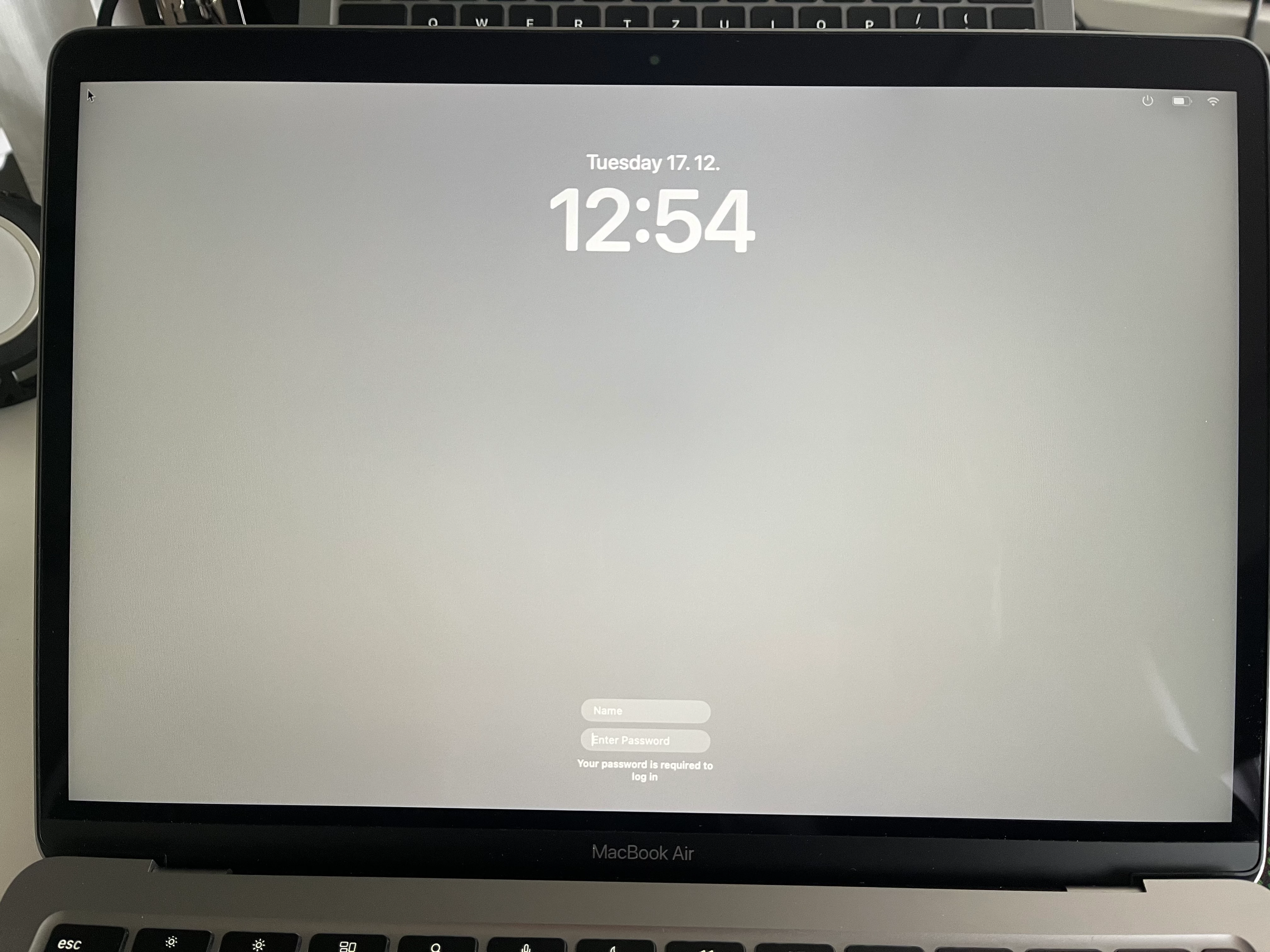
I’ve set up Jamf Connect with Google IdP following the documentation and tested it; everything seems to run fine. However, I've run into issues during PreStage Enrollment deployment in Jamf Pro. I can’t seem to launch Jamf Connect properly for local account creation to show the Google login screen. Right after the Setup Assistant, it only shows a black login screen with empty fields for user and password. According to troubleshooting, it might be due to the permissions in the package, but since I’m using the official Jamf Connect 2.42.0 package and distributing it through Cloud Distribution Point (Jamf Cloud), I don’t think there should be an issue.

Has anyone had a similar experience and found a solution?

Here is my configuration excluding secrets:


<key>AllowNetworkSelection</key> <true/> <key>CreateJamfConnectPassword</key> <true/> <key>CreateNewUserHide</key> <true/> <key>DenyLocal</key> <false/> <key>EnableFDE</key> <true/> <key>EnableFDERecoveryKey</key> <false/> <key>Migrate</key> <true/> <key>OIDCIgnoreAdmin</key> <false/> <key>OIDCNewPassword</key> <true/> <key>OIDCProvider</key> <string>GoogleID</string> <key>OIDCRedirectURI</key> <string>https://127.0.0.1/jamfconnect</string> <key>OIDCUsePassthroughAuth</key> <true/>


22 replies

Forum|alt.badge.img+20
  • Honored Contributor
  • Dec 16, 2024 9:53 PM UTC

How are you installing the Jamf Connect package? 

Are you installing it in your prestage so that it gets installed during setup?

Do you you have your Jamf Connect configuration profile scoped in your Prestage AND properly scoped so it doesn't get removed after install?

If you are doing all that, when did you upload your package to Jamf? Was it in the last month or so? There is a Product Issue with Jamf 11.11 & 11.11.1 where uploaded packages are not being checksummed correctly and will fail to install in a prestage. It is supposed to be fixed in 11.12, which hopefully will be released soon. 

It you did just recently upload the package, contact Jamf support, I think they have a work around to correct the file upload so you can use it in your Prestage.  


Forum|alt.badge.img+4
  • Author
  • Contributor
  • Dec 16, 2024 10:07 PM UTC

How are you installing the Jamf Connect package? 

Are you installing it in your prestage so that it gets installed during setup?

Do you you have your Jamf Connect configuration profile scoped in your Prestage AND properly scoped so it doesn't get removed after install?

If you are doing all that, when did you upload your package to Jamf? Was it in the last month or so? There is a Product Issue with Jamf 11.11 & 11.11.1 where uploaded packages are not being checksummed correctly and will fail to install in a prestage. It is supposed to be fixed in 11.12, which hopefully will be released soon. 

It you did just recently upload the package, contact Jamf support, I think they have a work around to correct the file upload so you can use it in your Prestage.  


Thanks for you reply! Yes, I've included the package in the prestage, scoped in on the same computers as configuration profiles. But I've re-uploaded the package today and our instance is on 11.11.2... So perhaps that is the issue. I've contacted the support as well, so we will see. 


A_Collins
Forum|alt.badge.img+11
  • Contributor
  • Dec 17, 2024 3:00 AM UTC

If you are using jamfconnect 2.42, it fails to install on prestage. Use version 2.41


mickgrant
Forum|alt.badge.img+12
  • Contributor
  • Dec 17, 2024 3:10 AM UTC

If you are deploying a branding package via prestage, it must be signed correctly.
Here is the relevant help files page - Packaging Jamf Connect Files and Images with Composer 
and here is a link to Creating a Signing Certificate Using Jamf Pro's Built-in CA to Use for Signing Configuration Profiles and Packages 


A_Collins
Forum|alt.badge.img+11
  • Contributor
  • Dec 17, 2024 3:22 AM UTC

@mickgrant jamf connect packages are already signed by Jamf and notarized by Apple


mickgrant
Forum|alt.badge.img+12
  • Contributor
  • Dec 17, 2024 3:28 AM UTC

@mickgrant jamf connect packages are already signed by Jamf and notarized by Apple


Jamf Connect packages are, but any logos or branding being deployed to be used by Jamf Connect must be signed. Which is why I posted the links to the documentation where it says as much


Forum|alt.badge.img+4
  • Author
  • Contributor
  • Dec 17, 2024 11:31 AM UTC

If you are deploying a branding package via prestage, it must be signed correctly.
Here is the relevant help files page - Packaging Jamf Connect Files and Images with Composer 
and here is a link to Creating a Signing Certificate Using Jamf Pro's Built-in CA to Use for Signing Configuration Profiles and Packages 


I'm not.


Forum|alt.badge.img+4
  • Author
  • Contributor
  • Dec 17, 2024 11:33 AM UTC

If you are using jamfconnect 2.42, it fails to install on prestage. Use version 2.41


Oh really? So both Jamf Pro and Jamf Connect latest versions are bugged? 😳


Forum|alt.badge.img+4
  • Author
  • Contributor
  • Dec 17, 2024 12:09 PM UTC

It really looks like the package didn’t even install. Account creation was skipped and admin account was hidden from the user as configured in the prestage. I tried deploying connect version 2.41.0 with the same result.


A_Collins
Forum|alt.badge.img+11
  • Contributor
  • Dec 17, 2024 10:44 PM UTC

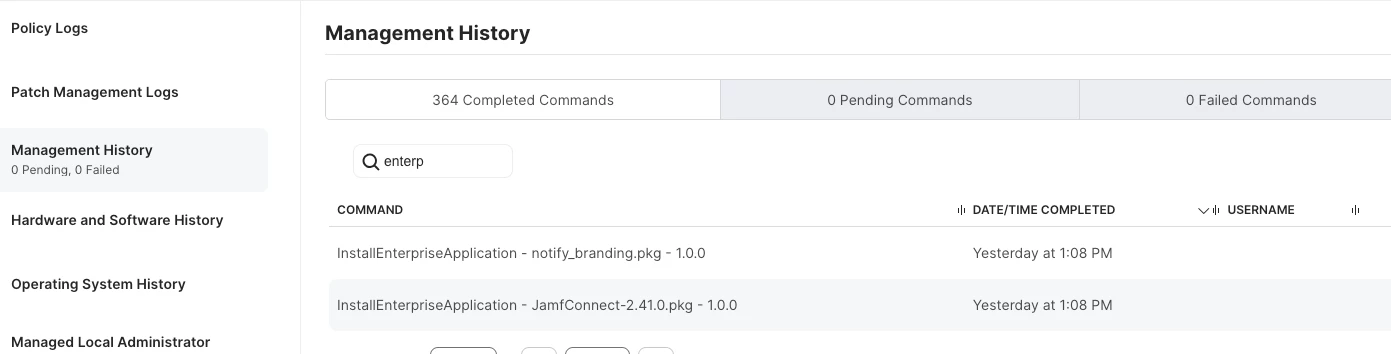
Check the management logs. Under history of management logs, you would see something like this if it is installed. 


shrisivakumaran
Forum|alt.badge.img+10

cross check jamf connect configuration profile, make sure Idp is reachable on the network and url is mentioned correctly


nikow
Forum|alt.badge.img+2
  • New Contributor
  • Dec 19, 2024 9:46 AM UTC

We can now also observe the error with us. Account creation during the PreStage does not work.


Forum|alt.badge.img+4
  • Author
  • Contributor
  • Dec 19, 2024 10:03 AM UTC

Thanks for you reply! Yes, I've included the package in the prestage, scoped in on the same computers as configuration profiles. But I've re-uploaded the package today and our instance is on 11.11.2... So perhaps that is the issue. I've contacted the support as well, so we will see. 


So still no response from Jamf support. I’m really starting to question the decision to get Jamf in the first place.


Forum|alt.badge.img+4
  • Author
  • Contributor
  • Dec 19, 2024 11:08 AM UTC

We can now also observe the error with us. Account creation during the PreStage does not work.


What IdP do you use?


Forum|alt.badge.img+4
  • Author
  • Contributor
  • Dec 19, 2024 11:54 AM UTC

Check the management logs. Under history of management logs, you would see something like this if it is installed. 


Yeah, well the log shows the entry and it’s not failed, but I think the application still isn’t running or maybe it didn’t even install.


nikow
Forum|alt.badge.img+2
  • New Contributor
  • Dec 19, 2024 12:13 PM UTC

What IdP do you use?


Entra


nikow
Forum|alt.badge.img+2
  • New Contributor
  • Dec 19, 2024 12:56 PM UTC

Found the error in our system. In the PreStage Enrollment profile, the distribution point of the Jamf Connect package was set to None....


Forum|alt.badge.img+4
  • Author
  • Contributor
  • Dec 19, 2024 1:10 PM UTC

Oh really? So both Jamf Pro and Jamf Connect latest versions are bugged? 😳


So I've got the same result with 2.41.0 as well


Forum|alt.badge.img+4
  • Author
  • Contributor
  • Dec 19, 2024 1:12 PM UTC

Found the error in our system. In the PreStage Enrollment profile, the distribution point of the Jamf Connect package was set to None....


We have Cloud Distribution Point (Jamf Cloud)


Forum|alt.badge.img+4
  • Author
  • Contributor
  • Dec 19, 2024 1:46 PM UTC

So the tech support just replied, saying it's probably the same known issue as in version 11.11. They're suggesting this workaround:

PreStage Enrollment packages fail to deploy in Jamf Pro 11.11.0 due to missing MD5 value
Until [the upcoming version] , t
he workaround is to use Terminal to calculate the package's MD5 value, then use the Jamf Pro API to apply it to the package record.

The MD5 can be calculated in Terminal via the following command:

md5 /path/to/file

You can drag and drop the file into Terminal to automatically fill in the path.

Next, collect the package record from the Jamf Pro API using a GET command against the /v1/packages/{id} endpoint. Copy the resulting XML, and add the "md5" value, then use a PUT command against the same endpoint to insert the MD5 value.

::Workflow example::
The correct checksum can be calculated in Terminal against a package with these methods:
md5 /path/to/package.pkg

shasum -a 512 /path/to/package.pkg

Package records can be checked and updated in Jamf Pro via the API. For example, we'll check for example a package with ID 116, "AdobeReaderDC-latest.pkg":
curl -X 'GET' \\
 'https://'instance name'.jamfcloud.com/api/v1/packages/116' \\
 -H 'accept: application/json' \\
 -H 'Authorization: Bearer <token>'
Returns the following response:
{
 "id": "116",
 "packageName": "AdobeReaderDC-latest.pkg",
 "fileName": "AdobeReaderDC-latest.pkg",
 "categoryId": "-1",
 "info": "",
 "notes": "",
 "priority": 10,
 "osRequirements": "",
 "fillUserTemplate": false,
 "indexed": false,
 "fillExistingUsers": false,
 "swu": false,
 "rebootRequired": false,
 "selfHealNotify": false,
 "selfHealingAction": "nothing",
 "osInstall": false,
 "serialNumber": "",
 "parentPackageId": "-1",
 "basePath": "",
 "suppressUpdates": false,
 "cloudTransferStatus": "READY",
 "ignoreConflicts": false,
 "suppressFromDock": false,
 "suppressEula": false,
 "suppressRegistration": false,
 "installLanguage": "en_US",
 "md5": "dbc11b91d3812a32f31ba077249bba7e",
 "sha256": "",
 "hashType": "MD5",
 "hashValue": "",
 "size": "",
 "osInstallerVersion": "",
 "manifest": "",
 "manifestFileName": "",
 "format": ""
}

But the actual package could show a different MD5 value when checked locally:
md5 /Users/‘Username’/Desktop/Replication\\ Folder/AdobeReaderDC-latest.pkg 
MD5 (/Users/’Username’/Desktop/Replication Folder/AdobeReaderDC-latest.pkg) = 56d5629a12bb19d898d155acfa55f503

We would then need to update the package record with the correct MD5 value:
curl -X 'PUT' \\
 'https://'instancename'.jamfcloud.com/api/v1/packages/116' \\
 -H 'accept: application/json' \\
 -H 'Authorization: Bearer <token>' \\
 -H 'Content-Type: application/json' \\
 -d '{
 "packageName": "AdobeReaderDC-latest.pkg",
 "fileName": "AdobeReaderDC-latest.pkg",
 "categoryId": "-1",
 "info": "",
 "notes": "",
 "priority": 10,
 "osRequirements": "",
 "fillUserTemplate": false,
 "fillExistingUsers": false,
 "swu": false,
 "rebootRequired": false,
 "selfHealNotify": false,
 "selfHealingAction": "nothing",
 "osInstall": false,
 "serialNumber": "",
 "parentPackageId": "-1",
 "basePath": "",
 "suppressUpdates": false,
 "cloudTransferStatus": "READY",
 "ignoreConflicts": false,
 "suppressFromDock": false,
 "suppressEula": false,
 "suppressRegistration": false,
 "installLanguage": "en_US",
 "md5": "56d5629a12bb19d898d155acfa55f503",
 "sha256": "",
 "hashType": "MD5",
 "hashValue": "",
 "osInstallerVersion": "",
 "manifest": "",
 "manifestFileName": "",
 "format": ""
}'


Forum|alt.badge.img+3
  • New Contributor
  • Dec 21, 2024 10:34 PM UTC

It really looks like the package didn’t even install. Account creation was skipped and admin account was hidden from the user as configured in the prestage. I tried deploying connect version 2.41.0 with the same result.


Is FileVault enabled?  If yes, this is the expected behavior.  If you want the IDP login screen to appear with FV enabled, you must modify your plist.  https://learn.jamf.com/en-US/bundle/jamf-connect-documentation-current/page/Turning_On_FileVault_with_Jamf_Connect.html 


Forum|alt.badge.img
  • New Contributor
  • Mar 6, 2025 1:09 AM UTC

So still no response from Jamf support. I’m really starting to question the decision to get Jamf in the first place.


Hi liska,

I have recently signed up with Jamf and already started to question my decision because of the extreme LACK of support.