

Hello Everyone,
I am at my wits end here and might need some more brains to figure out what the issue is. I am not fully sure if this is the right forum for this topic either, but I am giving it a try...
We have set up the Device Compliance in Jamf Pro for several weeks/months now and started to slowly onboard our macs.
What we did:
- We have a mac user group in our AD which is being synced to Azure.
- Created a Mac App via Jamf Catalogue to roll out the company portal to specific devices only
- Set our two Smart Groups for Compliance and Applicable Macs. This checks if the Company portal is installed and applies our Configuration Profiles and Policies.
- Policy:
- run Jamf manage and apply the Microsoft Device Compliance
- Configuration Profile:
- Applies the web view (According to: https://community.jamf.com/t5/jamf-pro/jamf-intune-macos-device-compliance-mac-not-being-added-to-intune/m-p/292367/highlight/true#M260024)
- We also have a Microsoft SSO CP in place.
- Policy:
This seems to work. I can also see that our devices are being rolled out and the Compliance is good...
However, then it gets weird. When I check Azure / Entra a few days later... Devices that were being enrolled and were properly reported with everything, suddenly have "NONE" set as MDM Authority?!
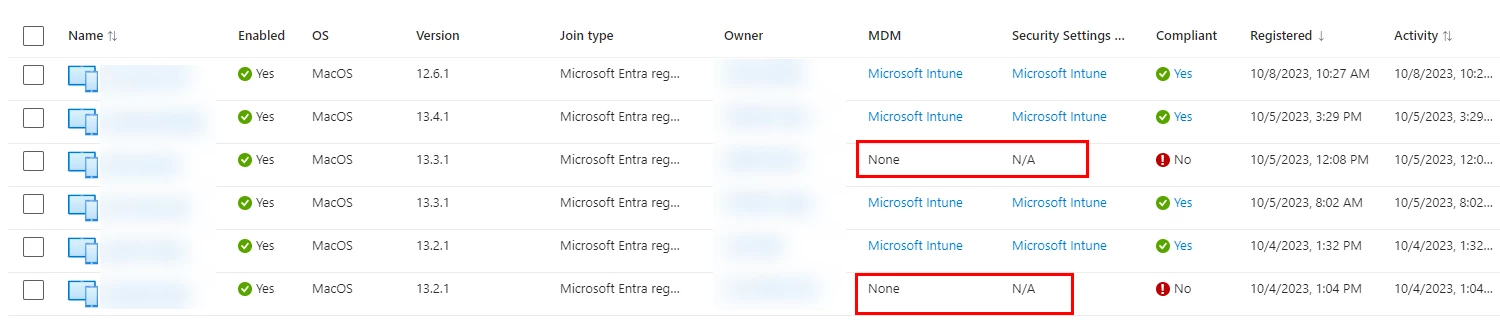
This does not apply to all of our macs. Just a few so far. We have rolled out 36 for now, and had this issue with 4 devices.
Re-enrolling doesn't seem to do the trick either. I tried with two devices but they still report none.
Also, a lot of devices are already in this list for weeks or months and still report properly. So I think the settings should be fine?
If it helps I can of course provide more info on the settings etc.
Did anyone see this weird behaviour before and may be able to help out?