We use Jamf Pro in the cloud and we have a local Microsoft CA server.
My goal is to install certificates from the local CA using Jamf pro cloud on the mac devices.
I understand there are two ways to do this:
1. Using Jamf ADCS Connector
2. Using Jamf SCEP with local NDES server
Am I right?
What is the right and secure way to do it?
We also have Azure and Intune if that can help.
Thanks
Best answer by dfarnworth_b
Ah yeah, this one took me a few days to figure out ...In our environment, the purpose of this was to do cert based 802.1x authentication.
At first my intention was to use the SCEP server already setup for our windows based devices enrolled through intune, struggled with it but failed to get it to work. This was (as I later found out) due to the intune connector, it takes over SCEP preventing you from using it for other purposes. So I spun up a new SCEP server specifically for Mac devices to retrieve a cert from our Windows PKI.
Once that was clear the general steps were this:
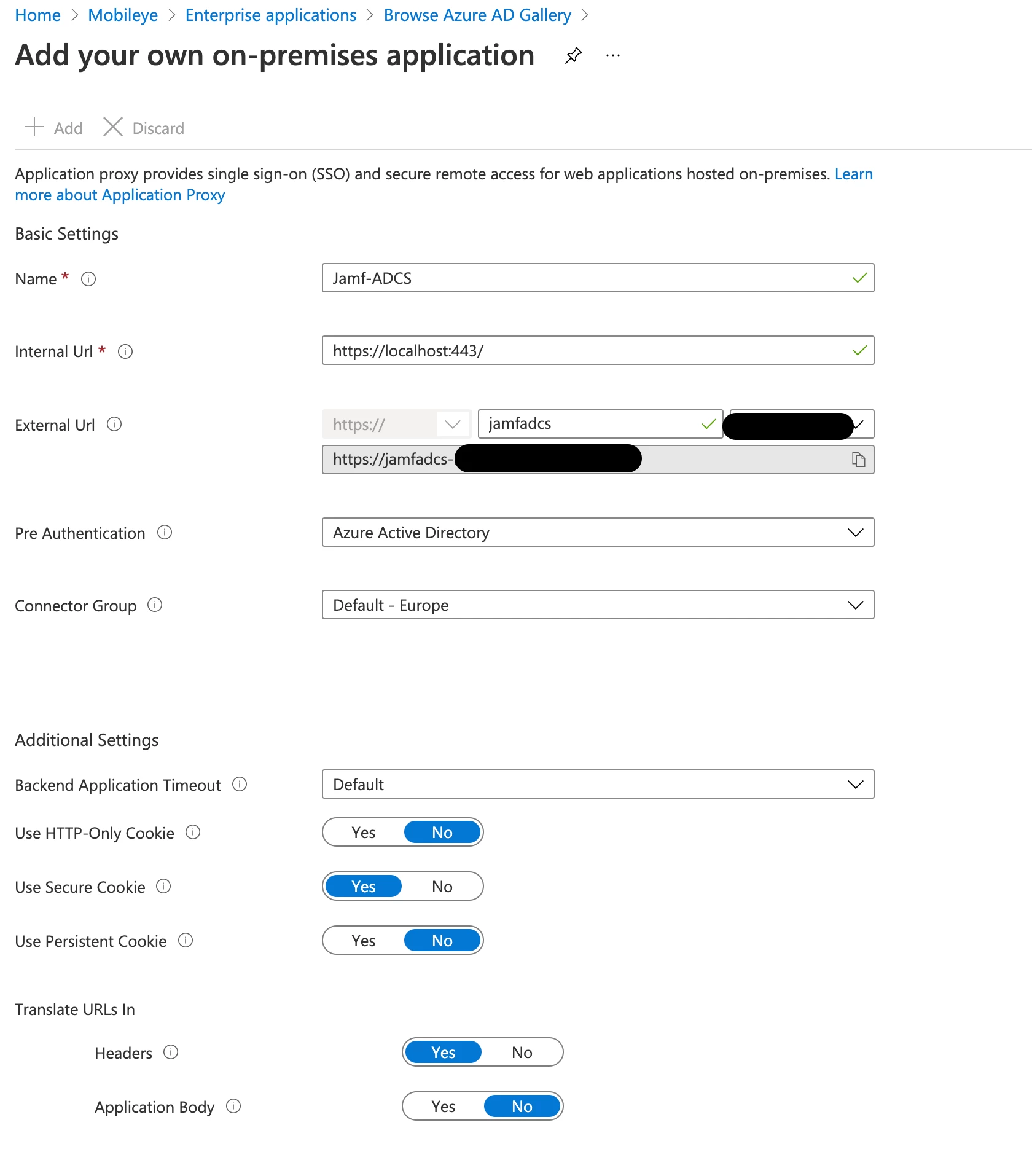
Create an AzureAD app
Install the the AAD App Proxy on the new SCEP server and link it back
Create service account
Create cert template in PKI
Go into JAMF -> Settings -> PKI Cert -> Management Cert Template -> External CA -> Configure this as a SCEP proxy, pointing to the URL of your Azure AD App.
Create a Configuration Profile with the SCEP, Cert and Network information.
LMK If you want screenshots or more detail, I know I glossed over a bunch of stuff.
I'd be very interested in some more detail around this, diags/screenshots/gotchas/watchas etc if you have time to provide?
AD-CS is the way forward, but if you have Azure we found it easier to create a Azure proxy connection to the server running the AD-CS connector and publish it out that way (that vey similar to how Intune provide its certificates from the premise CA using its own internal connector)
AD-CS is the way forward, but if you have Azure we found it easier to create a Azure proxy connection to the server running the AD-CS connector and publish it out that way (that vey similar to how Intune provide its certificates from the premise CA using its own internal connector)
There's still ports to setup for the proxy in Azure, but it meant I didn't have to deal with our network team at all and punch more holes in the firewall. I don't have a guide for the Azure side, as my Azure SME did this part for me, but for the Jamf side I pieced information from both Travelling Tech Guy's blog https://travellingtechguy.blog and watching Laurent's JNUC presentation on AD-CS https://www.youtube.com/watch?v=PbQOG5rJBcQ&t=1683s
Setup is really in two parts 1) getting the AD-CS connector installed and communicating with Jamf
2) setting ups PKI and certificate templates for the payloads to the clients
The best tip I can give for the latter what Laurent mentions in his presentation of don't use an existing certificate template being used for Windows but create a new one specifically for the Mac's If I have listened to this first around it would of saved a whole lot of time troubleshooting
3. I am in the process of creating the app in azure and not sure what data I should give in the internal Url (localhost or the name of the server?) and how to configure the other settings.
3. I am in the process of creating the app in azure and not sure what data I should give in the internal Url (localhost or the name of the server?) and how to configure the other settings.
There's still ports to setup for the proxy in Azure, but it meant I didn't have to deal with our network team at all and punch more holes in the firewall. I don't have a guide for the Azure side, as my Azure SME did this part for me, but for the Jamf side I pieced information from both Travelling Tech Guy's blog https://travellingtechguy.blog and watching Laurent's JNUC presentation on AD-CS https://www.youtube.com/watch?v=PbQOG5rJBcQ&t=1683s
Setup is really in two parts 1) getting the AD-CS connector installed and communicating with Jamf
2) setting ups PKI and certificate templates for the payloads to the clients
The best tip I can give for the latter what Laurent mentions in his presentation of don't use an existing certificate template being used for Windows but create a new one specifically for the Mac's If I have listened to this first around it would of saved a whole lot of time troubleshooting
I am seeing comments below indicating that this wouldnt work since the certs wont be passed through app proxy. How did you get around that?
3. I am in the process of creating the app in azure and not sure what data I should give in the internal Url (localhost or the name of the server?) and how to configure the other settings.
Did you get this fully working? Did you do another work around?
Ah yeah, this one took me a few days to figure out ...In our environment, the purpose of this was to do cert based 802.1x authentication.
At first my intention was to use the SCEP server already setup for our windows based devices enrolled through intune, struggled with it but failed to get it to work. This was (as I later found out) due to the intune connector, it takes over SCEP preventing you from using it for other purposes. So I spun up a new SCEP server specifically for Mac devices to retrieve a cert from our Windows PKI.
Once that was clear the general steps were this:
Create an AzureAD app
Install the the AAD App Proxy on the new SCEP server and link it back
Create service account
Create cert template in PKI
Go into JAMF -> Settings -> PKI Cert -> Management Cert Template -> External CA -> Configure this as a SCEP proxy, pointing to the URL of your Azure AD App.
Create a Configuration Profile with the SCEP, Cert and Network information.
LMK If you want screenshots or more detail, I know I glossed over a bunch of stuff.
Ah yeah, this one took me a few days to figure out ...In our environment, the purpose of this was to do cert based 802.1x authentication.
At first my intention was to use the SCEP server already setup for our windows based devices enrolled through intune, struggled with it but failed to get it to work. This was (as I later found out) due to the intune connector, it takes over SCEP preventing you from using it for other purposes. So I spun up a new SCEP server specifically for Mac devices to retrieve a cert from our Windows PKI.
Once that was clear the general steps were this:
Create an AzureAD app
Install the the AAD App Proxy on the new SCEP server and link it back
Create service account
Create cert template in PKI
Go into JAMF -> Settings -> PKI Cert -> Management Cert Template -> External CA -> Configure this as a SCEP proxy, pointing to the URL of your Azure AD App.
Create a Configuration Profile with the SCEP, Cert and Network information.
LMK If you want screenshots or more detail, I know I glossed over a bunch of stuff.
Thank you. We are going with the dmz route on ADCS connector.
Ah yeah, this one took me a few days to figure out ...In our environment, the purpose of this was to do cert based 802.1x authentication.
At first my intention was to use the SCEP server already setup for our windows based devices enrolled through intune, struggled with it but failed to get it to work. This was (as I later found out) due to the intune connector, it takes over SCEP preventing you from using it for other purposes. So I spun up a new SCEP server specifically for Mac devices to retrieve a cert from our Windows PKI.
Once that was clear the general steps were this:
Create an AzureAD app
Install the the AAD App Proxy on the new SCEP server and link it back
Create service account
Create cert template in PKI
Go into JAMF -> Settings -> PKI Cert -> Management Cert Template -> External CA -> Configure this as a SCEP proxy, pointing to the URL of your Azure AD App.
Create a Configuration Profile with the SCEP, Cert and Network information.
LMK If you want screenshots or more detail, I know I glossed over a bunch of stuff.
can you help me with screenshot i struggling to do the same setup we have created a new Scep server for jamf and success we get the certificate the certificate is getting rejected by the radius server.
Ah yeah, this one took me a few days to figure out ...In our environment, the purpose of this was to do cert based 802.1x authentication.
At first my intention was to use the SCEP server already setup for our windows based devices enrolled through intune, struggled with it but failed to get it to work. This was (as I later found out) due to the intune connector, it takes over SCEP preventing you from using it for other purposes. So I spun up a new SCEP server specifically for Mac devices to retrieve a cert from our Windows PKI.
Once that was clear the general steps were this:
Create an AzureAD app
Install the the AAD App Proxy on the new SCEP server and link it back
Create service account
Create cert template in PKI
Go into JAMF -> Settings -> PKI Cert -> Management Cert Template -> External CA -> Configure this as a SCEP proxy, pointing to the URL of your Azure AD App.
Create a Configuration Profile with the SCEP, Cert and Network information.
LMK If you want screenshots or more detail, I know I glossed over a bunch of stuff.
not working for me ( unable to get client certificate )
ADCS is working for us to get client certificate but via Azure Proxy unable to get client certificate but i m getting default offline certificate IPSEC. : any advise here pls
ADCS is working for us to get client certificate but via Azure Proxy unable to get client certificate but i m getting default offline certificate IPSEC. : any advise here pls
Register the certificate template in registry to issue the certificate to Jamf.
By default the registry entry is ipsec, later i found NDES template was not register to issue as default certificate once you update this Template your CA authority will issue the registered certificate template.
i have updated registry on below templates i have mentioned client certificate template created for JamfNDES Computer\\HKEY_LOCAL_MACHINE\\SOFTWARE\\Microsoft\\Cryptography\\MSCEP EncryptionTemplate
GeneralPurposeTemplate
SignatureTemplate
after making these changes now Configuration profile in pending state earlier it was working with default
i have updated registry on below templates i have mentioned client certificate template created for JamfNDES Computer\\HKEY_LOCAL_MACHINE\\SOFTWARE\\Microsoft\\Cryptography\\MSCEP EncryptionTemplate
GeneralPurposeTemplate
SignatureTemplate
after making these changes now Configuration profile in pending state earlier it was working with default
You need to restart the server to apply the settings have you completed it.