Question

Jamf Pro Patch Feed Updates

  • February 26, 2021
  • 42 replies
  • 248 views

Show first post

42 replies

Forum|alt.badge.img+16

Update: the naming refresh of deprecated patch definitions should now be complete. As a recap:

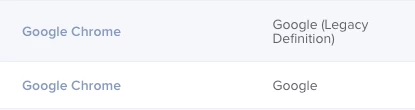
  • Deprecated titles will now show a (legacy definition) label in the publisher column. This will also appear in any existing software title you’ve previously added in Jamf Pro to easily identify which objects are based upon a deprecated title.

  • End users should no longer see a (deprecated) label in Self Service or other notifications.

  • We will continue to maintain version updates for both new and legacy software titles for the foreseeable future until we have more details on migrating off of the deprecated titles.

Thanks for everyone’s feedback and understanding as we worked to make this right for you and your end users. We’re excited to bring more new titles to you in the near future so stay tuned for more updates.


wildfrog
Forum|alt.badge.img+11
  • Valued Contributor
  • March 4, 2021

Thanks @michael.devins for the update. So that I can calibrate my expectations. . .if I'm currently using what are now considered "legacy definitions" will they be converted/migrated/transitioned on the JSS end? Or will the JSS admin be expected to delete their "legacy definitions" and recreate them with the new/current definitions?


Forum|alt.badge.img+3

@robertliebsch, it is somewhat counter-intuitive, but the process (once the initial import is done) is as follows:
- Click the "Extension Attributes" tab, which has "1 Error".
- Review the script contents.
- Click the "Edit" icon / button in the bottom-right corner of the window.
- Click the "Accept" button which appears below the descriptive text about Inventory data.
- Check the "I have reviewed the script and accept use of this extension attribute." checkbox in the "Accept this Extension Attribute" modal.
- Click the "OK" button in the "Accept this Extension Attribute" modal.
- Click the "Save" icon / button in the bottom-right corner of the window.
The error should disappear, and the Extension Attribute will begin gathering inventory data as machines update their inventory.


wildfrog
Forum|alt.badge.img+11
  • Valued Contributor
  • March 4, 2021

@duncan.mccracken That sounds quite a lot like how Jamf's definition for Firefox has been handled for quite some time.


Forum|alt.badge.img+12
  • Valued Contributor
  • March 4, 2021

I see that the simple "macOS" option is marked as legacy/deprecated, replaced by individual components for each major version.

I for one find the macOS option very useful as a way to quickly see the status of the whole fleet on one screen. Any chance you'd consider keeping it? I can't imagine anyone's using the Patch Management feature to actually install macOS updates, especially considering that it looks like Apple's no longer providing update package files.


Forum|alt.badge.img+8
  • Valued Contributor
  • March 4, 2021

Why has this update been released randomly instead of with a JSS update?


Forum|alt.badge.img+11
  • Valued Contributor
  • March 5, 2021

Probably due to a bug in Jamf Pro - Don't go adding both new and deprecated patch titles for the same software (eg. Firefox) and expect to use them both in Smart Group scoping. Smart Groups can see and add both patch reporting titles as individual criteria items, even browse the different version numbers in each patch reporting title, but when saving the Smart Group, it will only be able to query one.

If you use patch reporting title definitions in your smart group criteria, think about migrating away from the deprecated title first.


Eltord
Forum|alt.badge.img+12
  • Valued Contributor
  • March 5, 2021

I'm curious what this change is leading up to down the road. Since the acquisition of Kinobi, our team has been very worried what will be happening with the patch management solution. As it turns out, this current change did not really affect my team as almost all of our definitions are being imported from our Kinobi server instead of using Jamf's built in ones (we found those to be lacking at the time of decision making), but it does have me wonder what the next steps are.

Is there any kind of roadmap or anything that can be shared with the general community that can let us admins know what we can expect to happen with patch management, or maybe just the goals of Jamf as to what they want patch management as a feature set to be down the line?


Forum|alt.badge.img+8
  • Valued Contributor
  • March 7, 2021

Yes - I agree with @UESCDurandal - there should be a "macOS" that encompasses all versions of macOS so we have that option. The same goes for the Adobe Creative Cloud apps and Microsoft Office apps. Being able to track them both in the current release for patches and over historical timelines are important. I've gotten pretty creative with the legacy patch management policies with pushing out updates of new versions - especially since patch management policies have some special, magical, powers that standard policies do not without going through a lot of extra effort and customization.


Forum|alt.badge.img

As it turns out, this current change did not really affect my team as almost all of our definitions are being imported from our Kinobi server instead of using Jamf's built in ones (we found those to be lacking at the time of decision making), but it does have me wonder what the next steps are.

Oursainsburys


Forum|alt.badge.img+3
  • New Contributor
  • March 24, 2021

I also agree with @UESCDurandal & @taugust_ric in regards to having an all-encompassing macOS item in patch management. The decision to make this a legacy definition doesn't make much sense. I want to be able to see my entire fleet's OS versions in one place, not have to jump between individual OS components to see everything.


JustinC
Forum|alt.badge.img+10
  • Employee
  • April 30, 2021

@UESCDurandal @taugust_ric @nateee , we have taken on the feedback and have made the decision to keep maintaining the combined macOS patch definition alongside our newer separated, version specific macOS definitions. That way customers can choose which option best suits their requirements.


ianatkinson
Forum|alt.badge.img+5
  • Contributor
  • May 4, 2021

I haven't set up any new definitions yet so all mine say 'legacy' at the moment, are these going to be converted to new ones at some point (I'm already on 10.28)? I surely don't need to delete Chrome to then set up Chrome etc. across them all?


howie_isaacks
Forum|alt.badge.img+23
  • Esteemed Contributor
  • May 4, 2021

@ianatkinson I removed and re-added all of my patches to remove the legacy ones. I believe that was necessary. I didn't like that my users saw the (Deprecated) message next to the patch. There was no need for Jamf to make this visible to the users 🤬


Forum|alt.badge.img
  • New Contributor
  • May 11, 2021

Patching is all broken now... I am not happy with Jamf at all right now... This is literally the worst software... My patch definitions are not being updated, definitions are not being deployed, and the patching is not being updated with the machines. I don't know what they did, but this is terrible.

Even the support is not the greatest anymore, I used to get calls, and they were really hands on, lately it seems like there is not sense of urgency, and have been hands off... Maybe time to find a new solution.


coachdnadel
Forum|alt.badge.img+12
  • Jamf Heroes
  • March 27, 2022

I'm seeing it in the Publisher column (the second column) but so far of the titles I'm using, only for Chrome. Imagine it'll be a bit until they're all updated. What I'm antsy for is the method to migrate from the deprecated titles to the new ones rather than having to rebuild them all by hand.


@ThomM did you receive any migration information/instructions?


ThomM
Forum|alt.badge.img+21
  • Jamf Heroes
  • March 28, 2022

@ThomM did you receive any migration information/instructions?


Nope.  I ended up rebuilding them manually.