
Solved

JAMF Recon - Can't fill in Full Name and Real Name with properly spaced name!

  • February 22, 2016
  • 2 replies
  • 34 views

Forum|alt.badge.img+7


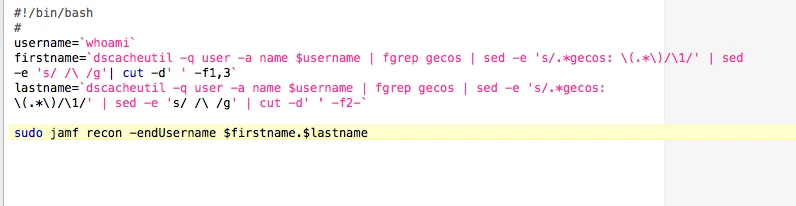
So we don't have LDAP and I want to fill in a User's name based on the Full Name of their login account. The issue becomes that I run the recon command and it takes spaces into account and only recons the first name. So then I thought I'd do two commands to determine first and last name and recon both of those together but I have no idea how to make a space between them. I'd prefer not to have a . separating first and last name.

What am I missing? :)

Best answer by tthurman

@dianabirsan

If you put quotes around the two variables to make it an entire string, it'll submit properly.

firstName="John"
lastName="Smith"

sudo jamf recon -endUsername "$firstName $lastName"

EDIT
For kicks, you could also make one variable out of two. (If for some reason the binary didn't accept it the first way.

firstName="John"
lastName="Smith"
fullName="$firstName $lastName"

sudo jamf recon -endUsername $fullName

2 replies

Forum|alt.badge.img+14
  • Valued Contributor
  • Answer
  • February 22, 2016

@dianabirsan

If you put quotes around the two variables to make it an entire string, it'll submit properly.

firstName="John"
lastName="Smith"

sudo jamf recon -endUsername "$firstName $lastName"

EDIT
For kicks, you could also make one variable out of two. (If for some reason the binary didn't accept it the first way.

firstName="John"
lastName="Smith"
fullName="$firstName $lastName"

sudo jamf recon -endUsername $fullName

Forum|alt.badge.img+7
  • Author
  • New Contributor
  • February 22, 2016

Damn those "", things I don't know :) Thanks that solved it! Just doing one variable now and it works. Woohoo