Question

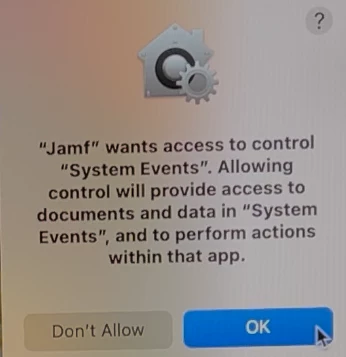
"jamf" wants access to control "system events"

  • April 30, 2019
  • 108 replies
  • 834 views

Show first post

108 replies

Forum|alt.badge.img+18
  • Esteemed Contributor
  • February 7, 2022

@Bol My logs showed the app I was telling to open with oascript wanted the access.  Creative cloud and its helpers.  So now  im wondering if i can just remove that portion, but even when my script opens safari it asks for that as well.  I used your whole identifier and the same code requirement however it actually ended up prompting for more access.


Bol
Forum|alt.badge.img+11
  • Contributor
  • February 7, 2022

Include this in a profile, along with all the regular permissions / Apple Events you would normally give Jamf;


Bol
Forum|alt.badge.img+11
  • Contributor
  • February 7, 2022

@GabePPS Also, I would include any other application bundle's or binaries that this script touches. So if something from Adobe, also include an Apple Event for Self Service to access it.


Mauricio11
Forum|alt.badge.img+11
  • Valued Contributor
  • February 8, 2022

@Bol My logs showed the app I was telling to open with oascript wanted the access.  Creative cloud and its helpers.  So now  im wondering if i can just remove that portion, but even when my script opens safari it asks for that as well.  I used your whole identifier and the same code requirement however it actually ended up prompting for more access.


I was having similar issues until I found another discussion where it was mentioned to remove this part of the osascripts

tell application "System Events" 

 Once the tell and end tell were removed that popup just gone. Odd


Bol
Forum|alt.badge.img+11
  • Contributor
  • February 8, 2022

I was having similar issues until I found another discussion where it was mentioned to remove this part of the osascripts

tell application "System Events" 

 Once the tell and end tell were removed that popup just gone. Odd


 @Mauricio11  Yes, this is supposed to happen by design. 
We created profiles that allowed AppleScript to access say Finder in the logged on user context, although it looks like the requirement changed for bundled app id’s after security updates.

Making the profile changes I mentioned above, using macOS 12.2, I’ve been able to keep my AppleScript “Tell” blocks of code as below. For now..

Jamf -> Bash -> osascript -> Finder


Forum|alt.badge.img+18
  • Esteemed Contributor
  • February 8, 2022

@bol Actually we are not using self service for this piece, but a script that happens during the first log in.  If I can make the same thing happen without using the tell command, its fine.  But I don't think it will allow keystrokes to be entered without the tell command.


Im still tweaking some of the scripts I used to use since now I don't need it to use the creative cloud app, I changed creative cloud to only use browser sign ins so that it will be locked into our microsoft SSO.

My need is now just to get safari to type in the current users email address and then hit enter.  So I'm going to play around with making this happen with removing the tell command to see what that does in practice.  

@Mauricio11 I saw that discussion too, but now ive lost it lol.


Forum|alt.badge.img+18
  • Esteemed Contributor
  • February 8, 2022

I too was having this happen... I added the BundleID of Jamf.app with access to System Events and was getting pop-ups
Was about to go down the rabbit hole of what combo would work then I tried something simpler...

Remove the tell, activate, and end tell lines
Remove these lines:

tell application "System Events"
    activate
...
end tell

Now in the example from the original poster @leonwun , this may not be much of a help as you are explicitely telling System Events to restart and shutdown, methods that may not be available if you are not telling System Events. Not sure if these are the "nice" methods that ask for a user to save work, but if they are not (or you don't care :) perhaps you could just capture the output of the osascript for button returned and then use bash to run shutdown -h now (halt/shutdown) or shutdown -r now (restart)

osaresult=$(/usr/bin/osascript -e 'set question to display dialog "The device has not been restared for [...]" with title "RESTART YOUR COMPUTER" buttons {"Shut Down", "Restart", "Cancel"} cancel button "Cancel" with icon caution' 2>/dev/null)
button=$(awk -F 'button returned:|, gave up:' '{print $2}' <<< $osaresult)

Use a case statement (or ifs) with the ${button} variable to do what you need

NOTE: There are caveats if you omit "telling" an application and you include an icon path
It must invoked/run from Self Service to succeed if an icon path is used
If you run the script directly from Terminal it will fail
If you invoke the policy via command line, it will fail (jamf policy -id <id> or jamf policy -event <name>)
If the policy is called from another policy using "jamf policy ..." via script script or with Files and Processes "run command", it will fail also...

For example, this will fail when run from Terminal:

osascript -e 'set dialogAnswer to display dialog "You can do a simple button pop-up, with timeout of 5 seconds" with title "Title" with icon file ":System:Library:CoreServices:CoreTypes.bundle:Contents:Resources:Clock.icns" buttons {"OK"} default button 1 giving up after "5"'
20:261: execution error: File file :System:Library:CoreServices:CoreTypes.bundle:Contents:Resources:Clock.icns wasn’t found. (-43)

However if the above snippet is in a script that is run in a Self Service actuated policy it will succeed.
So... there's a workaround but it only works in Self Service otherwise it's got some serious downsides to consider... hope this saved some folks a few hours (that I'll never get back ;)


@brunerd 

I know this post is a bit older, but I'm also struggling to remove the tell application commands from my osascripts that types a users email in and hits enter for them (trying for no touch deployment using microsofts sso).  I am still getting the system events message, but I cant seem to get my scripts to type in the info without the tell.


In example here I want Safari to open and type in their user name and then open the extensions preference pane of safari so the user can check the check box for the classlink extension.  This works if the user clicks to allow jamf to use system events currently however I want less clicks.  So in your opinion would this script run without the tell pieces?

#!/bin/bash dockStatus=$(pgrep -x Dock) echo "Waiting for Desktop..." while [[ "$dockStatus" == "" ]] do echo "Desktop is not loaded. Waiting." sleep 3 dockStatus=$(pgrep -x Dock) done echo "$currentUser has successfully logged on! The Dock appaears to be loaded with PID $dockStatus." sleep 2 currentUser=$(/bin/ls -l /dev/console | /usr/bin/awk '{print $3}') sudo -u $currentUser open http://classlink.com sudo -u $currentUser osascript <<EOF tell application "Safari" activate delay 3 tell application "System Events" keystroke "$currentUser" end tell end tell tell application "Safari" to activate delay 4 tell application "System Events" to tell process "Safari" keystroke "," using command down tell window 1 click button "Extensions" of toolbar 1 activate "Extensions" keystroke return end tell end tell EOF


Bol
Forum|alt.badge.img+11
  • Contributor
  • February 8, 2022

Ok, that was the same as me, login script which is kicked off by the daemon.

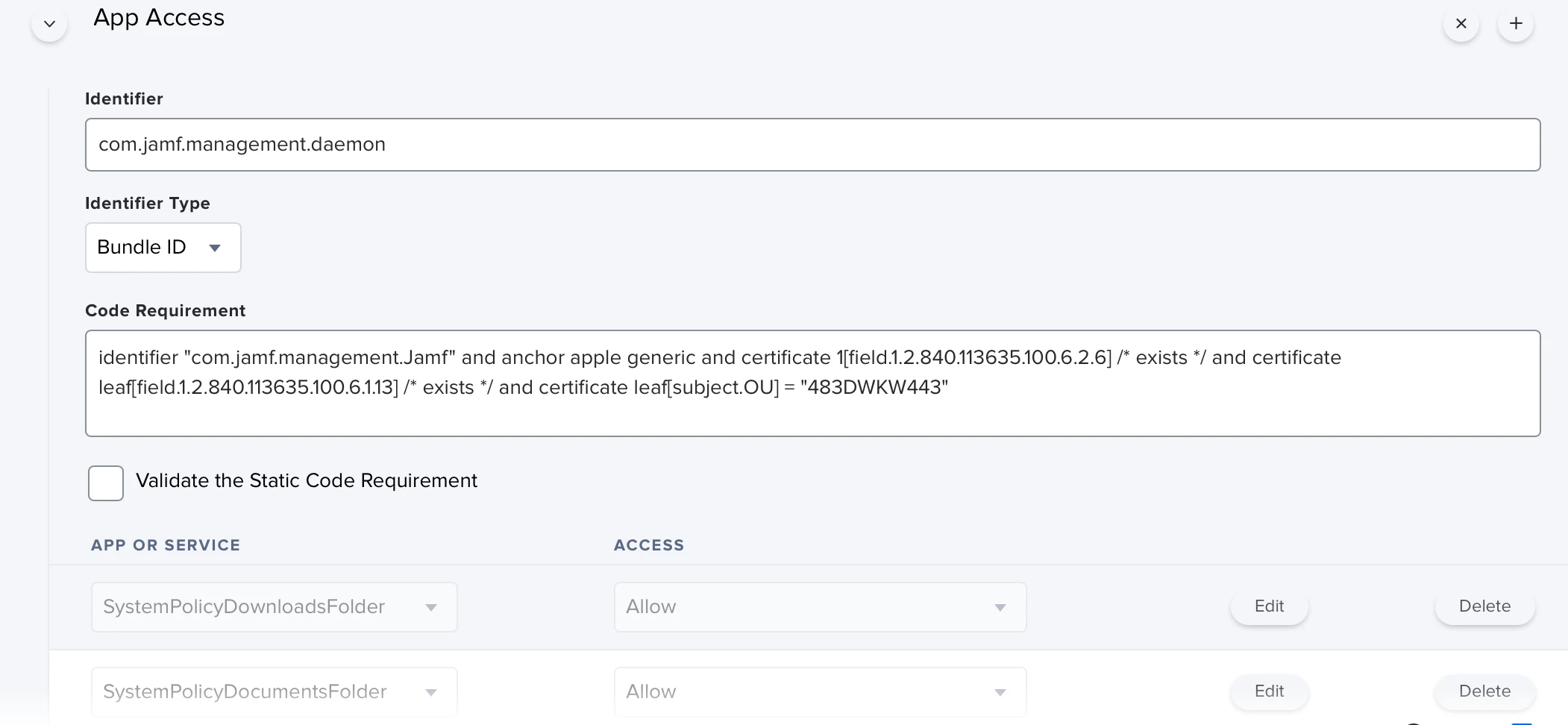
What worked for me was whitelisting JamfDaemon's identifier, with the code requirement of the Jamf.app bundle it lives inside.

/Library/Application Support/JAMF/Jamf.app/Contents/MacOS/JamfDaemon.app/Contents/MacOS/JamfDaemon

Identifier: com.jamf.management.daemon


/Library/Application Support/JAMF/Jamf.app

Code Requirement : identifier "com.jamf.management.Jamf" and anchor apple generic and certificate 1[field.1.2.840.113635.100.6.2.6] /* exists */ and certificate leaf[field.1.2.840.113635.100.6.1.13] /* exists */ and certificate leaf[subject.OU] = "483DWKW443"

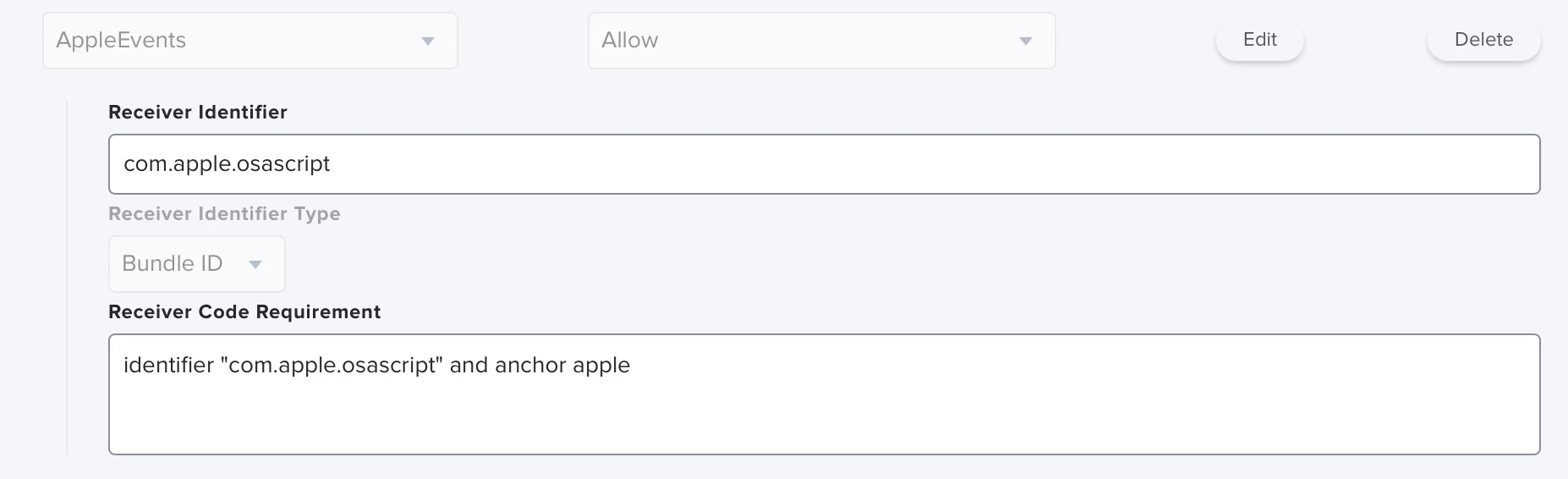
Allow it Apple Event access to osascript and you should be good to go. Although my popup was resolved by giving access to Finder (I was calling 'tell application "Finder" make new alias to smbMount at desktop..), yours is asking for system events.

If you run the show log for tcc, you should be able to narrow it down as I did here;

2022-01-17 22:33:43.340574+1030 0x15a6a    Default     0x45da1              9216   0    tccd: [com.apple.TCC:access] target_executable_path_URL: file:///Library/Application%20Support/JAMF/Jamf.app/Contents/MacOS/JamfDaemon.app/Contents/MacOS/JamfDaemon

2022-01-17 22:33:43.340914+1030 0x15a6a    Info        0x45da1              9216   0    tccd: [com.apple.TCC:access] Constructed 'accessingProcess' from indirect_object_token in message from <TCCDProcess: identifier=com.apple.finder, pid=9338, auid=2041273090, euid=2041273090, binary_path=/System/Library/CoreServices/Finder.app/Contents/MacOS/Finder>

2022-01-17 22:33:43.340943+1030 0x15a6a    Info        0x45da1              9216   0    tccd: [com.apple.TCC:access] AttributionChain: accessing={<TCCDProcess: identifier=com.apple.finder, pid=9338, auid=2041273090, euid=2041273090, binary_path=/System/Library/CoreServices/Finder.app/Contents/MacOS/Finder>}, requesting={<TCCDProcess: identifier=com.apple.finder, pid=9338, auid=2041273090, euid=2041273090, binary_path=/System/Library/CoreServices/Finder.app/Contents/MacOS/Finder>},


Bol
Forum|alt.badge.img+11
  • Contributor
  • February 8, 2022

I removed as many of the Tell commands from my scripts as well but could never quite find a working alternative to creating an alias that reconnected to smb shares.


Forum|alt.badge.img+18
  • Esteemed Contributor
  • February 8, 2022

So I'm testing this again with adding the general .Jamf piece on the code requirement.  However Im now layering these with my previous entries and wondering if they are conflicting with each other.


Bol
Forum|alt.badge.img+11
  • Contributor
  • February 8, 2022

From the config profiles being applied, if there are two of the same identifiers declared, I believe it will apply the most restrictive. I had singular profiles for everything originally but then started again, making one larger profile for everything Jamf. I took their example on github and needed to add the daemon / service binaries to it.


Bol
Forum|alt.badge.img+11
  • Contributor
  • February 8, 2022

See these logs which will detail the reason it failed which was code requirement. Using PPPC, if you drag the JamfDaemon into the window and upload it, this was what happed.
Editing it's code requirement to match that of the Jamf binary instead is what worked. I believe these helper binaries used to be inherit approval based on the Jamf.app, now it's not so a slight change was needed.

2022-01-17 22:33:43.341540+1030 0x15a6a Info 0x45da1 9216 0 tccd: [com.apple.TCC:access] -[TCCDAccessIdentity initWithIdentifier:type:executableURL:SDKVersion:platformType:]: self.bundle=0x129b055f0, bundle:<TCCDBundle: bundleID=com.jamf.management.Jamf, version=10.35.0-t1640197529, path=/Library/Application Support/JAMF/Jamf.app>; for: com.jamf.management.daemon, URL: file:///Library/Application%20Support/JAMF/Jamf.app/Contents/MacOS/JamfDaemon.app/Contents/MacOS/JamfDaemon, /Library/Application Support/JAMF/Jamf.app/Contents/MacOS/JamfDaemon.app/Contents/MacOS/JamfDaemon

2022-01-17 22:33:43.342193+1030 0x15a6a    Default     0x45da1              9216   0    tccd: [com.apple.TCC:access] -[TCCDAccessIdentity staticCode]: static code for: identifier com.jamf.management.daemon, type: 0: 0x129b0b1c0 at /Library/Application Support/JAMF/Jamf.app

2022-01-17 22:33:43.369037+1030 0x15a6a    Info        0x45da1              9216   0    tccd: [com.apple.TCC:access] -[TCCDAccessIdentity matchesCodeRequirement:]: SecStaticCodeCheckValidity() static code (0x129b0b1c0) from com.jamf.management.daemon : identifier "com.jamf.management.daemon" and anchor apple generic and certificate 1[field.1.2.840.113635.100.6.2.6] /* exists */ and certificate leaf[field.1.2.840.113635.100.6.1.13] /* exists */ and certificate leaf[subject.OU] = "483DWKW443"; status: -67050

2022-01-17 22:33:43.369054+1030 0x15a6a    Info        0x45da1              9216   0    tccd: [com.apple.TCC:access] Override: eval: matched <kTCCServiceAppleEvents, com.jamf.management.daemon>; result: Auth:Unknown (<Unspported Authorization Reason value>); because: code does not meet requirement


Bol
Forum|alt.badge.img+11
  • Contributor
  • February 9, 2022

Sorry I just remembered about the script, I haven't test but understand you could remove the following tell statement; 

tell application "Safari" to activate

 Although the others would be required for what you are trying.


Forum|alt.badge.img+18
  • Esteemed Contributor
  • February 10, 2022

Sorry I just remembered about the script, I haven't test but understand you could remove the following tell statement; 

tell application "Safari" to activate

 Although the others would be required for what you are trying.


@Bol If you'd like to test if you can get it not to prompt, I'd be quite in your debt.  Here is the code which assumes that the Safari window is already opened to the online creative cloud login which is something like this https://auth.services.adobe.com/en_US/index.html

EDIT: I've modified the below script a few time so just posted the new version that I have gotten to work appropriately but still need the get that prompt for Jamf with System Events to go away.


#!/bin/bash dockStatus=$(pgrep -x Dock) echo "Waiting for Desktop..." while [[ "$dockStatus" == "" ]] do echo "Desktop is not loaded. Waiting." sleep 3 dockStatus=$(pgrep -x Dock) done echo "$currentUser has successfully logged on! The Dock appaears to be loaded with PID $dockStatus." sleep 3 currentUser=$(/bin/ls -l /dev/console | /usr/bin/awk '{print $3}') sudo -u $currentUser osascript <<EOF delay 2 tell application "System Events" keystroke "$currentUser" delay .5 keystroke "@princetonk12.org" delay 1 keystroke return delay 5 keystroke "w" using command down delay 5 keystroke "w" using command down delay 3 end tell EOF sudo -u $currentUser open http://link.princetonk12.org sleep 2 sudo -u $currentUser osascript <<EOF tell application "Safari" to activate delay 3 tell application "System Events" keystroke "$currentUser" delay 3 tell application "Safari" to activate delay 4 tell application "System Events" to tell process "Safari" keystroke "," using command down tell window 1 click button "Extensions" of toolbar 1 activate "Extensions" keystroke return end tell end tell end tell EOF


 Ive scoured the log files as you listed above and added entries for both Jamf as you have shown and for the helper apps like Safari and of course osascript, but adding them and creating a large jamf tcc profile still didnt fix the prompt.  Happy for any outside eyes on this script and any prompts.


Forum|alt.badge.img+18
  • Esteemed Contributor
  • February 10, 2022

@Bol Maybe can you share full screen shots of your whole Config Profile and I'll just replicate the individual lines to see if that works?


Forum|alt.badge.img+18
  • Esteemed Contributor
  • February 11, 2022

Working on this again today.  Im really going nuts trying to get this proper.

Here is the jamf log that show when I click "Deny" on Jamf wants to control message:

41:76: execution error: Not authorized to send Apple events to System Events. (-1743) 105:123: execution error: Not authorized to send Apple events to System Events. (-1743)

I do see in my full log file from the mac im testing on showing the parent process differing, but making the changes you suggest then cause the process to not be whitelisted for Accessibility.  It is like I can get it to not make the Jamf wants to control message, but then Accessibility is gone from the whitelist.  So I can't seem to have both.  


Again this is all in the name of making the first user login touchless so the script is just inputting their username and hitting enter which requires system events and accessibility. 


Forum|alt.badge.img+18
  • Esteemed Contributor
  • February 11, 2022

Im probably just bothering too many people at this point, but Im really spending too much time tearing my hair out so im throwing this out to @talkingmoose and @rich.trouton and @bentoms and maybe @donmontalvo and @mm2270  to maybe take a look to see if you can add any of your amazing brains to this issue.  I feel like I've tried to do every variation of the PPPC for Jamf and its processes, as well as OSAScript.  But things are still not working and this is really the last piece of a great (almost) no touch login process and I so don't want my end users clicking the "Allow" button.  My script is listed above and works perfectly once I click approve, but need to get rid of the message which is still squeaking though all my whitelists (that used to work before 11.4).

I can post the logs from the tcc approvals/denials (although they are quite long) if needed.


If any of you can help I'd be unbelievably appreciative!


Forum|alt.badge.img+33
  • Hall of Fame
  • February 11, 2022

Can you post the PPPC profile that you're using? It may not have all the correct permissions for Jamf and osascript.

For comparison, I've posted a PPPC profile which should be comprehensive for Jamf and osascript sending AppleEvents:

https://gist.github.com/rtrouton/daa89fd7a27a52137865aff015d474ad


Forum|alt.badge.img+18
  • Esteemed Contributor
  • February 11, 2022

@rich.trouton Thanks so much for the response!

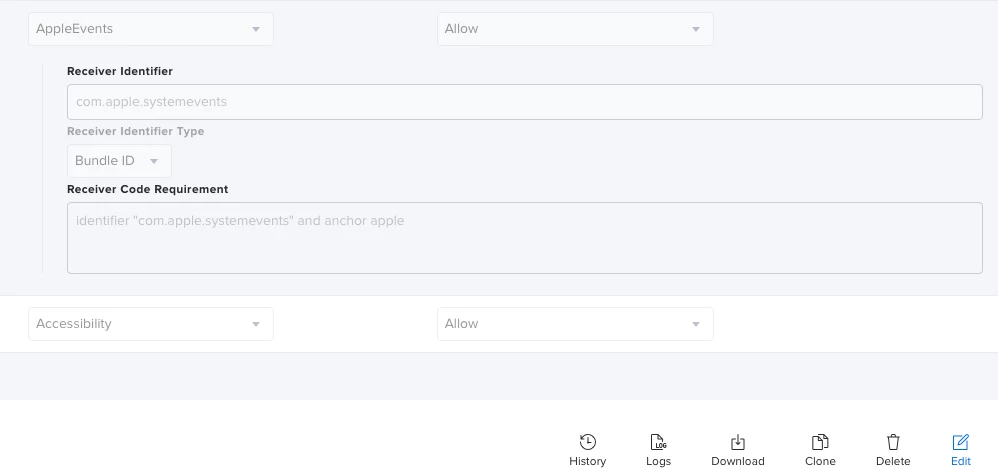
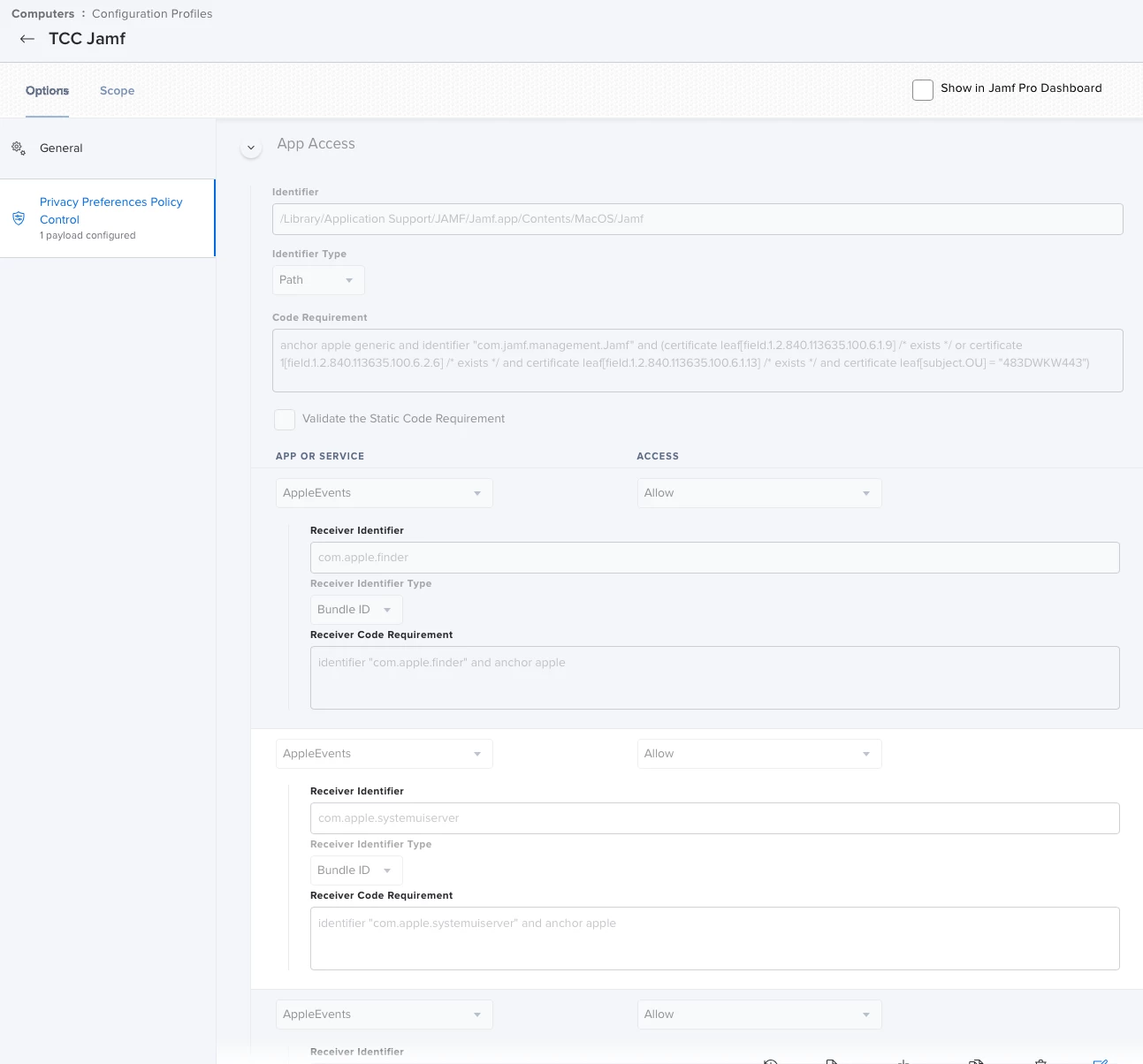
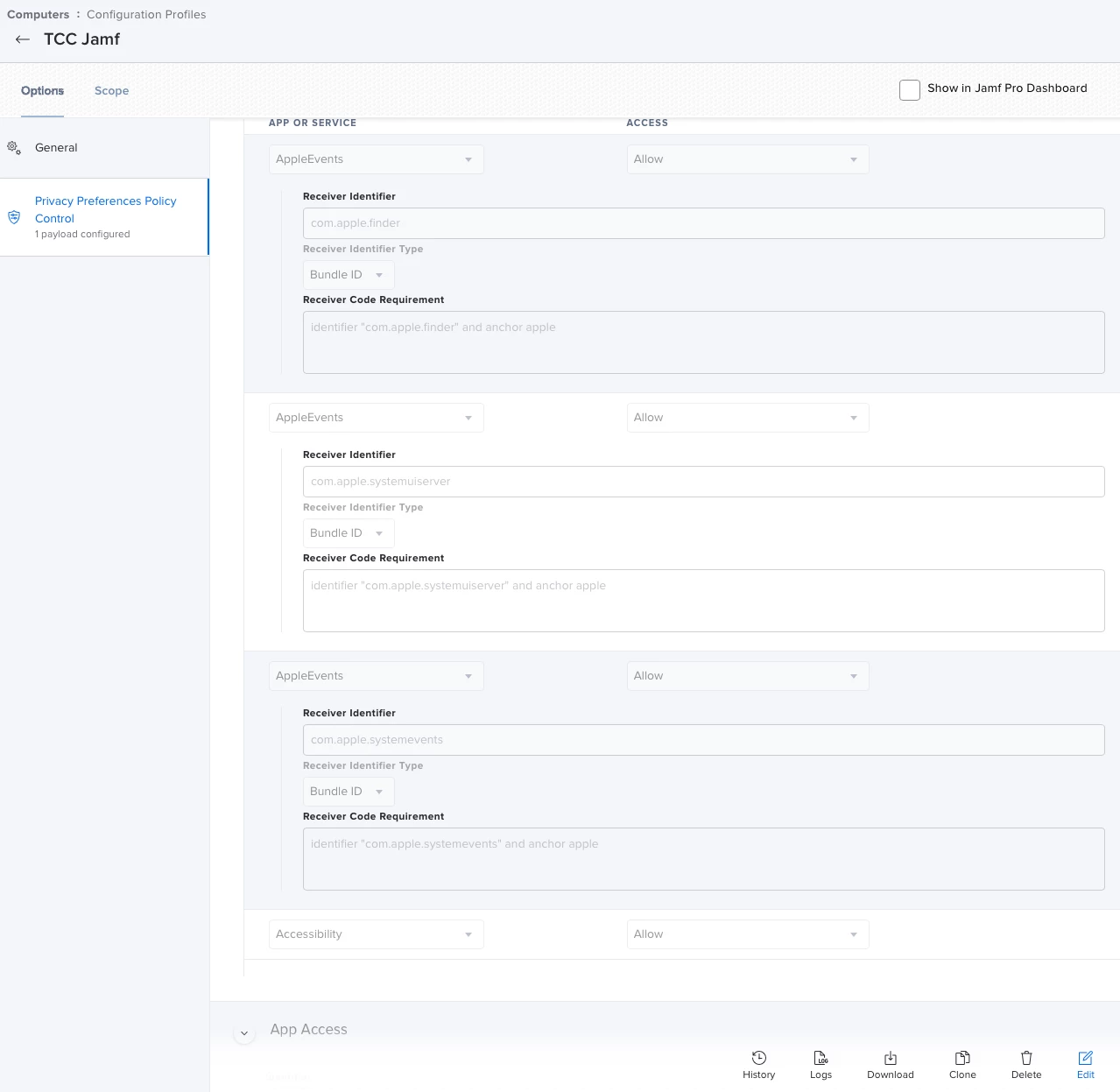
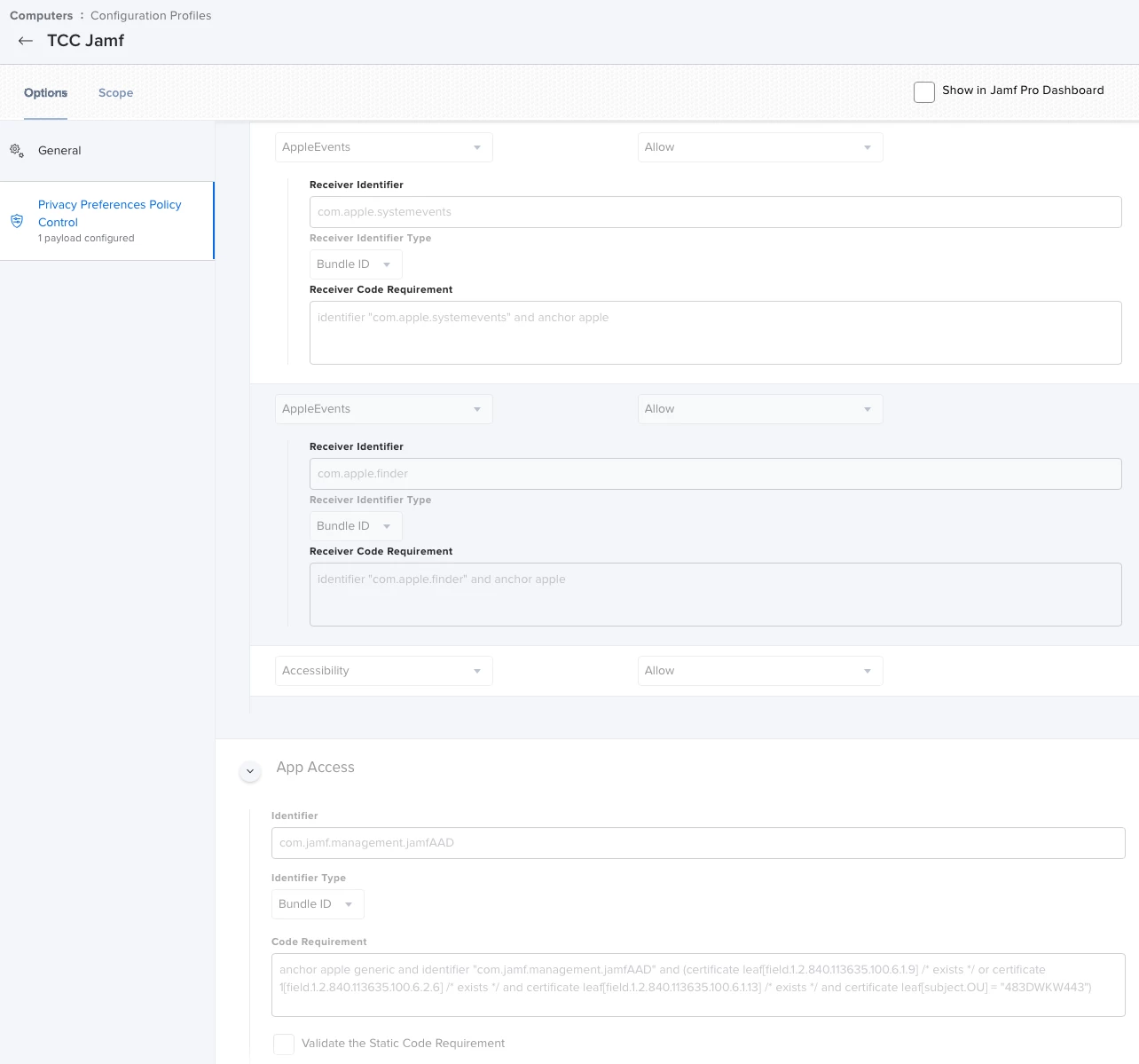
My older Jamf TCC profile which worked before (maybe)11.4 is shown below but I had a 2nd separate TCC profile for osascript.  I have most of the tcc config profiles set separately and again used to work in that regard.  Im going to attempt using just your profile and exclude my two from it, but in looking it over I don't see the access to accessibility that I think it may require to input keyboard typing.  I'll let you know though.


Forum|alt.badge.img+18
  • Esteemed Contributor
  • February 11, 2022

@rich.trouton So I just tried your profile and it also states the same that Jamf wants access to system events.  (It did also ask for Accessibility as I thought).  Whats interesting if I look at Security & Privacy under Automation as to what got added when I clicked approve, it shows the "Parent" process of JamfDaemon (which looks to be the App and not the process inside the app).


Bol
Forum|alt.badge.img+11
  • Contributor
  • February 13, 2022

@GabePPS Sorry I didn't get back to you earlier, timezones and a full on week back to school.


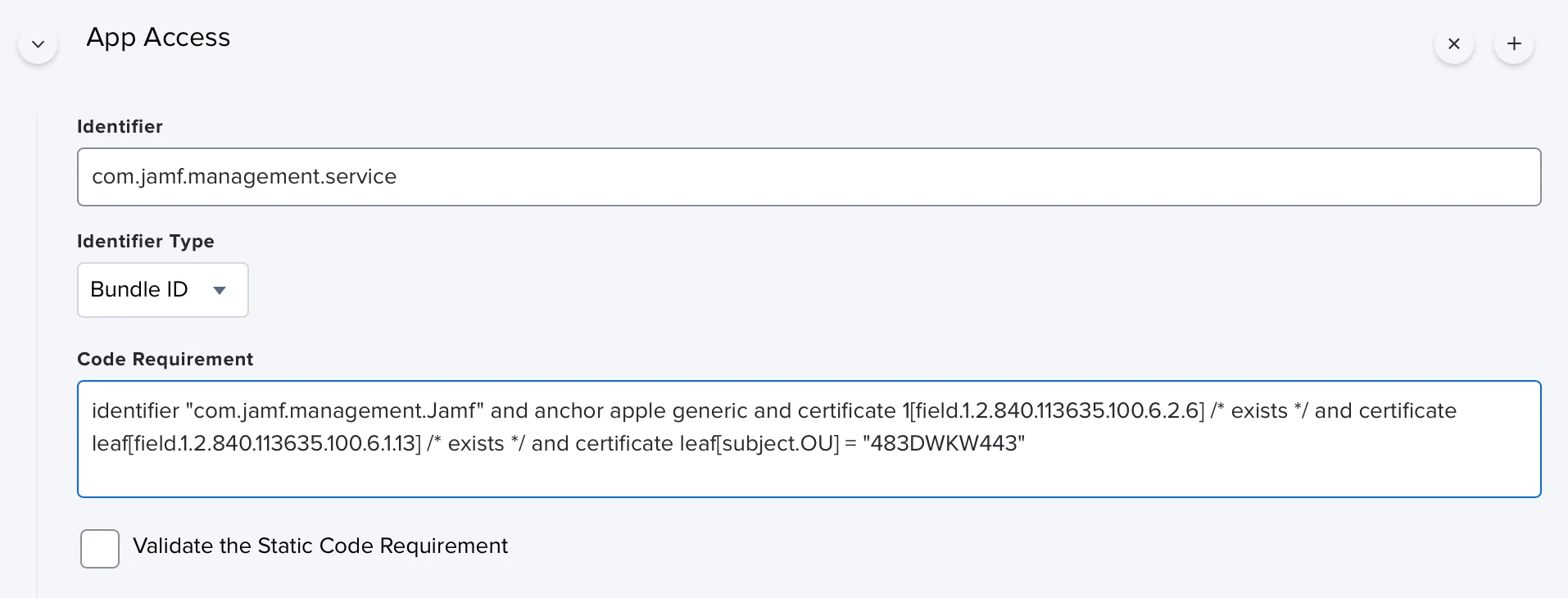
I can take a look at the script, no troubles, but I can already see the problem with your profile. As I mentioned in my original post in this thread, you need to change the code requirement to match the parent jamf.app it's located in, not that of the binary itself.

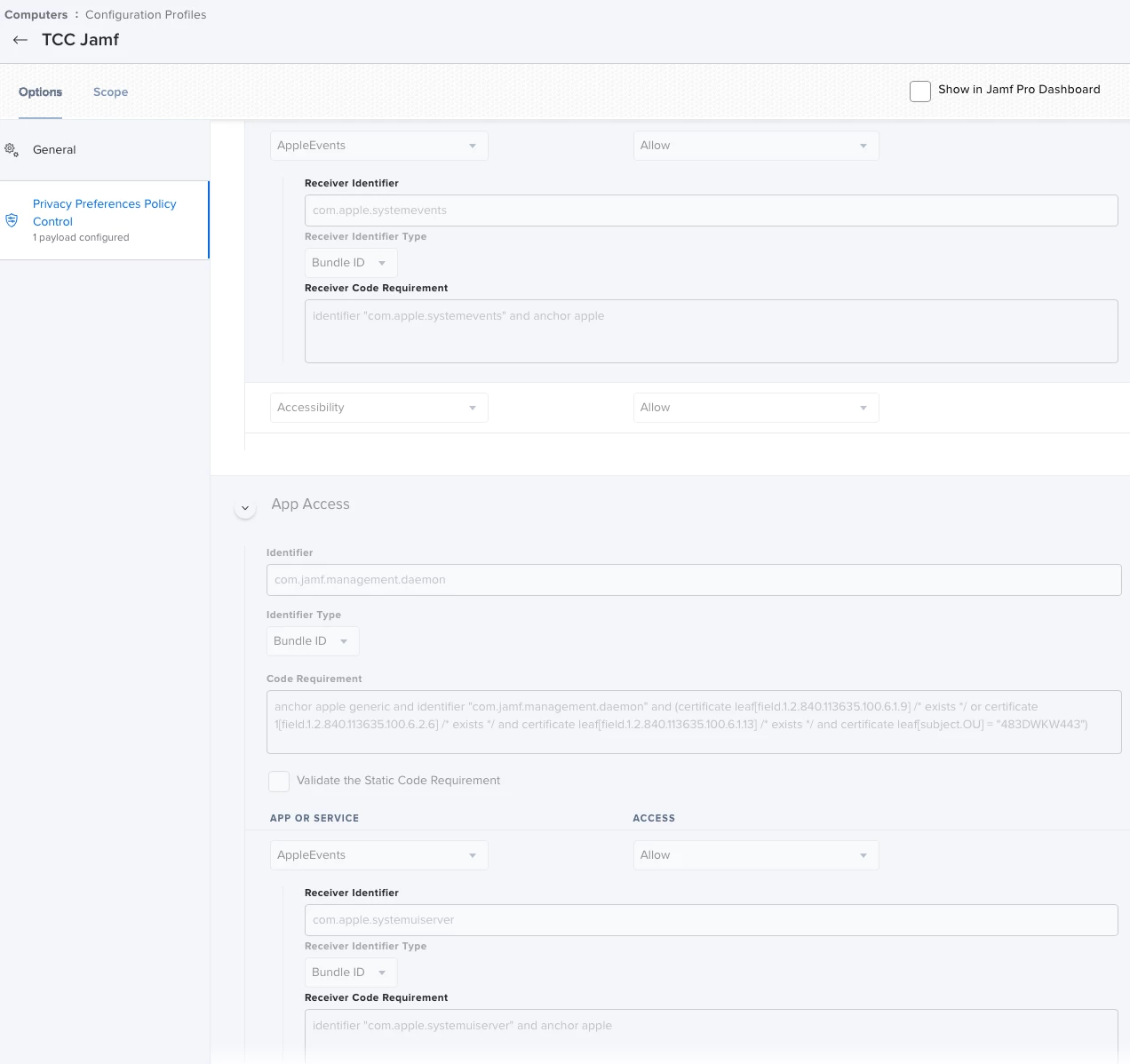
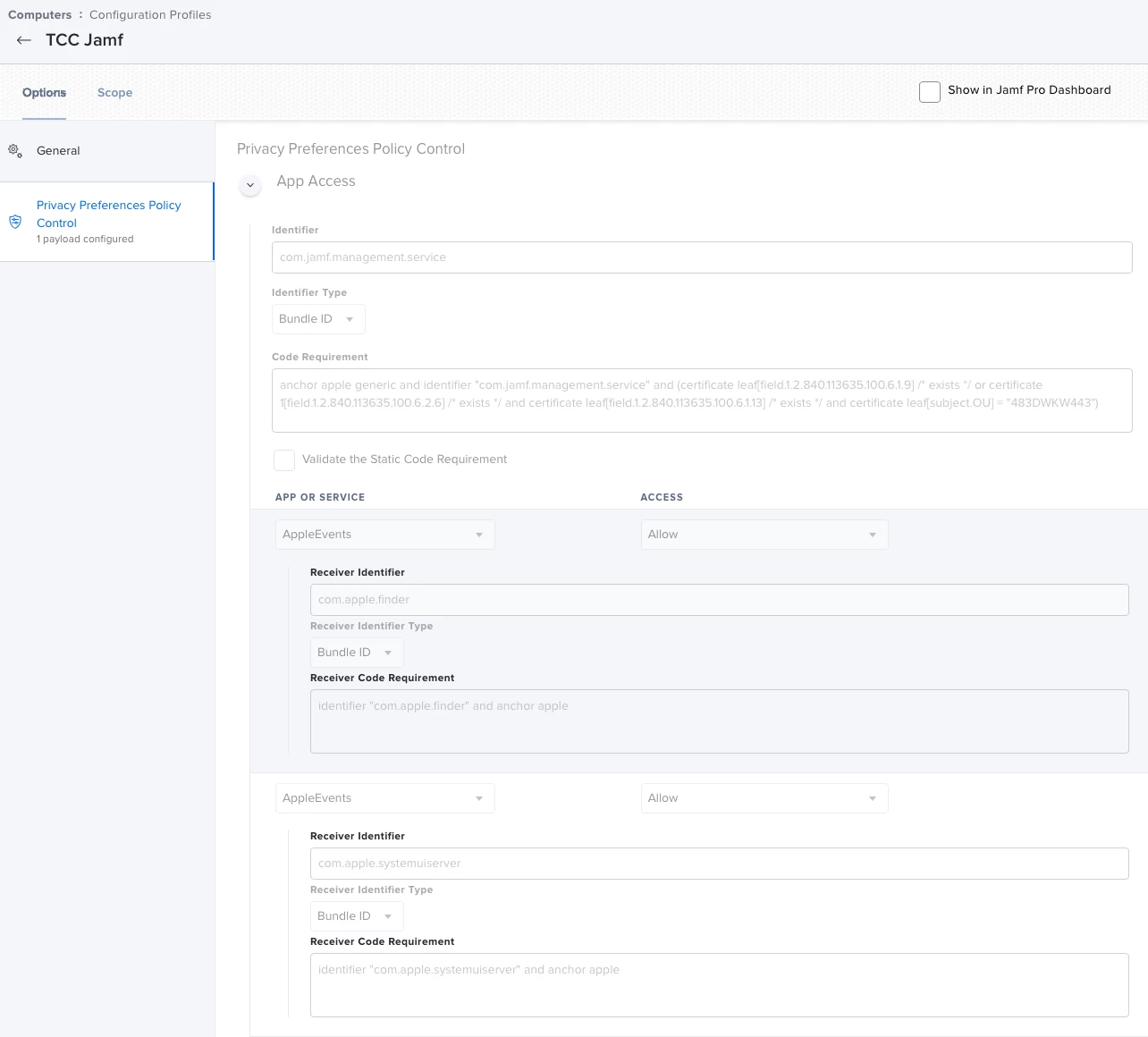
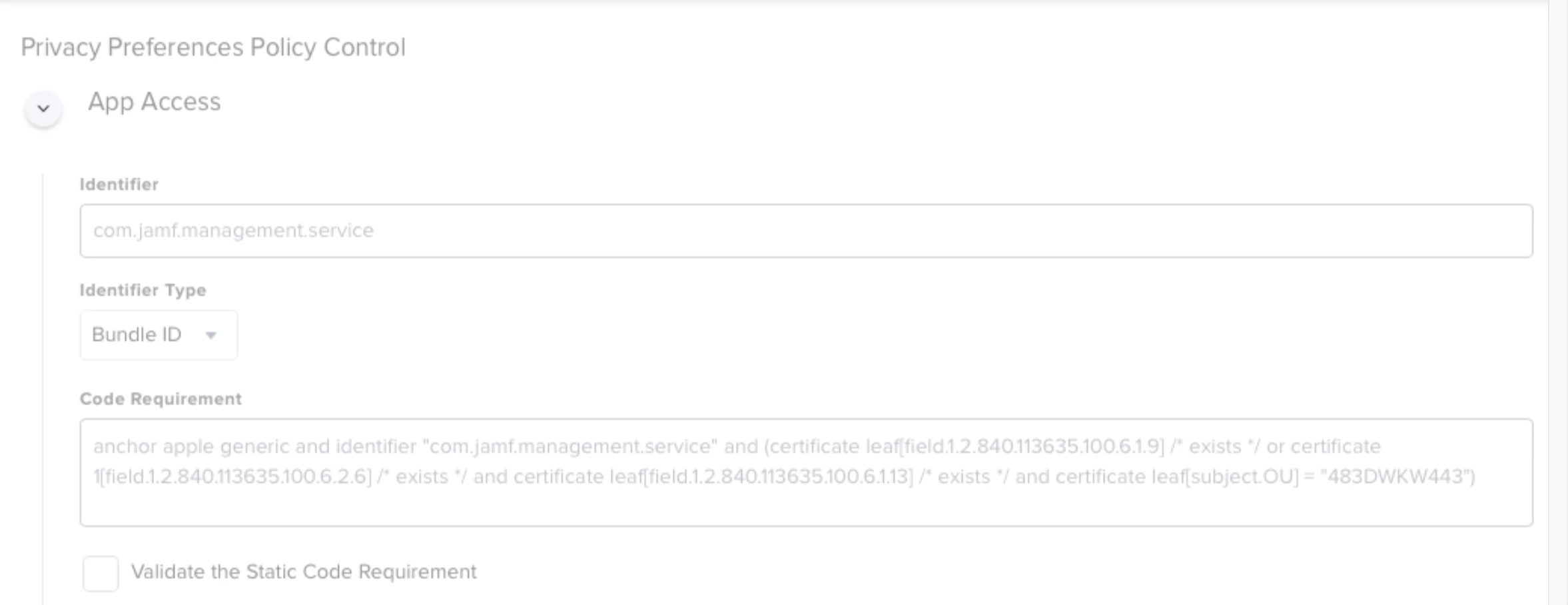
See your profile picture here;


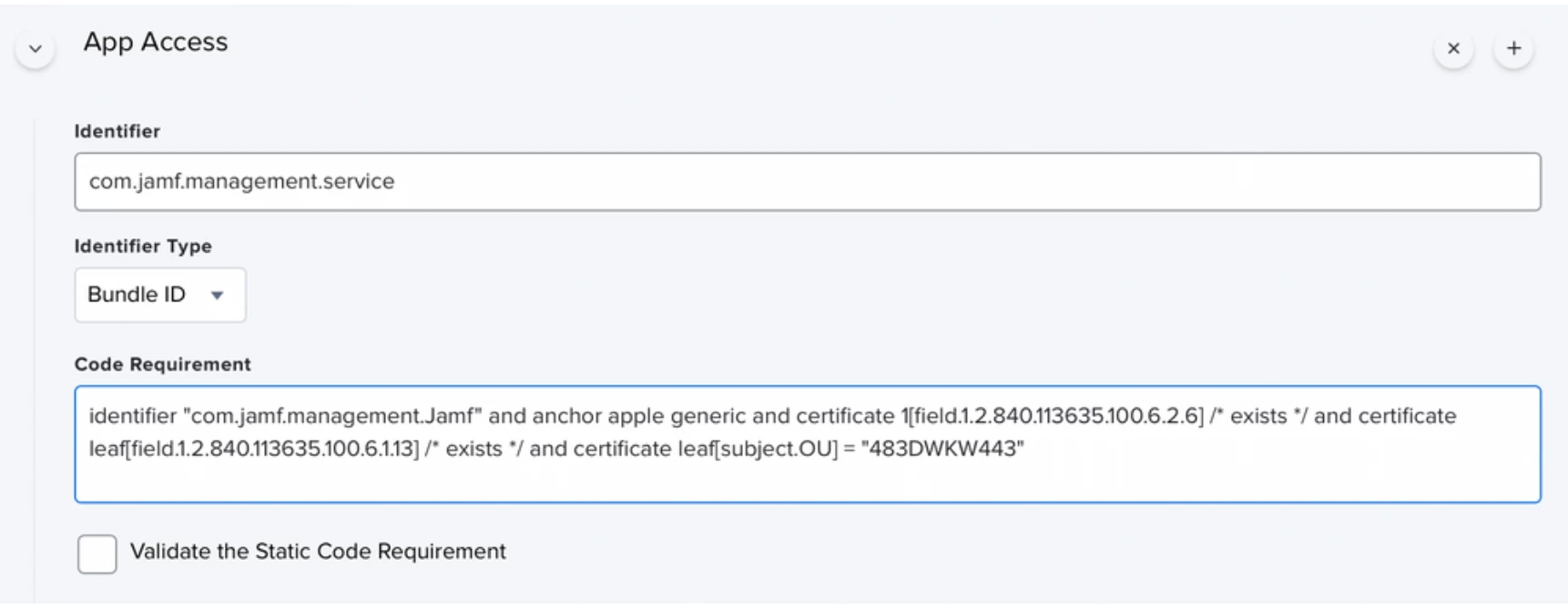
Change it to look like this, I posted this above accessing osascript;

You need to change this for the daemon (login triggers) and the service (launched from self service)

Identifier: com.jamf.management.daemon
Code Requirement : identifier "com.jamf.management.Jamf" and anchor apple generic and certificate 1[field.1.2.840.113635.100.6.2.6] /* exists */ and certificate leaf[field.1.2.840.113635.100.6.1.13] /* exists */ and certificate leaf[subject.OU] = "483DWKW443"


nagement.service
Code Requirement : identifier "com.jamf.management.Jamf" and anchor apple generic and certificate 1[field.1.2.840.113635.100.6.2.6] /* exists */ and certificate leaf[field.1.2.840.113635.100.6.1.13] /* exists */ and certificate leaf[subject.OU] = "483DWKW443"

Let me know if that works or not.


Bol
Forum|alt.badge.img+11
  • Contributor
  • February 13, 2022

@rich.trouton So I just tried your profile and it also states the same that Jamf wants access to system events.  (It did also ask for Accessibility as I thought).  Whats interesting if I look at Security & Privacy under Automation as to what got added when I clicked approve, it shows the "Parent" process of JamfDaemon (which looks to be the App and not the process inside the app).


Whats interesting if I look at Security & Privacy under Automation as to what got added when I clicked approve, it shows the "Parent" process of JamfDaemon (which looks to be the App and not the process inside the app).

@GabePPS 
Yes! This is exactly what I have been saying, I tried to paste a config profile you could upload into Jamf but it didn't work. Just make sure your entries for these binaries match code requirements.

<dict> <key>Allowed</key> <integer>1</integer> <key>CodeRequirement</key> <string>identifier "com.jamf.management.Jamf" and anchor apple generic and certificate 1[field.1.2.840.113635.100.6.2.6] /* exists */ and certificate leaf[field.1.2.840.113635.100.6.1.13] /* exists */ and certificate leaf[subject.OU] = "483DWKW443"</string> <key>Identifier</key> <string>com.jamf.management.service</string> <key>IdentifierType</key> <string>bundleID</string> <key>StaticCode</key> <integer>0</integer> </dict> <dict> <key>Allowed</key> <integer>1</integer> <key>CodeRequirement</key> <string>identifier "com.jamf.management.Jamf" and anchor apple generic and certificate 1[field.1.2.840.113635.100.6.2.6] /* exists */ and certificate leaf[field.1.2.840.113635.100.6.1.13] /* exists */ and certificate leaf[subject.OU] = "483DWKW443"</string> <key>Identifier</key> <string>com.jamf.management.daemon</string> <key>IdentifierType</key> <string>bundleID</string> <key>StaticCode</key> <integer>0</integer> </dict>


Bol
Forum|alt.badge.img+11
  • Contributor
  • February 13, 2022

@rich.trouton So I just tried your profile and it also states the same that Jamf wants access to system events.  (It did also ask for Accessibility as I thought).  Whats interesting if I look at Security & Privacy under Automation as to what got added when I clicked approve, it shows the "Parent" process of JamfDaemon (which looks to be the App and not the process inside the app).


@GabePPS wrote:

@rich.trouton So I just tried your profile and it also states the same that Jamf wants access to system events.  (It did also ask for Accessibility as I thought).  Whats interesting if I look at Security & Privacy under Automation as to what got added when I clicked approve, it shows the "Parent" process of JamfDaemon (which looks to be the App and not the process inside the app).


It used to be those helper binaries would be allowed permissions, given we have profiles whitelisting the jamf.app bundle. That's no longer the case.

When we whitelist those binaries (daeomn & service) they need to have the code requirement of the jamf.app bundle they live in, not there own.


Forum|alt.badge.img+18
  • Esteemed Contributor
  • February 13, 2022

@GabePPS Sorry I didn't get back to you earlier, timezones and a full on week back to school.


I can take a look at the script, no troubles, but I can already see the problem with your profile. As I mentioned in my original post in this thread, you need to change the code requirement to match the parent jamf.app it's located in, not that of the binary itself.

See your profile picture here;


Change it to look like this, I posted this above accessing osascript;

You need to change this for the daemon (login triggers) and the service (launched from self service)

Identifier: com.jamf.management.daemon
Code Requirement : identifier "com.jamf.management.Jamf" and anchor apple generic and certificate 1[field.1.2.840.113635.100.6.2.6] /* exists */ and certificate leaf[field.1.2.840.113635.100.6.1.13] /* exists */ and certificate leaf[subject.OU] = "483DWKW443"


nagement.service
Code Requirement : identifier "com.jamf.management.Jamf" and anchor apple generic and certificate 1[field.1.2.840.113635.100.6.2.6] /* exists */ and certificate leaf[field.1.2.840.113635.100.6.1.13] /* exists */ and certificate leaf[subject.OU] = "483DWKW443"

Let me know if that works or not.


@Bol I tried exactly what you stated however as I said earlier, yes it removed the prompt for JAMF wants access, however then it didn’t allow for the keyboard input to happen since changing the parent process confuses the tcc whitelisting for accessibility. So it seems I can either have the message that JAMF wants access or it prompts to allow accessibility. But I cannot have both for this script if we edit the parent and child processes. 


do me a favor and try running my script at login. (You’ll need a window of any app opened that has a login screen or input menu showing for it to type something so maybe open a safari webpage to something where it can type as soon as you login. )


Forum|alt.badge.img+18
  • Esteemed Contributor
  • February 14, 2022

I think I'm going to have to give on having AppleScript type in the login info, I just cant find a way to make this work in its current form.