Solved

JSS Backups stopped after upgrading to Java 8

  • June 7, 2016
  • 6 replies
  • 32 views

AVmcclint
Forum|alt.badge.img+21

Windows 2012 Server, JSS 9.81. We did have a VERY old version of Java 7 on the server so I upgraded it to the latest Java 8 a few weeks ago. I just discovered that our JSS has not been backed up since the day I upgraded the Java. When I manually run the JSSDatabaseUtil.jar (by launching it from the command line) I get the following error:

C:Windowssystem32>java -jar "C:Program FilesJSSinJSSDatabaseUtil.jar"
Error: Registry key 'SoftwareJavaSoftJava Runtime Environment'CurrentVersion'

has value '1.8', but '1.7' is required.
Error: could not find java.dll
Error: Could not find Java SE Runtime Environment.

How do I fix this? I thought Java 8 was supported.

Best answer by CasperSally

are your env variables correct?

https://jamfnation.jamfsoftware.com/article.html?id=348

Also check C:Program FilesJSSTomcatin omcat7w.exe --> Java --> Java Virtual Machine --> [path] - set to default

Restart tomcat.

6 replies

Forum|alt.badge.img+17
  • Honored Contributor
  • 1143 replies
  • Answer
  • June 7, 2016

are your env variables correct?

https://jamfnation.jamfsoftware.com/article.html?id=348

Also check C:Program FilesJSSTomcatin omcat7w.exe --> Java --> Java Virtual Machine --> [path] - set to default

Restart tomcat.


AVmcclint
Forum|alt.badge.img+21
  • Author
  • Esteemed Contributor
  • 1043 replies
  • June 7, 2016

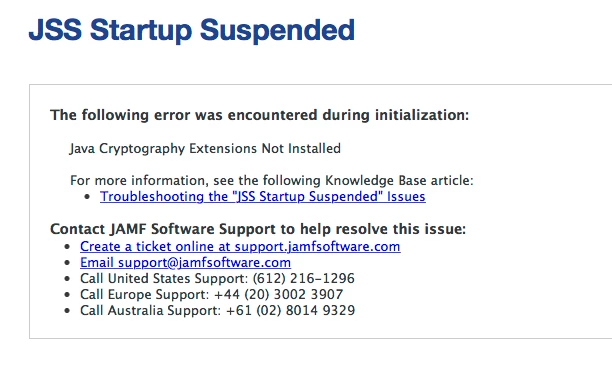
At your suggestion I changed the variables and the tomcat7w java settings and I got the following on JSS after I restarted Tomcat:
I reverted back to the previous settings but I still can't get the JSSDatabaseUtil to run.


spalmer
Forum|alt.badge.img+22
  • Valued Contributor
  • 168 replies
  • June 7, 2016

Based on the last error you posted you might want to reinstall the Java Cryptographic Extensions. You need to reinstall those after every Java upgrade/update. If this is not installed you may see other things fail like Push Notifications.


AVmcclint
Forum|alt.badge.img+21
  • Author
  • Esteemed Contributor
  • 1043 replies
  • June 7, 2016

Tech support walked me through completely uninstalling the old and new JRE & JDK, then reinstalling them and installing the Crypto extensions (even though the default install does include the files, for some reason they don't work). After doing that and making sure the tomcat7w java settings were pointing to the upgraded java, now it's working as designed.


AVmcclint
Forum|alt.badge.img+21
  • Author
  • Esteemed Contributor
  • 1043 replies
  • June 7, 2016

For those searching for the crypto files: they can be found here http://www.oracle.com/technetwork/java/javase/downloads/jce8-download-2133166.html


Forum|alt.badge.img+5
  • Contributor
  • 10 replies
  • February 7, 2017

FYI... The default JCE files are limited in how strong an encryption can be applied. The replacement files that you need to install are unlimited.