Question

JSS INSTALLER WON'T INSTALL

  • February 25, 2018
  • 6 replies
  • 11 views

Forum|alt.badge.img+3

I keep getting this error:
ERROR: PLEASE VERIFY SERVER, PORT, USERNAME
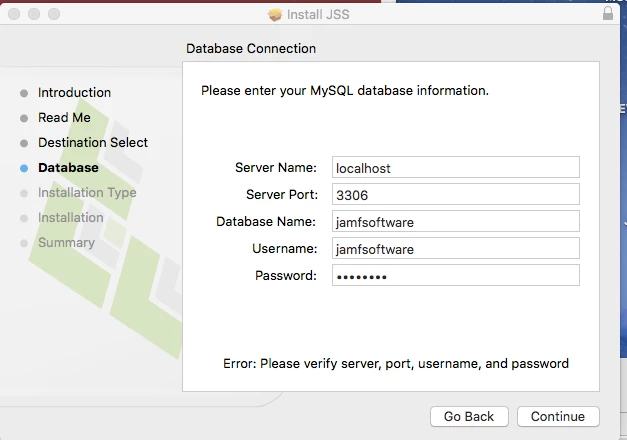
SQL Server installed and running

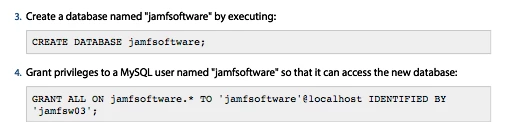
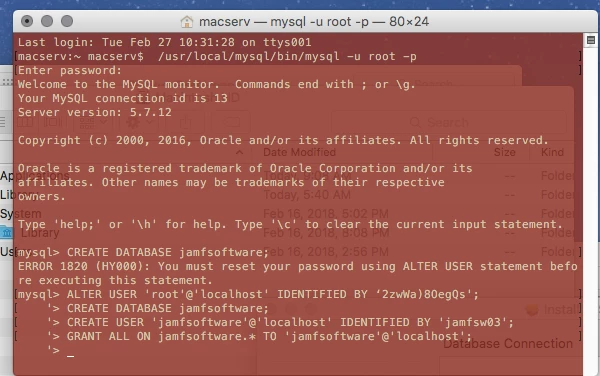
Created in Terminal Database below: CREATE DATABASE jamfsoftware;
'> GRANT ALL ON jamfsoftware.* TO 'jamfsoftware'@localhost IDENTIFIED BY '> 'jamfsw03';
'>

Please help:

6 replies

Forum|alt.badge.img+10
  • Valued Contributor
  • 193 replies
  • February 25, 2018

Did you?

   CREATE USER 'jamfsoftware'@'localhost' IDENTIFIED BY 'yourpassword';

Forum|alt.badge.img+3
  • Author
  • New Contributor
  • 4 replies
  • February 25, 2018

i followed the steps exactly as in the installation manual.


Forum|alt.badge.img+10
  • Valued Contributor
  • 193 replies
  • February 26, 2018

I have always done:

CREATE DATABASE jamfsoftware;

CREATE USER 'jamfsoftware'@'localhost' IDENTIFIED BY 'yourpassword';

GRANT ALL ON jamfsoftware.* TO 'jamfsoftware'@'localhost';

I am still running 9.101 on windows. What version and server OS are you working on?


Forum|alt.badge.img+8
  • New Contributor
  • 59 replies
  • February 26, 2018

I would make sure to do the steps that @m.donovan pointed out, instead of trying to do:

GRANT ALL ON jamfsoftware.* TO 'jamfsoftware'@localhost IDENTIFIED BY '> 'jamfsw03';

MySQL 5.7 will throw an error if you do it as one long command like above.


Forum|alt.badge.img+3
  • Author
  • New Contributor
  • 4 replies
  • February 27, 2018

Thanks m.donovan and crbeck.
I am exhausted. Please view image above. I don't know what I am doing wrong?
The SQL Server is running
The following is installed:
OS: El Capitan
Casper: 9.100
javaforosx
jdk-8u161-macosx-x64.
SQL VERSION : mysql-5.7.12-osx10.11-x86_64

after all this , I keep getting.
Please verify server, port, username and password when i try to install JSS


Forum|alt.badge.img+26
  • Valued Contributor
  • 909 replies
  • February 27, 2018

Run the following two MySQL commands and display your output if possible. The output should show whether the database got created and whether the user got created properly.

show databases;

select user, host, authentication_string from mysql.user;

Assuming the database got created, the user got created and the password didn't get fat-fingered or something with the proper permissions, have you tried restarting the MySQL service. You could either do that in the System Preferences pane or by using to stop it:
sudo launchctl unload -F /Library/LaunchDaemons/com.oracle.oss.mysql.mysqld.plist

to restart it:
sudo launchctl load -F /Library/LaunchDaemons/com.oracle.oss.mysql.mysqld.plist