For those of you that have used the beta JSS. I'm curious about the new Lost Mode function from the JSS. Does the act of putting a device in Lost Mode still require an apple ID logged into iCloud? At CETPA (California Educational Technology Professionals Association) event this year Filewave mentioned they would have this ability soon, without needed an Apple ID logged into the device or iCloud account. The casper reps at the same event said that Filewave was full of it haha. However, that intrigued me because that would save my district a LOT of time. We rely heavily on still using Find-My-iPad. It would be awesome to be able to have some of that functionality without needing the iCloud account logged int.

Solved
JSS Version 9.9 and Lost mode
 +5
+5Best answer by tobiaslinder
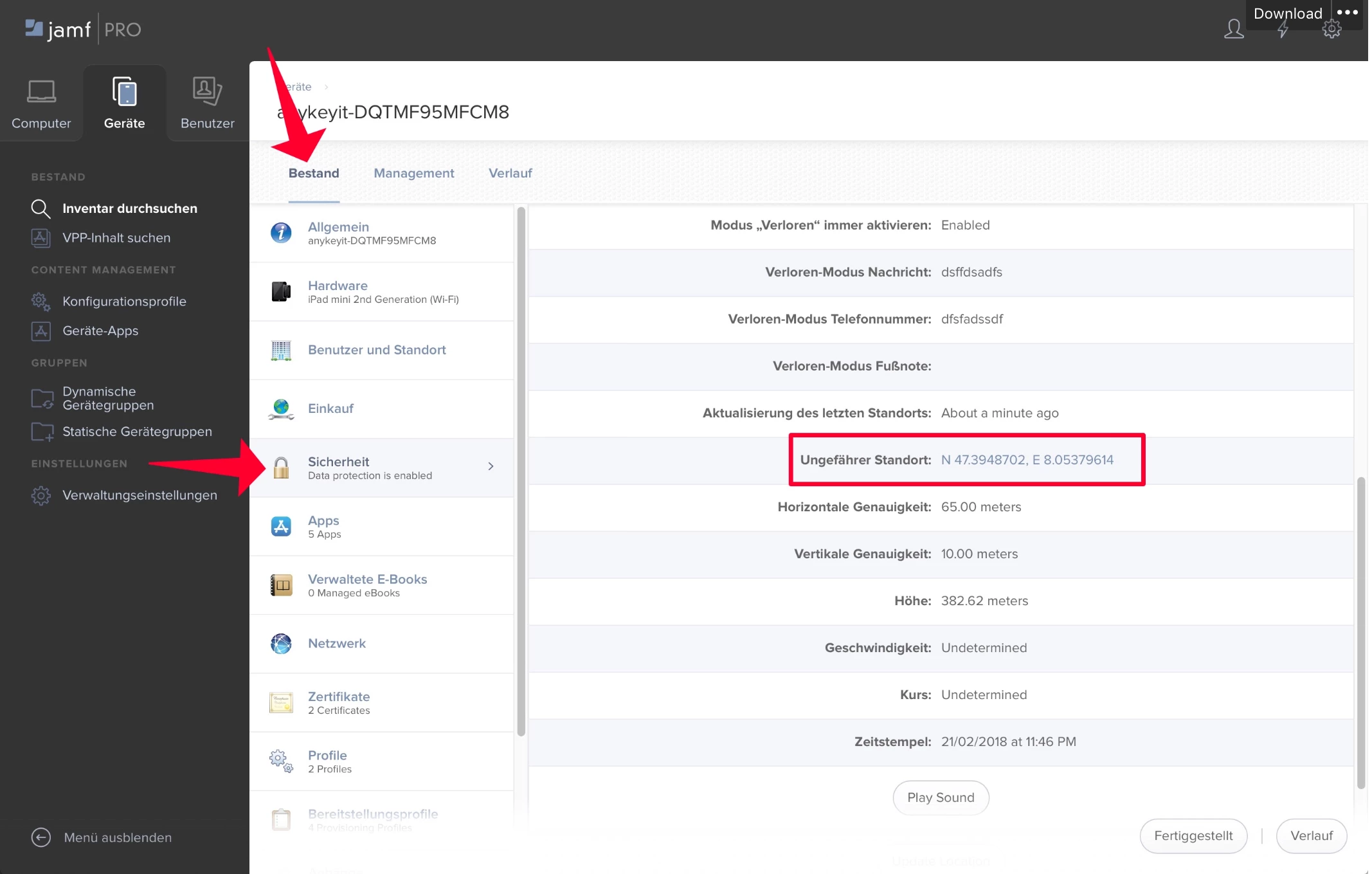
Actually the new Lost Mode function from the JSS really works without any Apple ID active. It is using the a new MDM function that comes with iOS 9.3.
It works like this:
- You click on the activate lost mode button in JSS
- You set a lost mode message with phone number
- The device gets looked with a lost mode message
- You can access the geo location information of the device and also update it with a button
- When the device is found again you can deactivate lost mode
- The user gets a push message that the MDM server accessed the geo location




Enter your E-mail address. We'll send you an e-mail with instructions to reset your password.