Question

LaunchAgent in user template?

  • August 15, 2018
  • 5 replies
  • 47 views

Forum|alt.badge.img+8

Hey all,

We're moving to AD logins (mobile accounts with no syncing) and recently encountered a problem with permissions on the network share (which has since been resolved).

In the end the decision was made to uncheck the "Use UNC path from AD to derive network home location" because we'd rather have the user able to login even when there's a problem with the network share, rather than failing to login altogether.

I'm trying to script the mounting of the network share on login using a LaunchAgent & script. Since the users will be creating their accounts the first time they login, I was going to put the LaunchAgent into the user template.

I'm wondering:
- Is this the right way to approach this?
- If I put the LaunchAgent in the user template do I have to "load" it, or will it load automatically somehow when the account is created?
- If I have to load the agent, does anyone have any suggestions for a simple method to accomplish this?

I would appreciate any help or suggestions that you guys are willing to give me.

5 replies

Forum|alt.badge.img+9
  • Valued Contributor
  • August 15, 2018

Put your LaunchAgent in /Library/LaunchAgents and it will run when any user logs in.


Forum|alt.badge.img+8
  • Author
  • Contributor
  • August 15, 2018

Thanks for your reply @barnesaw. I was thinking doing that, but I'm not sure if it will run the script as root or as the logged in user if it's in the global Library (I'm trying to get it to mount the share using the user's credentials).

I ended up doing some testing and have determined that putting the LaunchAgent in the User Template does indeed automatically load when the account is created.

So now I've run into another problem. I don't know if I should start another discussion or just continue going here. Here's what's happening:

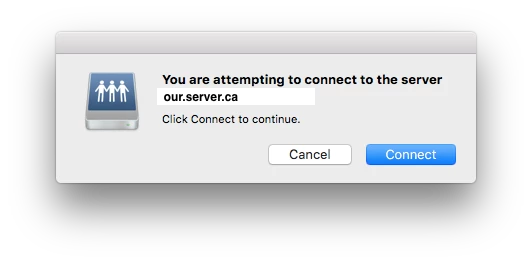
Everything works reasonably well the first time I login. It creates the account and when I reach the desktop I get a pop-up that says "you are attempting to connect to the server "server.name.com", and I click the blue "continue" button and the share mounts. Sweet. Here's a screenshot of this:

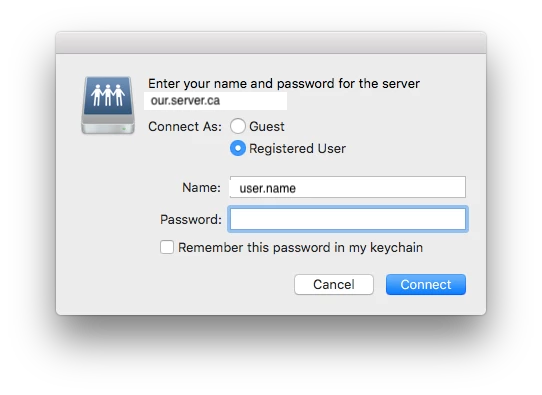
However, every login afterwards prompts for a password... Here's another screenshot:

So, I don't know why it's authenticating the first time and then not authenticating for all subseqent logins. Here is the script that I'm using:

#!/bin/bash

# this script was written to determine the currently logged in user and then determine
# the path to their network home folder
# it will then mount the home folder

## Get Current User
currentUser=$(stat -f %Su /dev/console)

## Determine path to network share
homeLoc=$( dscl . -read /Users/$currentUser SMBHome | cut -c 10- | sed 's.\\./.g' )

## mount the share
/usr/bin/osascript -e "mount volume "smb:$homeLoc""

exit

I tried using mount -t smbfs as well, but it just silently fails to mount the share. When I run it in terminal (as the user) it prompts for a password...

Again, any help or suggestions would be appreciated. I don't know what I'm doing wrong here.


Forum|alt.badge.img+9
  • Valued Contributor
  • August 15, 2018

Anything run in /Library/LaunchAgents runs as the logging in user. LaunchDaemons run as root.

As far as the password prompt goes...I use NoMAD to handle AD connections (local user and kerberos tickets), so I can't help you.


Forum|alt.badge.img+8
  • Author
  • Contributor
  • August 15, 2018

@barnesaw - Thanks anyway, I appreciate you taking the time to answer.


Forum|alt.badge.img+14
  • Valued Contributor
  • August 16, 2018

If it prompts in terminal, it will prompt when the script runs via LaunchAgent.

I would work on getting it with no prompt in terminal and then test with a LaunchAgent.