Solved

LDAP User Group Membership Mappings

  • July 10, 2014
  • 12 replies
  • 54 views

Forum|alt.badge.img+15

Hi-

I'm trying to use AD for my users and group logins to the JSS.

My user mappings seem to be correct. I can test users, I can add a user from AD, give it JSS permissions and my AD user and PW work nicely.

My User Group mappings seem to be correct, as my test shows the groups in my AD environment. When I add one of these groups to the JSS and give it permission, I cannot login as one of the users in the group.

after speaking to support they asked if my "User Group Membership mappings" saw that my user was in that AD group. The result is NO.

I've tried different combinations and have not had any success. Any suggestions?
we are on 9.32

Thanks
Dan

Best answer by dderusha

I saw @bentoms advised to start using the Directory Utility on a mac that is already bound to the domain. I found Directory Utility to be easier to use than Apache Studio, ended up using both to get there. Apache studio does not require the mac to be bound to AD.
I had our AD admin create a test group and put two users into that group.

Please take screen captures of your current settings before you try anything new.

There are 4 sections that need to be configured under the gear - System Settings - LDAP servers. Pick or add your server.

Here is my server connection
https://www.dropbox.com/s/7f5v21ohu3p9a3x/Screen%20Shot%202014-07-11%20at%206.29.22%20AM.JPG

I Started with the User Mappings. Even though I was able to get my users to populate with a couple of other settings, these ended up being the ones that worked with the group settings.

https://www.dropbox.com/s/p3zwizoh9wnk0b7/User_Mappings.JPG

There is a test button to see if your settings work. Click it and test the user.
When testing you may need to do the full username i.e.; user@mycompay.com Once I saw my user, we moved on to User Group Mappings.

https://www.dropbox.com/s/znhawrwuivk7fxw/Group%20Mappings.JPG

Now test your Group Mappings. In my testing I was able to do partial group matches. If my group was called JAMF Nation Users, I was able to find it with just JAMF.

When you can see your test group, it's time to move onto User Group Membership.

https://www.dropbox.com/s/gdhfezq11nqh5kt/User%20Group%20membership%20Mappings.JPG

Back to the test button - User Group Membership Mapping tab
enter user and the full group name, when the result is YES....time to pop the corks

https://www.dropbox.com/s/yoii0i0tb1khcnk/Test_User_wGroup.JPG

But does it really work? I removed my AD user from the JSS and made sure I had a local admin account setup to get back in if this all failed. Added my JAMF Nation Users group, gave it full admin privs.....logged out. NOW I could log in with my AD user that was part of the JAMF Nation Users group.

That's what worked for us, let me know if you have troubles with the links

Hope it helps

Dan

12 replies

Forum|alt.badge.img+15
  • Author
  • Contributor
  • July 10, 2014

Called Support again and Thanks to Juston, Jason and Bryant we are good to go.


donmontalvo
Forum|alt.badge.img+36
  • Hall of Fame
  • July 10, 2014

We have wanted to use AD groups but it seems to trample all over out AD users' access. Any voodoo secrets to share? Maybe we need a JAMF article how to mix them? :)


Forum|alt.badge.img+15
  • Author
  • Contributor
  • Answer
  • July 11, 2014

I saw @bentoms advised to start using the Directory Utility on a mac that is already bound to the domain. I found Directory Utility to be easier to use than Apache Studio, ended up using both to get there. Apache studio does not require the mac to be bound to AD.
I had our AD admin create a test group and put two users into that group.

Please take screen captures of your current settings before you try anything new.

There are 4 sections that need to be configured under the gear - System Settings - LDAP servers. Pick or add your server.

Here is my server connection
https://www.dropbox.com/s/7f5v21ohu3p9a3x/Screen%20Shot%202014-07-11%20at%206.29.22%20AM.JPG

I Started with the User Mappings. Even though I was able to get my users to populate with a couple of other settings, these ended up being the ones that worked with the group settings.

https://www.dropbox.com/s/p3zwizoh9wnk0b7/User_Mappings.JPG

There is a test button to see if your settings work. Click it and test the user.
When testing you may need to do the full username i.e.; user@mycompay.com Once I saw my user, we moved on to User Group Mappings.

https://www.dropbox.com/s/znhawrwuivk7fxw/Group%20Mappings.JPG

Now test your Group Mappings. In my testing I was able to do partial group matches. If my group was called JAMF Nation Users, I was able to find it with just JAMF.

When you can see your test group, it's time to move onto User Group Membership.

https://www.dropbox.com/s/gdhfezq11nqh5kt/User%20Group%20membership%20Mappings.JPG

Back to the test button - User Group Membership Mapping tab
enter user and the full group name, when the result is YES....time to pop the corks

https://www.dropbox.com/s/yoii0i0tb1khcnk/Test_User_wGroup.JPG

But does it really work? I removed my AD user from the JSS and made sure I had a local admin account setup to get back in if this all failed. Added my JAMF Nation Users group, gave it full admin privs.....logged out. NOW I could log in with my AD user that was part of the JAMF Nation Users group.

That's what worked for us, let me know if you have troubles with the links

Hope it helps

Dan


Forum|alt.badge.img+3
  • New Contributor
  • August 8, 2014

Have you checked that the LDAP in JSS is looking at the root level only in AD?

In System Settings >> LDAP Server >> Mapping, check that you only have DC=domain, DC=com under Search Base


Forum|alt.badge.img+7
  • Contributor
  • November 14, 2014

Does your E-Mail Notifications work for User added via LDAP Groups? Thanks


Forum|alt.badge.img+2
  • New Contributor
  • July 23, 2015

This was soooooooo helpful!!!!!


Forum|alt.badge.img+8
  • Contributor
  • August 5, 2015

This post was awesome!

One question, though:

I've got all the mappings working so that the test cases in the LDAP settings work as intended, but when I go into the JSS User Accounts & Groups section in the JSS, the groups show up, but the Members still shows as "N/A". I definitely have members in each of the groups in my Active Directory.

Any thoughts?


Forum|alt.badge.img+15
  • Author
  • Contributor
  • August 5, 2015

Hi @krispayne my groups show the same under members. Does authentication work for the users in those groups?

Dan


Forum|alt.badge.img+8
  • Contributor
  • August 5, 2015

@dderusha, I am able to login with my test AD account, so no issues there, just was curious to see the grouped members in the JSS vs. going into AD


apizz
Forum|alt.badge.img+15
  • Honored Contributor
  • December 24, 2015

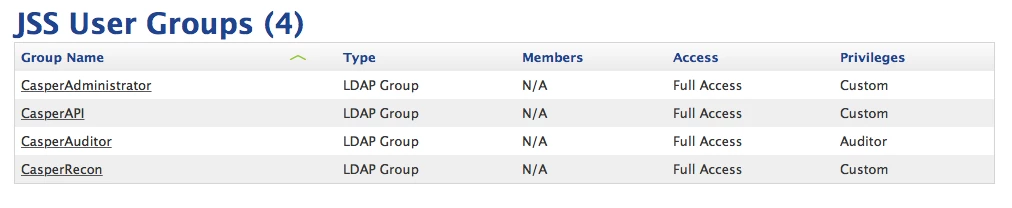
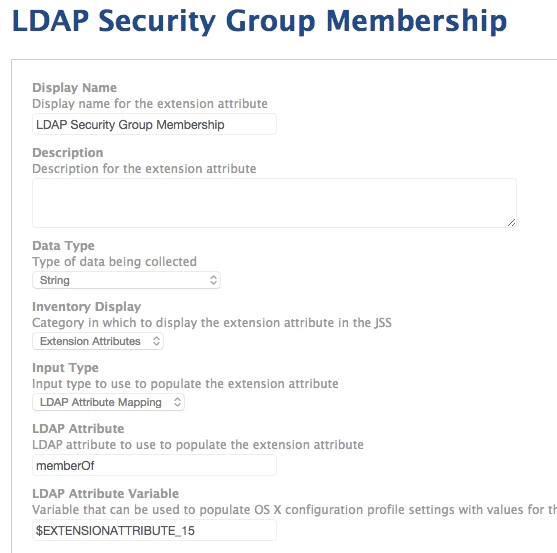
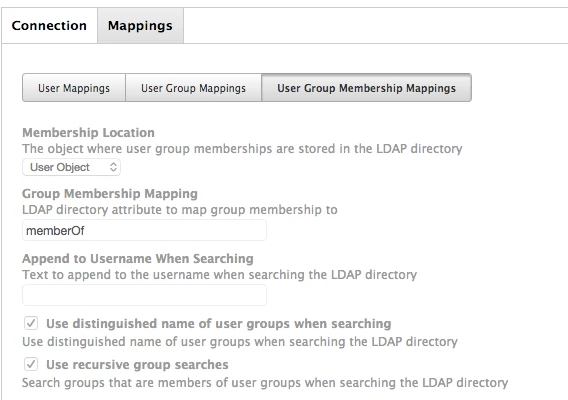
Related to this, I've been trying to get an Extension attribute working that lists all security groups from AD that the user is a part of. At the moment, the extension attribute is only displaying 1 security group, not all of them. Any ideas if I'm doing something wrong?

Extension Attribute listed on computer:

LDAP Security Group Extension Attribute settings:

JSS LDAP User Group Membership Mappings Settings:


Forum|alt.badge.img
  • New Contributor
  • December 7, 2017

Thank you so much for the post @dderusha I've been trying to figure out why I couldn't scope to a security group in LDAP and making sure that our LDAP was set up properly made everything work.


Forum|alt.badge.img+7
  • Valued Contributor
  • February 3, 2022

Related to this, I've been trying to get an Extension attribute working that lists all security groups from AD that the user is a part of. At the moment, the extension attribute is only displaying 1 security group, not all of them. Any ideas if I'm doing something wrong?

Extension Attribute listed on computer:

LDAP Security Group Extension Attribute settings:

JSS LDAP User Group Membership Mappings Settings:


This helped so much and solved my issues on Computer Records, Management, Policies, I was getting an LDAP error and once I changed it to User Object the error went away!

Specific Error: ERROR CALCULATING POLICIES IN SCOPE

Check that your LDAP server is properly configured and accessible