Solved

Line breaks missing from script output in Policy Logs after 9.98 update

  • April 5, 2017
  • 13 replies
  • 75 views

Forum|alt.badge.img+5

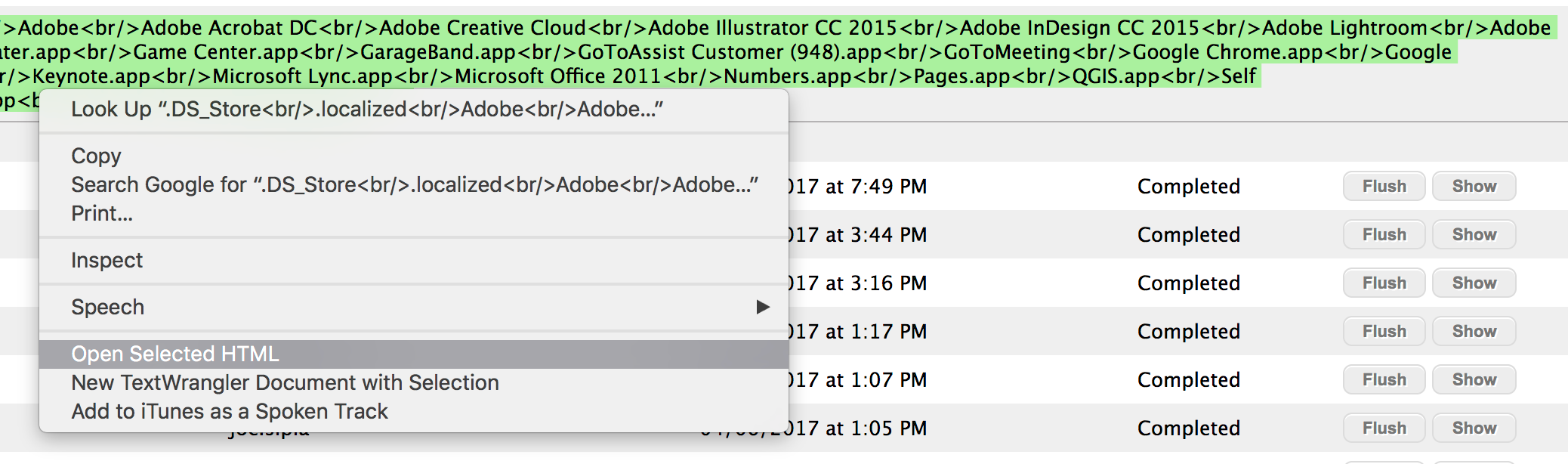
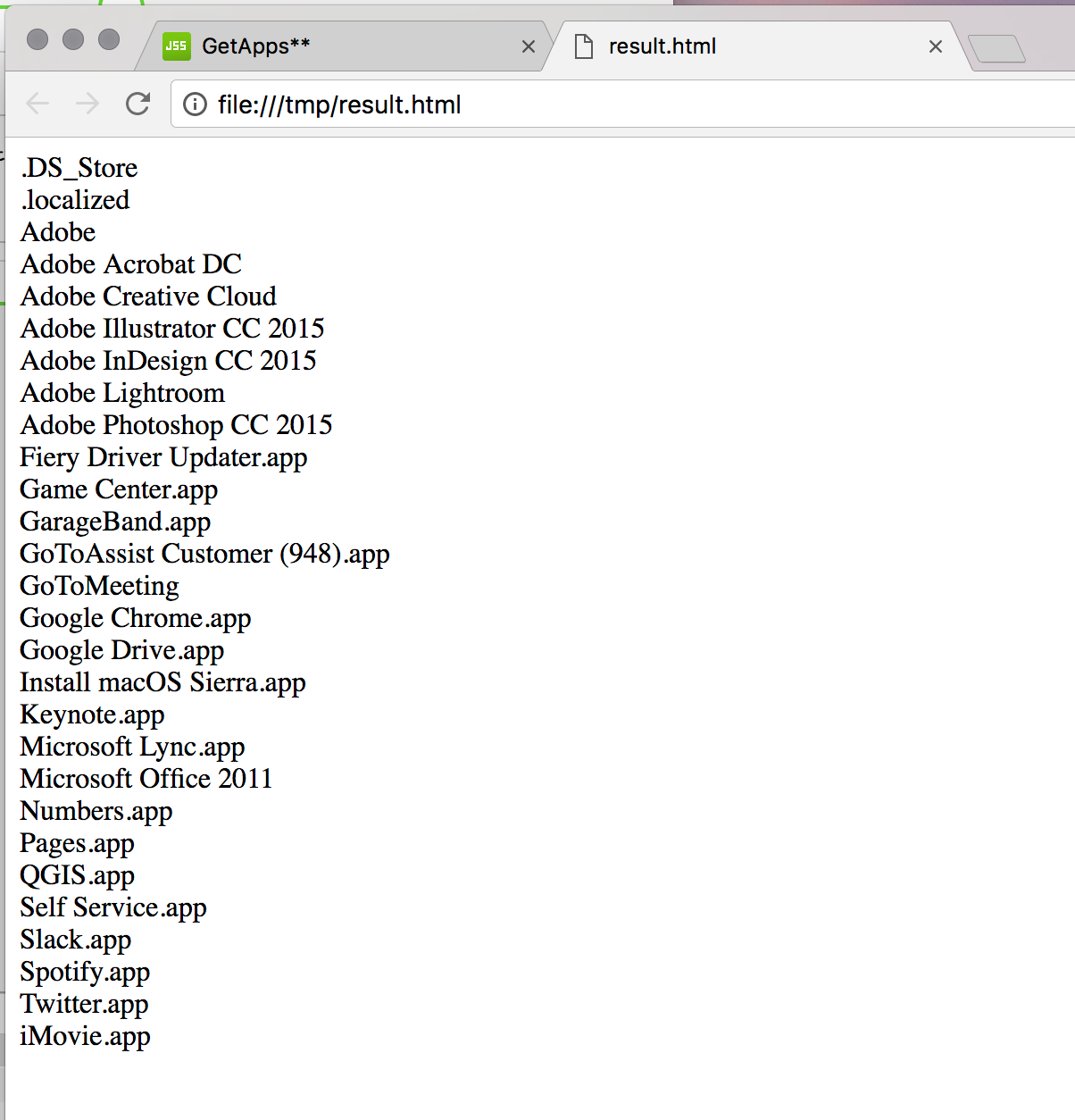
Since the JSS 9.98 upgrade, all script results are displayed on a single line in the JSS policy logs. Where line breaks should be, the HTML tag for line break is seen. To view results proper, I have to paste them into Text Wrangler, then save and open as HTML.

Below is an example. A simple test with

ls /Folder

Best answer by dan-snelson

[PI-003837] Policies with scripts or Files & Processes: Execute Command does not respect line breaks

13 replies

Forum|alt.badge.img+12
  • Contributor
  • April 11, 2017

Same issue here. See example of an output...

Script result: Wed Mar 29 13:12:31 PDT 2017: Current Flash version: 24.0.0.221<br/>Wed Mar 29 13:12:31 PDT 2017: Available Flash version: 25.0.0.127<br/>Wed Mar 29 13:12:31 PDT 2017: Downloading newer version.<br/>usage: dirname path<br/>Wed Mar 29 13:12:33 PDT 2017: Mounting installer disk image.<br/>usage: dirname path<br/>Wed Mar 29 13:12:38 PDT 2017: Installing...<br/>Wed Mar 29 13:12:55 PDT 2017: Unmounting installer disk image.<br/>Wed Mar 29 13:13:05 PDT 2017: Deleting disk image.<br/>usage: dirname path<br/>Wed Mar 29 13:13:05 PDT 2017: SUCCESS: Flash has been updated to version 25.0.0.127<br/>


dan-snelson
Forum|alt.badge.img+30
  • Honored Contributor
  • Answer
  • April 13, 2017

[PI-003837] Policies with scripts or Files & Processes: Execute Command does not respect line breaks


Forum|alt.badge.img+5
  • Author
  • New Contributor
  • April 13, 2017

Well, guess we need Jamf Pro 10!

My workaround for now is a service I created in automator to render the results as html..


¯_(ツ)_/¯


Forum|alt.badge.img+18
  • Contributor
  • August 31, 2017

I'm a bit late to the game here since we just upgraded to 9.100, and this issue is very annoying. I can't find any info on it being fixed, where can I get the status on this?


Forum|alt.badge.img+12
  • Contributor
  • August 31, 2017

@alexjdale Stlil not fixed as of 9.100... Use to work in 9.97.

It's a bit of work, but I go into the machine record >> History >> policies >> Show. Line breaks will work here...


Forum|alt.badge.img+18
  • Contributor
  • August 31, 2017

Thanks, I wanted to make sure I wasn't missing something. We skipped 9.98 and 9.99 so this was new to me.


Forum|alt.badge.img+9
  • Contributor
  • February 8, 2018

In version 10.1, this is still an issue.


Forum|alt.badge.img+6
  • Contributor
  • February 8, 2018

Having the same problem on 10.1.1


donmontalvo
Forum|alt.badge.img+36
  • Hall of Fame
  • February 9, 2018

A green initiative had me cursing this issue last week when I had to create a script that would look for installed printers that offered Duplex, but where Duplex was off by default. I was somewhat pleased with the script. It output what I expected:

<PrinterName> <None>
<PrinterName> <DuplexNoTumble>
<Printername> <DuplexTumble>

My upside up smiley turned into an upside down smiley once I uploaded it to Jamf Pro 9.101.4 and found the EA that read the output of my script spit out...you guessed it...a single line, which was a PITA to work with.

<PrinterName> <None> <PrinterName> <DuplexNoTumble> <Printername> <DuplexTumble>

I really hope to see this issue resolved one day. I mean, heck, we can get a Tesla into space. Why can't we get line breaks in an EA output?


donmontalvo
Forum|alt.badge.img+36
  • Hall of Fame
  • February 9, 2018

Forum|alt.badge.img+8
  • Valued Contributor
  • June 12, 2019

This appears to have returned again at the last update, anyone have a fix ?


Forum|alt.badge.img+9
  • Contributor
  • October 7, 2019

It's still an issue as of 10.15.1.
Here's the FR for it: https://www.jamf.com/jamf-nation/feature-requests/6993/correctly-display-line-breaks-in-policy-logs


Forum|alt.badge.img+8
  • Valued Contributor
  • October 7, 2019

@luke.reagor We are seeing this PI resolved under Jamf Pro 10.15.1. Output from script execution via policy includes line breaks, as expected.