
Question

Log out after 30 minutes of inactivity enabled only on some devices

  • August 11, 2016
  • 11 replies
  • 46 views

Forum|alt.badge.img+4

Hey all -

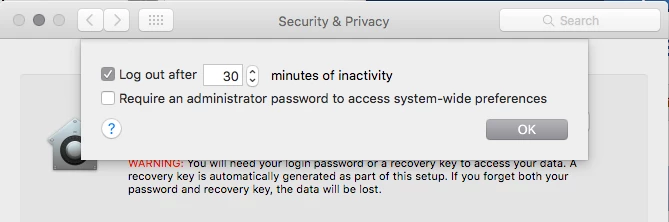
So I have several devices that are forcing logouts after 30 minutes. The checkbox in question is in System Preferences > Security & Privacy > Advanced ... > Log out after XX minutes of inactivity.

The strange part is that this only affects some devices. My personal device, an early 2015 13" MacBook Pro running 10.11.6, is not affected, while several of my development team running mid 2015 15" MacBook Pros on the same OS version are affected. Profiles to each of these machines are identical.

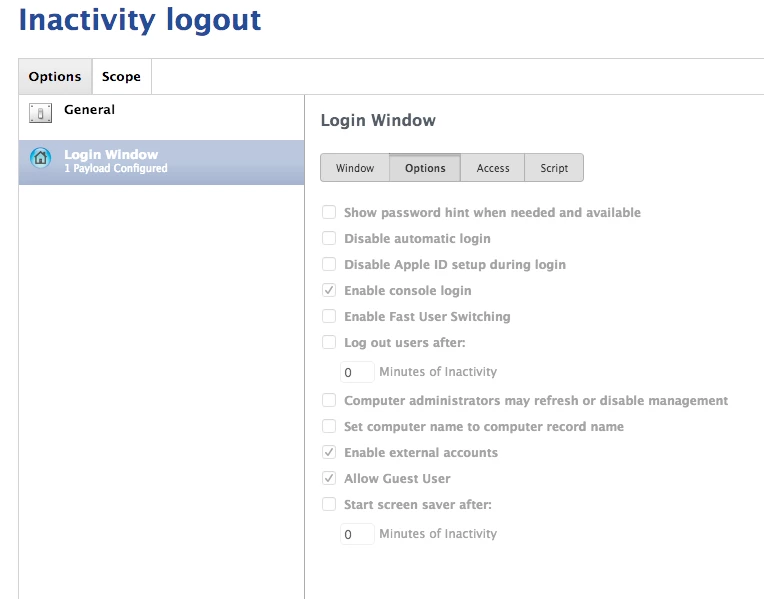
I created a configuration profile to address this specifically via LogIn Window > Options > uncheck Log users out after XX minutes of inactivity. I pushed this to the all devices (affected and not) and verified installation, and this checkbox STILL re-enables itself on the problem machines.

I'm pulling my hair out at this point, any ideas are greatly appreciated.
11 replies

dan-snelson
Forum|alt.badge.img+28
  • Honored Contributor
  • 632 replies
  • August 12, 2016

@chovrud Are you running 9.93?

Known Issues Configuration profiles created in v9.93 with a Security & Privacy payload and a FileVault 2 Redirect payload contain an inactive automatic logout setting.

See: http://docs.jamfsoftware.com/9.93/casper-suite/release-notes/Known_Issues.html


Forum|alt.badge.img+4
  • New Contributor
  • 5 replies
  • August 12, 2016

Do you have any other profiles with Login Window/Login Items/Restrictions/Finder payloads?

I've found some very odd issues with these in 9.93 where unexpected settings are being set. Very similar to the issues outlined here - https://macmule.com/2016/05/09/icloud-spotlight-login-window-issues-with-jss-9-9-the-security-privacy-profile-payload/#more-2591

My workaround is to place all payloads in the same configuration profile.


Forum|alt.badge.img+8
  • Contributor
  • 143 replies
  • August 12, 2016

You have to check the payload of the configuration profile itself, not what the JSS says is part of the profile.

Download the profile and open it in an xml editor and see if it says anything for "askForPasswordDelay"

These issues have been with the JSS since 9.90 so that has been about eight months or so without them being fixed.


Forum|alt.badge.img+4
  • Author
  • Contributor
  • 10 replies
  • August 15, 2016

Hey all -

Thank you for the responses. The strange thing is that this has been occurring since before I rolled out JSS profiles to these machines, in my futile attempt to manage devices via OSX server. Regardless, I'll check the config profile and report back with what I find.

Thanks.


bentoms
Forum|alt.badge.img+35
  • Hall of Fame
  • 4331 replies
  • August 20, 2016

@chovrud This post, might help your spelunking.


Forum|alt.badge.img+5
  • Contributor
  • 52 replies
  • August 29, 2016

Just adding my two cents to this. First off, I am running 9.92.1466020067. I've checked all the profiles and do not see any other profiles asking for "askForPasswordDelay". I created a whole new profile to explicitly push that setting and does not overwrite that setting.

Anyone have a script to overwrite this?


Forum|alt.badge.img+4
  • Author
  • Contributor
  • 10 replies
  • August 30, 2016

Solution - it appears that some old profiles were carrying payloads that were not supposed to be associated with what was happening. In this instance I removed a couple old Power Saver payloads and it cleared out the random settings in Privacy & Security.

This is an Apple issue, not a JAMF one.


Forum|alt.badge.img+5
  • Contributor
  • 52 replies
  • August 30, 2016

@chovrud Makes sense. I will try this out later and see if that resolves my issues and report back here.


bentoms
Forum|alt.badge.img+35
  • Hall of Fame
  • 4331 replies
  • August 31, 2016

FWIW [this](lhttps://macmule.com/2016/05/09/icloud-spotlight-login-window-issues-with-jss-9-9-the-security-privacy-profile-payload/) may help.


Forum|alt.badge.img+5
  • Contributor
  • 49 replies
  • August 31, 2016

I had a similar issue, in my case I had a separate configuration profile to configure "Finder" once I deleted that separate configuration profile from our JSS it fixed the issue that kept putting the check mark on forcing users to log out after xx minutes.

also it fixed another issue I was having with screen saver not turning on "immediately" or after xx seconds.

if you have a configuration profile with the "Configure Finder" remove it to see if it fixes the issue.


Forum|alt.badge.img+3
  • New Contributor
  • 5 replies
  • September 8, 2016

Just seen the updated 9.96 should fix the “logout after x minutes of inactivity” bug.

[PI-002673] Fixed an issue where configuration profiles created in v9.93 with a Security & Privacy payload and a FileVault 2 Redirect payload contain an inactive automatic logout setting.

Source: http://docs.jamfsoftware.com/9.96/casper-suite/release-notes/Bug_Fixes_and_Enhancements.html

