
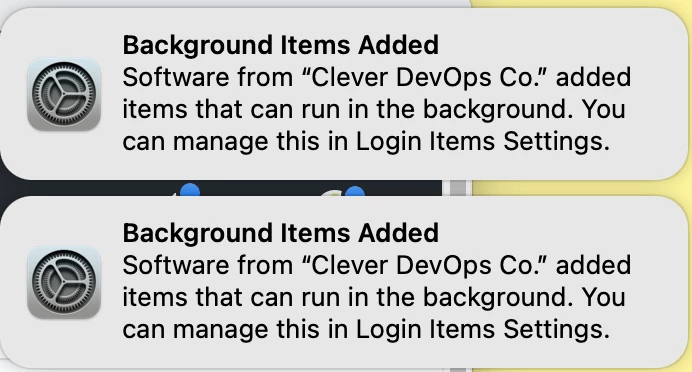
Please tell me we're going to be able to suppress these and a million notifications aren't the future for end users:
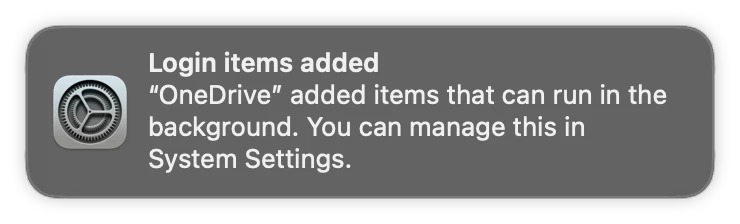
Please tell me we're going to be able to suppress these and a million notifications aren't the future for end users:

 +25
+25Is there any way whatsoever to block a notification like this for a .sh script? Presumably those don't have a Bundle ID (if they do I can't figure out how to find it) and this only applies to full blown .app applications?
@Shaun Make sure the LaunchDaemon calling your .sh script has a Label entry in the .plist, and use that name in a Label rule in your Service Management - Managed Login Items payload.

 +21
+21@Shaun Make sure the LaunchDaemon calling your .sh script has a Label entry in the .plist, and use that name in a Label rule in your Service Management - Managed Login Items payload.
I have a similar situation. We have a LaunchDaemon that runs a shell script. I do have a Label in the plist. It is com.company.thingy. I used iMazing Profile Editor to create a config for all my other apps (I used sfltool dumpbtm to get the bundles for them) and they are all locked in but the launch daemon that shows up in Login Items as "sh" is not locked down. I have the entry in the profile as follows:
Label | com.company.thingy | generic comment I can't figure out why it isn't locked down when the signed profile is installed. Is there something else I'm missing?
+21I have a similar situation. We have a LaunchDaemon that runs a shell script. I do have a Label in the plist. It is com.company.thingy. I used iMazing Profile Editor to create a config for all my other apps (I used sfltool dumpbtm to get the bundles for them) and they are all locked in but the launch daemon that shows up in Login Items as "sh" is not locked down. I have the entry in the profile as follows:
Label | com.company.thingy | generic comment I can't figure out why it isn't locked down when the signed profile is installed. Is there something else I'm missing?
Nevermind... I figured it out. I had text in the Team Identifier field. When I removed that extra text and re-applied the profile, it now works.

 +8
+8It's strange why Apple will post that notification. The user can't do anything about it anyway.
It can be closed with this applescript:
tell application "System Events"
	try
		set _groups to groups of UI element 1 of scroll area 1 of group 1 of window "Notification Center" of application process "NotificationCenter"
		repeat with _group in _groups
			set temp to value of static text 1 of _group
			log temp
			if temp contains "Managed Login Items Added" then
				perform (first action of _group where description is "Close")
			end if
		end repeat
	end try
end tell
Hello Michael, How are you running applescript utilizing Jamf? Thanks

 +5
+5Hello Michael, How are you running applescript utilizing Jamf? Thanks
This is the script, I execute:
#!/bin/zsh

# get current user
currentUser=$(scutil <<< "show State:/Users/ConsoleUser" | awk '/Name :/ { print $3 }')

runAsUser() {
    if [[ $currentUser != "loginwindow" ]]; then
        uid=$(id -u "$currentUser")
        launchctl asuser $uid sudo -u $currentUser "$@"
    fi
}

removeNotification() {
    runAsUser osascript -e "tell application \\"System Events\\"
	try
		set _groups to groups of UI element 1 of scroll area 1 of group 1 of window \\"Notification Center\\" of application process \\"NotificationCenter\\"
		repeat with _group in _groups
			set temp to value of static text 1 of _group
			log temp
			if temp contains \\"Managed Login Items Added\\" then
				perform (first action of _group where description is \\"Close\\")
			end if
		end repeat
	end try
end tell"
}

removeNotification
You may need a Configuration Profile to allow this (I can't remember if this is the case).
+8This is the script, I execute:
#!/bin/zsh

# get current user
currentUser=$(scutil <<< "show State:/Users/ConsoleUser" | awk '/Name :/ { print $3 }')

runAsUser() {
    if [[ $currentUser != "loginwindow" ]]; then
        uid=$(id -u "$currentUser")
        launchctl asuser $uid sudo -u $currentUser "$@"
    fi
}

removeNotification() {
    runAsUser osascript -e "tell application \\"System Events\\"
	try
		set _groups to groups of UI element 1 of scroll area 1 of group 1 of window \\"Notification Center\\" of application process \\"NotificationCenter\\"
		repeat with _group in _groups
			set temp to value of static text 1 of _group
			log temp
			if temp contains \\"Managed Login Items Added\\" then
				perform (first action of _group where description is \\"Close\\")
			end if
		end repeat
	end try
end tell"
}

removeNotification
You may need a Configuration Profile to allow this (I can't remember if this is the case).
Thank you. You are correct regarding the Configuration Profile. Requiring access to JamfManagementService. Will work on getting that built, unless you have it handy.
+5Thank you. You are correct regarding the Configuration Profile. Requiring access to JamfManagementService. Will work on getting that built, unless you have it handy.
I believe these are what I have set up to allow Jamf to run these commands without asking user for permission:
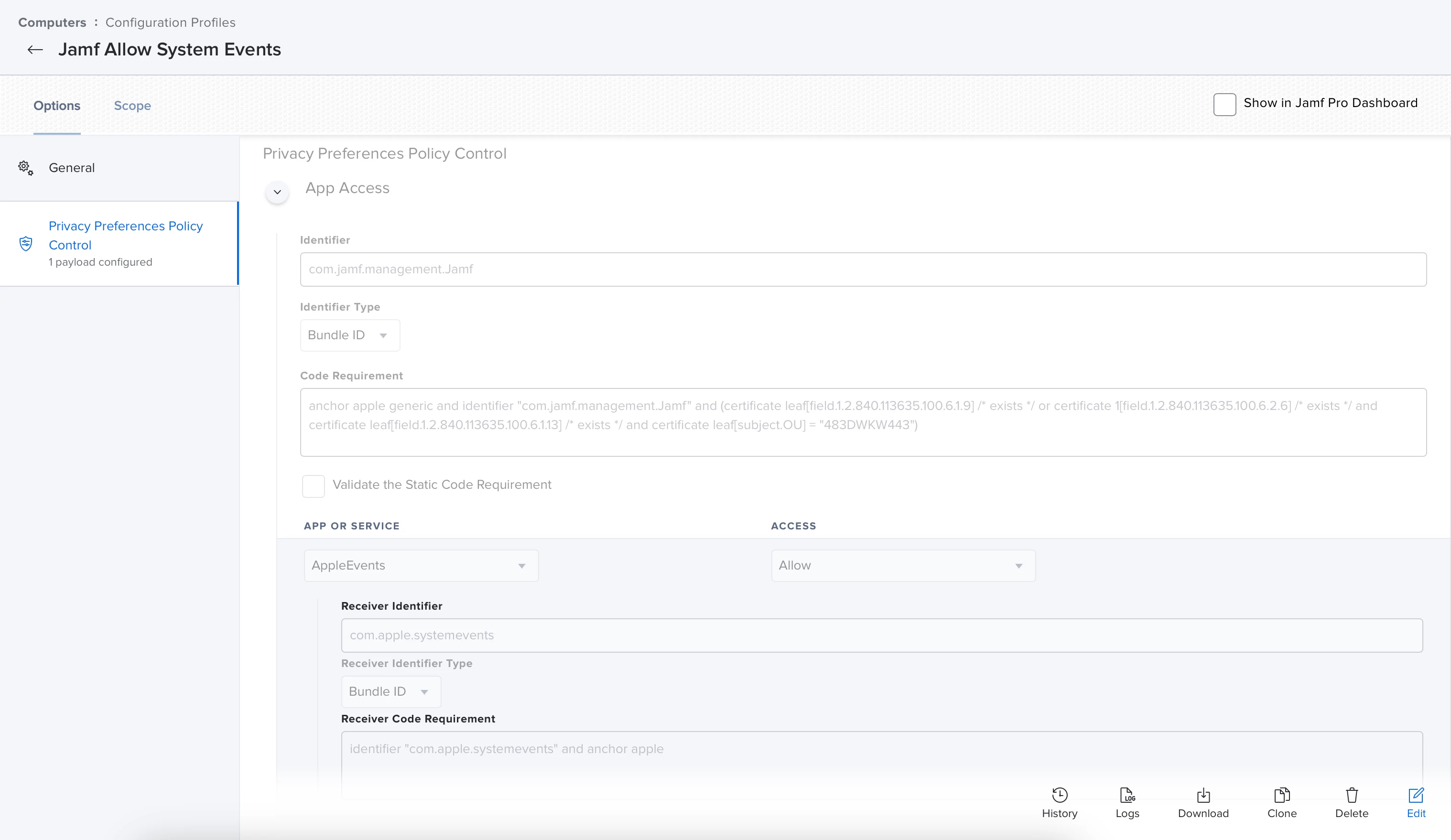
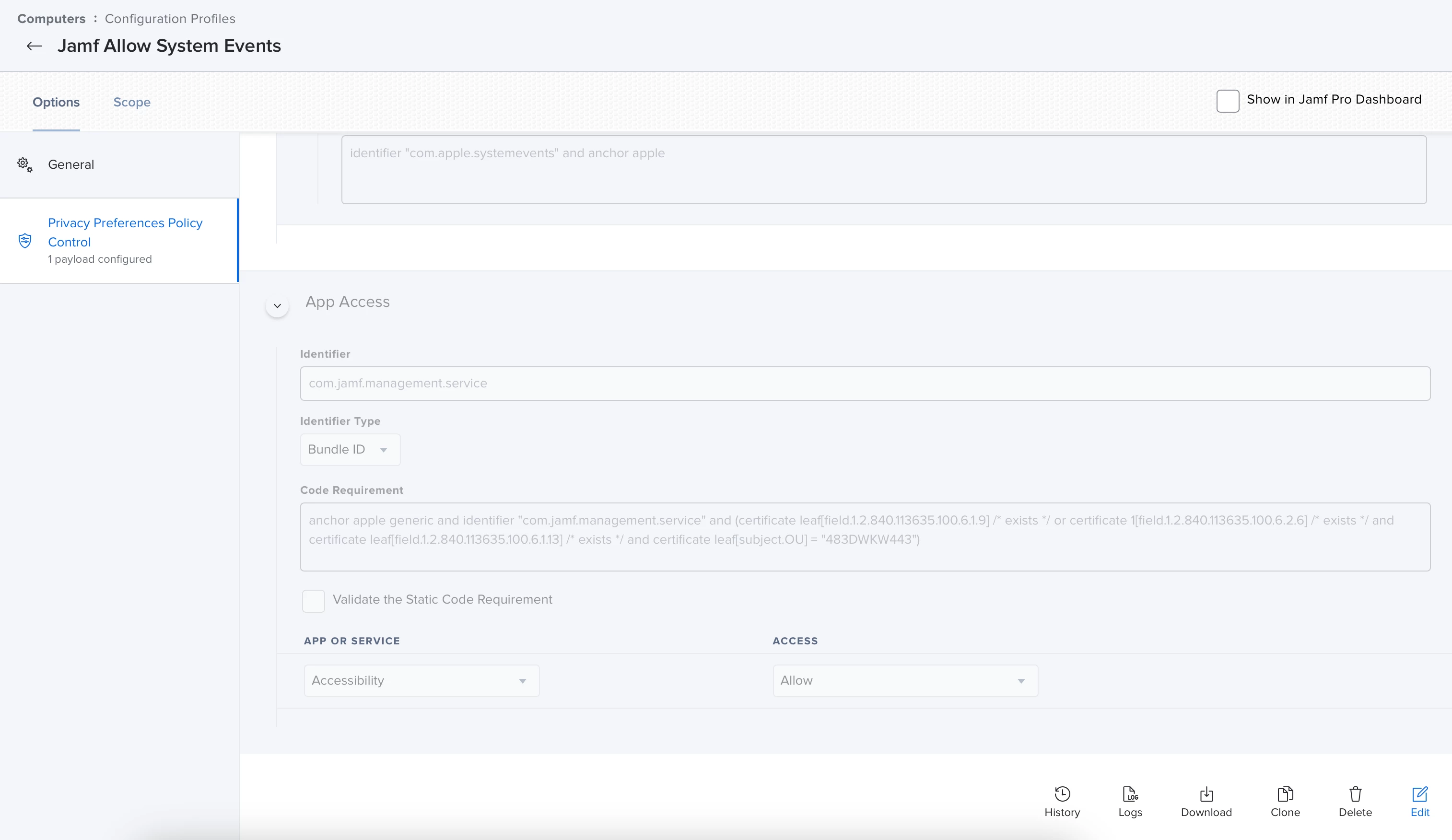
+8I believe these are what I have set up to allow Jamf to run these commands without asking user for permission:
Thanks ! I utilized iMazing Profile and added Bundle Identifier com.jamf.management.Jamf. If that doesn't do it I will definitely utilize your detail. Thanks again
+25It's strange why Apple will post that notification. The user can't do anything about it anyway.
It can be closed with this applescript:
tell application "System Events"
	try
		set _groups to groups of UI element 1 of scroll area 1 of group 1 of window "Notification Center" of application process "NotificationCenter"
		repeat with _group in _groups
			set temp to value of static text 1 of _group
			log temp
			if temp contains "Managed Login Items Added" then
				perform (first action of _group where description is "Close")
			end if
		end repeat
	end try
end tell
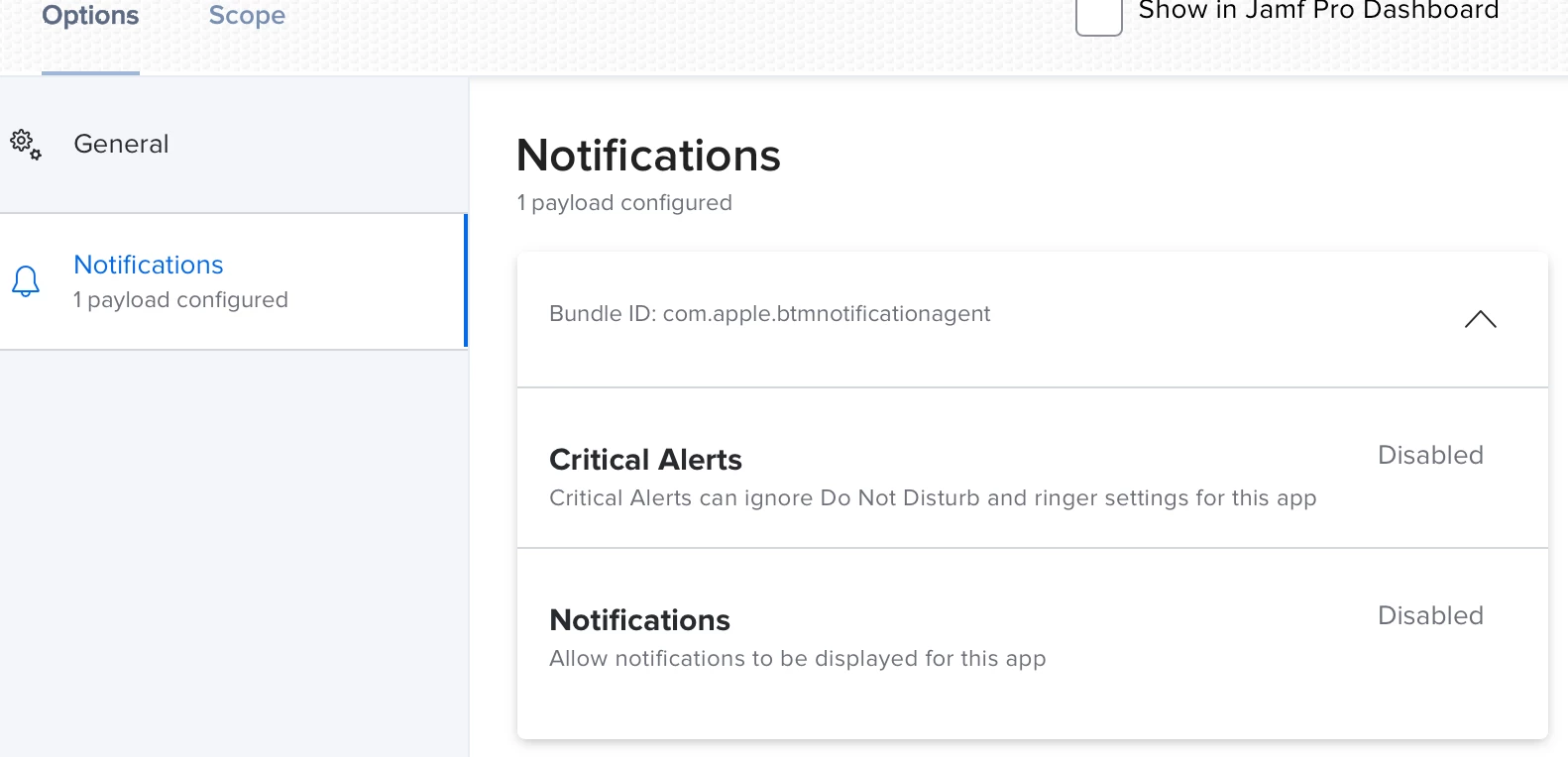
@michael_madsen & @PhillyPhoto You can suppress the Managed Login Items Added notifications by deploying a Configuration Profile with a Notifications payload for Bundle ID com.apple.btmnotificationagent setting Critical Alert and Notifications to Disabled (note that this will disable all Managed Login Items Added notifications, not just for items you may have locked via a Managed Login Items payload) :
Sorry. It's the Custom Schema used for the other 18 in place already. Schema at the bottom.
External Applications > Source > 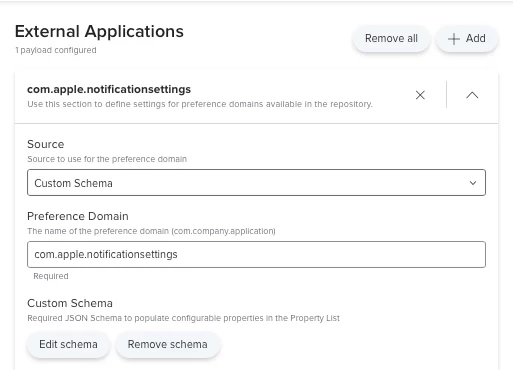
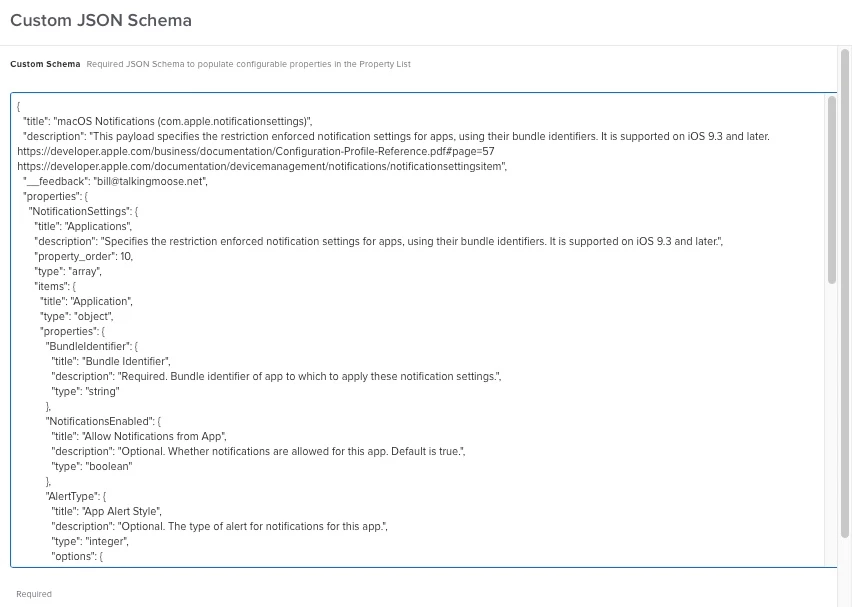
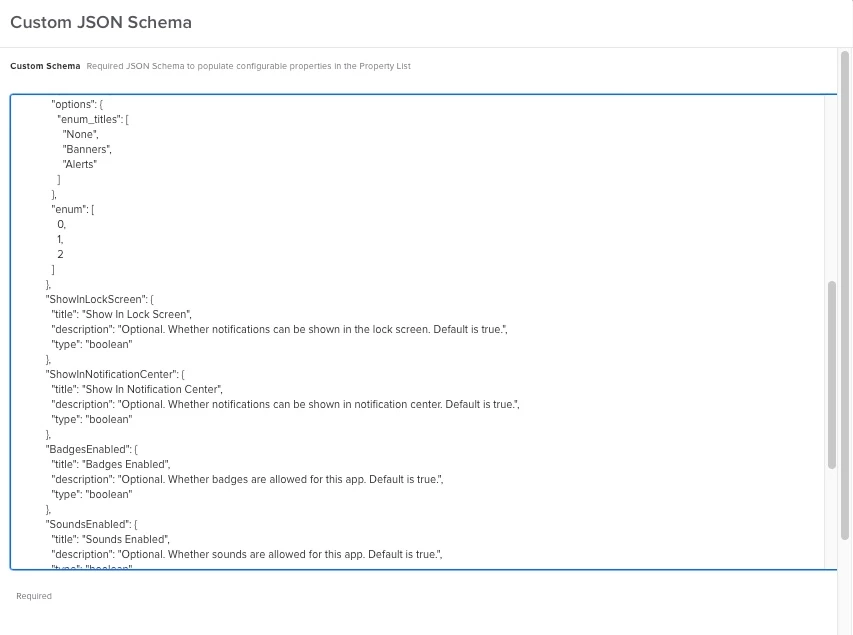
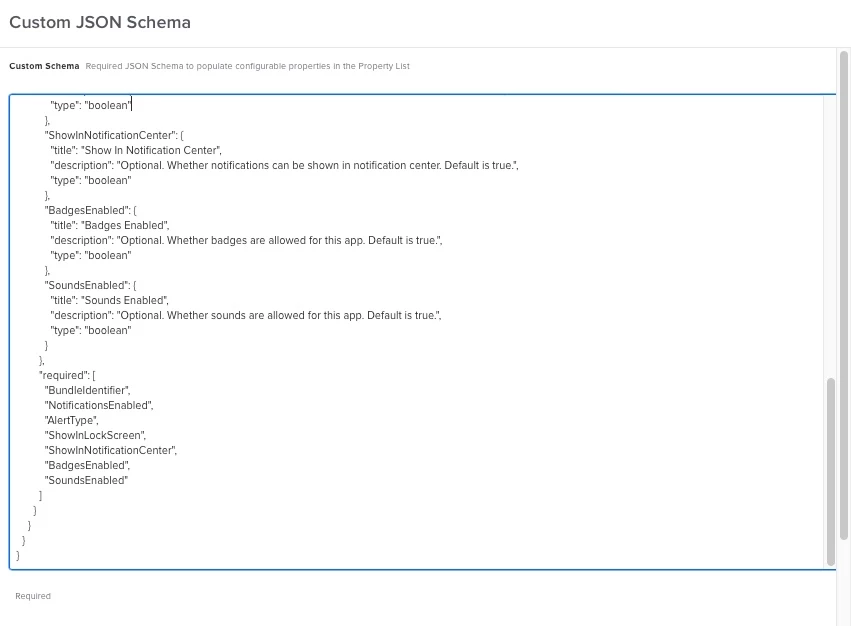 Custom Schema:
{
"title": "macOS Notifications (com.apple.notificationsettings)",
"description": "This payload specifies the restriction enforced notification settings for apps, using their bundle identifiers. It is supported on iOS 9.3 and later. https://developer.apple.com/business/documentation/Configuration-Profile-Reference.pdf#page=57 https://developer.apple.com/documentation/devicemanagement/notifications/notificationsettingsitem",
"__feedback": "bill@talkingmoose.net",
"properties": {
"NotificationSettings": {
"title": "Applications",
"description": "Specifies the restriction enforced notification settings for apps, using their bundle identifiers. It is supported on iOS 9.3 and later.",
"property_order": 10,
"type": "array",
"items": {
"title": "Application",
"type": "object",
"properties": {
"BundleIdentifier": {
"title": "Bundle Identifier",
"description": "Required. Bundle identifier of app to which to apply these notification settings.",
"type": "string"
},
"NotificationsEnabled": {
"title": "Allow Notifications from App",
"description": "Optional. Whether notifications are allowed for this app. Default is true.",
"type": "boolean"
},
"AlertType": {
"title": "App Alert Style",
"description": "Optional. The type of alert for notifications for this app.",
"type": "integer",
"options": {
"enum_titles": [
"None",
"Banners",
"Alerts"
]
},
"enum": [
0,
1,
2
]
},
"ShowInLockScreen": {
"title": "Show In Lock Screen",
"description": "Optional. Whether notifications can be shown in the lock screen. Default is true.",
"type": "boolean"
},
"ShowInNotificationCenter": {
"title": "Show In Notification Center",
"description": "Optional. Whether notifications can be shown in notification center. Default is true.",
"type": "boolean"
},
"BadgesEnabled": {
"title": "Badges Enabled",
"description": "Optional. Whether badges are allowed for this app. Default is true.",
"type": "boolean"
},
"SoundsEnabled": {
"title": "Sounds Enabled",
"description": "Optional. Whether sounds are allowed for this app. Default is true.",
"type": "boolean"
}
},
"required": [
"BundleIdentifier",
"NotificationsEnabled",
"AlertType",
"ShowInLockScreen",
"ShowInNotificationCenter",
"BadgesEnabled",
"SoundsEnabled"
]
}
}
}
}
I am still looking for a solid solution to this issue.
The popups are consent on macOS13.2
@A-bomb is your configuration profile working to stop these in your environment?
I replicated it on my JAMF instance and the issues persist.
 +14
+14I am still looking for a solid solution to this issue.
The popups are consent on macOS13.2
@A-bomb is your configuration profile working to stop these in your environment?
I replicated it on my JAMF instance and the issues persist.
@bcrockett You now have two choices. Either 1) create a mobile config and upload it to Jamf Pro, or 2) use the new Managed Login Items in Jamf Pro 10.43.1.
I have been using the uploaded mobile config method with no issues to date and will be testing the new payload soon.

 +18
+18I am still looking for a solid solution to this issue.
The popups are consent on macOS13.2
@A-bomb is your configuration profile working to stop these in your environment?
I replicated it on my JAMF instance and the issues persist.
This has worked since it was posted...still works.
+18@bcrockett You now have two choices. Either 1) create a mobile config and upload it to Jamf Pro, or 2) use the new Managed Login Items in Jamf Pro 10.43.1.
I have been using the uploaded mobile config method with no issues to date and will be testing the new payload soon.
Same. Report back on the Jamf solution if you test. I will be soon, but we'll see which one is best for ongoing work...
+18Thank you for sharing that!
I actually posted waaaaaaay back the profile code i used based off of that page.
It works. Check it out and see!
@bcrockett You now have two choices. Either 1) create a mobile config and upload it to Jamf Pro, or 2) use the new Managed Login Items in Jamf Pro 10.43.1.
I have been using the uploaded mobile config method with no issues to date and will be testing the new payload soon.
@jbutler47 I got this working using the new Managed Login Items!
I will share a more detailed config soon for now I have a screenshot of my config page. 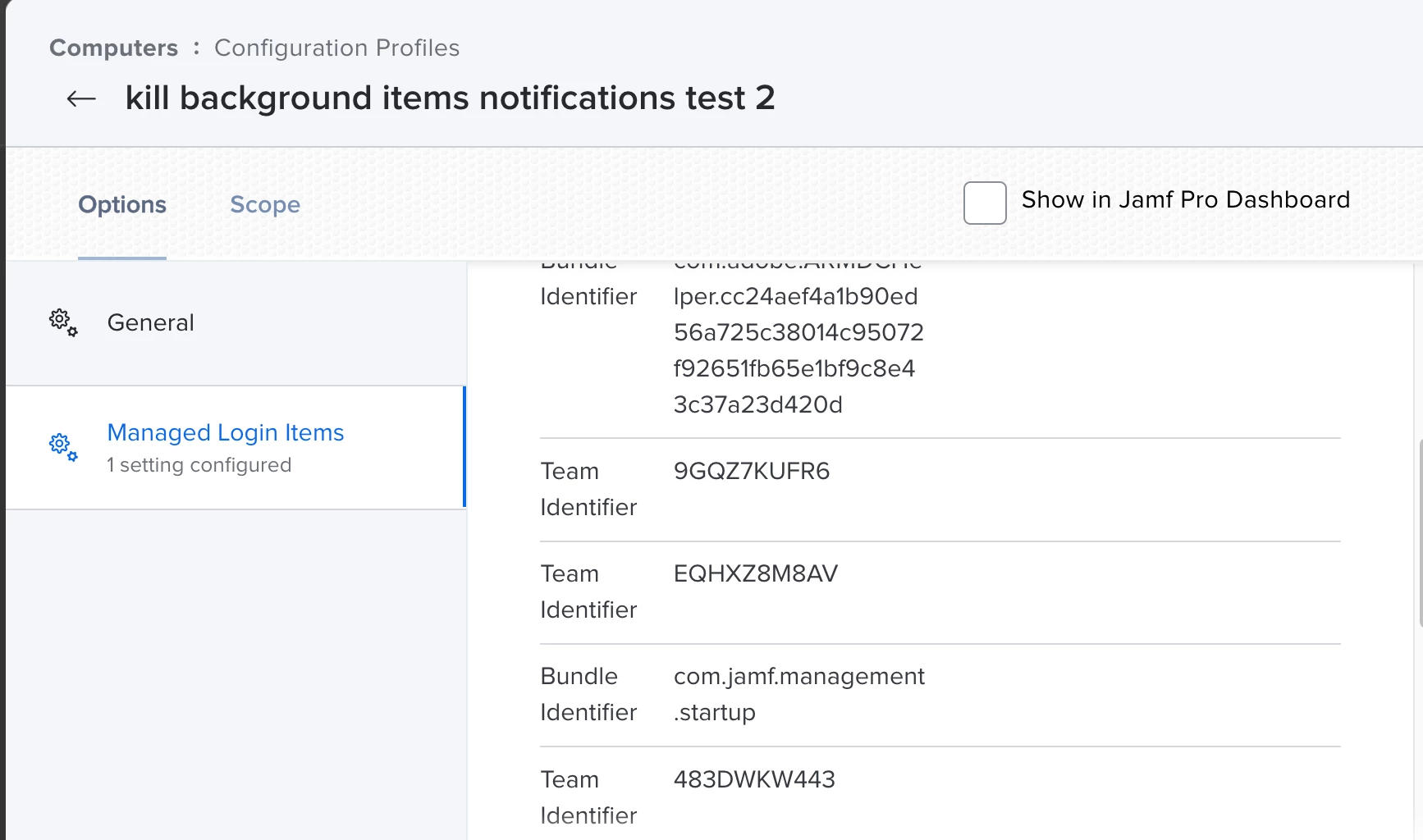

 +8
+8I am still looking for a solid solution to this issue.
The popups are consent on macOS13.2
@A-bomb is your configuration profile working to stop these in your environment?
I replicated it on my JAMF instance and the issues persist.
+18@jbutler47 I got this working using the new Managed Login Items!
I will share a more detailed config soon for now I have a screenshot of my config page.
Have not looked at it yet, but that looks great! Thanks for posting it up. Have to add some new items so good time to check it out.
+8Well, that's cool. 10.43.1 converted my existing manual XML to the new Managed Login Items format, automatically. I was getting ready to rebuild it.
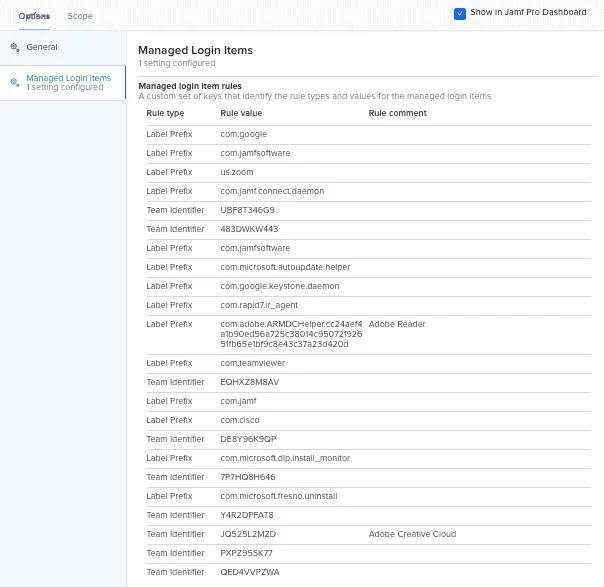
Greetings,
Using the information in this thred I got the notifications under control.
First, I used managed login items through a configuration profile. That stopped the notification from apps like Nudge, Adobe, Zoom, etc with the banner title: Background Items Added
After that configuration was pushed through to the client a new notification popped up with the banner title: Managed Login Items Added
Which was less annoying because it gave the user an option to stop the message from poping up again for one week.
However, I still wanted to stop it entirely.
So using jamf pro VERSION
10.43.1-t1674743888
I added another configuration profile with a notification payload where I used the bundle ID
Bundle ID: com.apple.btmnotificationagent
To stop - disable all notifications!
I am more of a visual learner.
For that reason, I made a film showing both of these workflows.
Hopefully, it helps folks stop - control the notifications for everything.
Cheers, ~B
Enter your E-mail address. We'll send you an e-mail with instructions to reset your password.