Solved

"loginwindow" wants access to control "System Events"

  • December 11, 2018
  • 10 replies
  • 70 views

Forum|alt.badge.img+12

We have a few scripts that rely on user-input dialog boxes that generate the following popup when executed via a Jamf policy on macOS 10.14.x
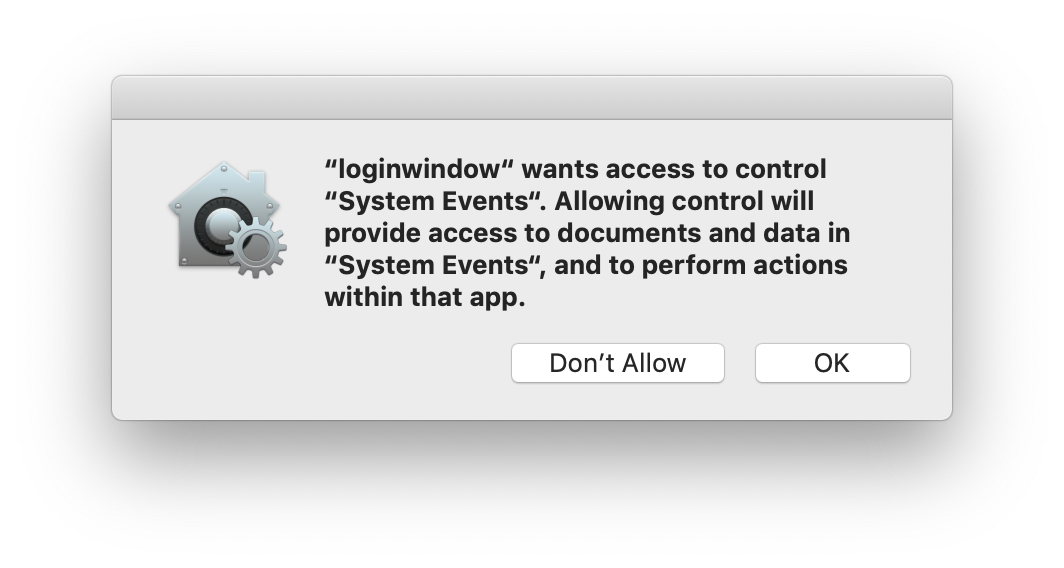
I've attempted to create a TCC profile to pre-approve com.apple.loginwindow for com.apple.systemevents but it doesn't seem to have made a difference.

Has anyone found a way to suppress this box?

Best answer by jared_f

https://github.com/jamf/PPPC-Utility

10 replies

Forum|alt.badge.img+14
  • Valued Contributor
  • December 11, 2018

Use the PPPC utility on Github, assuming your app is code signed you can make a configuration profile and push it via Jamf.


Forum|alt.badge.img+14
  • Valued Contributor
  • Answer
  • December 11, 2018

https://github.com/jamf/PPPC-Utility


Forum|alt.badge.img+12
  • Author
  • Valued Contributor
  • December 11, 2018

@jared_f Thanks! This tool is much better than the PPPC tool I had found previously. I was able to generate a profile that allows loginwindow access to systemevents


Forum|alt.badge.img+4
  • Contributor
  • January 17, 2019

I downloaded that utility, but I've never used anything like it. How do I add loginwindow to have access to system events, cause I would also like to suppress that message.


bstephens
Forum|alt.badge.img+3
  • New Contributor
  • January 17, 2019

@rcarey It looks like the instructions to use with JAMF are listed when you scroll down the page at https://github.com/jamf/PPPC-Utility.


Forum|alt.badge.img+4
  • Contributor
  • January 17, 2019

@bstephens I did see that, but was trying to figure out where to find "loginwindow" so I could add it into the utility to create the profile. Didn't know it was in the CoreServices folder, but got it figured out and it works great. This utility is awesome!


Forum|alt.badge.img+11
  • New Contributor
  • January 29, 2019

@UESCDurandal Did you get something that works?
I've built a working payload for /usr/local/jamf/bin/jamfAgent and System Events however loginwindow is still giving me problems.
We have a login policy that runs a script that calls osascript (and yes, I've even added osascript to no avail)

I've tried with both the PPPC default of a bundle identifier for loginwindow:

            <key>Services</key>
            <dict>
                <key>AppleEvents</key>
                <array>
                    <dict>
                        <key>AEReceiverCodeRequirement</key>
                        <string>identifier "com.apple.systemevents" and anchor apple</string>
                        <key>AEReceiverIdentifier</key>
                        <string>com.apple.systemevents</string>
                        <key>AEReceiverIdentifierType</key>
                        <string>bundleID</string>
                        <key>Allowed</key>
                        <true/>
                        <key>CodeRequirement</key>
                        <string>identifier "com.apple.loginwindow" and anchor apple</string>
                        <key>Comment</key>
                        <string></string>
                        <key>Identifier</key>
                        <string>com.apple.loginwindow</string>
                        <key>IdentifierType</key>
                        <string>bundleID</string>
                    </dict>
                </array>
            </dict>
        </dict>
    </array>

As well as the explicit path:

            <key>Services</key>
            <dict>
                <key>AppleEvents</key>
                <array>
                    <dict>
                        <key>AEReceiverCodeRequirement</key>
                        <string>identifier "com.apple.systemevents" and anchor apple</string>
                        <key>AEReceiverIdentifier</key>
                        <string>com.apple.systemevents</string>
                        <key>AEReceiverIdentifierType</key>
                        <string>bundleID</string>
                        <key>Allowed</key>
                        <true/>
                        <key>CodeRequirement</key>
                        <string>identifier "com.apple.loginwindow" and anchor apple</string>
                        <key>Comment</key>
                        <string></string>
                        <key>Identifier</key>
                        <string>/System/Library/CoreServices/loginwindow.app/Contents/MacOS/loginwindow</string>
                        <key>IdentifierType</key>
                        <string>path</string>
                    </dict>
                </array>
            </dict>
        </dict>
    </array>

But still getting the pop-up... hmm, what am I missing? @rcarey


bentoms
Forum|alt.badge.img+35
  • Hall of Fame
  • January 29, 2019

@UESCDurandal You likely have some AppleScript blocks which say "tell application System Events"... remove the tell & end tell bits then try again.. you can often amend the scripts.


Forum|alt.badge.img+11
  • New Contributor
  • January 29, 2019

@bentoms Thanks, yeah, removing the tell blocks to System Events is a functioning workaround that does work however, I then lose the ability to set a timeout block beyond the normal Applescript default timeout of 2 minutes, which is important if you are expecting user input and don't won't your script to have died in the background whilst the dialog remains on screen (and the user has walked off to get a cup of coffee and come back) Nevermind, bad editing on my part... timeout still works. Yay.

UPDATE: Thinking about it... is it the way in which loginwindow is signed (or rather is not) compared to jamfAgent for example, loginwindow's CodeRequirement is:

<key>CodeRequirement</key>
<string>identifier "com.apple.loginwindow" and anchor apple</string>

versus jamfAgent (or any other signed app)

<key>CodeRequirement</key>
<string>identifier "com.jamfsoftware.jamfAgent" and anchor apple generic and certificate 1[field.1.2.840.113635.100.6.2.6] /* exists */ and certificate leaf[field.1.2.840.113635.100.6.1.13] /* exists */ and certificate leaf[subject.OU] = "483DWKW443"</string>

(sigh) That's it isn't that it? Wah wah...


Forum|alt.badge.img+12
  • Author
  • Valued Contributor
  • January 29, 2019

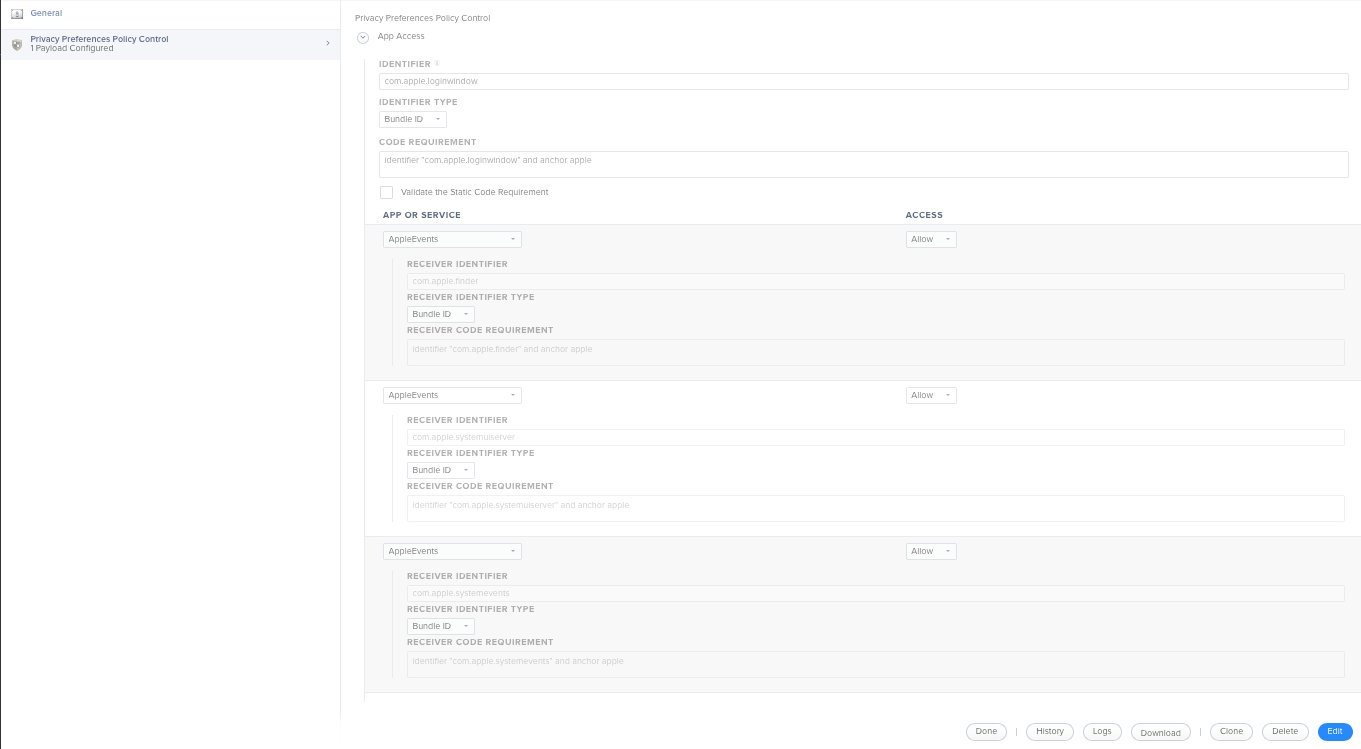
@brunerd Here's a screenshot of the final version of the config profile that did the trick for us.

After initially approving com.apple.loginwindow access to com.apple.systemevents I quickly discovered that additional prompts appeared requesting access to com.apple.finder and com.apple.systemuiserver, hence their addition to the profile.

As @bentoms mentions, I could also consider reworking our scripts to no longer include "tell application System Events". That'll be a project for another day