Question

Mac Apps auto install

  • February 4, 2026
  • 5 replies
  • 23 views

Forum|alt.badge.img+2

I’m fairly new to Jamf and inherited a Jamf Pro instance that I’m having to update/change as we get new devices and new software.  We have Adobe Creative Cloud pushed to all computers using Mac Apps, but need the Shared License pushed to just our public computers. Right now we have a policy to install the Shared License, but it fails each time it runs. I’m assuming this is because it’s already installing the regular license through Mac Apps. 

My question is, can I change the target on Mac Apps to be only computers that aren’t public (using a smart group) and it not affect computers that already have the app installed? I don’t want to mess with our staff’s computers by pushing out any updates or reinstalls that they aren’t expecting.

Thanks in advance for any help!

Kayla

5 replies

Chubs
Forum|alt.badge.img+23
  • Jamf Heroes
  • February 4, 2026

Nah.  Go into the CC web downloader and select the license only.  Create just the pkg and deploy it.

Do you have the logs for the installation failure?


Forum|alt.badge.img+2
  • Author
  • New Contributor
  • February 4, 2026

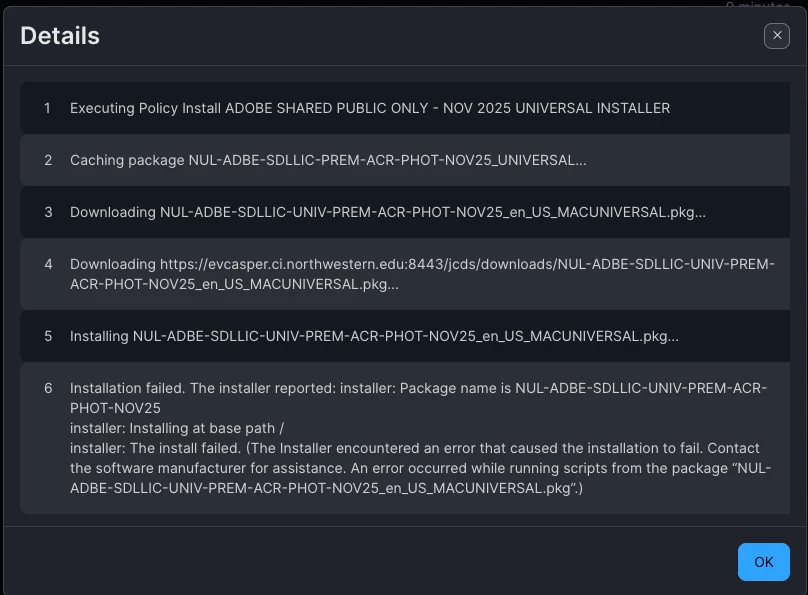
It’s installed Creative Cloud, but the shared license policy failed. Here’s a photo of the log.


Chubs
Forum|alt.badge.img+23
  • Jamf Heroes
  • February 4, 2026

Sooooo is this a license installer or an installer for Adobe Premier, Acrobat, and Photoshop?  It’s showing NUL which is named user license.  Technically if the users have a login, they can log into the app installers without a “license installer” and it’ll license it.


Forum|alt.badge.img+2
  • Author
  • New Contributor
  • February 4, 2026

NUL is our institution, northwestern university library. We’re installing creative cloud, adobe premier, acrobat and photoshop, then letting users install other apps as they need. 


Chubs
Forum|alt.badge.img+23
  • Jamf Heroes
  • February 4, 2026

NUL is our institution, northwestern university library. We’re installing creative cloud, adobe premier, acrobat and photoshop, then letting users install other apps as they need. 

What I’d do is just push the license file/pkg only - if you’re using DBL (device based license) and do the app installs via the app installers.  Just straight up ignore using a PKG file for application deployment.

If your users are named user licenses, then just push the app installers and don’t worry about a PKG at all.  Their university login will work to activate them.  

Assuming these are lab computers,  you’re likely wanting to do the former.