Solved

Mac Office 2016 Outlook 15.23 can't connect to exchange server. Anyone else got this issue?

  • June 23, 2016
  • 7 replies
  • 32 views

Forum|alt.badge.img+10

Hi all,

Mac office 2016 update 15.23 just came out a week or two ago. Eagerly I downloaded this and uploaded to Casper and distribute it out. I did this before noticing the bottom right corner of Outlook was showing "Not connected to: <our email server>"

From our Casper logs, around 80 people have taken this update.

A) Is there anyway to fix the connection?
B) If there's no way to fix the connection, I have to roll everyone back to 15.21 version. How do I do this via Casper?

Best answer by rqomsiya

Try this uninstall script (courtesy of BP) to fully uninstall Office 2016, then push out the 15.21 package.

#!/bin/bash
​
#Get Currently Loggedin User
declare -x loggedinuser=`python -c 'from SystemConfiguration import SCDynamicStoreCopyConsoleUser; import sys; username = (SCDynamicStoreCopyConsoleUser(None, None, None) or [None])[0]; username = [username,""][username in [u"loginwindow", None, u""]]; sys.stdout.write(username + "
");'`
echo "Current user is " $loggedinuser
​
declare -x current_date=$(date +'%Y%m%d_%H%M%S')
​
#Kill Office processes
killall "Microsoft Excel"
killall "Microsoft Word"
killall "Microsoft OneNote"
killall "Microsoft Powerpoint"
killall "Microsoft Outlook"
killall "Microsoft Database Daemon"
killall "Microsoft AU Daemon"
​
​
#Function to remove directory only if found
removeDirectory () {
for i in "${@}"; do
    if [[ -d "$1" ]]; then
        /bin/rm -rf "$1"
        /bin/echo "Removed directory ""$i"
    fi
done
}
​
#Function to remove file only if found
removeFile () {
for i in "${@}"; do
    if [[ -e $1 ]]; then
        /bin/rm -f "$1"
        /bin/echo "Removed file ""$i"
    fi
done
}
​
#Function to backup Office/Outlook preferences/profiles only if found
backup () {
for i in "${@}"; do
    if [[ -d $1 ]]; then
        sudo -u "$loggedinuser" /bin/mv "$1" /Users/$loggedinuser/Documents/Office_2016_Backup_"$current_date"/Office/
        /bin/echo "Backed up ""$i"" to /Users/$loggedinuser/Documents/Office_2016_Backup_$current_date/Office/"
    fi
done
}
​
#Removing Office 2016 apps
removeDirectory "/Applications/Microsoft Excel.app"
removeDirectory "/Applications/Microsoft OneNote.app"
removeDirectory "/Applications/Microsoft Outlook.app"
removeDirectory "/Applications/Microsoft PowerPoint.app"
removeDirectory "/Applications/Microsoft Word.app"
​
#Remove Offie 2016 volume licensing
removeFile "/Library/LaunchDaemons/com.microsoft.office.licensingV2.helper.plist"
removeFile "/Library/PrivilegedHelperTools/com.microsoft.office.licensingV2.helper"
removeFile "/Library/Preferences/com.microsoft.office.licensingV2.plist"
​
#Remove Office 2016 user preferences
removeDirectory "/User/$loggedinuser/Library/Containers/com.microsoft.errorreporting"
removeDirectory "/User/$loggedinuser/Library/Containers/com.microsoft.netlib.shipassertprocess"
removeDirectory "/User/$loggedinuser/Library/Containers/com.microsoft.Office365ServiceV2"
removeDirectory "/User/$loggedinuser/Library/Containers/com.microsoft.Outlook"
removeDirectory "/User/$loggedinuser/Library/Containers/com.microsoft.Powerpoint"
removeDirectory "/User/$loggedinuser/Library/Containers/com.microsoft.RMS-XPCService"
removeDirectory "/User/$loggedinuser/Library/Containers/com.microsoft.Word"
removeDirectory "/User/$loggedinuser/Library/Containers/com.microsoft.onenote.mac"
​
#Backup Outlook for Mac 2016
if [ ! -d /Users/$loggedinuser/Documents/Office_2016_Backup_"$current_date"/Office ]; then
    sudo -u "$loggedinuser" /bin/mkdir -p /Users/$loggedinuser/Documents/Office_2016_Backup_"$current_date"/Office/
    echo Creating /Users/$loggedinuser/Documents/Office_2016_Backup_"$current_date"/Office/
fi
​
backup "/Users/$loggedinuser/Library/Group Containers/UBF8T346G9.Office/"
backup "/Users/$loggedinuser/Library/Group Containers/UBF8T346G9.MS"
backup "/Users/$loggedinuser/Library/Group Containers/UBF8T346G9.OfficeOsfWebHost"
​
​
OFFICERECEIPTS=$(pkgutil --pkgs=com.microsoft.office.*)
​
for ARECEIPT in $OFFICERECEIPTS
do
    pkgutil --forget $ARECEIPT
done
​
exit 0

Let me know if you have any issues....

7 replies

rqomsiya
Forum|alt.badge.img+12
  • Honored Contributor
  • June 23, 2016

Same issue. If your exchange server excepts Kerberos, that may work. Otherwise roll back.


Forum|alt.badge.img+10
  • Author
  • Valued Contributor
  • June 23, 2016

Found this forum. Microsoft is acknowledging the issue

http://answers.microsoft.com/en-us/mac/forum/macoffice2016-macoutlook/outlook-for-mac-ver-15230-unable-to-access/4dff92f8-44e7-4aa9-a09b-c70c65009e0b?page=1

The work around is to go to another folder, then go back to Inbox will refresh incoming mails.

Otherwise, how do we roll back this update systematically?

If I just install the older version (15.21), then 15.23 stays because it knows 15.23 is later.
If I uninstall (uncleanly) Outlook, then install 15.21, Outlook will failed to start, saying it's not the latest.
The only way I can get it working is to delete everything (via something like App Cleaner), then install the whole thing again - But this process is very hard to push it out to everyone.


rqomsiya
Forum|alt.badge.img+12
  • Honored Contributor
  • Answer
  • June 23, 2016

Try this uninstall script (courtesy of BP) to fully uninstall Office 2016, then push out the 15.21 package.

#!/bin/bash
​
#Get Currently Loggedin User
declare -x loggedinuser=`python -c 'from SystemConfiguration import SCDynamicStoreCopyConsoleUser; import sys; username = (SCDynamicStoreCopyConsoleUser(None, None, None) or [None])[0]; username = [username,""][username in [u"loginwindow", None, u""]]; sys.stdout.write(username + "
");'`
echo "Current user is " $loggedinuser
​
declare -x current_date=$(date +'%Y%m%d_%H%M%S')
​
#Kill Office processes
killall "Microsoft Excel"
killall "Microsoft Word"
killall "Microsoft OneNote"
killall "Microsoft Powerpoint"
killall "Microsoft Outlook"
killall "Microsoft Database Daemon"
killall "Microsoft AU Daemon"
​
​
#Function to remove directory only if found
removeDirectory () {
for i in "${@}"; do
    if [[ -d "$1" ]]; then
        /bin/rm -rf "$1"
        /bin/echo "Removed directory ""$i"
    fi
done
}
​
#Function to remove file only if found
removeFile () {
for i in "${@}"; do
    if [[ -e $1 ]]; then
        /bin/rm -f "$1"
        /bin/echo "Removed file ""$i"
    fi
done
}
​
#Function to backup Office/Outlook preferences/profiles only if found
backup () {
for i in "${@}"; do
    if [[ -d $1 ]]; then
        sudo -u "$loggedinuser" /bin/mv "$1" /Users/$loggedinuser/Documents/Office_2016_Backup_"$current_date"/Office/
        /bin/echo "Backed up ""$i"" to /Users/$loggedinuser/Documents/Office_2016_Backup_$current_date/Office/"
    fi
done
}
​
#Removing Office 2016 apps
removeDirectory "/Applications/Microsoft Excel.app"
removeDirectory "/Applications/Microsoft OneNote.app"
removeDirectory "/Applications/Microsoft Outlook.app"
removeDirectory "/Applications/Microsoft PowerPoint.app"
removeDirectory "/Applications/Microsoft Word.app"
​
#Remove Offie 2016 volume licensing
removeFile "/Library/LaunchDaemons/com.microsoft.office.licensingV2.helper.plist"
removeFile "/Library/PrivilegedHelperTools/com.microsoft.office.licensingV2.helper"
removeFile "/Library/Preferences/com.microsoft.office.licensingV2.plist"
​
#Remove Office 2016 user preferences
removeDirectory "/User/$loggedinuser/Library/Containers/com.microsoft.errorreporting"
removeDirectory "/User/$loggedinuser/Library/Containers/com.microsoft.netlib.shipassertprocess"
removeDirectory "/User/$loggedinuser/Library/Containers/com.microsoft.Office365ServiceV2"
removeDirectory "/User/$loggedinuser/Library/Containers/com.microsoft.Outlook"
removeDirectory "/User/$loggedinuser/Library/Containers/com.microsoft.Powerpoint"
removeDirectory "/User/$loggedinuser/Library/Containers/com.microsoft.RMS-XPCService"
removeDirectory "/User/$loggedinuser/Library/Containers/com.microsoft.Word"
removeDirectory "/User/$loggedinuser/Library/Containers/com.microsoft.onenote.mac"
​
#Backup Outlook for Mac 2016
if [ ! -d /Users/$loggedinuser/Documents/Office_2016_Backup_"$current_date"/Office ]; then
    sudo -u "$loggedinuser" /bin/mkdir -p /Users/$loggedinuser/Documents/Office_2016_Backup_"$current_date"/Office/
    echo Creating /Users/$loggedinuser/Documents/Office_2016_Backup_"$current_date"/Office/
fi
​
backup "/Users/$loggedinuser/Library/Group Containers/UBF8T346G9.Office/"
backup "/Users/$loggedinuser/Library/Group Containers/UBF8T346G9.MS"
backup "/Users/$loggedinuser/Library/Group Containers/UBF8T346G9.OfficeOsfWebHost"
​
​
OFFICERECEIPTS=$(pkgutil --pkgs=com.microsoft.office.*)
​
for ARECEIPT in $OFFICERECEIPTS
do
    pkgutil --forget $ARECEIPT
done
​
exit 0

Let me know if you have any issues....


Forum|alt.badge.img+16
  • Honored Contributor
  • June 23, 2016

Same issue here. We opened a ticket with Microsoft, but no result so far. Kerberos and username/password are both not working.


Forum|alt.badge.img+10
  • Author
  • Valued Contributor
  • June 24, 2016

Hi all,

The script provided by rqomsiya works. Thank you very much :)

I will need to run it through a few more scenerio, but definitely cleaned up Office 2016, and allowed me to downgrade. (And yes, I've learned my lesson of running a lot more test before pushing it out to the masses)

Thanks again!


Forum|alt.badge.img
  • New Contributor
  • August 2, 2016


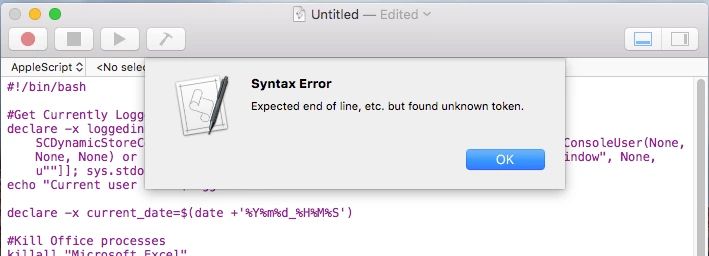
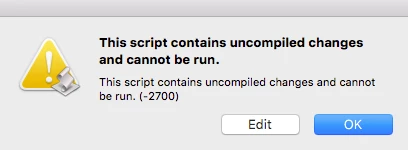
This is what I get when I try to run this script. Any thoughts?


Forum|alt.badge.img+15
  • Contributor
  • August 2, 2016

@jappleseed79 The script is BASH and you are trying to run an AppleScript. They are different languages. Script Editor only speaks AppleScript.

It might be best to create a new script in your JSS, then run it via Policy on one computer and make sure it does what you expected.

You can also do a google search for introduction to BASH scripting. TextWrangler is a free decent editor and has a run command built in.