Many of the MacBooks we purchased are showing as enrolled in Apple Business Manager and assigned to Jamf Pro but not showing up in Jamf unless we manually enroll or wipe them. Curious if there is something that we can do to ensure that we do not have to spot check these before sending them out to the user or if this is just a temporary situation as the inventory is relatively new.

Solved
MacBooks not Auto-Enrolling - Require being wiped
 +5
+5Best answer by snowfox
Apple Business Manager is sending the devices to the Jamf Server and are auto assigned but do not seem to show up in Jamf until the process kicks off. If the device is wiped it begins the process of going to our pre-stage enrollment and that is assigned to all devices and seems to work no matter how many times you wipe it further. I am trying to find this serial number assignment check box but do not see it in the Automated Device Enrollment or the Pre-Stage Enrollment. Curious if we need to do an Inventory Preload to get around this unless anyone can point me in the right direction.
Apple Business Manager is sending the devices to the Jamf Server and are auto assigned but do not seem to show up in Jamf until the process kicks off.
That is correct, they wont. This behavior is by design. The enrolment process installs a certificate and MDM.config file on the machine so they can be managed, until that happens no machine account will appear on Jamf Pro. Every device must go through either the setup assistant process (ADE) or be manually enrolled via the web URL (UIE). The whole point of the certificate is to create a trust relationship between the workstation and the server. Never let the ADE certificate expire on the server otherwise the trust relationship will be lost on ALL of your workstations and every device will have to be manually re-enrolled back into Jamf Pro again, either via a wipe and rebuild or via the web URL. Either way it will be a painful lesson to learn. You could do the inventory preload but none of the machines will have an established trust relationship with the server if they haven't been through the enrolment process and don't have a certificate & MDM.config file installed.
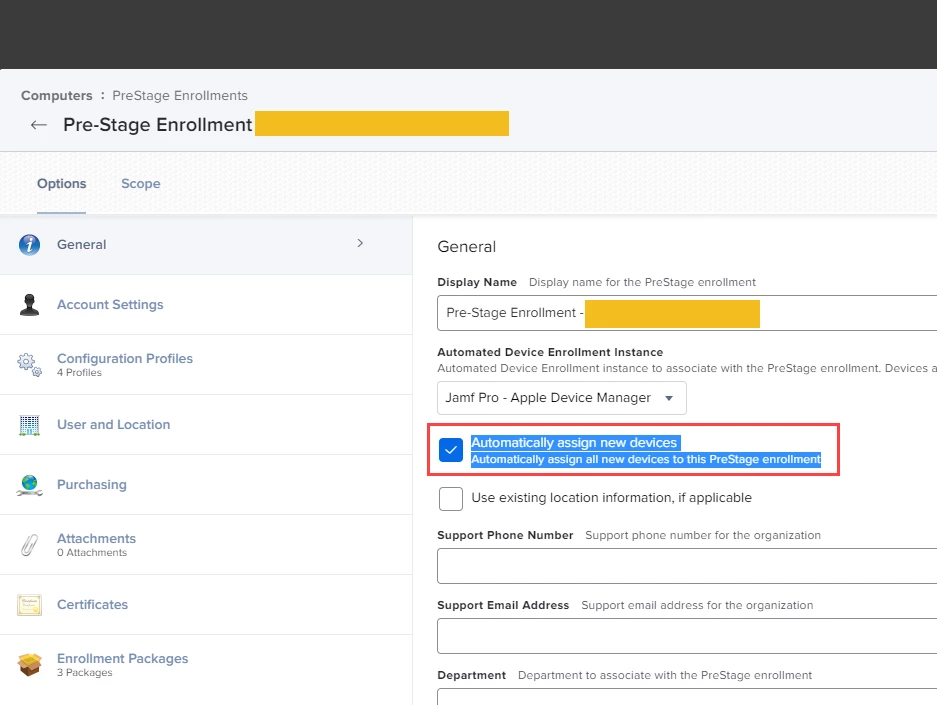
Sorry I maybe didn't word my reply previously correctly. I was talking about Auto Device Assignment on ABM. You can go into settings and configure device assignment by model type, if you have more than one MDM server i.e. we have Jamf and Intune. Jamf is assigned for Mac Desktop devices and Intune is assigned for iPad devices. You can also go through your ABM device/serial list and assign device serials to an MDM server if required. In a prestage enrolment there is a tick button (under general) to assign new devices to this prestage enrolment. Any existing serials that were not assigned to a prestage enrolment will have to manually assigned one by one. That can be a pain if you have a lot of them to do.
No machine record will appear in Jamf until the device goes through the prestage enrolment which wont happen until it goes through the setup assistant process or web URL enrolment process.
I hope this is making more sense this time.


Enter your E-mail address. We'll send you an e-mail with instructions to reset your password.