Question

macOS Catalina install error

  • October 8, 2019
  • 20 replies
  • 43 views

Forum|alt.badge.img+11
  • Valued Contributor

Just running upgrades on test computers for macOS Catalina and have had multiple errors as in the Screenshot.
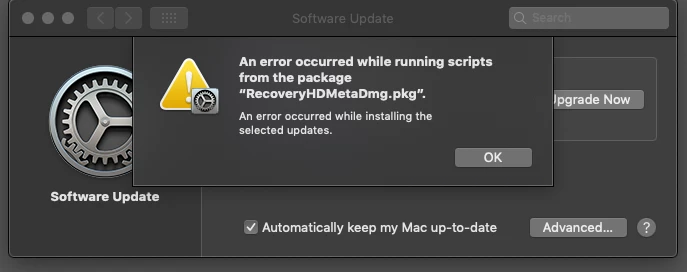
Click "OK" the install fails and goes away, resulting in the installer needs downloading again.

20 replies

Forum|alt.badge.img+7

Yup, same here on 2 machines. Tried 3 times now.


whitebeer
Forum|alt.badge.img+7
  • Contributor
  • October 8, 2019

Confirmed, same problem for me - tried it 3 times now.
Do you have any restriction concerning software update deferral in place?


whitebeer
Forum|alt.badge.img+7
  • Contributor
  • October 8, 2019

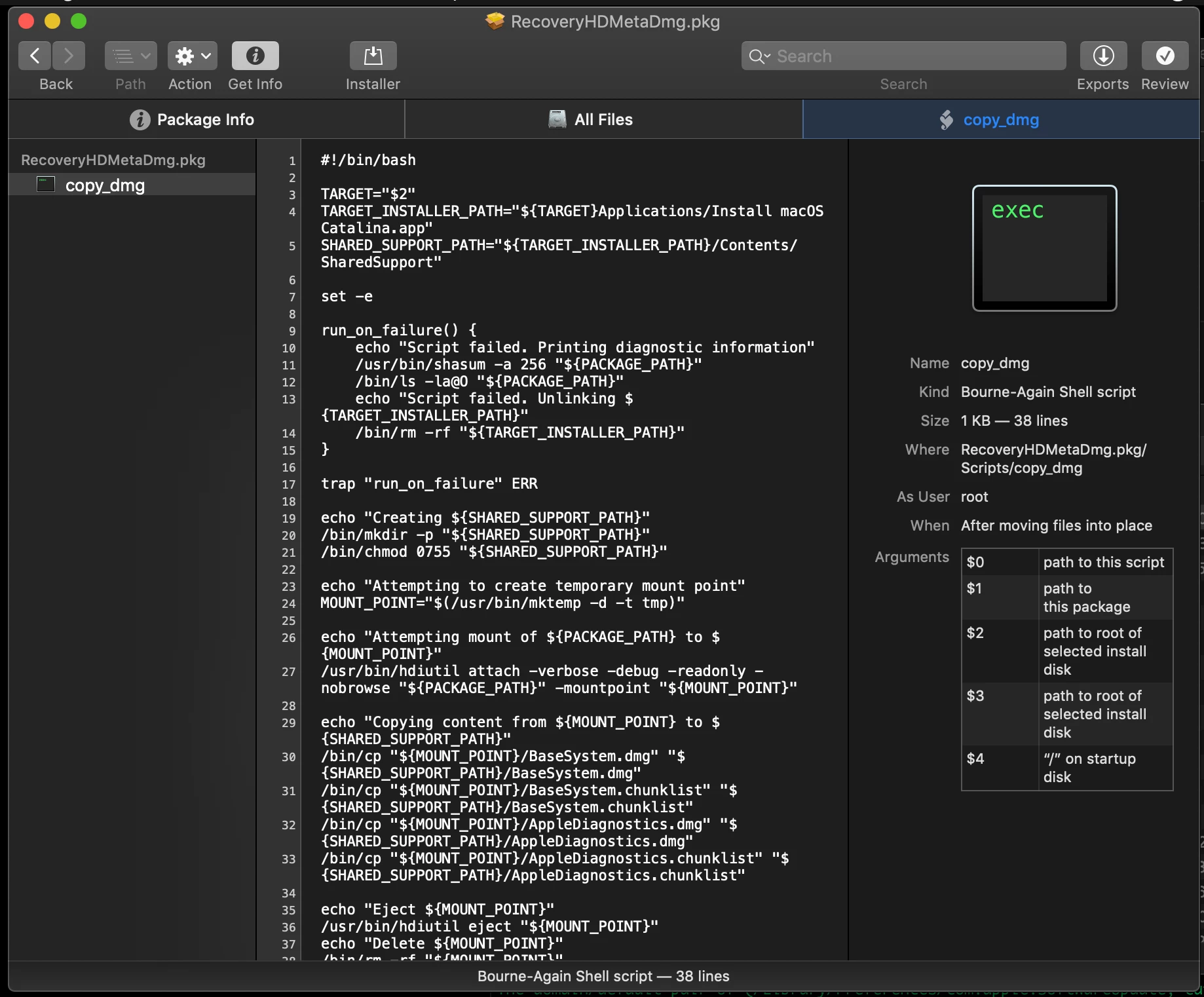
Downloaded the RecoveryHDMetaDMG.pkg manually from the SUC, opened that with Suspicious Package and it seems that the following script fails for some reason:

And least now I know why the Installer is always missing after the Install fails 🤨

run_on_failure() {
    echo "Script failed. Printing diagnostic information"
    /usr/bin/shasum -a 256 "${PACKAGE_PATH}"
    /bin/ls -la@O "${PACKAGE_PATH}"
    echo "Script failed. Unlinking ${TARGET_INSTALLER_PATH}"
    /bin/rm -rf "${TARGET_INSTALLER_PATH}"
}

Forum|alt.badge.img+12
  • Valued Contributor
  • October 8, 2019

How I love the installers that in case of a failure remove all traces, so that you have no chance to find out what might have gone wrong :(


Forum|alt.badge.img+3
  • New Contributor
  • October 8, 2019

We have noticed that bash-scripts seem to fail after the update to catalina. Could the reason be that zsh is now the default/standard interactive shell?


Forum|alt.badge.img+12
  • Valued Contributor
  • October 8, 2019

There should be no reason for bash-scripts to fail if you use a proper '#!/bin/bash'. If on the other hand you simply assume that your script will use bash without using the shebang than your scripts will now run in zsh, and all elements that are bash specific will make the script fail.


Forum|alt.badge.img+10
  • Valued Contributor
  • October 8, 2019

On a related note, short of dissecting Apple's installers ourselves, is there anywhere to go to find exactly what and how an OS install or upgrade should be working? There are so many different packages that need to run and on so many different levels...

Boo indeed on developers who delete their logs and installers after they fail... Borders on malware. :-)


whitebeer
Forum|alt.badge.img+7
  • Contributor
  • October 8, 2019

I got the update working for me - forgot my machine is one of the tests with Microsoft Defender ATP. When I disabled it the update worked fine, so check again with disabled AV ...


Forum|alt.badge.img+11
  • Author
  • Valued Contributor
  • October 8, 2019

We can confirm that disabling Microsoft Defender ATP allows the update to occur. Tested this with a local admin account, now looking for a non-admin user for testing as all our non-admin are AD accounts.

Will report back the results.


Forum|alt.badge.img+5
  • Contributor
  • October 9, 2019

Does /var/log/install.log reveal anything?


whitebeer
Forum|alt.badge.img+7
  • Contributor
  • October 9, 2019

good to hear, @dmw3 !
But I can't understand why - Defender doesn't seem to block anything, nor alerted.
Seems like we have to bring some exclusions in place for future updates 🙈
MAU just came up with an application update for Defender ATP, maybe that could help.


Forum|alt.badge.img
  • New Contributor
  • November 12, 2019

Anyone else having this problem without Microsoft Defender ATP installed? I am seeing this same error but am not running the mentioned apps.


Forum|alt.badge.img+11
  • Valued Contributor
  • January 7, 2020

Same here as of today trying to upgrade my test machine to Catalina brand new install don't have MSO Defender installed but do have TrendMicro that has never stopped an update in the past and shows 0 blocks in the Console.


Forum|alt.badge.img

I am also having the same problem without Microsoft Defender installed, nor the previously mentioned apps.


Forum|alt.badge.img+6
  • Contributor
  • January 15, 2020

I'm seeing exactly the same thing. We do have TrendMicro running ... I got an unistaller pkg from Trend and ran that ... was finally able to complete the upgrade to Catalina without the script error.


Forum|alt.badge.img+11
  • Valued Contributor
  • March 10, 2020

@troyewebster We have WFBS TrendMicro and are now exhibiting this error as well even though trend has never stopped an Apple installation ever, have you tried upgrading a different way or was that your solution to turn "OFF" the AV?


Forum|alt.badge.img+1

No fixes for users without AV?


PCDoc
Forum|alt.badge.img+3
  • New Contributor
  • June 2, 2020

Same error message with no AV.


Forum|alt.badge.img+11
  • Valued Contributor
  • June 5, 2020

Anyone ever find a solution to this still having some machines pop up with this random error now from Mojave to Catalina.


Forum|alt.badge.img
  • New Contributor
  • October 14, 2020

Hi There, We've encountered the same issue for a while and FINALLY found out what was blocking us.
We had a MacOS device policy that was preventing the opening of DMG files.
Profiles > Restrictions > Media > Disk Images
The checkbox was left unchecked, therefore we could not open (actually) any other DMG file from the user's end.

I hope this will help other users.