Question

macOS High Sierra 10.13 is now live

  • September 25, 2017
  • 30 replies
  • 110 views

nvandam
Forum|alt.badge.img+9

Good luck, everyone.

30 replies

Forum|alt.badge.img+12
  • Valued Contributor
  • September 25, 2017

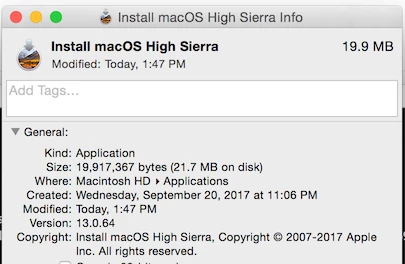
Install macOS High Sierra.app downloaded and is ~19MB on my system. seems to be missing the payload the GM had.


Forum|alt.badge.img+18
  • Contributor
  • September 25, 2017

Downloaded it about 5 minutes ago. 5.18GB.


Forum|alt.badge.img+8
  • Valued Contributor
  • September 25, 2017

Along with iBook Author v2.6


Forum|alt.badge.img+16
  • Employee
  • September 25, 2017

Appears to be handling the payload process differently than the GM candidate did. MAS downloads small installer app and then proceeds to download the entirety of the installer files to a folder at the root of the drive: /macOS Install Data.


Forum|alt.badge.img+8
  • Valued Contributor
  • September 25, 2017

The Server Version 5.4 seems to take a while to be updated alongside with SWIFT PlayGround 2 Version - perhaps they come a bit later this month...?!


mm2270
Forum|alt.badge.img+24
  • Legendary Contributor
  • September 25, 2017

The one I downloaded was also only about 19.9 MB. I'm thinking it downloads the actual content once it's run. I haven't run this dl yet on anything, but maybe it's something new?


Forum|alt.badge.img+16
  • Employee
  • September 25, 2017

@mm2270, it appears, from what I can tell from reading the installer pkg scripts, to cache the installer files at the root of the drive and then (unconfirmed, will know for sure in about 20 minutes) will copy itself into the 'Install macOS High Sierra.app' file after upgrading.


jconte
Forum|alt.badge.img+12
  • Valued Contributor
  • September 25, 2017

Same experience here, 19.9mb on a 2010 MacPro, even after it took 3 tries to update the firmware.
Macbook didn't require the firmware update downloaded the 5.18gb installer. weird.....


nvandam
Forum|alt.badge.img+9
  • Author
  • Valued Contributor
  • September 25, 2017

@Sonic84 Same thing happened to me. The download ended up being about 24MB... I deleted that and redownloaded it. I've now got a 5.1GB installer. :)


Forum|alt.badge.img+16
  • Honored Contributor
  • September 25, 2017

New Argument for startosinstall:

--converttoapfs, specify either YES or NO on if you wish to convert to APFS.


Forum|alt.badge.img+1
  • New Contributor
  • September 25, 2017

Same experience here, downloaded 19.9MB. After I hit install it downloaded the /macOS Install Data to the root of the drive. Going through the install now and will see if it compiles it into the .app afterwards. If not will try and re-download after install is complete.


Forum|alt.badge.img+16
  • Employee
  • September 25, 2017

I attempted to delete and re-download on multiple host OS's 10.9 and 10.12 and downloading from the High Sierra splash page or purchase history continues to pull down the small installer .app. Waiting on OS upgrade to finish to confirm full installer app after upgrade.


Forum|alt.badge.img+16
  • Employee
  • September 25, 2017

Went to a third computer with 10.13 GM Candidate on it, downloaded the small app, deleted it, hit download again, and it pulled down the full installer app.


Forum|alt.badge.img+16
  • Employee
  • September 25, 2017

After installation, all root-level installation files are deleted and so is the small installer app. After upgrading, you can download the full installer from the Mac App Store.


Forum|alt.badge.img+16
  • Honored Contributor
  • September 25, 2017

Does anyone know if there are available space requirements for the APFS migration portion of the installer or is that rolled into the 14.3 GB free space requirement?


Forum|alt.badge.img+1
  • New Contributor
  • September 25, 2017

@cstout Same thing for me, after completing the upgrade it continues to download the 19.9MB file. Anyone else having this issue?


Forum|alt.badge.img+8
  • Valued Contributor
  • September 25, 2017

On my Macbook the download was 19.9MB on my iMac the download was 5G.


Forum|alt.badge.img+7

Tried downloading on MacBook Pro and Mac Pro, both downloaded 19MB installer. Installed on MacBook Pro and tried to download installer again, still getting 19MB app.

I tried mirroring the full installer download but when I ran it I got an error saying components were missing, all somewhat annoying Apple.


Forum|alt.badge.img+11
  • Valued Contributor
  • September 26, 2017

I've seen varying results, it either downloads all ~5Gb of the installer or it downloads about 25Mb. All very odd.


Forum|alt.badge.img+1

Hi everyone, checking if you are experiencing below issue:

When dragging the Install macOS HighSierra into Casper Admin it does not extract the InstallESD.dmg from the installer, but instead creates a .app.TAR file, do you have the same behaviour?

We are on JSS 9.101.0-t1504998263.

Thanks!


Forum|alt.badge.img+7

Was it the full 5GB download or the 25/19mb one? I tried the small one and it spat the dummy.


Forum|alt.badge.img+1

it was the full 5.18 GB download.


Forum|alt.badge.img+7

I think a ticket to JAMF maybe in order.


Forum|alt.badge.img+13
  • Honored Contributor
  • September 26, 2017

bentoms
Forum|alt.badge.img+35
  • Hall of Fame
  • September 26, 2017

Using internal ASUS?

well...

High Sierra app store installer gets its disk images using softwareupdated, i.e. it uses a local Software Update Server if CatalogURL is set in /Library/Preferences/com.apple.SoftwareUpdate.plist

knowledge passed down from a friend..

So might want to remove the URL then try