Question

MacOS Tahoe's Default Desktop Widgets - Removing them?

  • Sep 16, 2025 2:59 PM UTC
  • 10 replies
  • 9189 views

Forum|alt.badge.img+7

Tahoe now wants to put three default widgets on the desktop in the upper left corner (Calendar, Weather, Photos)  I don’t mind the weather and calendar widgets but the Photos widget will confuse people who are using this machine in a Lab setting. 

How can I control, remove or disallow them during or after setup?

I looked through all the Configuration Profile settings but there doesn’t seem to be any way in the Jamf GUI to address this. Will it require a custom Configuration profile?

Thanks!

10 replies

karthikeyan_mac
Forum|alt.badge.img+20

Hi ​@dan_berlyoung , 

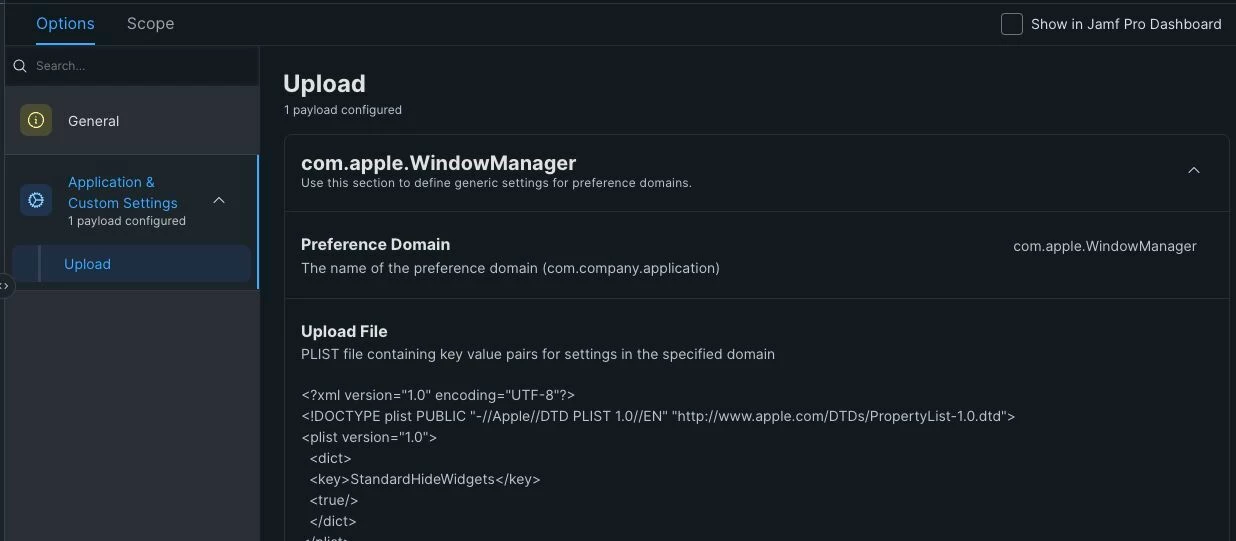
Setting the MDM configuration profile to deploy the key/value:
• Domain: com.apple.WindowManager
• Payload: StandardHideWidgets to true
will disable the new widget from being added automatically after the upgrade.


<?xml version="1.0" encoding="UTF-8"?>
<!DOCTYPE plist PUBLIC "-//Apple//DTD PLIST 1.0//EN" "https://lnkd.in/g9qumfc8">
<plist version="1.0">
<dict>
<key>StandardHideWidgets</key>
<true/>
</dict>
</plist>


Thanks.


dletkeman
Forum|alt.badge.img+19
  • Jamf Heroes
  • Sep 16, 2025 3:44 PM UTC

toastmonster
Forum|alt.badge.img
  • New Contributor
  • Sep 17, 2025 11:08 AM UTC

StandardHideWidgets will remove them from the desktop.

StageManagerHideWidgets will remove them from stage manager.

I haven’t found a way to remove them from the view you get when you click the desktop wallpaper.


JFSanchez
  • New Contributor
  • Sep 22, 2025 2:24 PM UTC

In testing, this seems to hide the widgets but doesn’t actually give you back the real estate to use. Is there a way to actually turn them off? 


KassKat
  • New Contributor
  • Oct 4, 2025 6:35 PM UTC

To get the use of the real estate back, you have to delete all widgets manually (right click, Remove Widget). Once they are all removed, then you get the real estate back. Simply turning them off in Settings doesn’t give the real estate back.

HTH!


Forum|alt.badge.img
  • New Contributor
  • Nov 6, 2025 11:48 PM UTC

I’m seeing an issue where once you remove the configuration profile users are no longer able to go into System Settings - Desktop & Dock - and check Show Widgets On Desktop, it just immediately unchecks the box. Has anyone else run across this?


rheuer22
  • New Contributor
  • Nov 11, 2025 5:44 PM UTC

I have the same issue. This would be nice to be able to customize what widgets to have on the desktop or to remove them during provisioning. The method above just checks/unchecks the hide box in settings.


Forum|alt.badge.img
  • New Contributor
  • Nov 18, 2025 4:02 PM UTC

Our issue ended up being an issue with the profile created within jamf. After deleting and recreating the profile the recommended solution worked properly.


k_akamine
  • New Contributor
  • Jul 23, 2026 11:31 PM UTC

I can’t seem to do this using Jamf School. Has anyone found a way to do this using Jamf School? I’m thinking about using blueprints but other than that, I have no clue. 


Person
Forum|alt.badge.img+12
  • Jamf Heroes
  • Jul 24, 2026 7:59 PM UTC

​@KassKat A little late on this post, but I found that out about the widget issue when we had a user with a very cluttered desktop who had a section on the top left corner that could never have files. 😅 ​