Question

macOS Tour Notifications

  • July 8, 2019
  • 21 replies
  • 108 views

Forum|alt.badge.img+7

Has anyone figured out how to disable "Welcome to macOS Mojave" tour notifications that appear after an upgrade?
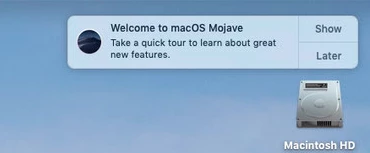
Have tried a couple of approaches but am not having any luck.

21 replies

Forum|alt.badge.img+9
  • New Contributor
  • July 8, 2019

Have you tried disabling the Mojave update messages? The welcome is a part of the same process.

sudo mv /Library/Bundles/OSXNotification.bundle ~/Documents/ && softwareupdate --ignore macOSInstallerNotification_GM

Forum|alt.badge.img+7
  • Author
  • Contributor
  • July 9, 2019

Thank you @cpresnall!

I did not try that, and this approach appears to be working.


Forum|alt.badge.img+7
  • Author
  • Contributor
  • August 5, 2019

As an update, I have found that the above command may only work for a brief period of time or not at all. I have the command set to run every time the Macs restart, but still the tour notification appears after a period of time.

I haven't had a chance to troubleshoot further. Just updating in case someone else attempts to implement this solution and finds it is not working.


Forum|alt.badge.img+7
  • Author
  • Contributor
  • August 19, 2019

Anyone else have a suggestion for disabling macOS Tour Notifications.


Forum|alt.badge.img+8
  • Valued Contributor
  • August 23, 2019

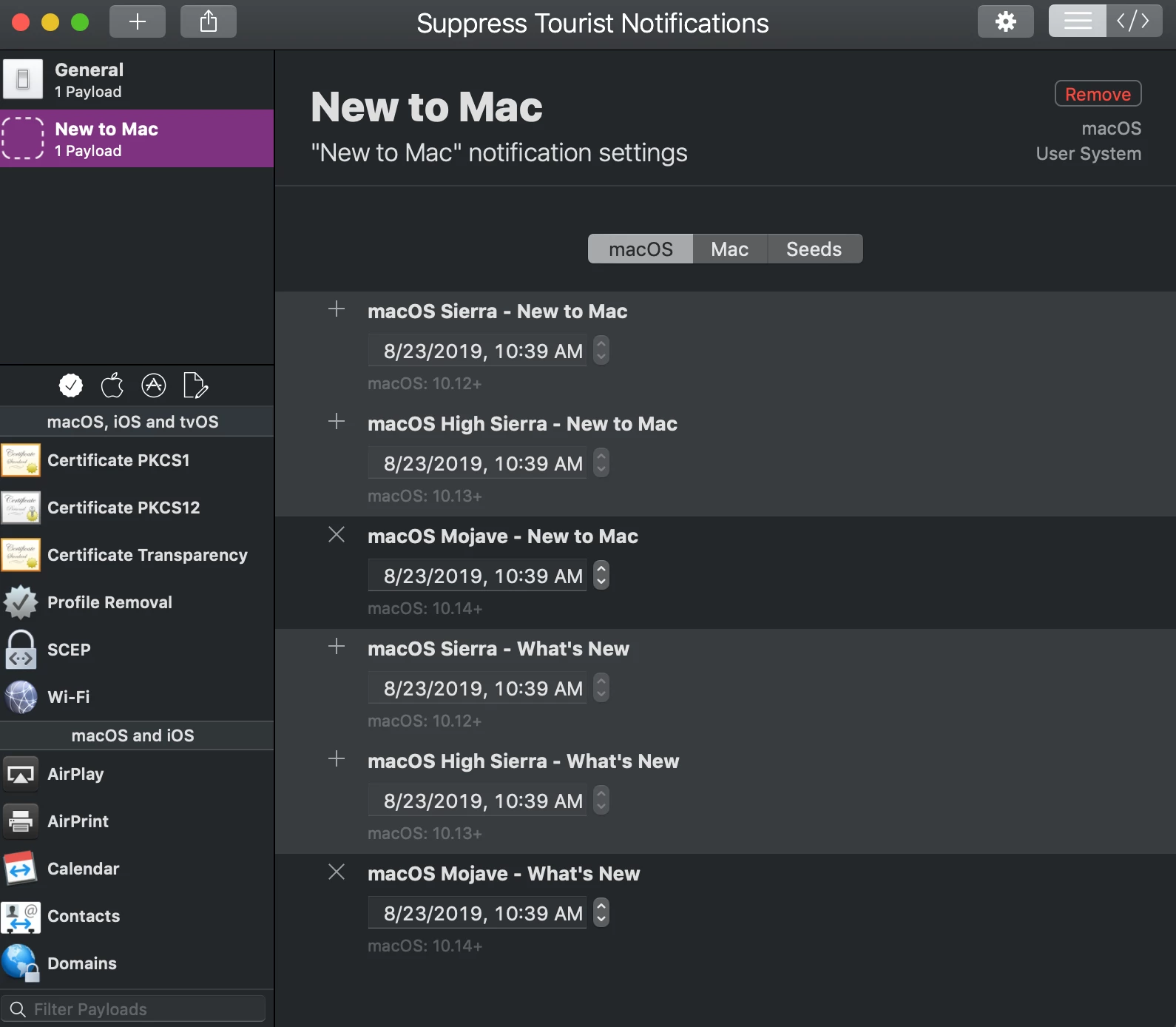
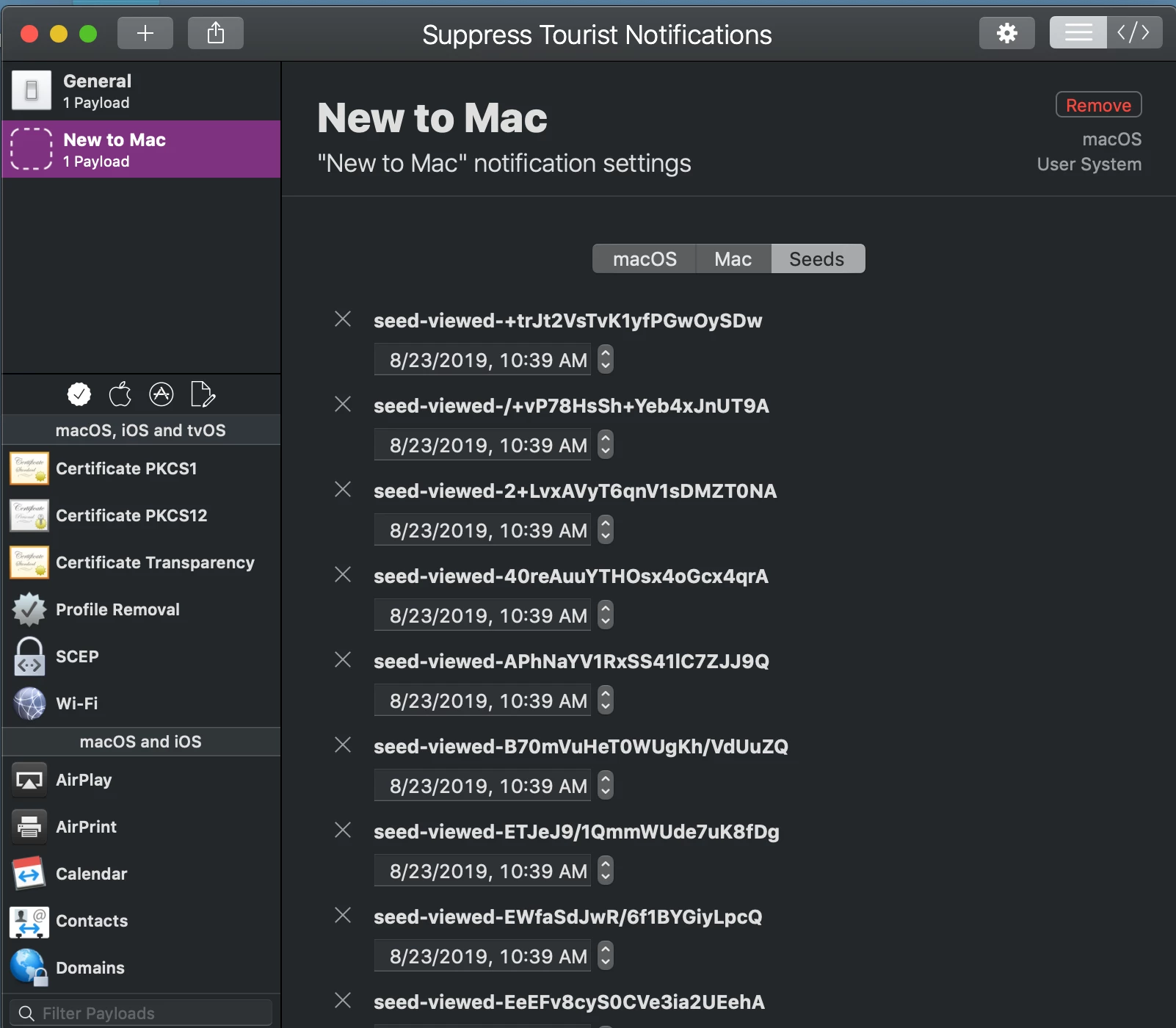
Use Profile Creator

The payload should be something like this

<!DOCTYPE plist PUBLIC "-//Apple//DTD PLIST 1.0//EN" "http://www.apple.com/DTDs/PropertyList-1.0.dtd">
<plist version="1.0">
<dict>
    <key>PayloadContent</key>
    <array>
        <dict>
            <key>PayloadContent</key>
            <dict>
                <key>com.apple.touristd</key>
                <dict>
                    <key>Forced</key>
                    <array>
                        <dict>
                            <key>mcx_preference_settings</key>
                            <dict>
                                <key>seed-https://help.apple.com/macOS/mojave/mac-basics</key>
                                <date>2019-08-23T15:40:08Z</date>
                                <key>seed-https://help.apple.com/macOS/mojave/whats-new</key>
                                <date>2019-08-23T15:40:08Z</date>
                                <key>seed-viewed-+trJt2VsTvK1yfPGwOySDw</key>
                                <date>2019-08-23T15:40:08Z</date>
                                <key>seed-viewed-/+vP78HsSh+Yeb4xJnUT9A</key>
                                <date>2019-08-23T15:40:08Z</date>
                                <key>seed-viewed-2+LvxAVyT6qnV1sDMZT0NA</key>
                                <date>2019-08-23T15:40:08Z</date>
                                <key>seed-viewed-40reAuuYTHOsx4oGcx4qrA</key>
                                <date>2019-08-23T15:40:08Z</date>
                                <key>seed-viewed-APhNaYV1RxSS41lC7ZJJ9Q</key>
                                <date>2019-08-23T15:40:08Z</date>
                                <key>seed-viewed-B70mVuHeT0WUgKh/VdUuZQ</key>
                                <date>2019-08-23T15:40:08Z</date>
                                <key>seed-viewed-ETJeJ9/1QmmWUde7uK8fDg</key>
                                <date>2019-08-23T15:40:08Z</date>
                                <key>seed-viewed-EWfaSdJwR/6f1BYGiyLpcQ</key>
                                <date>2019-08-23T15:40:08Z</date>
                                <key>seed-viewed-EeEFv8cyS0CVe3ia2UEehA</key>
                                <date>2019-08-23T15:40:08Z</date>
                                <key>seed-viewed-FQrkbNP9ThKQQtpqx2saFg</key>
                                <date>2019-08-23T15:40:08Z</date>
                                <key>seed-viewed-GZAJdmpdSqmfH2PkCr8ebw</key>
                                <date>2019-08-23T15:40:08Z</date>
                                <key>seed-viewed-JTecrrXDSVut2tSfltty9Q</key>
                                <date>2019-08-23T15:40:08Z</date>
                                <key>seed-viewed-KwUoo0fRRM2VPmIm0V67xg</key>
                                <date>2019-08-23T15:40:08Z</date>
                                <key>seed-viewed-LR2P9+rnQ2q9xSUy1ZgWOw</key>
                                <date>2019-08-23T15:40:08Z</date>
                                <key>seed-viewed-MM3ne3nTR9eXFyVwZ5gN7Q</key>
                                <date>2019-08-23T15:40:08Z</date>
                                <key>seed-viewed-Pa88nesPSO6POlutVN4/Sg</key>
                                <date>2019-08-23T15:40:08Z</date>
                                <key>seed-viewed-SdV08ZZQRxOCWq6JBEXmfg</key>
                                <date>2019-08-23T15:40:08Z</date>
                                <key>seed-viewed-Tu81gKhDTvmNkjyqcPBfKA</key>
                                <date>2019-08-23T15:40:08Z</date>
                                <key>seed-viewed-UhiR1M79RWmXLIQr4M0AWw</key>
                                <date>2019-08-23T15:40:08Z</date>
                                <key>seed-viewed-WEyaCPMVRB6HbnmRq9EnNQ</key>
                                <date>2019-08-23T15:40:08Z</date>
                                <key>seed-viewed-We59wh+OTa6c1yas/yppwg</key>
                                <date>2019-08-23T15:40:08Z</date>
                                <key>seed-viewed-b/dLke8ZTQaN9KKrxfwDQw</key>
                                <date>2019-08-23T15:40:08Z</date>
                                <key>seed-viewed-baXokbqsQ/2KLkzIZrR6ng</key>
                                <date>2019-08-23T15:40:08Z</date>
                                <key>seed-viewed-bydF6fX5Sp6aBYdEXD0VwQ</key>
                                <date>2019-08-23T15:40:08Z</date>
                                <key>seed-viewed-d+gfl8CNTNeauANKjf9WqA</key>
                                <date>2019-08-23T15:40:08Z</date>
                                <key>seed-viewed-f/Pn3F4RScOh+GUBKO9sRA</key>
                                <date>2019-08-23T15:40:08Z</date>
                                <key>seed-viewed-fWRpNw7IR3S3qxX63nmvMw</key>
                                <date>2019-08-23T15:40:08Z</date>
                                <key>seed-viewed-hP2OZh+MTEKeFcjgec2gZw</key>
                                <date>2019-08-23T15:40:08Z</date>
                                <key>seed-viewed-krdWS8DSQIqJSqQFXW1/pw</key>
                                <date>2019-08-23T15:40:08Z</date>
                                <key>seed-viewed-kti4ZkMKQFyCL2kbgCY23A</key>
                                <date>2019-08-23T15:40:08Z</date>
                                <key>seed-viewed-lEDfW5O+SZe8KTQ93HGOPA</key>
                                <date>2019-08-23T15:40:08Z</date>
                                <key>seed-viewed-lQlm1yrMS0GPVyAL44id+A</key>
                                <date>2019-08-23T15:40:08Z</date>
                                <key>seed-viewed-n87FVu1TSwGzble8vqBvsg</key>
                                <date>2019-08-23T15:40:08Z</date>
                                <key>seed-viewed-pDWyREoARJm5V1mJYr9GKg</key>
                                <date>2019-08-23T15:40:08Z</date>
                                <key>seed-viewed-srluh6uOQiuWCzxguqhDNw</key>
                                <date>2019-08-23T15:40:08Z</date>
                            </dict>
                        </dict>
                    </array>
                </dict>
            </dict>
            <key>PayloadDisplayName</key>
            <string>New to Mac</string>
            <key>PayloadIdentifier</key>
            <string>com.github.erikberglund.ProfileCreator.2E663E41-E83E-4094-BFF9-30D7C0D0E699.com.apple.touristd.713C61A9-2169-4EBC-9704-065A1C2301BC</string>
            <key>PayloadOrganization</key>
            <string></string>
            <key>PayloadType</key>
            <string>com.apple.ManagedClient.preferences</string>
            <key>PayloadUUID</key>
            <string>713C61A9-2169-4EBC-9704-065A1C2301BC</string>
            <key>PayloadVersion</key>
            <integer>1</integer>
        </dict>
    </array>
    <key>PayloadDisplayName</key>
    <string>Suppress Tourist Notifications</string>
    <key>PayloadIdentifier</key>
    <string>com.github.erikberglund.ProfileCreator.2E663E41-E83E-4094-BFF9-30D7C0D0E699</string>
    <key>PayloadOrganization</key>
    <string>Trinity</string>
    <key>PayloadScope</key>
    <string>System</string>
    <key>PayloadType</key>
    <string>Configuration</string>
    <key>PayloadUUID</key>
    <string>2E663E41-E83E-4094-BFF9-30D7C0D0E699</string>
    <key>PayloadVersion</key>
    <integer>1</integer>
</dict>
</plist>


Forum|alt.badge.img+7
  • Author
  • Contributor
  • August 23, 2019

@mlizbeth Thanks for this! I actually stumbled upon the Profile Creator app myself and created a config profile for this purpose, as you have shown above.

However, in my profile I just selected the macOS options, and didn't include the seeds. Are they required? My profile seems to be suppressing notifications with them.


Forum|alt.badge.img+8
  • Valued Contributor
  • August 23, 2019

I included the seeds just in case. Better safe than sorry.


Forum|alt.badge.img+7
  • Author
  • Contributor
  • December 12, 2019

I am now looking for a way to suppress the 10.15 Catalina "what's new"/tour notifications if anyone has a solution. ProfileCreator does not have a "New to Mac" profile for Catalina yet.


Forum|alt.badge.img+1
  • New Contributor
  • January 27, 2020

I am also looking for way to get rid of welcome to Catalina notifications if anyone has found a way


JoshRouthier
Forum|alt.badge.img+8
  • Valued Contributor
  • March 4, 2020

The ProfileCreator app has been updated to support suppressing the Catalina notifications


Forum|alt.badge.img+1
  • New Contributor
  • March 5, 2020

@JoshRouthier Where do I get the latest version? The website is showing 0.3.2 as the latest but that is dated July 2019. If that is the correct version, then how would one make a profile to block Catalina tour notifications? I can't seem to find anything related to this.


afarnsworth
Forum|alt.badge.img+8
  • Contributor
  • March 5, 2020

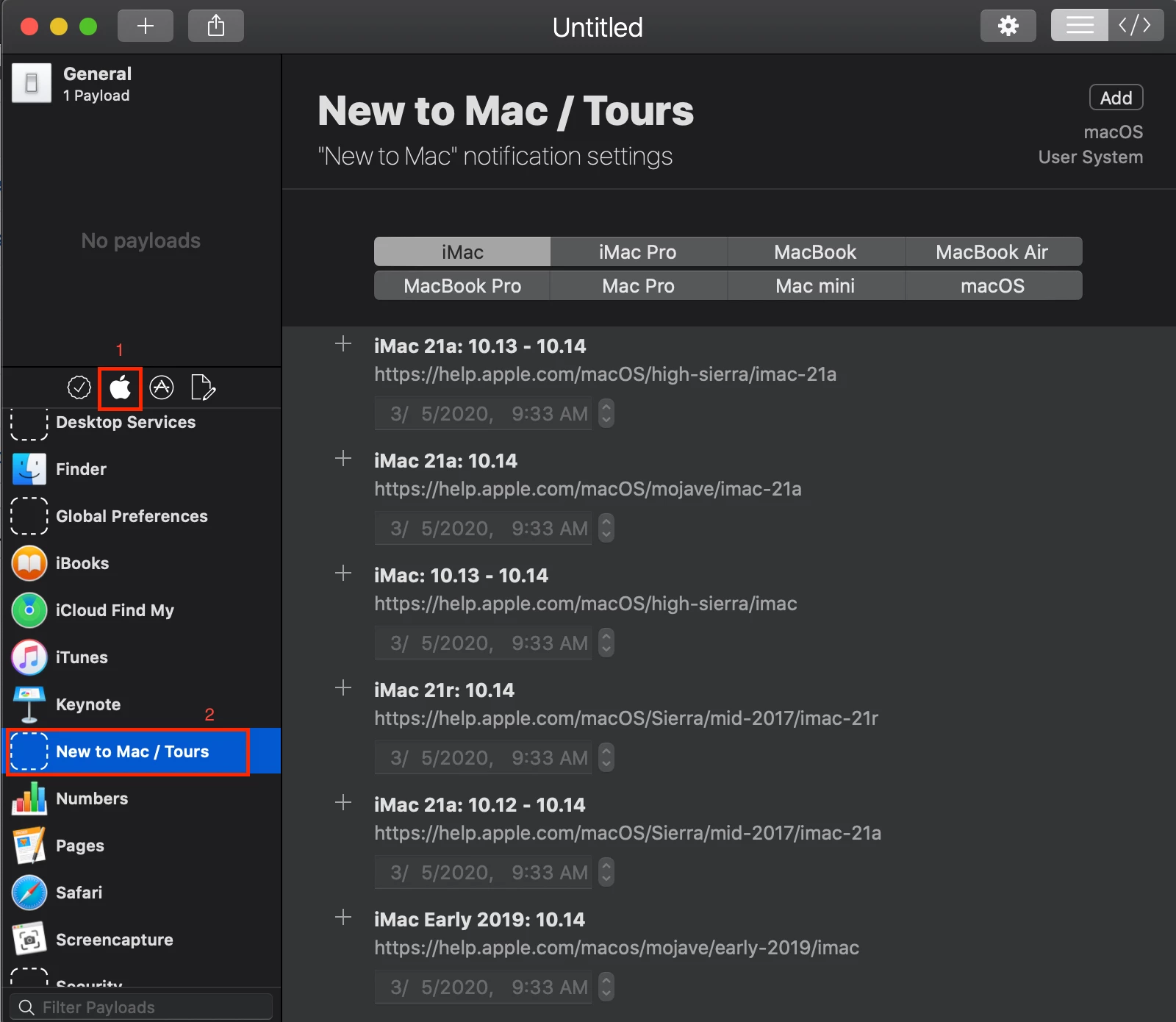
@sschramm Download that version but click the following to find the tour payload.


Forum|alt.badge.img+1
  • New Contributor
  • March 5, 2020

Thanks for the screenshot @afarnsworth, I see it now! I'll give this a shot!


Forum|alt.badge.img+8

I tried to add everything in the "new to mac / tours" config profile, but the "welcome to Catalina" notification still show up ?


Forum|alt.badge.img+3
  • New Contributor
  • March 25, 2020

I created a profile with Profile Creator and uploaded it to my Jamf instance, it fails on any machine I have though.


Forum|alt.badge.img+3
  • New Contributor
  • March 25, 2020

I get the error - "-[__NSCFConstantString objectForKeyedSubscript:]: unrecognized selector sent to instance 0x7fff93351b90"


Forum|alt.badge.img+13
  • Contributor
  • May 18, 2020

@wilko_andy I have this issue too. Did you ever figure it out?

/randy


howie_isaacks
Forum|alt.badge.img+23
  • Esteemed Contributor
  • May 18, 2020

I like to keep these notifications. I want my users to learn a bit about a new OS that has been installed. Too few actually take the time to learn. That said, knowing how to turn off the notifications to stop experienced users from seeing this would be helpful.


Forum|alt.badge.img+12
  • Valued Contributor
  • May 18, 2020

I agree with @howie_isaacks that the tour is useful. If nothing else, as a support provider, it gives you plausible deniability when users complain that they never had the opportunity to learn about new features when their Mac's OS is updated. In response to those complaints, you can ask them if they took the tour, when the OS offered it to them. Tell them it's a form of professional development!


Forum|alt.badge.img+13
  • Contributor
  • May 19, 2020

@jefff @howie_isaacks I manage a lot of computer labs on a University campus. Most of our students want to get on, open things, do work and have a friction free environment that gets out of their way.

BTW, I figured out that the error @wilko_andy and I have at least for me is caused by not having a signing cert. In the General part of ProfileCreator, making the Config non-removable by the end user is necessary.

/randy


Forum|alt.badge.img+7
  • Author
  • Contributor
  • May 26, 2020

Like @Randydid , we don't want this appearing in our Mac labs. It's easy enough to go to each Mac and manually removed the prompt, but a profile would be nice.