Answer

Managed Preference - Desktop Wallpaper - Isn't Changing?

  • December 2, 2015
  • 8 replies
  • 61 views

Forum|alt.badge.img+5

So set the test machine in the scope, we have no other managed preference setting the wallpaper, I selected the Desktop Picture tab and then changed to the following -

Background
Background picture information.
Level
Level at which to apply the preference

Image Pathcom.apple.desktop ImageFilePath
Path of image file. For example , "/Library/Desktop Pictures/Aqua Blue.jpg."

Save and then log into the machine but it doesn't actually change? Tried it on a few machines and nothing?

Any Ideas?

Thanks
Best answer by MattCrawford

We had a similar issue when we wanted to use a custom desktop in the student labs.
In the end the best way I found that worked was to capture the .jpg being copied into a shared folder and create a package of that. This is deployed to the desired machines.

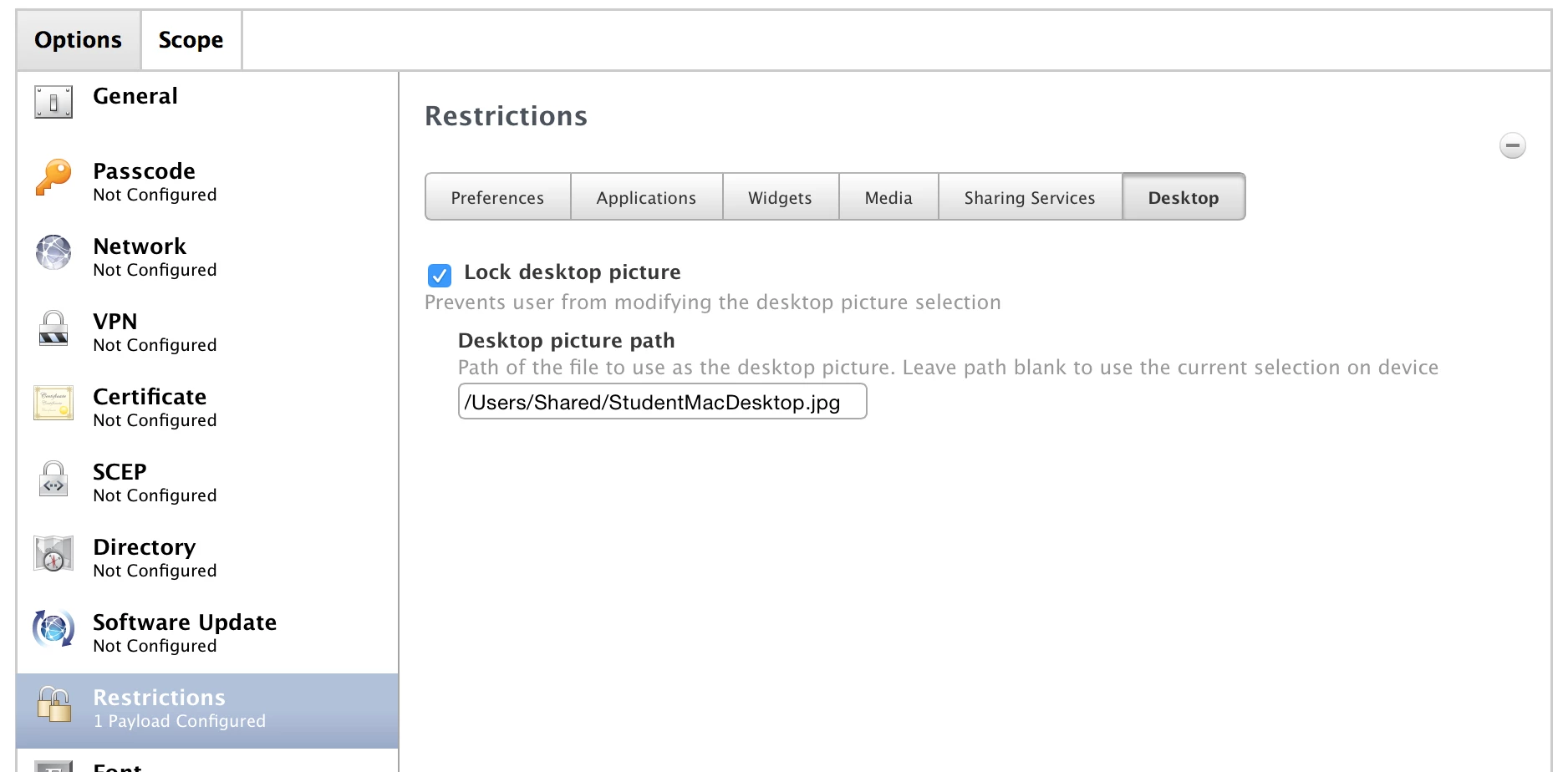
We then use a Configuration Profile to set it. In Restrictions payload the Desktop tab allows the desktop image location to be specified and also locked for changes.

As I said works for our situation.

8 replies

Forum|alt.badge.img+7
  • Contributor
  • December 2, 2015

What client OS are you attempting to enforce this MCX against? Apple has by and large deprecated MCX in favour of Profiles. Have you tried this via a profile?


Forum|alt.badge.img+5
  • Author
  • Contributor
  • December 3, 2015

Yeah tried profile too and that failed, uploaded my own custom profile and it just stayed empty down the side bar and nothing was configured? 10.10 machines mainly!


Forum|alt.badge.img+5
  • Author
  • Contributor
  • December 3, 2015

Strange thing is, if i copy the profile to a USB, then install it, it works?


Forum|alt.badge.img+8
  • Contributor
  • Answer
  • December 3, 2015

We had a similar issue when we wanted to use a custom desktop in the student labs.
In the end the best way I found that worked was to capture the .jpg being copied into a shared folder and create a package of that. This is deployed to the desired machines.

We then use a Configuration Profile to set it. In Restrictions payload the Desktop tab allows the desktop image location to be specified and also locked for changes.

As I said works for our situation.


Forum|alt.badge.img+5
  • Author
  • Contributor
  • December 3, 2015

@Crawford

Did it through a restriction and it worked perfectly!! Thanks!


Forum|alt.badge.img+8
  • Contributor
  • December 3, 2015

@betty02 My pleasure - gotten so many useful things from here it's nice to be able to contribute back


dstranathan
Forum|alt.badge.img+19
  • Valued Contributor
  • December 3, 2015

@Crawford

Related question:

Can I set the wallpaper once (corporate image etc) and still let the user change it later if they want to? Or is the Restriction profile payload designed to LOCK the wallpaper forever?

The wording of the profile is weird. Can I set the path and NOT check the "Lock desktop picture" box, and have the wallpaper still be displayed?


Forum|alt.badge.img+8
  • Contributor
  • December 3, 2015

Yep, we had a play with that. If you don't check the box and the user has the correct admin rights they can change it.

Matt :)