Solved

Mass login in OS X

  • July 3, 2015
  • 22 replies
  • 35 views

Forum|alt.badge.img+7

Hey everyone,

I'm trying to mass login into 30 machines via Casper or ARD. The machines are sitting at the login window waiting for a username and password.

I'm currently trying this, but it never logs in. Can someone help me with this?

osascript -e 'tell application "System Events" to keystroke "LOGIN_NAME"'; 
osascript -e 'tell application "System Events" to keystroke tab'; 
osascript -e 'tell application "System Events" to delay 0.5'; 
osascript -e 'tell application "System Events" to keystroke "PASSWORDHERE"'; 
osascript -e 'tell application "System Events" to delay 0.5'; 
osascript -e 'tell application "System Events" to keystroke return'

Thank you all very much.

Best answer by MacW0lf

Try the following and run as root:

osascript -e "tell application "System Events" to keystroke "USERNAME""
osascript -e 'tell application "System Events" to delay 0.5';
osascript -e "tell application "System Events" to keystroke tab"
osascript -e "tell application "System Events" to keystroke "PASSWORD""
osascript -e 'tell application "System Events" to delay 0.5';
osascript -e "tell application "System Events" to keystroke return"

22 replies

davidacland
Forum|alt.badge.img+18
  • Valued Contributor
  • July 3, 2015

I use exactly the same code. Should be ok, just need to make sure you send it as root and the macs are tabbed into the first text field (username). Give them a restart if they're not there.


Forum|alt.badge.img+7
  • Author
  • Contributor
  • July 3, 2015

@davidacland

I didn't think of that tabbed part. I'll them all a restart and try again on Monday! I'll report back, thanks!


Forum|alt.badge.img+3
  • New Contributor
  • July 5, 2015

How about trying following? remove "" from the script.

osascript -e 'tell application "System Events" to keystroke "LOGIN_NAME"';
osascript -e 'tell application "System Events" to keystroke tab';
osascript -e 'tell application "System Events" to delay 0.5';
osascript -e 'tell application "System Events" to keystroke "PASSWORDHERE"';
osascript -e 'tell application "System Events" to delay 0.5';
osascript -e 'tell application "System Events" to keystroke return'

Forum|alt.badge.img+7
  • Author
  • Contributor
  • July 6, 2015

@davidacland @bhoumikb

Thanks guys.

Right now it fails at hitting return at the end. It fills in the username/password but doesn't continue. I've tried "return" and sleep 2 with no results.

The error:

Script result: 36:56: execution error: An error of type -10810 has occurred. (-10810)
_RegisterApplication(), FAILED TO establish the default connection to the WindowServer, _CGSDefaultConnection() is NULL.
36:49: execution error: System Events got an error: Application isn’t running. (-600)
_RegisterApplication(), FAILED TO establish the default connection to the WindowServer, _CGSDefaultConnection() is NULL.
/Library/Application Support/JAMF/tmp/Mass Login 2: line 6: unexpected EOF while looking for matching `''
/Library/Application Support/JAMF/tmp/Mass Login 2: line 7: syntax error: unexpected end of file

tcam
Forum|alt.badge.img+7
  • Contributor
  • July 6, 2015

are the client computers running 10.10?


Forum|alt.badge.img+4
  • New Contributor
  • Answer
  • July 6, 2015

Try the following and run as root:

osascript -e "tell application "System Events" to keystroke "USERNAME""
osascript -e 'tell application "System Events" to delay 0.5';
osascript -e "tell application "System Events" to keystroke tab"
osascript -e "tell application "System Events" to keystroke "PASSWORD""
osascript -e 'tell application "System Events" to delay 0.5';
osascript -e "tell application "System Events" to keystroke return"


Forum|alt.badge.img+7
  • Author
  • Contributor
  • July 6, 2015

@tcam Yup, OS X 10.10.4

@rklassen

Thank you very much, worked like a charm!


Forum|alt.badge.img+12
  • Valued Contributor
  • July 7, 2015

Awesomely useful…thanks you guys as always!


Forum|alt.badge.img+2
  • New Contributor
  • August 10, 2015

Not working for me on 10.10.4. Does not input the user name

46:47: syntax error: Expected “given”, “in”, “of”, expression, “with”, “without”, other parameter name, etc. but found unknown token. (-2741)


stephaniemm77
Forum|alt.badge.img+5
  • Contributor
  • September 14, 2016

anyone have an update for this, it no longer seems to work with newest version of OSX El Capitan.


stephaniemm77
Forum|alt.badge.img+5
  • Contributor
  • September 14, 2016


This is the error I am getting.


Forum|alt.badge.img+12
  • Valued Contributor
  • September 14, 2016

It errored out for me too in El Cap, but then works anyways...

The trick (for my environment anyways) is that you have to send it right after the computer has been restarted else the cursor isn't in the right location for the script to work...


Forum|alt.badge.img+17
  • Valued Contributor
  • September 14, 2016

Adding these before the rest of the script should help avoid the "cursor isn't in the right location" problem:

osascript -e 'tell app "SecurityAgent" to activate'
sleep 1;

I also add these lines after, so if the cursor is in the wrong field the password isn't left visible to all and sundry. If login is successful, they have no effect.

osascript -e 'tell app "System Events" to keystroke tab'
osascript -e 'tell app "System Events" to keystroke (ASCII character 8) using {option down}'


Forum|alt.badge.img+14
  • Valued Contributor
  • September 14, 2016

Interesting...I never would have thought that this could be done. It sounds like a security issue waiting to happen.


Forum|alt.badge.img+12
  • Valued Contributor
  • September 14, 2016

Like everything else, you have to careful who you give access to what. Think this one is root-only, but haven't tested that.


stephaniemm77
Forum|alt.badge.img+5

Ive been using this command for some time, unfortunately its not working in 10.14 anymore....anyone have an update?


Forum|alt.badge.img+13
  • Honored Contributor
  • June 17, 2019

I just used this the other day. The tech I was working with was amazed.

osascript <<EOF tell application "System Events" keystroke "username here" keystroke tab delay 0.5 keystroke "Password here" delay 0.5 keystroke return keystroke return end tell EOF

Forum|alt.badge.img+13
  • Honored Contributor
  • June 17, 2019

stephaniemm77
Forum|alt.badge.img+5

This isnt working for me for some reason...I am getting this error
43:44: syntax error: Expected “given”, “in”, “of”, expression, “with”, “without”, other parameter name, etc. but found unknown token. (-2741)


Forum|alt.badge.img
  • New Contributor
  • August 21, 2019

Has anyone managed to find a solution? It used to work just fine for me but after a Mojave update it just hangs and eventually times out in ARD. Anyone?


stephaniemm77
Forum|alt.badge.img+5

@annabarsu same! I love this command so sad it doesn't work anymore


Forum|alt.badge.img+8
  • New Contributor
  • August 21, 2019

@annabarsu @stephaniemm77

I'm still using this with Mojave.

osascript -e 'tell application "System Events"' -e 'keystroke "username"' -e 'keystroke return'  -e 'delay 0.5' -e 'keystroke "password"' -e 'delay 0.5' -e 'keystroke return' -e 'end tell'

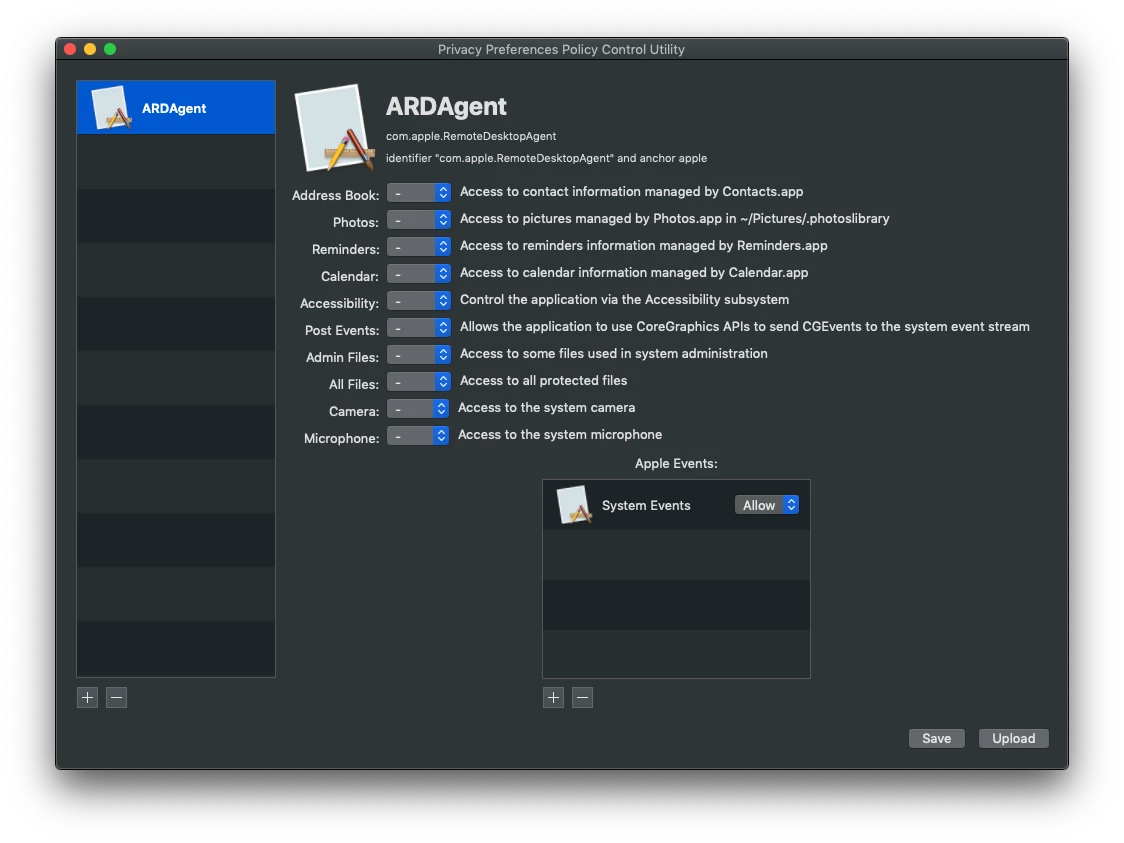
With Mojave you have to create a Privacy Preferences Policy Control profile to give ARD access to System Events.

I think this is all you need to set if you use Jamf's PPPC Utility, just click the plus under Apple Events to choose System Events. I ended up setting more permissions than necessary for ARDAgent so you may need to test. ARDAgent's path is /System/Library/CoreServices/RemoteManagement/ARDAgent.app if you need to find it. Upload the profile you create to your Jamf Pro server and scope it out to your Mojave Macs.

Just make sure the computers have the cursor in the username field and you run command as user root.