Hello,
Since the publication of latest iOS update (12.0.1) i can't send command to update iOS version on my iPads.
My version of Jamf is 1.7.0,
Some people have this problem too ?
Quentin Faivre

Having the same issue here. Running version 10.7.1-t1536934276. No matter how many or few devices are selected, system does nothing when trying to issue iOS update command.
We were seeing this issue as well so I reached out to support. They said it's a known issue they are working on. PI-006356 is the article to keep an eye on this issue.
Hey, I tried to send a remote command (update iOS) to one iPad yesterday and it failed so I suspect I'm another in the same boat. We're running 10.7.0 on our own infrastructure.
I just see a spinning indicator under 'taking action...', which continues on endlessly.
hello
sorry for my English, I'm French.
You say we could see article PI-006356. Where is it please ? Don't find it.
Thanks
Thomas HOREL
So I have to say I also have been doing some searching and don't really see this product issue listed in any release notes either. I'll reach back out to support to see where this is listed.
Same here...
When I go to..
Action
Send Remote Command
Update iOS Version on supervised devices (iOS 9 - 10.2, enrolled via a PreStage enrollment; and/or iOS 10.3 or later)
It just spins, not matter what group or individual computer I try to upgrade
I am running Jamf Pro 10.7
Interesting. I just tried this for an iPad running iOS 11.4.1, and the command went, no continual spinning. The iPad received the commands and updated.
We updated last night to 10.7.1-t1536934276 (we are hosted).
chris
Just chiming in. We're seeing the same problem with updating iOS. We can't send remote commands to update iOS on 1+ iPads. Endless spinning graphic. Happens in 10.7 and 10.7.1
We are encountering the same problem. Spinnnnnning graphic... (via send remote command)
Last week we had a successful update of 10 ipads from 11.4.1 to 12.0, our jss is and has been on 10.7.1.
As of today, we are failing to update a batch of 6 iPads from 11.4.1 to 12.0.1.
So my support person said it’s not listed in release notes yet because they just discovered it.
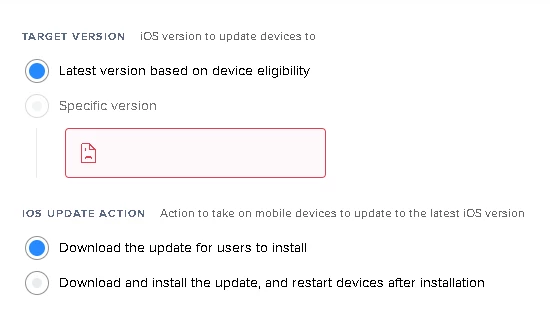
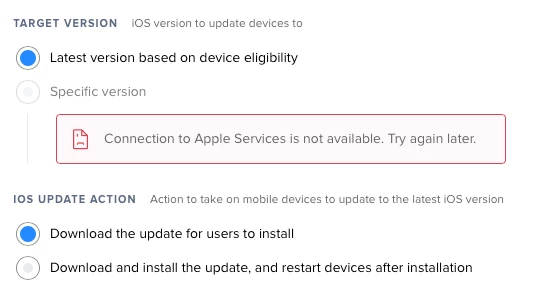
Prior to seeing this behavior, I did see a few times an error message where I would be at the next window and would be picking up which version of iOS to update to(11.4.1 or 12.0), as I think this was prior to 12.0.1. The text was in RED about some failure... No screenshot, however.
Recently no matter how many clients I pick it never loads to that choose screen. Just the scrolling wheel.
Prior to seeing this behavior, I did see a few times an error message where I would be at the next window and would be picking up which version of iOS to update to(11.4.1 or 12.0), as I think this was prior to 12.0.1. The text was in RED about some failure... No screenshot, however.
Recently no matter how many clients I pick it never loads to that choose screen. Just the scrolling wheel.
I have contacted the Jamf Support and it's a PI-006356 they try to resolve it
So... Wait & see !
Just chiming in to say we are experiencing same issue, running hosted 10.7.0-t1536687501 on Windows 2012 R2. Thank you for working with support to create PI-006356!
I saw this error in the logs, and thought I'd paste it here in case it's helpful to others searching. (Still funny to me that all mass actions are labeled as "mass wipe" in the logs, haha)
2018-10-12 08:13:07,779 [INFO ] [Thread-6 ] [viceSearchActionAssistant] - *** was presented with the following 213 devices to mass wipe:
[MobileIOSDevice [ID=***, Name=***, ReportID=***],
...
2018-10-12 08:13:15,858 [ERROR] [Thread-11 ] [HTMLController ] - Exception processing HTMLResponse:
java.time.format.DateTimeParseException: Text '' could not be parsed at index 0
at java.time.format.DateTimeFormatter.parseResolved0(Unknown Source)
at java.time.format.DateTimeFormatter.parse(Unknown Source)
at java.time.LocalDate.parse(Unknown Source)
at com.jamfsoftware.jss.objects.mobiledevicemanagement.commands.osupdates.applesoftwarelookup.service.bean.OSUpdateIOSBean.getExpirationDateObject(OSUpdateIOSBean.java:74)
at com.jamfsoftware.jss.objects.mobiledevicemanagement.commands.osupdates.applesoftwarelookup.frontend.AppleSoftwareLookupFrontendAdapter.lambda$getSelectOptions$0(AppleSoftwareLookupFrontendAdapter.java:42)
at java.util.stream.ReferencePipeline$2$1.accept(Unknown Source)
at java.util.ArrayList$ArrayListSpliterator.forEachRemaining(Unknown Source)
at java.util.stream.AbstractPipeline.copyInto(Unknown Source)
at java.util.stream.AbstractPipeline.wrapAndCopyInto(Unknown Source)
at java.util.stream.ReduceOps$ReduceOp.evaluateSequential(Unknown Source)
at java.util.stream.AbstractPipeline.evaluate(Unknown Source)
at java.util.stream.ReferencePipeline.collect(Unknown Source)
at com.jamfsoftware.jss.objects.mobiledevicemanagement.commands.osupdates.applesoftwarelookup.frontend.AppleSoftwareLookupFrontendAdapter.getSelectOptions(AppleSoftwareLookupFrontendAdapter.java:47)
at com.jamfsoftware.jss.objects.advancedsearch.MobileDeviceSearchActionAssistant.processRequest(MobileDeviceSearchActionAssistant.java:714)
at com.jamfsoftware.jss.frontend.Assistant.process(Assistant.java:264)
at com.jamfsoftware.jss.frontend.HTMLController.processRequest(HTMLController.java:375)
at com.jamfsoftware.jss.frontend.HTMLController.doPost(HTMLController.java:78)
at javax.servlet.http.HttpServlet.service(HttpServlet.java:661)
at javax.servlet.http.HttpServlet.service(HttpServlet.java:742)
at org.apache.catalina.core.ApplicationFilterChain.internalDoFilter(ApplicationFilterChain.java:231)
at org.apache.catalina.core.ApplicationFilterChain.doFilter(ApplicationFilterChain.java:166)
at com.jamfsoftware.jss.sso.filter.SsoFilter.doFilter(SsoFilter.java:56)
at org.apache.catalina.core.ApplicationFilterChain.internalDoFilter(ApplicationFilterChain.java:193)
at org.apache.catalina.core.ApplicationFilterChain.doFilter(ApplicationFilterChain.java:166)
at com.jamfsoftware.jss.frontend.JSSAccessFilter.doFilter(JSSAccessFilter.java:69)
at org.apache.catalina.core.ApplicationFilterChain.internalDoFilter(ApplicationFilterChain.java:193)
at org.apache.catalina.core.ApplicationFilterChain.doFilter(ApplicationFilterChain.java:166)
at org.apache.tomcat.websocket.server.WsFilter.doFilter(WsFilter.java:52)
at org.apache.catalina.core.ApplicationFilterChain.internalDoFilter(ApplicationFilterChain.java:193)
at org.apache.catalina.core.ApplicationFilterChain.doFilter(ApplicationFilterChain.java:166)
at com.jamfsoftware.jss.frontend.JSSLoadingFilter.doFilter(JSSLoadingFilter.java:208)
at org.apache.catalina.core.ApplicationFilterChain.internalDoFilter(ApplicationFilterChain.java:193)
at org.apache.catalina.core.ApplicationFilterChain.doFilter(ApplicationFilterChain.java:166)
at org.apache.catalina.core.StandardWrapperValve.invoke(StandardWrapperValve.java:198)
at org.apache.catalina.core.StandardContextValve.invoke(StandardContextValve.java:96)
at org.apache.catalina.authenticator.AuthenticatorBase.invoke(AuthenticatorBase.java:493)
at org.apache.catalina.core.StandardHostValve.invoke(StandardHostValve.java:140)
at org.apache.catalina.valves.ErrorReportValve.invoke(ErrorReportValve.java:81)
at org.apache.catalina.core.StandardEngineValve.invoke(StandardEngineValve.java:87)
at org.apache.catalina.connector.CoyoteAdapter.service(CoyoteAdapter.java:342)
at org.apache.coyote.http11.Http11Processor.service(Http11Processor.java:800)
at org.apache.coyote.AbstractProcessorLight.process(AbstractProcessorLight.java:66)
at org.apache.coyote.AbstractProtocol$ConnectionHandler.process(AbstractProtocol.java:800)
at org.apache.tomcat.util.net.Nio2Endpoint$SocketProcessor.doRun(Nio2Endpoint.java:1699)
at org.apache.tomcat.util.net.SocketProcessorBase.run(SocketProcessorBase.java:49)
at org.apache.tomcat.util.net.AbstractEndpoint.processSocket(AbstractEndpoint.java:1050)
at org.apache.tomcat.util.net.Nio2Endpoint$Nio2SocketWrapper$4.completed(Nio2Endpoint.java:630)
at org.apache.tomcat.util.net.Nio2Endpoint$Nio2SocketWrapper$4.completed(Nio2Endpoint.java:608)
at org.apache.tomcat.util.net.SecureNio2Channel$1.completed(SecureNio2Channel.java:960)
at org.apache.tomcat.util.net.SecureNio2Channel$1.completed(SecureNio2Channel.java:889)
at sun.nio.ch.Invoker.invokeUnchecked(Unknown Source)
at sun.nio.ch.WindowsAsynchronousSocketChannelImpl$ReadTask.completed(Unknown Source)
at sun.nio.ch.Iocp$EventHandlerTask.run(Unknown Source)
at sun.nio.ch.AsynchronousChannelGroupImpl$1.run(Unknown Source)
at java.util.concurrent.ThreadPoolExecutor.runWorker(Unknown Source)
at java.util.concurrent.ThreadPoolExecutor$Worker.run(Unknown Source)
at java.lang.Thread.run(Unknown Source)So there is a workaround but I am seeing the same error as @ndeangelis
ndeangelis
Thank you for that post with the screenshot.
I did see this earlier (what I mean prior to how it is now where the page does not load at all, I think before 12.0.1 was released) except there was red text in that field.
Update:
I ran the command and this is what I see (see the text in the red). I think it's the same I saw prior to 12.0.1
That mass wipe action scared me in the logs, also!
I'm seeing this too, btw.
Just updated from 9.101 to 10.7.1 on a Windows server environment.
I was trying to use the feature to update some AppleTVs to tvOS 12.
I cannot find any article regarding PI-006356. Can someone either point me in the right direction or specify what the "fix" is that has been mentioned in this thread?
I am wondering if the timing of this coincides with Apple no longer permitting iOS 11.4.1 to be installed. We were using Apple Configurator and the corresponding .ipsw files to downgrade the couple of iPads that had inadvertently updated to iOS 12. On Thursday we discovered that process no longer worked, but instead fails with the error message "The OS install could not be authorized for this device. The build may not be approved for production installs." We have found in the past that there is only a short window of time that Apple will allow an outdated version of iOS to be installed, and that message indicates that time is up for iOS 11.4.1.
So according to the support rep I spoke with they just discovered this issue and it has not been listed in the Release notes, hence why we can't find the PI number anywhere.
@sharriston thanks for the info, did your support rep give you the workaround that you mentioned?
This is what the rep said "The workflow would look something like this - > > Edit the /etc/hosts file on all Tomcat nodes > Put in an entry that looks like this: 127.0.0.1 gdmf.apple.com <http://gdmf.apple.com/> > Save the hosts file and then attempt to push out the update. "
It does work but produces an error and from what I understand it will only allow going from 12.0 to 12.0.1
Enter your E-mail address. We'll send you an e-mail with instructions to reset your password.
Sorry, we're still checking this file's contents to make sure it's safe to download. Please try again in a few minutes.
OKSorry, our virus scanner detected that this file isn't safe to download.
OK