Question

Mass Update iOS issue

  • October 10, 2018
  • 38 replies
  • 216 views

Show first post

38 replies

Forum|alt.badge.img+3
  • New Contributor
  • October 16, 2018

Thank you, Jamf support sent me the same info this morning, and I can now push out a command to update the iOS to the latest version. They also mentioned that once they resolve the issue, that additional line in /etc/hosts will need to be removed in order to choose older versions of the iOS.

I've only tested on one iPad so far, but it does seem to work going from iOS 11.4.1 to 12.0.1.


summoner2100
Forum|alt.badge.img+7
  • Contributor
  • October 16, 2018

Hey,

Sounds like useful information here. We're seeing the same on our self hosted install, and I was wondering what the deal was. We updated from 10.5 to 10.7.1. (hosted on windows)

Getting the spinning wheel everytime we try to go into updates.

Commenting to follow this thread.

Thanks.


Forum|alt.badge.img+6
  • Contributor
  • October 17, 2018

The fact that something like this makes it out of QA into the final product is both mind boggling and pathetic.


Forum|alt.badge.img+4
  • Contributor
  • October 17, 2018

We used the same process sharriston described above, but it doesn't work for us. New Win2016 server and JAMF 10.7.1


sharriston
Forum|alt.badge.img+10
  • Valued Contributor
  • October 17, 2018

We had to restart tomcat after editing the etc/host file


Forum|alt.badge.img+4
  • Contributor
  • October 17, 2018

We've done that too. I'll give it another kick for good measure.

EDIT: The last restart must have done something. Still get an error about not being able to reach Apple, but at least we can update. We have to wait through the spinning circle, ignore the error message, and update to the most recent version.


Forum|alt.badge.img+5
  • Contributor
  • October 18, 2018

What do jamfnow users do if their instance of jamf is hosted for them?
I presume we're all still waiting for a fix.


Quentin25
Forum|alt.badge.img+3
  • Author
  • New Contributor
  • October 18, 2018

Hello all !

I tested the function this morning and... it works !!

I don't know what they did.

Quentin


Forum|alt.badge.img+8
  • Contributor
  • October 18, 2018

We recently sent out remote commands to update to iOS 12.0.1 and "most" worked, but keep reading for further explanation.

Our environment is a mix of Shared iPad mode and what we call "Single User" mode (which require no login to access the home screen). We've always struggled to send iOS updates to Shared iPads due to a plethora of variables that have to be considered before an update will actually succeed (user logged out, battery level, device syncing to iCloud). However, our single user iPads have succeeded so far. Most of them were on 11.3.1 or 11.4.1 and updated to iOS 12.0.1 no problem. The variables to consider in our environment regardless of iPad mode (Shared or Single User) are the size of iOS packages (sometimes over 1-2 Gb), count of devices command is sent to, how the data is transferred (WiFi or tethered usb), time of device inactivity, and caching servers. For Single User iPads, we find it easier to have the teachers and students just go and start the download and install on their own iPads.

For Shared iPads, we have resorted to usb hubs and Apple Configurator 2. It's painful and slow. But it works. Shared iPad does not have a built in update service in Settings like the traditional Single User iPad configuration. This is because an update is a global decision for all users of the iPad, and not all users may want to update yet. We have not tried sending out the iOS update remote command to our Shared iPads, and probably won't as the success rate is very low and Shared iPads are very susceptible to failed updates which require a full restore via AC2.

Lastly, double check that your iPads don't have a profile on them that is deferring the iOS update. The remote command to update does not take precedence over this deferral as iOS automatically always chooses to go with more restrictions than less. I've noticed that removing this deferral, canceling the update commands and then resending them typically works. One other note about iOS (and probably macOS) deferrals is that if your profile says defer for 30 days, that doesn't mean defer for 30 days since the release of the iOS update from Apple, it means 30 days from the installation of the profile to defer. We learned this when some of our iPads updated successfully when they had the deferral in place and some iPads did not. The ones that did not update most likely installed the deferral profile later than the successful ones.

I hope this helps!


sharriston
Forum|alt.badge.img+10
  • Valued Contributor
  • October 23, 2018

So I couldn't find the PI listed in the release notes for 8 but I was able to update a few test iPads after upgrading.


Forum|alt.badge.img+4
  • Contributor
  • October 26, 2018

So I checked just now and look what I got... It looks like Apple fixed it.


Forum|alt.badge.img+3
  • New Contributor
  • October 30, 2018

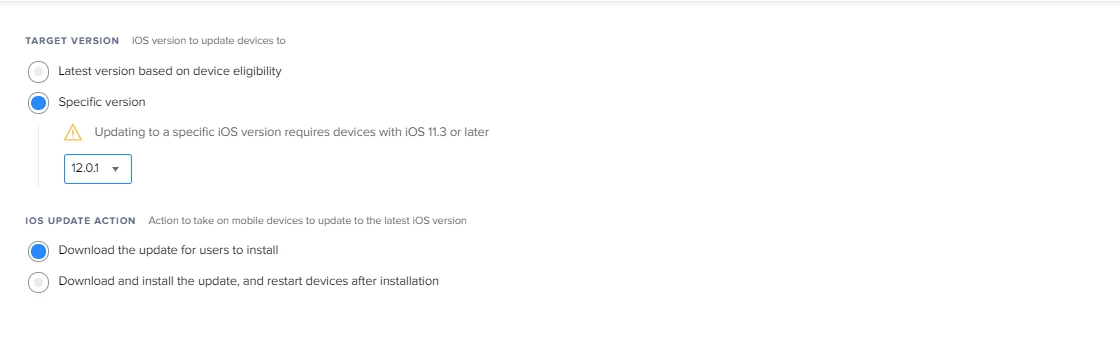
I checked as well and see the same thing, however if I try to actually send the command to update to a specific version I get back a message "The remote command failed to send." If I choose Latest version based on device eligibility the command goes thru fine, but even if I choose 12.0.1 (currently the latest version), I get the message that it failed.


Forum|alt.badge.img+12
  • Honored Contributor
  • February 21, 2019
For Shared iPads, we have resorted to usb hubs and Apple Configurator 2. It's painful and slow. But it works. Shared iPad does not have a built in update service in Settings like the traditional Single User iPad configuration. This is because an update is a global decision for all users of the iPad, and not all users may want to update yet. We have not tried sending out the iOS update remote command to our Shared iPads, and probably won't as the success rate is very low and Shared iPads are very susceptible to failed updates which require a full restore via AC2.

This is what we're doing. Shared mode iPads just fail all the time. We're also having an issue of "not enough space" on the device due to the hard drive being split into the number of users logged in. If the max number of allowed shared mode users are logged onto the iPad, they can't be updated until one of them is removed to free up some space for the update to be installed. This leads onto jamf not having a mass logout/remove button. I have to open up each iPad individually and remove a user.