

Hi All,
A couple of things...
Firstly... a few weeks ago I noticed that a bunch of our macs haven't reported in for *cough* *cough* about 6 months 😞
I finally got hold of one of the users of these macs and found some interesting things...
doing 'sudo jamf recon' yielded the typical error of:
% sudo jamf recon
Password:

There was an error.

     Device Signature Error - A valid device signature is required to perform the action.
After which trying 'sudo jamf trustjss' did not help either.
Upon further investigation, running 'profiles status -type enrollment' yields this:
Enrolled via DEP: Yes
MDM enrollment: Yes (User Approved)
MDM server: https://xxxxxxxxx.jamfcloud.com//computer/mdm
When running this command on a working Mac, I see this:
Enrolled via DEP: Yes
MDM enrollment: Yes (User Approved)
MDM server: https://xxxxxxxxx.jamfcloud.com/mdm/ServerURL
As you can see, there is a difference in the MDM Server URL ending...
Trying the good ol' 'sudo profiles renew -type enrollment' shows me this:
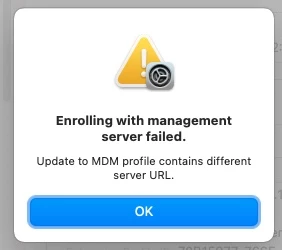
I haven't tried 'sudo jamf reenroll -nopolicy -prompt' just yet, as I consider that the penultimate sledgehammer move, and really trying to avoid the re-install MacOS move as much as possible as there's quite a few of these macs out there...
One of the questions I have here: where is that MDM Server URL held? is it possibly in NVRAM?
Which brings me to my "Secondly"... I ask that because we have 2 jamfcloud instances... a production one and a test one, and recently when I moved an old production Mac to the test Jamf Pro, I couldn't even enrol it due to an MD server URL error... I usually fixed that with an NVRAM reset, but have come across a test mac that even an NVRAM reset doesn't help 😞
I've ignored asking that last question for a while, but it's been bugging me for a long time now...
Any insight, if not resolutions, on this would be greatly appreciated,
Cheers,
Tom

