Question

Microsoft AutoUpdate - do not have permission to open

  • July 29, 2021
  • 10 replies
  • 86 views

Forum|alt.badge.img+4

I have a policy configured to push out the MS office 16.51 BusinessPro installer package to a mbp M1.  After installation I am able to sign in and open Word/Excel/etc.  If i try to open Help->Check for updates. I receive You do not have permission to open the application "Microsoft AutoUpdate".

Browsing to /Library/Application Support/Microsoft/MAU2.0   The permissions are System - RW, Wheel - RW, Everyone - R.

If I launch Microsoft AutoUpdate from this location the updater works as expected.  I am also able to then use help->check for updates.

Any ideas on how to get check for updates working without having to launch the autoupdate from the MAU2.0 folder at least 1 time?


10 replies

Forum|alt.badge.img+16
  • Contributor
  • July 29, 2021

Same here as well with a fresh batch of M1 Airs.

I worked on it for a bit thinking it was a PPPC issue, but it's not. Nothing in restricted software or from a config profile. I passed it off as a bug and ensured MAU didn't run on new installs of Office apps.


Forum|alt.badge.img+4
  • Author
  • New Contributor
  • July 30, 2021

I found 1 way to make autoupdate work.  I created a policy to install MS AutoUpdate package after MS office is installed.  Tested on a fresh machine this morning and it is working.


Forum|alt.badge.img+16
  • Contributor
  • August 2, 2021

I found 1 way to make autoupdate work.  I created a policy to install MS AutoUpdate package after MS office is installed.  Tested on a fresh machine this morning and it is working.


Is this in addition to the version installed with the office installer or did you exclude it?


snowfox
Forum|alt.badge.img+9
  • Contributor
  • August 12, 2021

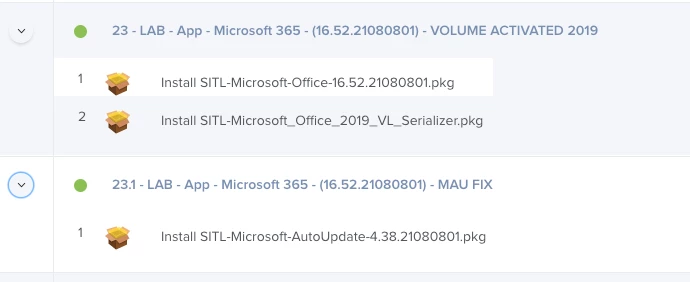
I'm running into the same issue.  If you install 16.52 full 365 suite pkg, you have to install the stand alone autoupdate pkg installer afterwards to get rid of the permission denied message when running one of the 365 apps for the first time.  If you install the stand alone installers seperately of each app, there is no pemission denied message displayed by the MAU app.  It looks like a bug in the full suite installer pkg.


Forum|alt.badge.img+16
  • Contributor
  • August 12, 2021

I'm running into the same issue.  If you install 16.52 full 365 suite pkg, you have to install the stand alone autoupdate pkg installer afterwards to get rid of the permission denied message when running one of the 365 apps for the first time.  If you install the stand alone installers seperately of each app, there is no pemission denied message displayed by the MAU app.  It looks like a bug in the full suite installer pkg.


I’m deploying stand-alone volume licensed i.e. non 365 installers and I’m seeing it. I haven’t tried deploying a stand-alone copy of mau after each install so I may give that a shot. 


snowfox
Forum|alt.badge.img+9
  • Contributor
  • August 13, 2021

I’m deploying stand-alone volume licensed i.e. non 365 installers and I’m seeing it. I haven’t tried deploying a stand-alone copy of mau after each install so I may give that a shot. 


This fixes it for me.  I'm deploying the full suite to a lab then volume activating, then installing the standalone MAU installer from the macadmins.software website.  The MAU permission denied message is no longer displayed.


snowfox
Forum|alt.badge.img+9
  • Contributor
  • August 13, 2021

This fixes it for me.  I'm deploying the full suite to a lab then volume activating, then installing the standalone MAU installer from the macadmins.software website.  The MAU permission denied message is no longer displayed.


Correction:  Works under the Administrator account where the MAU pkg was installed.

Restarted into a test standard user account and the message is back.  Fun and games.


jonw
Forum|alt.badge.img+10
  • New Contributor
  • August 24, 2021

@snowfox Having the same trouble, however applying Microsoft_AutoUpdate_4.38.21080801_Updater.pkg after deploying 16.52.21080801 DOES work for me in a non-admin account... go figure.

Also fwiw, as with others opening the MAU app directly has always worked for me... the error only appears when initiating an update check from within an Office app.  Which leads me to believe it's an internal bug. Just my 2 cents.


Forum|alt.badge.img+7
  • Contributor
  • September 16, 2021

office 16.53 is out...same issue.


Forum|alt.badge.img+7
  • Contributor
  • October 14, 2021

Just pushed 16.54 to a catalina device and a big sur device without the workaround.  I think they fixed it.