Question

microsoft autoupdater valid for both office 2016 and 2019??

  • January 14, 2021
  • 18 replies
  • 50 views

Forum|alt.badge.img+20

Hi there, is the MAU microsoft autoupdate 4.31 that was released 1/13/2021 good for both Office for Mac 2016 and Office for Mac 2019?

I downloaded it from here: https://macadmins.software/

I know office 2016 is 'end of life/support'

18 replies

Forum|alt.badge.img+12
  • Valued Contributor
  • January 15, 2021

@tcandela yup, it certainly is. All MAU updates are backward compartible. You can even use 4.31 to update 2011 if it still exists out there.


Forum|alt.badge.img+3
  • New Contributor
  • January 15, 2021

You can initiate an update from Office 2016 to Office 2019 via Autoupdate binary also. Only a matching autoupdate-config deployed via mobileconfig-profile is nessesary.


Forum|alt.badge.img+20
  • Author
  • Contributor
  • January 29, 2021

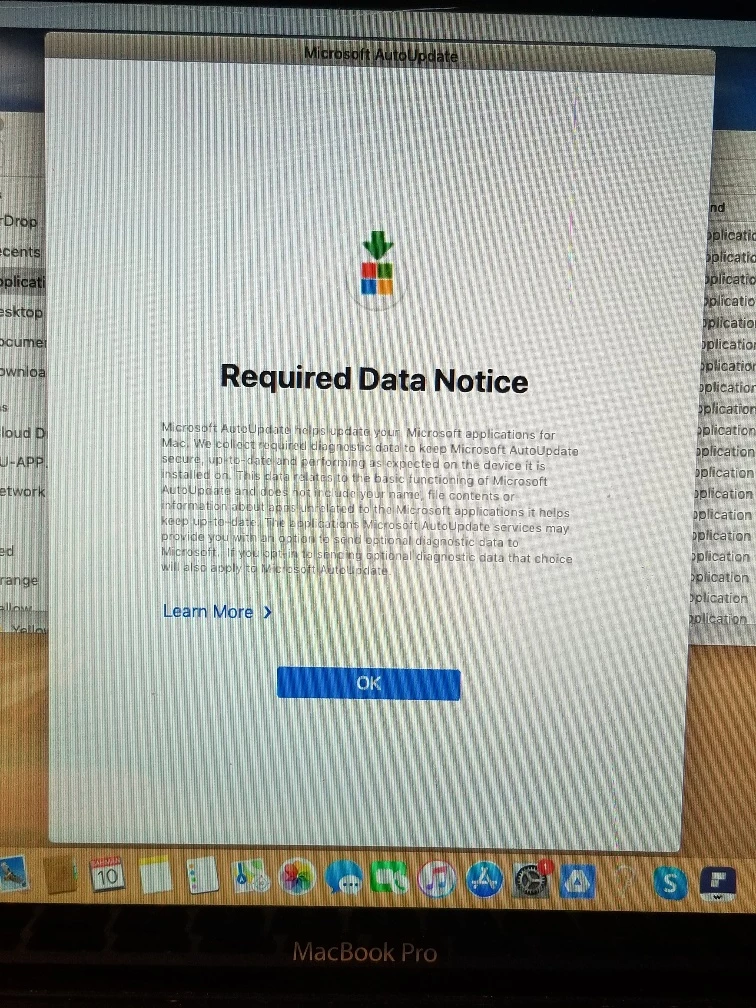
when I have the MAU2.0 installed on the computers there is a 'Required Data Notice' popup that appears until the user clicks OK. How do I get rid of this popup so users don't see it.

I just want MAU2.0 to install silently in the background, but this "Required Data Notice' pops up in the DOCK

I want users to be able to check for Microsoft Office updates on their own, and/or be prompted that there are available updates.

Currently I have a policy that checks for office that is not running the current version and will install the updates on logout. Kind of a hassle each time to download them and setup the policy and smart groups to check, so I decided to install MAU2.0 on the computers that don't have it installed.


Forum|alt.badge.img+12
  • Valued Contributor
  • January 30, 2021

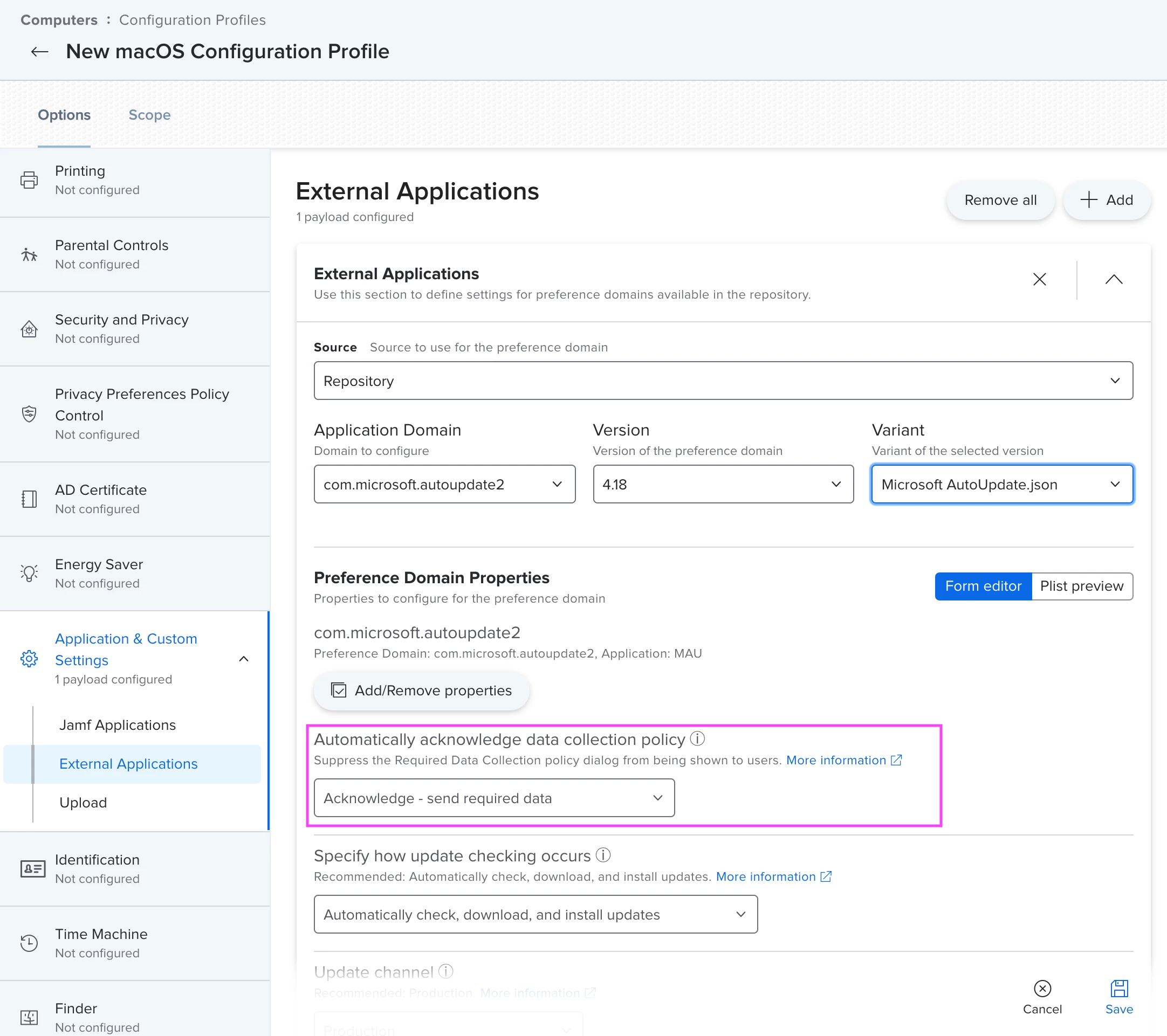
@tcandela To suppress the Required Data Notice pop-up, set the AcknowledgedDataCollectionPolicy preference to the string value of RequiredDataOnly in the com.microsoft.autoupdate2 domain.

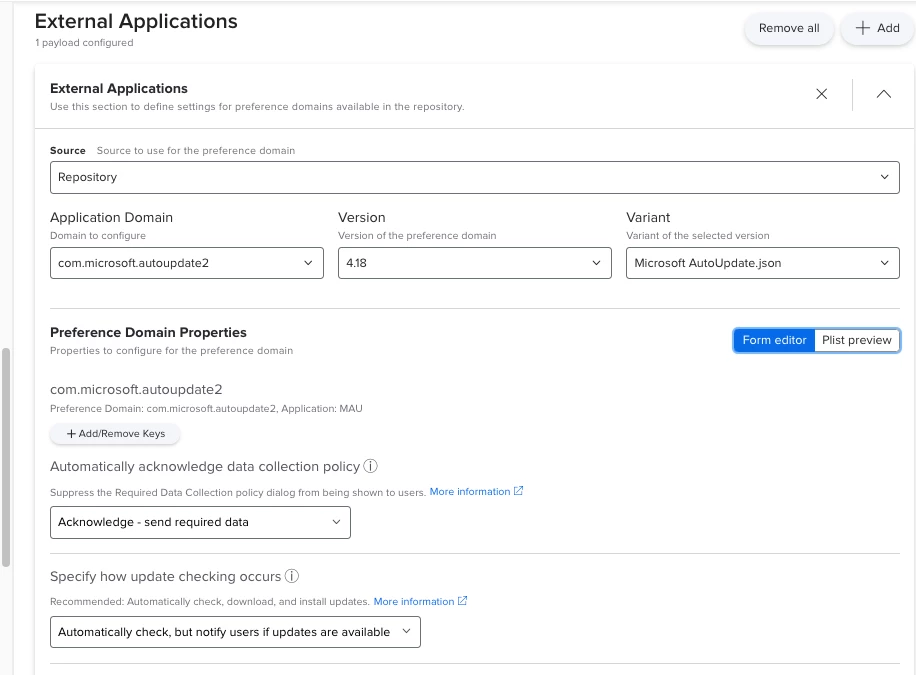
The easiest way to set this is through Configuration Policies -> Application and Custom Settings as in the attached screenshot

Alternatively, from Terminal use defaults write com.microsoft.autoupdate2 AcknowledgedDataCollectionPolicy -string 'RequiredDataOnly


Forum|alt.badge.img+20
  • Author
  • Contributor
  • January 31, 2021


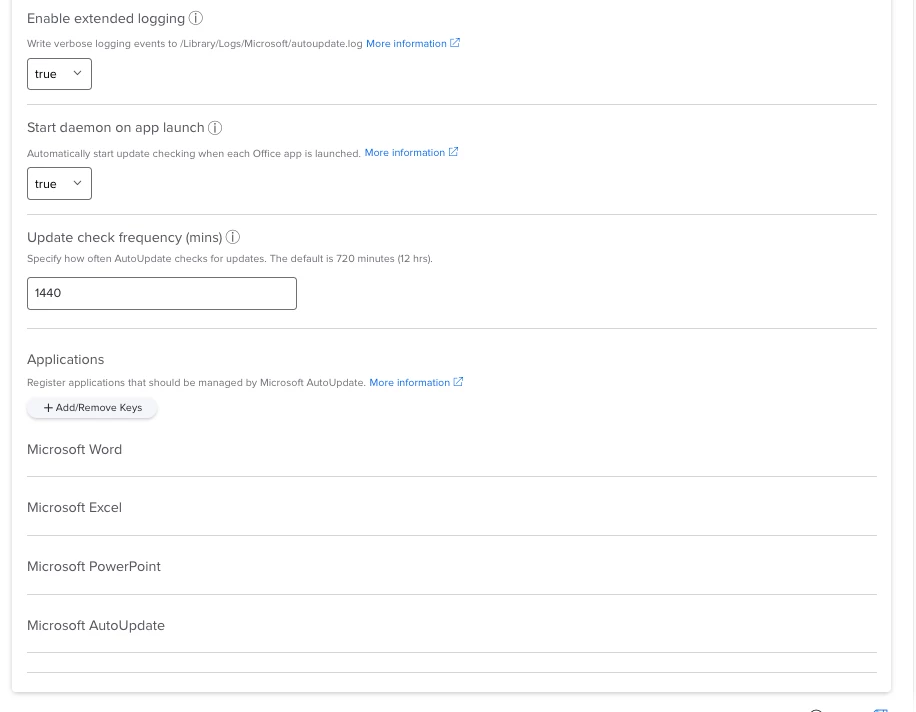
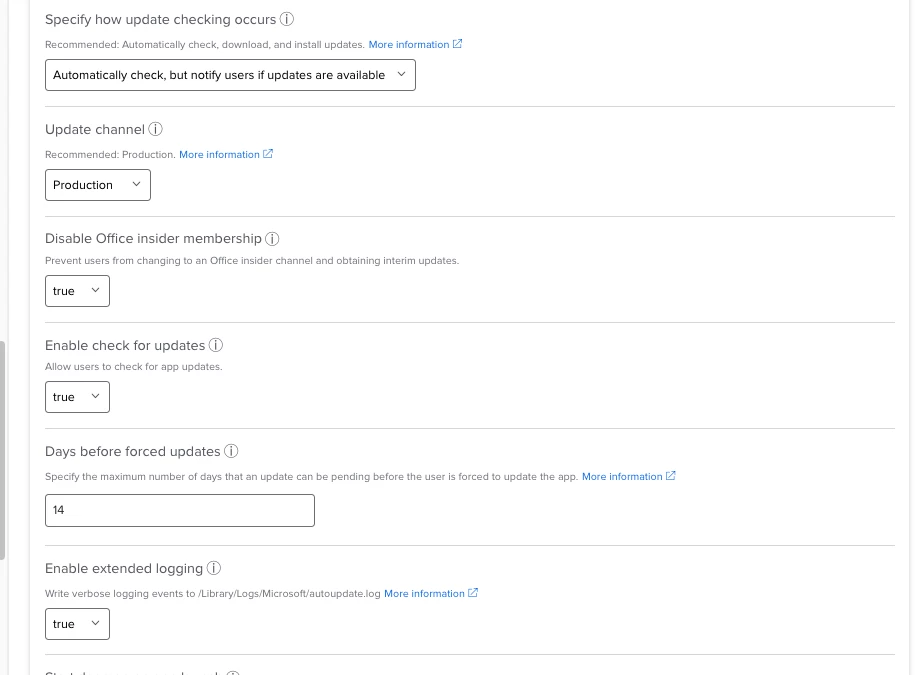
@pbowden Hi, I just configured the configuration profile. Check it out, let me know if you see anything out of place. I only have Word, Excel, PowerPoint and MAU installed so those should be the only things to check for updating. Computers without MAU2.0 i have a policy that will install it during 'check-in' (that's why the pop-up with required data notice was appearing).

I will apply this configuration profile to all computers with MAU installed.

I increased the check for updates to 24 hours instead of the default of 12.


Forum|alt.badge.img+12
  • Valued Contributor
  • February 1, 2021

@tcandela The profile looks good. Any particular reason why you're using the "Automatically check, but notify users if updates are available" instead of the "automatically download and install updates" option? The latter gives a much more seamless experience. I can elaborate if you need me to.

Thanks, Paul.


Forum|alt.badge.img+20
  • Author
  • Contributor
  • February 1, 2021

@pbowden no reason. You think the "automatically download and install updates" is the better option?

for macs with MAU currently installed the config profile will still apply?
for macs with MAU currently NOT installed, I'll have to have the config profile install before MAU gets installed? or else they'll get the require data notice popup?


Forum|alt.badge.img+12
  • Valued Contributor
  • February 1, 2021

@tcandela yes, definitely. Users will be notified either way, but with the second option, the updates will happen in the background rather than users needing to quit apps and watch a progress bar.


Forum|alt.badge.img+20
  • Author
  • Contributor
  • February 2, 2021

@pbowden can i apply the config profile to computers even if the MAU2.0 is not installed yet? through the config profile, Without MAU it won't be able to install updates anyways, correct?

I need the config profile installed before MAU2.0 so when MAU2.0 gets installed the user will not see the 'Required Data Notice'?


Forum|alt.badge.img+12
  • Valued Contributor
  • February 3, 2021

@tcandela yup, you should push the Config Profile before MAU is installed.


Forum|alt.badge.img+20
  • Author
  • Contributor
  • February 5, 2021

@pbowden - this is on a freshly enrolled Big Sur 2015 MacBook Pro, I installed the MAU config profile and then had the Office 2019 pkg install and after installation I was still prompted to OK the 'Required data notice'.

on a 10.15/10.14 laptop I was not prompted to OK the 'Required data notice'. So there is a possibility this config profile might not work with Big Sur? I wonder if the Office updating portion of the config profile will work with Big Sur ?????


Forum|alt.badge.img+12
  • Valued Contributor
  • February 5, 2021

@tcandela Big Sur doesn’t make any difference from the perspective of Office and MAU. Can you repeat the test with Big Sur and ensure that the Config Profile has made it to the device (via System Prefs > Profiles) before you deploy the Office PKG?

If it does repro with the same problem, please send me screenshots of both the privacy dialog and Config profile.

Thanks!


Forum|alt.badge.img+20
  • Author
  • Contributor
  • February 5, 2021

@pbowden yes the configuration profile was in place before i had the office 2019 pkg install. I made sure i checked prior to installing the pkg.

Ill try again from another big Sur

The required data notice and my configuration profile settings are displayed in my previous comments


Forum|alt.badge.img+12
  • Valued Contributor
  • February 5, 2021

@tcandela thanks! If it repro’s again on a second Big Sur machine, we should jumó on a screen share later on today and debug.


Forum|alt.badge.img+20
  • Author
  • Contributor
  • February 10, 2021

@pbowden does a person need to be logged in, in order for the MAU to install any updates?


Forum|alt.badge.img+12
  • Valued Contributor
  • February 10, 2021

@tcandela No. If MAU is set to Automatically Download and Install, then updates will be detected, downloaded and applied even if no user is logged-in. There are a couple of nuances to watch out for though:
1. You'll need to set the Config Profile appropriately to suppress the Required Data Notice/Privacy dialog
2. The msupdate CLI does require the user to be logged-in


Forum|alt.badge.img+20
  • Author
  • Contributor
  • February 17, 2021

@pbowden hey, Office 2019 has release update 16.46 so lets see if this MAU2 config profile does its job.


Forum|alt.badge.img+20
  • Author
  • Contributor
  • February 17, 2021

your really don't need a config profile as long as you have MAU2.0 installed. It'll popup when there are updates available to install. The user can update it once they see the popup. Why force it for the user is my opinion.