Question

Microsoft Enterprise SSO plug-in for Apple devices

  • April 21, 2021
  • 117 replies
  • 815 views

n_lecchi
Forum|alt.badge.img+13

I'm testing this MS plug-in for SSO

It works fine with Safari, but I'm not able to use it with Desktop-Apps like Office 365 ones.

Anyone have experience in SSO in Office 365 apps?

117 replies

Forum|alt.badge.img+20
  • Honored Contributor
  • April 21, 2021

I have added all the O365 apps to the AppAllowList custom setting. Here is my custom setting PLIST that i add to the SSO Profile:

<?xml version="1.0" encoding="UTF-8"?>
<!DOCTYPE plist PUBLIC "-//Apple//DTD PLIST 1.0//EN" "http://www.apple.com/DTDs/PropertyList-1.0.dtd">
<plist version="1.0">
<dict>
    <key>AppAllowList</key>
    <string>com.microsoft.Outlook,com.microsoft.teams,com.microsoft.OneDrive,com.microsoft.Word,com.microsoft.Excel,com.microsoft.Powerpoint,com.microsoft.onenote.mac,com.jamfsoftware.selfservice.mac</string>
    <key>browser_sso_interaction_enabled</key>
    <integer>1</integer>
    <key>disable_explicit_app_prompt</key>
    <integer>1</integer>
</dict>
</plist>

I don't think OneDrive is working yet, but it seems like all the other Apps pickup on the SSO credentials.


n_lecchi
Forum|alt.badge.img+13
  • Author
  • Contributor
  • April 22, 2021

RBlount, does it work well for you? In my tests, Office apps still require authentication.


Forum|alt.badge.img+9
  • Contributor
  • April 22, 2021

I tested the plist in my environment, it does in fact work, but the results are not consistent. A mac with a fresh setup worked out of the box but my daily driver was inconsistent.


Forum|alt.badge.img+13
  • Contributor
  • April 22, 2021

Does one need to be signed into the Intune Company Portal for this to get applied properly?


Forum|alt.badge.img+20
  • Honored Contributor
  • April 22, 2021

I find it hit or miss. Some apps seem to work better than other (Teams & Jamf Self Service seem to pick up the user better than the other Microsoft Apps.)

Is seems that when I was testing it a few months ago, it seemed to work better. I don't know if Apple changed something or Microsoft did.

I guess that is why Microsoft still considers it to be in Beta Preview.


n_lecchi
Forum|alt.badge.img+13
  • Author
  • Contributor
  • April 22, 2021
Does one need to be signed into the Intune Company Portal for this to get applied properly?

yes you need to log-in Intune company portal, too


Forum|alt.badge.img+7

I am also testing the Company portal SSO-E It's working with safari, office 0365 apps, and Skype for Business. Currently, Microsoft EDGE is not supporting SSO.


n_lecchi
Forum|alt.badge.img+13
  • Author
  • Contributor
  • April 23, 2021

Hi Vinu, I am surprised you SSO works Office 365. For me it works only for Safari. When i launch word, excel or PP, it require me another authentication for license.
Can you share configuration you are usings?

I am also testing the Company portal SSO-E It's working with safari, office 0365 apps

Forum|alt.badge.img+7
  • Contributor
  • April 23, 2021

Are you using Hybrid or pure Azure? We have been trying to just get it to work but we have failed.
azure-ad-and-seemless-single-sign-on


n_lecchi
Forum|alt.badge.img+13
  • Author
  • Contributor
  • April 23, 2021

My Azure is in Hybrid but it does not matter. SSO works with Company Portal Authentication. I enroll the Mac with a test user different to the Azure one, than I authenticate in Company Portal that generate a token for SSO that in my case works but only with Safari and WebApps. Desktop Office Apps require another authentication for assign license. I need to solve this part.

Are you using Hybrid or pure Azure

Forum|alt.badge.img+9
  • Contributor
  • April 23, 2021

To clarify, from my testing I have found that the Mac does not need to be enrolled into Intune for it to work, just that the company portal is installed. The SSO will work from there.


n_lecchi
Forum|alt.badge.img+13
  • Author
  • Contributor
  • April 23, 2021

Yes, it's right

To clarify, from my testing I have found that the Mac does not need to be enrolled into Intune for it to work, just that the company portal is installed. The SSO will work from there.

n_lecchi
Forum|alt.badge.img+13
  • Author
  • Contributor
  • April 26, 2021

Can anyone who managed authenticateìion with SSO into the Office 365 app share the correct configuration?


Forum|alt.badge.img+4

We are experiencing the same issue as the original poster.

If any one has any tips? what we are seeing it works with Safari and MS Teams only but not Office apps: Outlook, Excel and OneDrive,etc.

@ vinu.thankachan Could you tell us or share some more info how did you fix it and get that working please?


Forum|alt.badge.img+7

Hi ,
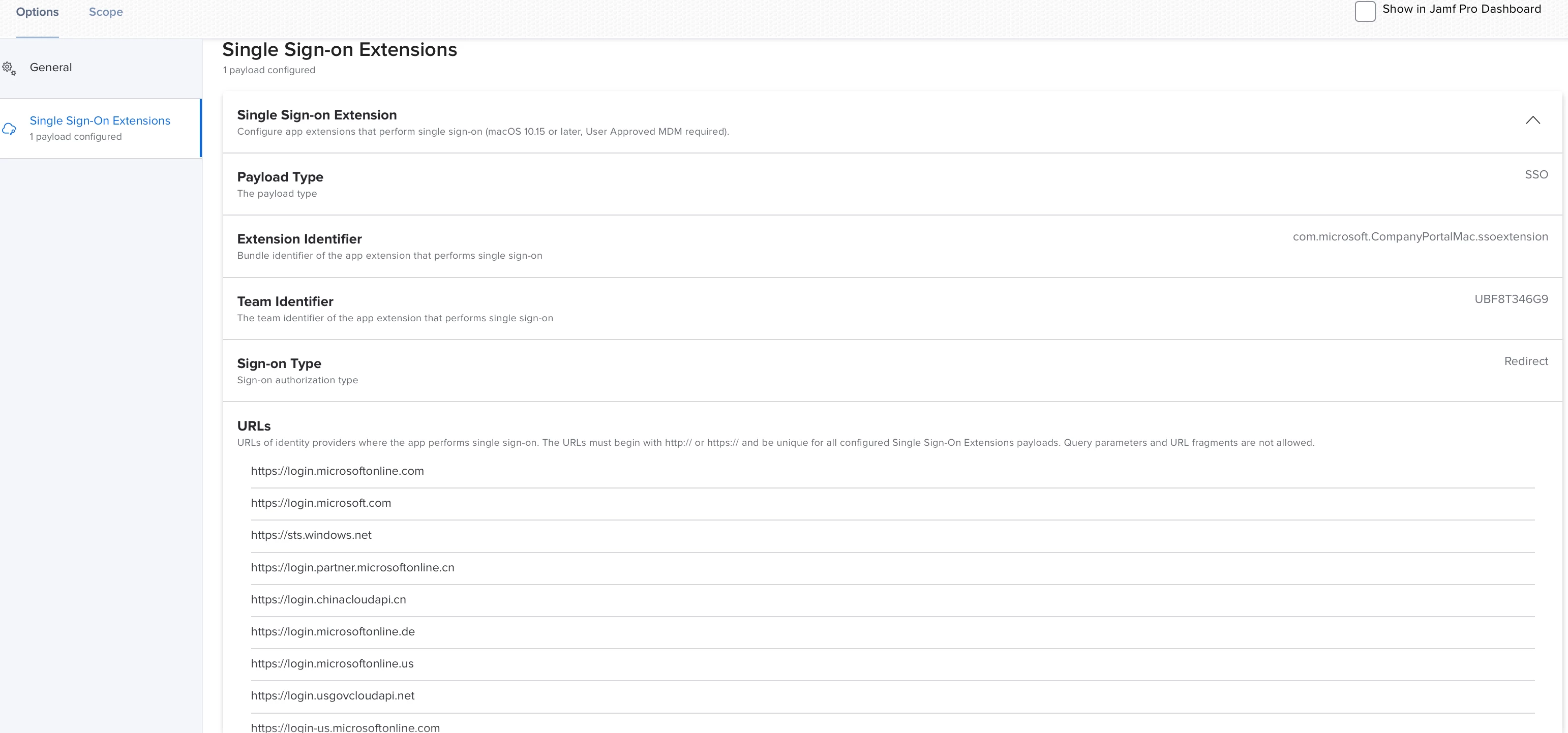
Sharing my configuration


n_lecchi
Forum|alt.badge.img+13
  • Author
  • Contributor
  • May 11, 2021

@ vinu.thankachan: this configuration enable you to single sign on in office? I seem strange: Are you sure you have not authentication in keychain?


Forum|alt.badge.img+4

Thanks for providing the info Vinu,

We have exactly the same configuration, as I said it works fine with Teams and Safari but not Office Apps


Forum|alt.badge.img+6
  • Contributor
  • May 12, 2021

I confirm as well, Safari and Teams are fine but not other MS office Apps.


Forum|alt.badge.img+4

One thing I thought to throw it here, ask and clarify with everyone: @Karl941 @n.lecchi @vinu.thankachan

1) How are you all installing office? 2) Are you using the app store, or are you installing via .pkg? 3) Do you think it matters? but Teams is installed for us through the Office .pkg; if it was a .pkg issue, then it shouldn't work for any of the apps.

What are your thoughts?


n_lecchi
Forum|alt.badge.img+13
  • Author
  • Contributor
  • May 12, 2021

I think it doesn't matter. The app installation can take place via .pkg or the App Store but activation takes place via the web, so the user must be authenticated on the O365 portal to do so.

The question is, can you pass SSO in any way? According to my test no, and the MS documentation seems to copy it. So I'm surprised someone can do it and I can't figure out how.


Forum|alt.badge.img+6
  • Contributor
  • May 13, 2021

@ali.fadavinia I have seen in the past slightly differences from deploying through PKG or Appstore push. So to validate, I did a test with Word from Appstore deploy and It's the same results as PKG, no matter the installation type, the app. is prompting to authenticate and don't transit through SSOEx. like Teams does
@vinu.thankachan Can you confirm it works (or not) for you if the Keychain and cookies are cleared ? Thanks.


Forum|alt.badge.img+7

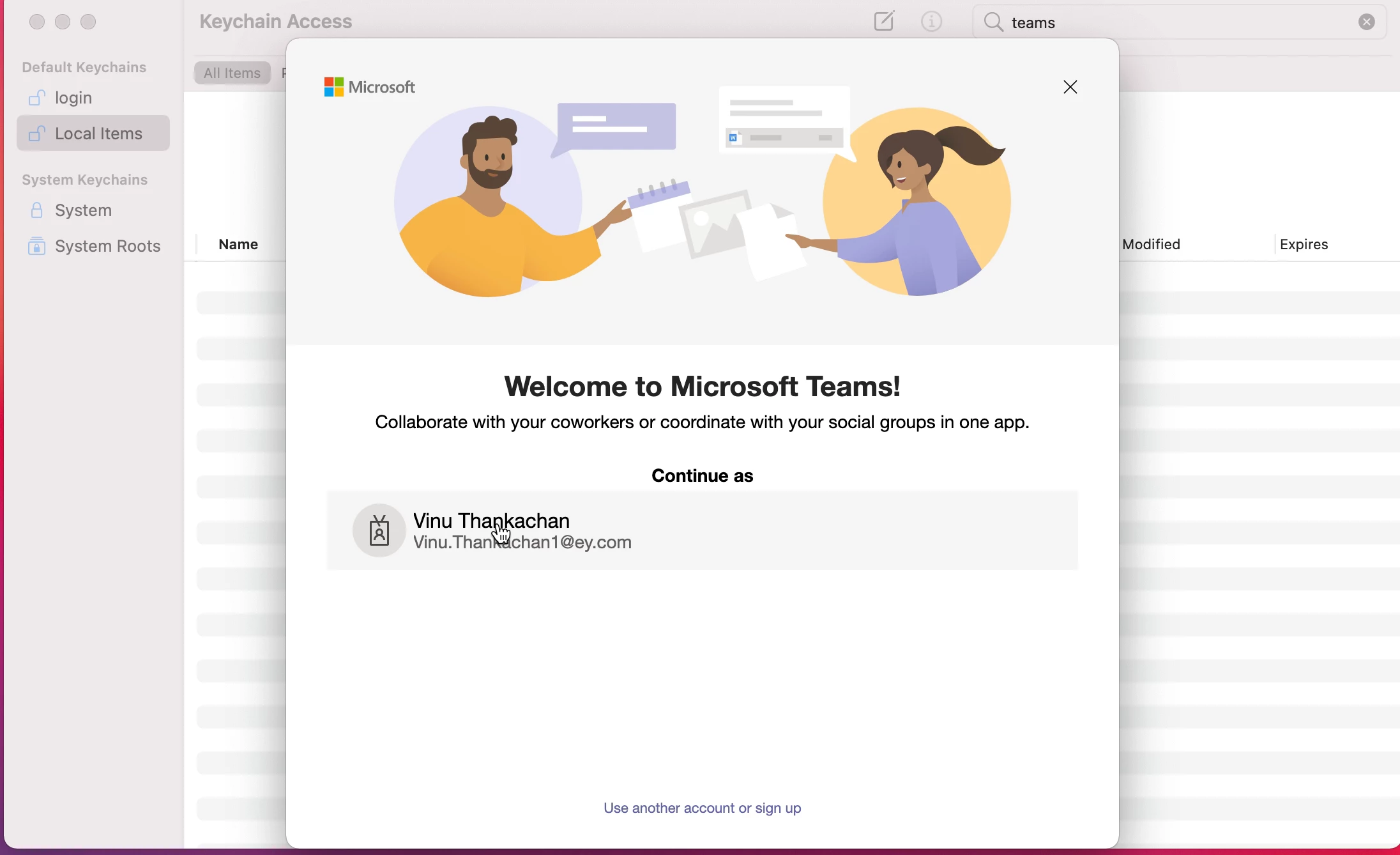
Sharing my experiance with Ms teams When I open teams for the first time, I get a prompt to choose the account. once I chose the account , Teams loads automatically


Forum|alt.badge.img+6
  • Contributor
  • May 13, 2021

@vinu.thankachan Thanks, however what we would like to validate it's the other MS apps (like Word, PPT or Excel), are you prompted from these ones or not?


Forum|alt.badge.img+18
  • Esteemed Contributor
  • May 14, 2021

@pbowden Wondering if you had any info on this or if there is someone else from Microsoft who could comment on this thread?

Gabe Shackney
Princeton Public Schools


Forum|alt.badge.img+6
  • Contributor
  • June 28, 2021

Did anyone ever figure this out? We are getting the same experience. SSO extension is configured and works with Microsoft websites, but the individual Office apps do not pick up the credentials, hence forcing us to sign into the apps manually. Teams is the only app that is close (it shows us the account selection, same as the screenshot above from @vinu.thankachan )