Question

Microsoft Office for Mac 2016 Official Release Date - 8/1

  • July 2, 2015
  • 77 replies
  • 240 views

Show first post

77 replies

Forum|alt.badge.img+14
  • Contributor
  • August 5, 2015

Looks like "Microsoft Office 2016 for Mac Standard" hit our VLSC ...


Forum|alt.badge.img+14
  • Contributor
  • August 5, 2015

@CGundersen

Standard? I wasn't aware there was going to be different kinds....


bpavlov
Forum|alt.badge.img+18
  • Esteemed Contributor
  • August 5, 2015

@CGundersen Can you confirm what apps come with that version?

@Abdiaziz I could be mistaken but I believe it was the same with 2011.


Forum|alt.badge.img+14
  • Contributor
  • August 5, 2015

@Abdiaziz

Seems to be the case. End up with a "Microsoft_Word_2016_Volume_Installer.pkg"

Also separate Excel, Outlook, PowerPoint and Word 2016 dl's.


talkingmoose
Forum|alt.badge.img+36
  • Community Manager
  • August 5, 2015

Microsoft quietly changed the definition of "Standard" with Office 2011. The volume license edition is now the only one referred to as "Standard". You know, because there is no "Pro" or "Ultimate" or "Long Lengthy Pro Ultimate with a cherry on top" edition.


Forum|alt.badge.img+15
  • Contributor
  • August 5, 2015

Yup hit our VLSC too


bpavlov
Forum|alt.badge.img+18
  • Esteemed Contributor
  • August 5, 2015

Hasn't hit us yet apparently.


Forum|alt.badge.img+14
  • Contributor
  • August 5, 2015

@bpavlov

Excel, OneNote, Outlook, PowerPoint and Word.


Forum|alt.badge.img+26
  • Honored Contributor
  • August 5, 2015

At this time, Microsoft_Office_2016_Volume_Installer.pkg installs version 15.11.2 of Excel, OneNote, Outlook, PowerPoint, and Word.

After installing and opening each app at least once, Microsoft AutoUpdate shows that version 15.12.3 updates are available for Excel, OneNote, Outlook, PowerPoint, and Word.

If you don't open each app, it appears that AutoUpdate won't list the updates for never opened apps.


emily
Forum|alt.badge.img+26
  • Author
  • Hall of Fame
  • August 5, 2015

Yep, it's in our VLSC too. Can't wait to see how buggy it is!


Forum|alt.badge.img+15
  • Contributor
  • August 5, 2015

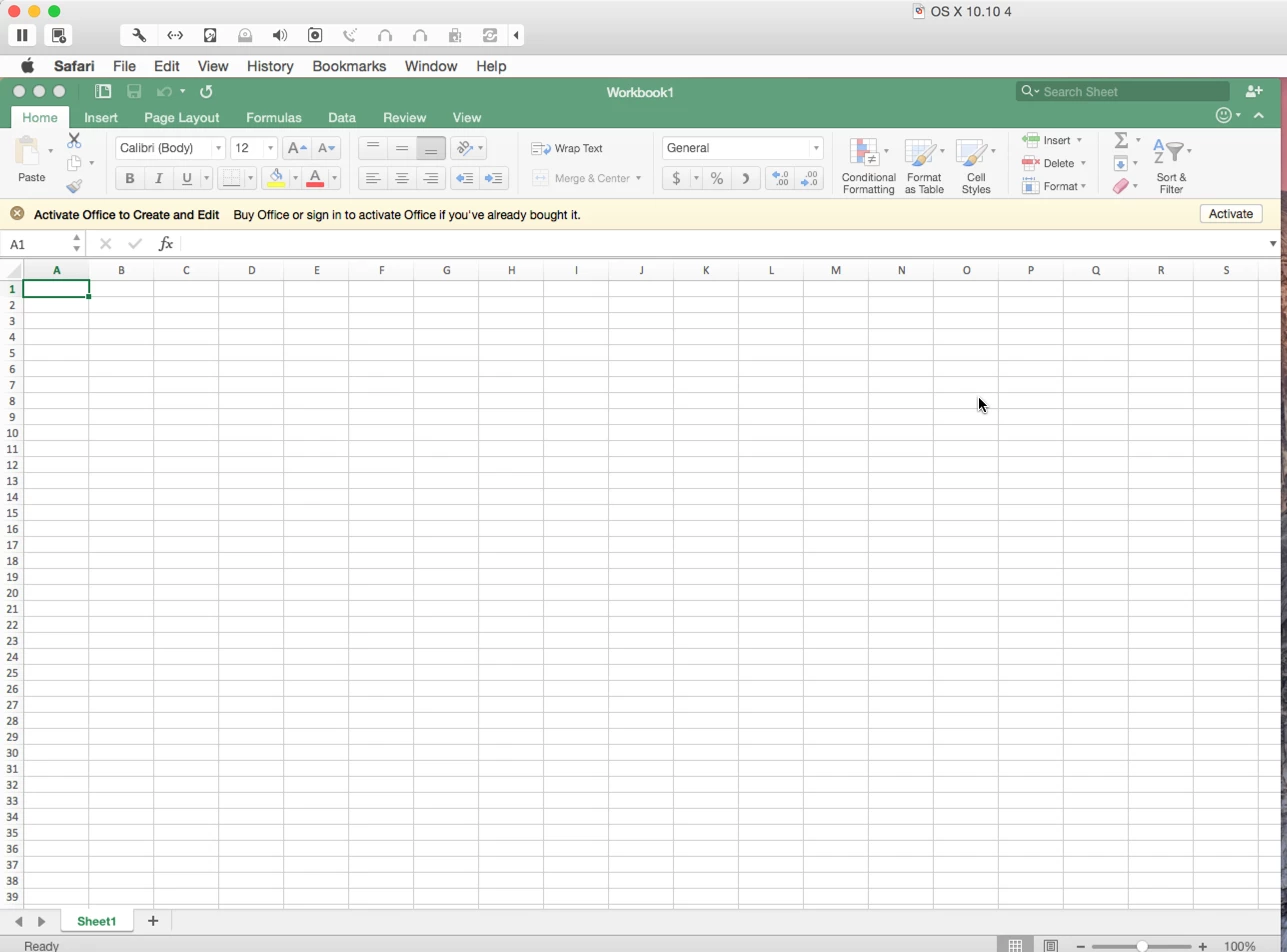
I am getting prompted for activating anyone else seeing this? Isn't this supposed to be volume licensed?


Forum|alt.badge.img+5
  • Contributor
  • August 5, 2015

i am getting the same.

really can't have that on my frozen lab machines...


emily
Forum|alt.badge.img+26
  • Author
  • Hall of Fame
  • August 5, 2015

Are you installing yourself or deploying to a computer without a user logged in? We've been talking about it in the macadmins Slack…


Forum|alt.badge.img+26
  • Honored Contributor
  • August 5, 2015

When opening each app, there is a prompt to sign in with an account or click on the "skip". The only one that doesn't offer a skip is the OneNote app. I believe it's because OneNote will only save to cloud, OneDrive, or sharepoint servers.

Our desire is to set it to "skip" past that for all of our users until if or when we change over to Office365 licenses.


Forum|alt.badge.img+15
  • Contributor
  • August 5, 2015

if you skip it it is not usable for anything exept view only


Forum|alt.badge.img+26
  • Honored Contributor
  • August 5, 2015

@RogerUL You may need to talk to your MS rep to find out why that is taking place.

The volume pkg I got today is working without any activation. Installed on a recently build device that still has Office 2011 on it.

Any chance you had the preview on this same virtual mac session?


emily
Forum|alt.badge.img+26
  • Author
  • Hall of Fame
  • August 5, 2015

It depends on how you're installing the apps. If you install for yourself, logged in as you, the licensing works fine. On deployment, the license files gets eaten. You'll want to manually copy over the license file. @rtrouton has documented a good workflow for this on his blog, and it looks like it still works with this new version.


Forum|alt.badge.img+15
  • Contributor
  • August 5, 2015

@emilykausalik yeah I just noticed that. It also works if office 2011 is installed


Forum|alt.badge.img+5
  • Contributor
  • August 5, 2015

logging in takes away an office 365 license for the user too (meaning 1 of 5 available installs). this is a huge no no for us with almost 150 frozen lab machines across our campus. i don't even have a way to skip the login window.


Forum|alt.badge.img+18
  • Contributor
  • August 5, 2015

I was able to handle the license file pretty easily by echoing out a copy of the /Library/Preferences/com.microsoft.office.licensingV2.plist file with a script. I run that after the app is installed and updated.


Forum|alt.badge.img+5
  • Contributor
  • August 6, 2015

So, I'm using the Microsoft_Office_2016_Volume_Installer.pkg which is not the o365 online version but the VLSC volume license. I have two machines, both bound to AD and logged in as UserA. No Office was ever installed on those machines.

On machine 1, I install Office 2016 by double clicking the Microsoft_Office_2016_Volume_Installer.pkg and completing the install. Word launches automatically but I just close that window which also quits Word. I log out and log in as UserB. Once logged in I get the same Word "What's New in Word" wizard, I click "Get started", click "Continue" and click "Start Using Word". Next Microsoft AU appears but I cancel that and never see a Sign In prompt. On that machine I see the /Library/Preferences/com.microsoft.office.licensingV2.plist with data, sequence and validate. Not sure what that means at this time but it's there and Office seems to be activated properly without unsing any o365 "credits".

On machine 2, I install Office 2016 using "sudo installer -pkg Microsoft_Office_2016_Volume_Installer.pkg -target /". When finished, Word doesn't launch, there is no /Library/Preferences/com.microsoft.office.licensingV2.plist and I log out anyway. I log in as UserB, launch Word, get the "What's New in Word", click "Get started" and there is no Skip. The only option is to "Sign in" which I can't do because I don't have any o365 accounts. There is no "/Library/Preferences/com.microsoft.office.licensingV2.plist" om that machine and I'm at a dead end.

I'm going top open a premier case for this issue but is anybody runs into the same, it might not be your fault.

To be continued...


Forum|alt.badge.img+18
  • Contributor
  • August 6, 2015

Grab the licensing file from machine 1, and package it in Composer or write a script that echoes that file out to its original location. After you install Office via Casper or another method where the license file isn't created, install that package or run that script and you're golden.

This license file problem has been around in various incarnations for several years.


Forum|alt.badge.img+33
  • Hall of Fame
  • August 7, 2015

I've got a post on packaging Office 2016 which addresses the problem of the volume license going missing. It's available via the link below:

https://derflounder.wordpress.com/2015/08/05/creating-an-office-2016-15-12-3-installer/


Forum|alt.badge.img+5
  • Contributor
  • August 7, 2015

Well, I have opened case with Microsoft to get this fixed. It doesn't really matter though because the work around is working really well. It works so well actually that even the 365 installer from portal.office.com (which is 15.12.3) can be "activated" using this method. No more install and update task, just install and copy the license file.


Forum|alt.badge.img+14
  • Contributor
  • August 24, 2015

New updated (v15.13.3) Microsoft_Office_2016_Volume_Installer in VLSC.