Solved

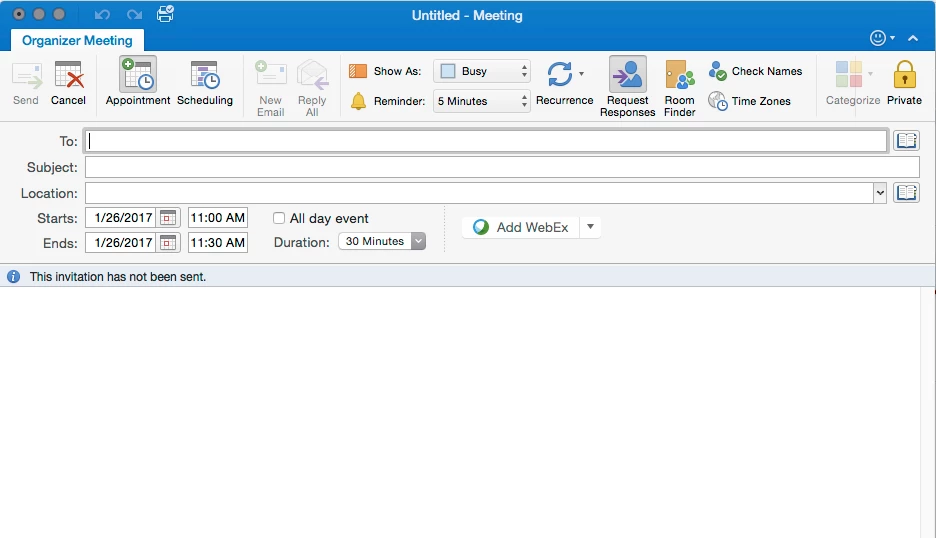
Microsoft Outlook 15.30.17010700 Categorize Option Greyed out when creating meetings

  • January 26, 2017
  • 4 replies
  • 47 views

Forum|alt.badge.img+13


When creating a meeting, the categorize button is greyed out. It can be changed after the meeting is created but not during. Every computer that is upgraded to this version has the option greyed out. Has anyone else seen or can anyone else confirm this?

Best answer by garybarlow

It's a known issue at Microsoft...

ISSUE

When creating a new calendar event or appointment in Outlook 2016 for Mac version 15.30, you are unable to categorize it and the Categorize icon appears grayed out.

STATUS: WORKAROUND

We are working on a fix estimated for the next release. As a temporary workaround, you can save the calendar item without categorizing it and then reopen it again. The Categorize icon should be enabled.

4 replies

Forum|alt.badge.img+3
  • New Contributor
  • Answer
  • January 26, 2017

It's a known issue at Microsoft...

ISSUE

When creating a new calendar event or appointment in Outlook 2016 for Mac version 15.30, you are unable to categorize it and the Categorize icon appears grayed out.

STATUS: WORKAROUND

We are working on a fix estimated for the next release. As a temporary workaround, you can save the calendar item without categorizing it and then reopen it again. The Categorize icon should be enabled.


Forum|alt.badge.img+13
  • Author
  • Valued Contributor
  • January 26, 2017

Thank you Gary,

May I ask where did you found that it is a known issue?


Forum|alt.badge.img+3
  • New Contributor
  • January 26, 2017

they have a "Solutions to known issues" page, handy to keep an eye on it.
[https://support.office.com/en-gb/article/Fixes-or-workarounds-for-recent-Office-issues-af8728b5-ec64-4359-812d-264c6907ea75?ui=en-US&rs=en-GB&ad=GB](link URL)


Forum|alt.badge.img+13
  • Author
  • Valued Contributor
  • January 26, 2017

Thanks Gary.