I know I'm late to the party but we just got our first MacBook Air (2018) and I woefully discovered that it ships with Mojave pre-installed and cannot be downgraded to High Sierra. I'm not even close to being ready for Mojave in our environment, but I pushed forward anyway. When I logged in for the first time as the AD user who will be using this computer, I got errors saying that the Library needed to be repaired. The errors kept popping up repeatedly until I hit cancel. After I got to the desktop, I went to the user's home folder and discovered that the Documents and Downloads folders had the red minus badge on them. I looked inside the Library folder and found several folders with the same badge on them. When I looked at the permissions, they looked like this: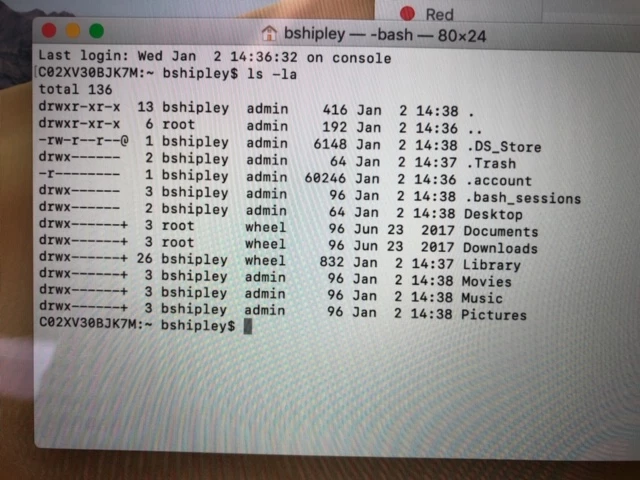
... and similarly within the Library folder. I manually changed the ownership to the user and moved on. This morning I decided to look in /System/Library/User Template/ to see what might be going on in there and I discovered that ALL of the templates are missing the Documents and Downloads folders.
bash-3.2# cd English.lproj/
bash-3.2# ls -la
total 0
drwxr-xr-x   9 root  wheel   288 Aug 17 19:59 .
drwx------  42 root  wheel  1344 Oct 27 00:11 ..
-rw-------   1 root  wheel     3 Jun 23  2017 .CFUserTextEncoding
drwx------+  3 root  wheel    96 Jun 26  2017 Desktop
drwx------+ 21 root  wheel   672 Jan  2 07:56 Library
drwx------+  3 root  wheel    96 Jun 26  2017 Movies
drwx------+  3 root  wheel    96 Jun 26  2017 Music
drwx------+  3 root  wheel    96 Jun 26  2017 Pictures
drwxr-xr-x+  4 root  wheel   128 Jun 23  2017 Public
bash-3.2# cd ..
bash-3.2# cd German.lproj/
bash-3.2# ls -la
total 0
drwxr-xr-x   9 root  wheel   288 Jun  9  2017 .
drwx------  42 root  wheel  1344 Oct 27 00:11 ..
-rw-------   1 root  wheel     3 Feb  1  2005 .CFUserTextEncoding
drwx------+  3 root  wheel    96 Jun  9  2017 Desktop
drwx------+ 21 root  wheel   672 Jan  2 07:56 Library
drwx------+  3 root  wheel    96 Jun  9  2017 Movies
drwx------+  3 root  wheel    96 Jun  9  2017 Music
drwx------+  3 root  wheel    96 Jun  9  2017 Pictures
drwxr-xr-x+  4 root  wheel   128 Jun  9  2017 Public
I did not get these errors or experience this weirdness when I logged in as the local admin account that was created by the PreStage Enrollment. And I am totally bewildered by the 2017 time stamp on all the template folders.
This Mac is in DEP, and I have gone through all my Policies to make sure there isn't some oddball .dmg package that's deleting those folders or setting weird permissions.
Is this normal for Mojave? I know there has been discussion about not using FUT for packages, but this happened upon the very first login of an AD user. The only items I have set to add to the user template are browser bookmarks for Safari and Firefox - items that don't even touch Documents and Downloads.