Solved

Monterey update

  • October 13, 2021
  • 10 replies
  • 66 views

Forum|alt.badge.img+5

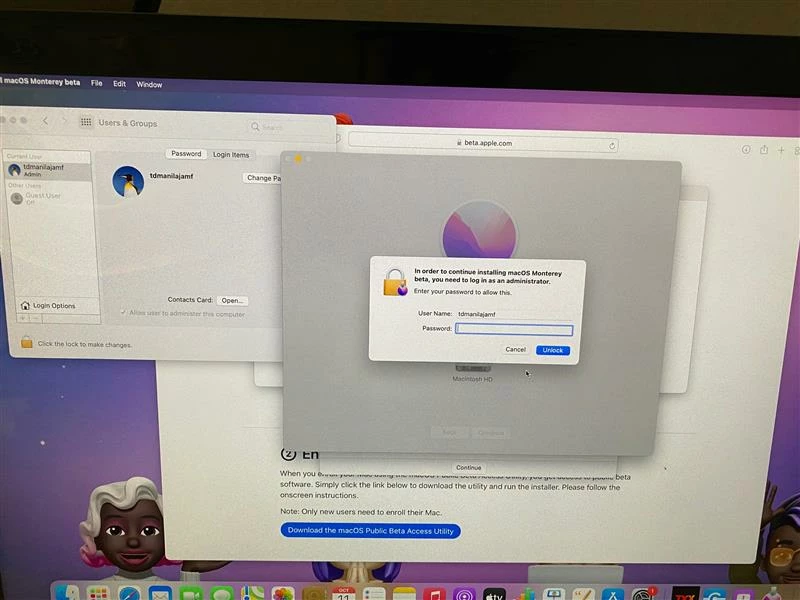
Hello Team, I would like to seek your assistance, as we all know Monterey is in coming and we would like to roll out the upgrade smoothly for end users. However, there's this pop up admin credentials that we have been facing and we just can't give the admin password with end users, question is, is there any script or policy that disable or bypass the admin credential while doing the upgrade? Your response would be a big help from us. Thank you.
 

Best answer by sdagley

@sdagley do you have it set up (Big Sur) on your Jamf System?  Can you send a screenshot of your deployment or supply your steps?


@sgiesbrecht I can't upload screenshots, but it's pretty straightforward. Just follow https://github.com/grahampugh/erase-install/wiki/8.-Use-in-Jamf-Pro


10 replies

sdagley
Forum|alt.badge.img+25
  • Jamf Heroes
  • October 13, 2021

@TDManila You might consider using a Self Service process to install Big Sur rather than having users run the Install macOS Monterey installer directly. The https://github.com/grahampugh/erase-install script (the erase part is optional, and it does support in-place upgrades) can be run from Self Service, and for Intel based Macs will not prompt the user for admin credentials. M1 Macs however do require admin credentials (technically the volume owner's credentials) and there is currently no mechanism to avoid that.


Forum|alt.badge.img+10
  • Valued Contributor
  • October 13, 2021

@sdagley do you have it set up (Big Sur) on your Jamf System?  Can you send a screenshot of your deployment or supply your steps?


Forum|alt.badge.img+3
  • New Contributor
  • October 19, 2021

As @sdagley pointed out, I have also implemented the erase-install script in my environment. It's eliminated every headache I've had with performing macOS updates! Our users just needs to perform one-click in self-service and they can walk away for an hour or two (depending on their internet connection). 


sdagley
Forum|alt.badge.img+25
  • Jamf Heroes
  • Answer
  • October 20, 2021

@sdagley do you have it set up (Big Sur) on your Jamf System?  Can you send a screenshot of your deployment or supply your steps?


@sgiesbrecht I can't upload screenshots, but it's pretty straightforward. Just follow https://github.com/grahampugh/erase-install/wiki/8.-Use-in-Jamf-Pro


FutureFacinLuke
Forum|alt.badge.img+8
  • Valued Contributor
  • November 11, 2021

@sdagley Thanks for this, really smoothed out the Monterey upgrade process for my users.


JDaher
Forum|alt.badge.img+9
  • Contributor
  • February 3, 2022

Hello,

I am testing this process and it's worked well for three Intel machines, but it fails on one with the Apple Silicon chip.

This is the command in Files and Processes: /Library/Management/erase-install/erase-install.sh --force-curl --reinstall

This is the error in Jamf logs:

Preparing: 100.0% An error occurred preparing the update. [erase-install] 'Self Service' ended [erase-install] 'caffeinate' ended /Library/Management/erase-install/erase-install.sh: line 945: 4663 Terminated: 15 /usr/bin/caffeinate -dimsu -w $pid [erase-install] 'jamfHelper' ended /Library/Management/erase-install/erase-install.sh: line 724: 5090 Terminated: 15 "$jamfHelper" -windowType $window_type -title "${!dialog_reinstall_title}" -heading "${!dialog_reinstall_heading}" -description "${!dialog_reinstall_desc}" -icon "$dialog_reinstall_icon"

Anybody else has seen this? 

Thank you


FutureFacinLuke
Forum|alt.badge.img+8

Hello,

I am testing this process and it's worked well for three Intel machines, but it fails on one with the Apple Silicon chip.

This is the command in Files and Processes: /Library/Management/erase-install/erase-install.sh --force-curl --reinstall

This is the error in Jamf logs:

Preparing: 100.0% An error occurred preparing the update. [erase-install] 'Self Service' ended [erase-install] 'caffeinate' ended /Library/Management/erase-install/erase-install.sh: line 945: 4663 Terminated: 15 /usr/bin/caffeinate -dimsu -w $pid [erase-install] 'jamfHelper' ended /Library/Management/erase-install/erase-install.sh: line 724: 5090 Terminated: 15 "$jamfHelper" -windowType $window_type -title "${!dialog_reinstall_title}" -heading "${!dialog_reinstall_heading}" -description "${!dialog_reinstall_desc}" -icon "$dialog_reinstall_icon"

Anybody else has seen this? 

Thank you


M1 Macs need to elevate the user to admin.

A workaround would may be to add a line to the script to elevate before the install kicks in, the user would need to authenticate

something like if logged in user is not a member of /Groups/Admin make the user a member of /Groups/Admin then run script && 


From a Round Table meeting with Apple I believe this is intentional on their part to encourage us admins to use the MDM methods they are adding to 12 and up for deploying updates.


JDaher
Forum|alt.badge.img+9
  • Contributor
  • February 4, 2022

M1 Macs need to elevate the user to admin.

A workaround would may be to add a line to the script to elevate before the install kicks in, the user would need to authenticate

something like if logged in user is not a member of /Groups/Admin make the user a member of /Groups/Admin then run script && 


From a Round Table meeting with Apple I believe this is intentional on their part to encourage us admins to use the MDM methods they are adding to 12 and up for deploying updates.


Thanks for your reply. I understand that, but in our case the logged-in user is an administrator. We do get prompted to enter administrator credentials, and we get as far as the screen-wide banner that pops up saying it's upgrading, but then it just reverts back to the desktop.

I did try to run the script adding the --fetch-full-installer option. We get a little bit further using this option. I can see in the logs that the installer downloaded, but it still returns this error: 

Preparing: 33.9%

Preparing: 34.5%

Preparing: 39.1%

Preparing: 43.7%

Preparing: 43.8%

Preparing: 100.0%

An error occurred preparing the update. [erase-install] 'Self Service' ended [erase-install] 'caffeinate' ended /Library/Management/erase-install/erase-install.sh: line 945: 37028 Terminated: 15 /usr/bin/caffeinate -dimsu -w $pid [erase-install] 'jamfHelper' ended /Library/Management/erase-install/erase-install.sh: line 724: 37101 Terminated: 15 "$jamfHelper" -windowType $window_type -title "${!dialog_reinstall_title}" -heading "${!dialog_reinstall_heading}" -description "${!dialog_reinstall_desc}" -icon "$dialog_reinstall_icon"


Forum|alt.badge.img+5
  • New Contributor
  • February 9, 2022

Thanks for your reply. I understand that, but in our case the logged-in user is an administrator. We do get prompted to enter administrator credentials, and we get as far as the screen-wide banner that pops up saying it's upgrading, but then it just reverts back to the desktop.

I did try to run the script adding the --fetch-full-installer option. We get a little bit further using this option. I can see in the logs that the installer downloaded, but it still returns this error: 

Preparing: 33.9%

Preparing: 34.5%

Preparing: 39.1%

Preparing: 43.7%

Preparing: 43.8%

Preparing: 100.0%

An error occurred preparing the update. [erase-install] 'Self Service' ended [erase-install] 'caffeinate' ended /Library/Management/erase-install/erase-install.sh: line 945: 37028 Terminated: 15 /usr/bin/caffeinate -dimsu -w $pid [erase-install] 'jamfHelper' ended /Library/Management/erase-install/erase-install.sh: line 724: 37101 Terminated: 15 "$jamfHelper" -windowType $window_type -title "${!dialog_reinstall_title}" -heading "${!dialog_reinstall_heading}" -description "${!dialog_reinstall_desc}" -icon "$dialog_reinstall_icon"


Did you find any resolution @JDaher ? We are seeing same errors. 


JDaher
Forum|alt.badge.img+9
  • Contributor
  • February 10, 2022

Did you find any resolution @JDaher ? We are seeing same errors. 


Hi,

No, I have not worked on this since last week. 

I posted the issue here: https://github.com/grahampugh/erase-install/discussions/200

I'll update here if I find a solution.