
Solved

Mount Network Share to Desktop

  • September 7, 2016
  • 8 replies
  • 53 views

Forum|alt.badge.img+14

Hi,

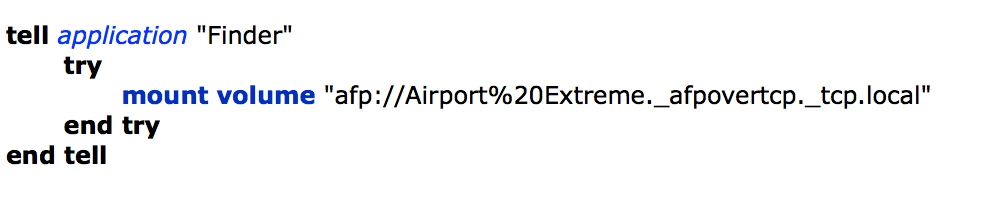
I wrote this simple script to mount out network drives. I got it to allow the user to mount to the finder but, then they have to drag their folder over to the desktop. Is there any way I can have the script check who is logged in and then mount their folder to their desktop?

Thanks, Jared
Best answer by BOBW

check out :

https://jamfnation.jamfsoftware.com/discussion.html?id=14262#responseChild86562

@davidacland script is what I use and it works fine

I do add a few lines though to grab current logged in user and make sure drive is mounted on desktop

#!/bin/bash

theuser=$(/usr/bin/who | awk '/console/{ print $1 }')
/usr/bin/osascript > /dev/null << EOT

        tell application "Finder" 
        activate
        mount volume "smb://zfssa1/home_staff/${theuser}/"
        end tell


EOT

echo $theuser
killall cfprefsd
defaults write com.apple.finder ShowMountedServersOnDesktop true
killall -HUP Finder

8 replies

Forum|alt.badge.img+8
  • Valued Contributor
  • Answer
  • September 7, 2016

check out :

https://jamfnation.jamfsoftware.com/discussion.html?id=14262#responseChild86562

@davidacland script is what I use and it works fine

I do add a few lines though to grab current logged in user and make sure drive is mounted on desktop

#!/bin/bash

theuser=$(/usr/bin/who | awk '/console/{ print $1 }')
/usr/bin/osascript > /dev/null << EOT

        tell application "Finder" 
        activate
        mount volume "smb://zfssa1/home_staff/${theuser}/"
        end tell


EOT

echo $theuser
killall cfprefsd
defaults write com.apple.finder ShowMountedServersOnDesktop true
killall -HUP Finder

Forum|alt.badge.img+14
  • Author
  • Valued Contributor
  • September 8, 2016

@BOBW Thank you very much. It worked perfectly.


Forum|alt.badge.img+6
  • Contributor
  • September 9, 2016

@BOBW that works, but it asked for a password and pre-fills the users "name" not their AD username.

Is there any way for the script to authenticate based on who's logged in?


Forum|alt.badge.img+8
  • Valued Contributor
  • September 9, 2016

@McKinnonTech yeah, im not 100% sure how to get the current AD user account, we work with local accounts therefore getting the use with above method works fine, maybe using dscl could get it for you.
There is also a script somewhere in JAMF Nation to use kerberos as authentication.

I will try to find them and let you know


Forum|alt.badge.img+4
  • New Contributor
  • September 9, 2016

You can use this command to mount the user's network drive:

sudo -u $3 /usr/local/jamf/bin/jamf mount -server SERVER.COMPANY.DOMAIN -share "SHARENAME" -type smb -visible

$3 is the variable user is stored in at login

if you're mounting an afp the type would be afp rather than smb.


Forum|alt.badge.img+14
  • Author
  • Valued Contributor
  • September 18, 2016

@McKinnonTech That is the same issue we are running into. We have out server set to scope a folder for each person who logins with their credentials. The issue. . . terminal opens and I added a command to close it but, it won't work because it attempts to close before the script was ran. I wish it could pull the users login credentials and auto mount.


Forum|alt.badge.img+6
  • Contributor
  • September 18, 2016

@jared_f I ended up using a script written by @Look over here (the second most recent on in the post):
https://jamfnation.jamfsoftware.com/discussion.html?id=15108

I'm running 10.11.16 and mounting a Synology SMB share, which creates/maps users home drives for you.

Maybe give that script in the post above a go with your set up.


Forum|alt.badge.img+14
  • Author
  • Valued Contributor
  • September 20, 2016

@McKinnonTech I will take a look. Thanks!