Question

MS Office 2016 Auto Updater

  • October 10, 2017
  • 42 replies
  • 107 views

Forum|alt.badge.img+6

What's up folks! Hate to bother everyone with this but we can't get this to work via Casper. Simple script to disable the Microsoft Auto Updater under the users profile. So that it's set to Manual:

#!/bin/sh
defaults write com.microsoft.autoupdate2 HowToCheck Manual

if we create the script and run it from the desktop, works. If we add it to Casper and create a policy to push it, doesn't work.

Any thoughts on why it's not working via Casper?

42 replies

bpavlov
Forum|alt.badge.img+18
  • Esteemed Contributor
  • October 10, 2017

That command is running as root instead of as the user when it comes from Jamf. You are probably better off doing this with a configuration profile to enforce the setting you want always.


Forum|alt.badge.img+6
  • Author
  • Contributor
  • October 10, 2017

Thanks @bpavlov! but we need something to push so it works on the fly. Kind of like when it's pushed via ARD. Can we not do that with a policy in Casper?


Forum|alt.badge.img+13
  • Honored Contributor
  • October 10, 2017

I just deleted autoupdate. I can't trust my users to perform updates without messing it up or calling me


RobertHammen
Forum|alt.badge.img+29
  • Esteemed Contributor
  • October 10, 2017

Your script would have to run as the user, and explicitly declare their homedir path

There are multiple examples of how to get the console user and assign it to a variable...

sudo -u $user /usr/bin/defaults write /Users/$user/Library/Preferences/com.microsoft.autoupdate2.plist HowToCheck Manual


Forum|alt.badge.img+16
  • Valued Contributor
  • October 10, 2017

@monaronyc What is the scenario where you would not want this enforced via config profile vs. setting this once via a script. When a client comes in scope it should get "pushed" pretty quickly to the client via APNS anyway. I'm not sure that running a policy would be all that much quicker.


Forum|alt.badge.img+6
  • Author
  • Contributor
  • October 11, 2017

@Kaltsas If a config profile is the way to go, we'd be more than happy to try it. Is there one out there we can grab and test?


Forum|alt.badge.img+16
  • Valued Contributor
  • October 11, 2017

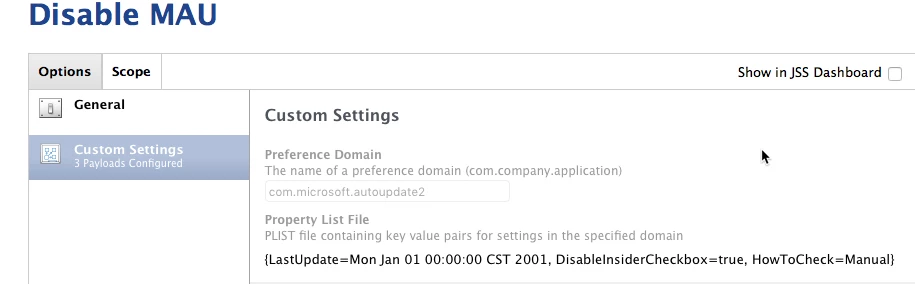
Make a config profile with custom settings. You can feed it the correct preference to override there.

The preference domain will be com.microsoft.autoupdate2

Here are the values I enforce the plist. In my experience if you don't have a LastUpdate value set it doesn't work ¯_(ツ)_/¯

{LastUpdate=Mon Jan 01 00:00:00 CST 2001, DisableInsiderCheckbox=true, HowToCheck=Manual}


talkingmoose
Forum|alt.badge.img+36
  • Community Manager
  • October 12, 2017

@Kaltsas, as of Microsoft AutoUpdate 3.8ish (I believe), it no longer needs that LastUpdate key.

This version added support for silent automatic downloads and installs and changed MAU's behavior to check every 12 hours instead of every 24 hours. Along with that it removed the need for the key. Having it there won't hurt a thing, though.


Forum|alt.badge.img+16
  • Valued Contributor
  • October 12, 2017

@talkingmoose

When your saying silent and automatic, it won't need user credentials then?
How do you enable, disable this?
I don't suppose there is a command line way of directly activating it?


Forum|alt.badge.img+8
  • Contributor
  • October 12, 2017

@Look To have MAU automatically download and install updates, add a key named HowToCheck with a value of AutomaticDownload to the domain com.microsoft.autoupdate2. No user credentials are required to install an update, but the user will get a prompt from MAU asking if they want to quit any running Office 2016 app needing an update, or if they want to defer until the app is quit.


talkingmoose
Forum|alt.badge.img+36
  • Community Manager
  • October 12, 2017

@Look, today Microsoft AutoUpdate (MAU) is at version 3.11 (thereabouts).

As of MAU 3.6, it no longer required admin credentials to install updates. It installs a privileged helper tool that runs with elevated privileges to do that for the user.

Fast forward to MAU 3.8. This version can silently check and download updates. Pair that with the privilege helper tool and now MAU can both silently download and install updates for Office applications that aren't running. If an app is running, then MAU will prompt the user to quit the app. If the user doesn't quit, MAU waits to install the next time the app is launched.

Fast forward again to MAU 3.9. This version can also update itself (the MAU app) without requiring user interaction.

Come Halloween, @pbowden has said we may have a MAU 4.0 beta, which will have command line support.


Forum|alt.badge.img+16
  • Valued Contributor
  • October 12, 2017

@StoneMagnet I am guessing as there is no global preference for this updates only occur when a user is logged in correct?


Forum|alt.badge.img+12
  • Valued Contributor
  • October 12, 2017

@StoneMagnet MAU 4.0 will support updates to Office 2016 apps, inc MAU even if there is no user logged-in (I know, because it's working in my lab right now!) .....through JAMF Pro of course!


Forum|alt.badge.img+16
  • Valued Contributor
  • October 12, 2017

Yeah @pbowden I have just kind of been hanging out for that to hit production release, I'm more interested in a controlled command triggered option which I believe it also supports.


Forum|alt.badge.img+12
  • Valued Contributor
  • October 12, 2017

@Look yup, that's correct, MAU 4.0 has a command-line interface that you can trigger from JAMF Pro, SSH, etc.


Forum|alt.badge.img+8
  • Contributor
  • October 13, 2017

@pbowden That will be a welcome update, I look forward to MAU 4.0 being released into the wild.

P.S. Thanks for macadmins.software, it's been a great resource.


Forum|alt.badge.img+16
  • Valued Contributor
  • October 13, 2017

@talkingmoose That's great news! We've had the same profile in place for some time (why mess with it if it works). I have been testing the automatic update update process, we'll remove the vestigial LastUpdate when/if we decide to move forward with enforcing AutomaticDownload.


Forum|alt.badge.img+8
  • Valued Contributor
  • March 6, 2018

@pbowden is there any idea when MAU4 will be released ?


dpertschi
Forum|alt.badge.img+19
  • Contributor
  • March 6, 2018

@HNTIT they're targeting April 10 for initial release. Check out beta 2, it's gonna be sweet. Add to that, ultra thin delta updates at ~12MB per app, hell yeah!


Forum|alt.badge.img+8
  • Valued Contributor
  • April 11, 2018

@dpertschi They have gone to 3.18.

Is there any update as to why it was delayed and where we can find out more.

Really need this new version, and while I am testing the Beta on a few machines, really need this to go live.


Forum|alt.badge.img+12
  • Valued Contributor
  • April 11, 2018

@HNTIT MAU 3.18 includes command-line support. We had some internal build issues that blocked us from changing the version to 4.0 this month, but all the command-line functionality is live in 3.18.
There were some issues with Ultrathin updates, so we're not going to ship these this month.

See https://docs.microsoft.com/DeployOffice/mac/update-office-for-mac-using-msupdate for more info.

Thanks! Paul.


Forum|alt.badge.img+7
  • Contributor
  • April 12, 2018

@pbowden Thanks for the update about the command line features of msupdate. I'm testing it and ran into an issue. Hopefully you can point out what I am doing wrong.

I ran the following command and it listed updates available.

ELUOTSTAIR01:MacOS eluo$ ./msupdate --list
Checking for updates...
Updates available:
  ONMC15  OneNote Update 16.12.0 (18041000)
  MSWD15  Word Update 16.12.0 (18041000)
  XCEL15  Excel Update 16.12.0 (18041000)
  PPT315  PowerPoint Update 16.12.0 (18041000)
  OPIM15  Outlook Update 16.12.0 (18041000)

But when running the following command, it failed to update

ELUOTSTAIR01:MacOS eluo$ ./msupdate --install --apps PPT315 --version 16.12.18041000
Detecting and downloading updates...
No updates applied

Strangely, the update for the older version works

ELUOTSTAIR01:MacOS eluo$ ./msupdate --install --apps ppt315 --version 16.10.18021001
Detecting and downloading updates...
Downloaded updates:
  PPT315

Forum|alt.badge.img+12
  • Valued Contributor
  • April 12, 2018

@EdLuo Thanks for the feedback! Sorry, that was a config error on the back-end. That command should now work.

Paul.


Forum|alt.badge.img+8
  • Valued Contributor
  • April 13, 2018

I also have an issue.

If I run ./msupdate --list, I get No Updates Available (After a mountain of on screen text, is there any way of reducing the output to screen ?)

However I have some products that DO need updates.

I think we are seeing the same issue that the older versions suffered from. Until an application has been run for the first time, it never reports needing updates.

I want the entire office suite to be fully up to date, even though a large portion of our estate never ever use OneNote, I want the App to be updated, and I don't want to manually visit every machine, or ask users to open App's they don't normally use. I just want them 100% up to date when they finally do use them.

I have machines that have never had OneNote used and therefore still on Version 15 !!! and when they staff member leaves and passes the machine to someone else, they fire up OneNote for the first time and complain about the older version.

Is there any way to centrally flag all Apps in the suite to receive updates ?


Forum|alt.badge.img+7
  • Contributor
  • April 13, 2018

@HNTIT

If I run ./msupdate --list, I get No Updates Available
I want the entire office suite to be fully up to date, even though a large portion of our estate never ever use OneNote, I want the App to be updated, and I don't want to manually visit every machine, or ask users to open App's they don't normally use. I just want them 100% up to date when they finally do use them. I have machines that have never had OneNote used and therefore still on Version 15 !!! and when they staff member leaves and passes the machine to someone else, they fire up OneNote for the first time and complain about the older version. Is there any way to centrally flag all Apps in the suite to receive updates ?

You may need to create a Configuration Profiles, Custom Settings to update apps that was never launched. Download the payload here for the Custom Settings

Also, take a look at the free training course for msupdate - Microsoft AutoUpdate Command-Line Tool. This should help with your question above.

After a mountain of on screen text, is there any way of reducing the output to screen ?

I get that too but only from viewing the results through the jamf logs.