Question

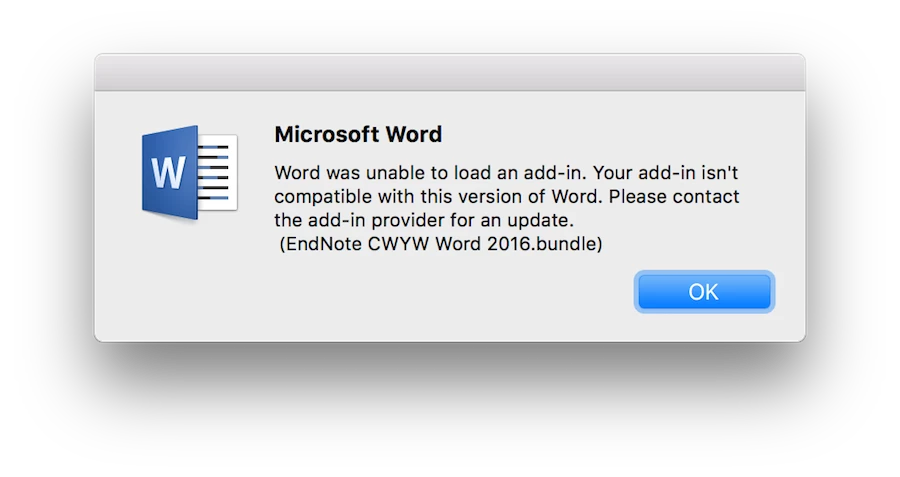
MS Word 2016 16.9 fails to load EndNote X8.1 add-in

  • January 18, 2018
  • 13 replies
  • 67 views

Forum|alt.badge.img+5

FYI, Appears to be an incompatibility--the 16.9 updated Microsoft Office Word 2016 willl not load the EndNote x8.1 Build 12930 add-in. The issue has been reported to Clarivate Analytics.

13 replies

Forum|alt.badge.img+5
  • Author
  • Contributor
  • January 18, 2018

Ahh! Didn't see their support document which acknowledges the incompatibility:

[https://support.clarivate.com/Endnote/s/article/EndNote-Word-2016-Mac-version-16-Compatibility?language=en_US](link URL)

We will be releasing an update shortly to address Word 2016 version 16.xx compatibility for EndNote X8. At this time, no production release of EndNote is compatible with the 16.xx release.

Forum|alt.badge.img+17
  • Valued Contributor
  • January 18, 2018

I should note I ran into this as well. I had to revert Word and disable updates on the affected machine.


Forum|alt.badge.img+10
  • Valued Contributor
  • January 22, 2018

Thank you for posting this information. So you know, the same problem occurs with EndNote X7.x if Office 2016 is updated to the 16.x version. With 15.41 CWYW plugin still works.

Thanks,
AJ


Forum|alt.badge.img
  • New Contributor
  • January 22, 2018

Hi.

Having the same problem and had to revert Word (to a earlier version). /Pjoter


Forum|alt.badge.img+1

I'm having the same issue. How did you revert the update?
Thank you in advance.


Forum|alt.badge.img+1

How did you revert the Word update?


Forum|alt.badge.img
  • New Contributor
  • January 22, 2018

You don't happen to have a guide on how to revert an old office version on mac? Only found guidlines for doing it on a windows machine.


Forum|alt.badge.img+5
  • Author
  • Contributor
  • January 22, 2018

@paulee The only way I know is to uninstall then reinstall, a somewhat inconvenient process for the user unfortunately. A new issue being reported on the Microsoft forums:

[https://social.technet.microsoft.com/Forums/office/en-US/2755a54f-357c-42bb-9184-6ef55798dfb1/excel-mac-169-upgrade-significant-lag-when-scrolling-or-pasting-via-cursor-keys?forum=excel](link URL)

I'm on the Insider Slow stream of Office for Mac and received the 16.9 update this morning on 2 machines. This has absolutely killed the performance of Excel on both my 2017 MacBookPro (3.1Ghz i5) and 2015 iMac (3.5Ghz i5). My old MBP (2011!) is still running Excel 15.41 and has no problems whatsoever.

I personally have not seen this behavior on my test units.


Forum|alt.badge.img+16
  • Valued Contributor
  • January 23, 2018

You can enroll in the X8.2 Beta for a version that works, but hardly ideal for an enterprise solution...


Forum|alt.badge.img
  • New Contributor
  • January 23, 2018

EndNote Word 2016 Mac Version 16 Beta Solution has been released. I am sorry not to try yet. In this cite, the method to revert previous office version has also been described.
https://support.clarivate.com/Endnote/s/article/EndNote-Word-2016-Mac-version-16-Compatibility?language=en_US


Forum|alt.badge.img+5
  • Author
  • Contributor
  • January 23, 2018

FYI, production version of EndNote 8.2 update has been released to address this issue with Word 2016 16.9.

[http://endnote.com/downloads/available-updates](link URL)


Forum|alt.badge.img+26
  • Honored Contributor
  • January 23, 2018

It appears that X8.1 is able to download, install the update, and the expected result is that it is version X8.2.

Prior versions would go through the process of updating, but end the result was the update didn't change the version. The summary even said the update completed. The application would remain at X8.0. I've had to run the patcher from Terminal to get it to update correctly.


Forum|alt.badge.img+11
  • Valued Contributor
  • February 13, 2018

There is a later update available:

For EndNote X8.0, X8.0.1 and X8.1:

Download the EndNote X8.2 cumulative update here (http://download.endnote.com/updates/18.0/EndNoteX82UpdateInstaller.zip).
Quit EndNote and run the downloaded file.
The next time you open EndNote, go to the EndNote X8 Menu and choose "About EndNote".
If this reads EndNote X8.2 (Bld 13302) you have the latest version of EndNote installed.