Question

Name change on Jamf pro

  • January 10, 2020
  • 20 replies
  • 68 views

danlaw777
Forum|alt.badge.img+17

If i change the name of the computer on the dashboard, will that propagate down to the machine in question? I looked thru several old posts pre 2016, and it looks like this was a change request. was it ever done?

20 replies

Hugonaut
Forum|alt.badge.img+15
  • Esteemed Contributor
  • 574 replies
  • January 10, 2020

1/13/20 - Edit: My response is not completely true, @jimmy.vance from jamf posted a solution below that does exactly what danlaw777 was looking for.


Original Post: No, it is the opposite.

Whatever the computer name is at the Computer level, it will reflect in Jamf.

For example If you changed the computer name in the Jamf Dashboard and it is different than what the computer is actually named, at the next check-in the Jamf Dashboard will revert to & or reflect the Computers Name.

You need to change the name of the computer at the computer level.


danlaw777
Forum|alt.badge.img+17
  • Author
  • Valued Contributor
  • 166 replies
  • January 10, 2020

I just found that out, i got impatient and named a mac with 2 different names and the 1 that was local took control.

now i just have to figure out a good way to write a script that will rename them .


Hugonaut
Forum|alt.badge.img+15
  • Esteemed Contributor
  • 574 replies
  • January 10, 2020

@danlaw777 you can start with this, it's all you need. the sudo jamf recon at the end of the script will update jamf after the computers renamed so it reflects the name change straight away

#!/bin/bash

ComputerName="NameHere"

scutil --set HostName $ComputerName
scutil --set LocalHostName $ComputerName
scutil --set ComputerName $ComputerName

sudo jamf recon

danlaw777
Forum|alt.badge.img+17
  • Author
  • Valued Contributor
  • 166 replies
  • January 10, 2020

does this prompt for end user input?


Hugonaut
Forum|alt.badge.img+15
  • Esteemed Contributor
  • 574 replies
  • January 10, 2020

No, it does not, are you seeking a user input text box for renaming?


Hugonaut
Forum|alt.badge.img+15
  • Esteemed Contributor
  • 574 replies
  • January 10, 2020

@danlaw777 heres a small applescript to get the job done

#!/usr/bin/osascript

set computername to text returned of (display dialog "Please type Computer Name" default answer "")

do shell script "sudo scutil --set HostName " & quoted form of computername

do shell script "sudo scutil --set LocalHostName " & quoted form of computername

do shell script "sudo scutil --set ComputerName " & quoted form of computername

do shell script "sudo jamf recon"

danlaw777
Forum|alt.badge.img+17
  • Author
  • Valued Contributor
  • 166 replies
  • January 10, 2020

im hoping to have minimal user input. my goal would be: greetings, please input your 3 character location code: XXX
then the script takes that codeand adds the serial number at the end
ie: xxx-ewjfnwfnwen

once thats done run recon to update jamfpro


Hugonaut
Forum|alt.badge.img+15
  • Esteemed Contributor
  • 574 replies
  • January 10, 2020

this will do it @danlaw777

#!/usr/bin/osascript

set locationcode to text returned of (display dialog "Please input your 3 character location code." default answer "" with title ("Employee Location Code") with icon alias (POSIX file "/System/Library/CoreServices/CoreTypes.bundle/Contents/Resources/BookmarkIcon.icns") buttons {"Continue"} default button "Continue")

set serialnumber to do shell script "system_profiler SPHardwareDataType|grep 'Serial Number' -m1|cut -d: -f2|cut -c 2-13"

do shell script "scutil --set HostName " & quoted form of (locationcode & "-" & serialnumber)

do shell script "scutil --set LocalHostName " & quoted form of (locationcode & "-" & serialnumber)

do shell script "scutil --set ComputerName " & quoted form of (locationcode & "-" & serialnumber)

do shell script "sudo jamf recon"

drtaru
Forum|alt.badge.img+12
  • Contributor
  • 28 replies
  • January 10, 2020

You can also lock the computer name via Jamf. If the Jamf binary sets the computer name it disallows the end user from changing it. I have modified Hugonauts script to make the change via jamf as well, which will prevent the name from being edited.

#!/usr/bin/osascript

set locationcode to text returned of (display dialog "Please input your 3 character location code." default answer "" with title ("Employee Location Code") with icon alias (POSIX file "/System/Library/CoreServices/CoreTypes.bundle/Contents/Resources/BookmarkIcon.icns") buttons {"Continue"} default button "Continue")

set serialnumber to do shell script "system_profiler SPHardwareDataType|grep 'Serial Number' -m1|cut -d: -f2|cut -c 2-13"

do shell script "scutil --set HostName " & quoted form of (locationcode & "-" & serialnumber)

do shell script "scutil --set LocalHostName " & quoted form of (locationcode & "-" & serialnumber)

do shell script "scutil --set ComputerName " & quoted form of (locationcode & "-" & serialnumber)

do shell script "sudo /usr/local/bin/jamf setComputerName -name" & quoted form of (locationcode & "-" & serialnumber)

do shell script "sudo jamf recon"

Hugonaut
Forum|alt.badge.img+15
  • Esteemed Contributor
  • 574 replies
  • January 10, 2020

i like that addition! very nice drtaru


danlaw777
Forum|alt.badge.img+17
  • Author
  • Valued Contributor
  • 166 replies
  • January 10, 2020

well, im not sure how i screwed it up, but when i run this, i dont get a prompt to insert the code, the only thing i see is that it runs, and then shows complete......


Forum|alt.badge.img+11
  • Employee
  • 1 reply
  • January 10, 2020

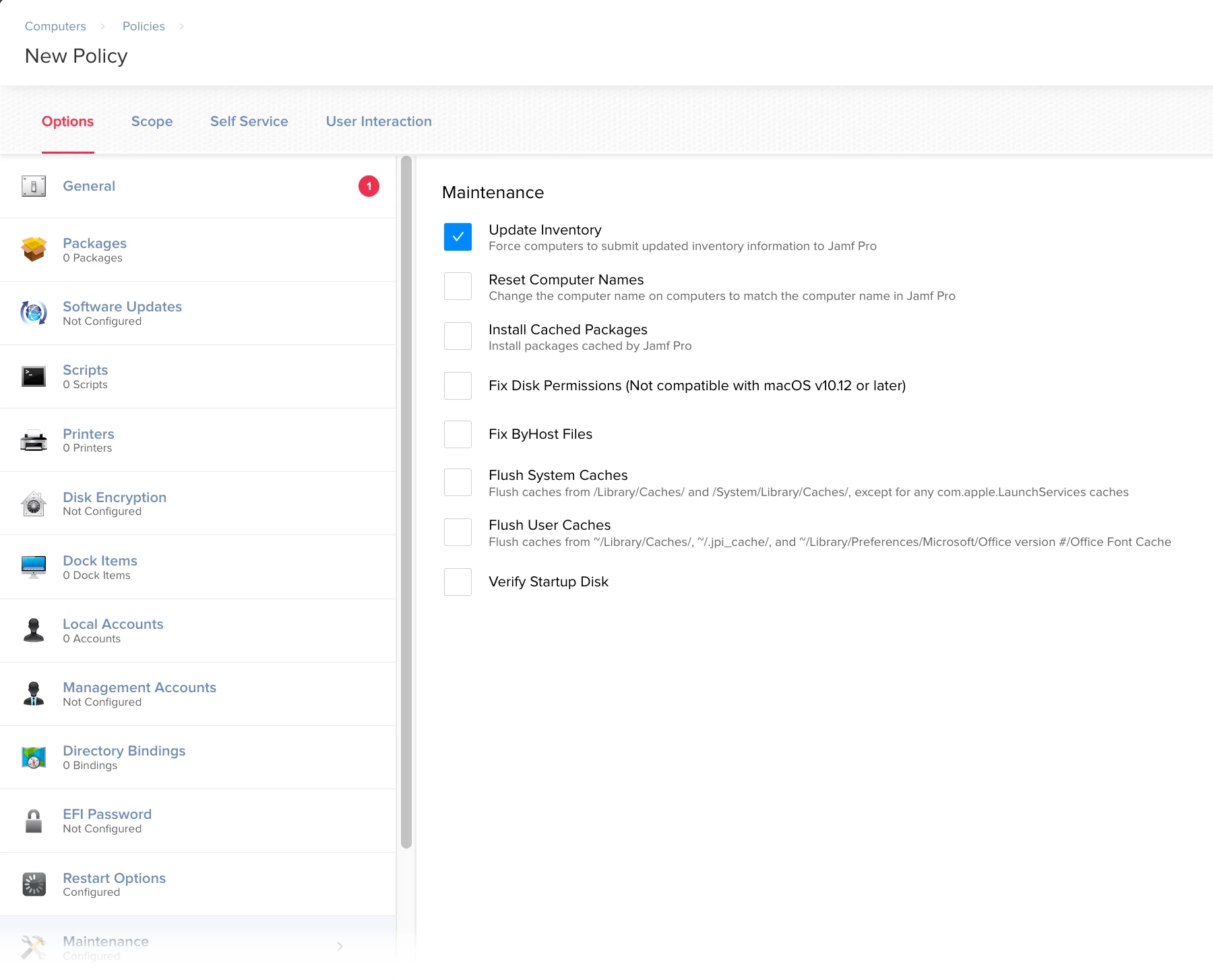
You can make use of the Reset Computer Names option in the Maintenance payload in Computer Policies. As stated, it will "Change the computer name on computers to match the computer name in Jamf Pro." Hope that helps!


danlaw777
Forum|alt.badge.img+17
  • Author
  • Valued Contributor
  • 166 replies
  • January 10, 2020

this was perfect, no interaction needed! thanks !


Hugonaut
Forum|alt.badge.img+15
  • Esteemed Contributor
  • 574 replies
  • January 13, 2020

haha & here we are making little interactive applescripts & jamf has it all done already in the gui +1 to Jamf. learn something new everyday.


danlaw777
Forum|alt.badge.img+17
  • Author
  • Valued Contributor
  • 166 replies
  • January 13, 2020

all it takes is for some new guy who doesnt know his A$$ from a whole in the wall to ask!


Forum|alt.badge.img+7
  • Contributor
  • 26 replies
  • January 13, 2020

You can also use the Jamf Remote app to change names via JSS without pushing any policies which probably utilises same maintenance script.

1> First rename the device in your JSS.
2> Open the Jamf Remote app > Computers tab > find your device and ensure it is ticked.
3> Advanced TAB > Maintenance, tick the FIX computer Names box
4> Click Go


rpayne
Forum|alt.badge.img+11
  • Contributor
  • 130 replies
  • January 13, 2020

We name all machines to their serial with the following script:

#!/bin/sh

#get serial number
serial=$(system_profiler SPHardwareDataType | awk '/Serial/ {print $4}')

# Set Hostname using variable created above
echo "Setting computer name to $serial locally..."
scutil --set HostName "$serial"
scutil --set LocalHostName "$serial"
scutil --set ComputerName "$serial"


exit 0

Forum|alt.badge.img+14
  • Valued Contributor
  • 345 replies
  • January 13, 2020

Just keep in mind that if the Mac is in active directory that this Reset Names feature will not rename it in AD.


danlaw777
Forum|alt.badge.img+17
  • Author
  • Valued Contributor
  • 166 replies
  • January 13, 2020

i do, fortunately, we aren't binding our macs to AD


scottb
Forum|alt.badge.img+18
  • Valued Contributor
  • 1287 replies
  • January 16, 2020

@rpayne - that's a great one for when a client has no clue what they want to do! Which is often, or when there is no LDAP, etc.

Thanks for the post.