Question

NetSUSLP Server 4.0.0 is now available

  • November 2, 2015
  • 29 replies
  • 193 views

Forum|alt.badge.img+9

We have put out a new version of the NetSUS Server. The source has been updated on GitHub and it is also available as both an OVA and an installer.

Added features:
- Renamed to NetBoot/SUS/LP (NetSUSLP) for reference to LDAP Proxy.
- Added El Capitan support for SUS.
- Added firewall functionality with port managing for running NetSUSLP services by
using app armor.
- Added ability to disabled WebAdmin interface.
- Added LDAP Proxy functionality with the use of slapd.
- Added GAWK installation for WebAdmin on Ubuntu operating systems.
- Added functionality to only enable services as needed.
- Added functionality to update Ubuntu apt-get repository to prevent failures on
service installation.
- Added certificate page to allow tomcat or slapd certificates, and configured an
installation to use a self-signed certificate.
- Changed NetBoot page to enable SMB for uploading a NetBoot file, and then disable it
when it is not in use.
- OVA updated to use 2GB of memory and hard drive space increased to use 300 GB of
hard drive space.

https://github.com/jamf/NetSUS/blob/master/README.md

Documentation can be found at:
http://content.jamfcloud.com/NetBootSUSLPServerUserGuide_v4.0.0.pdf


29 replies

Forum|alt.badge.img+7
  • Contributor
  • November 2, 2015

Yay! Glad to hear this. Hold my beer, diving into the docs now.


roiegat
Forum|alt.badge.img+16
  • Valued Contributor
  • November 2, 2015

Great job! I also noticed that SSH was on by default now...makes it easier to connect and work on it.


Forum|alt.badge.img+7
  • Contributor
  • November 2, 2015

Well that was underwhelming. I was hoping for more information on the LDAP proxy as I wasn't able to get a successful login in my environment. If anyone else has better luck that me with it, I'd love to hear about the config that worked for you.


Forum|alt.badge.img+4
  • Contributor
  • November 2, 2015

The bigger question is does this LDAP proxy work with JAMF Cloud? Our biggest hold back of going to the JAMF cloud is exposing LDAP externally. I am assuming this would step into that role but I want to be sure before getting too excited.


Forum|alt.badge.img+9
  • Author
  • Employee
  • November 2, 2015

Mattware, what issues are you running into trying to set up your environment. I didn't go into a lot of detail on the environment because of the different LDAP server types, I was able to test it with Microsoft Active Directory and see it work. So if you need more information on setting it up in Casper let me know.

Jubei as to whether or not it would work with JAMF Cloud, depending on how you are using it, it should handle some of those issues by allowing you to put this proxy server with internal and external networks so it can talk to the LDAP Server which is the internal network and offer a channel on the external network. So it may or may not fit your needs but it does allow some more options.

Steve


Forum|alt.badge.img+4
  • Contributor
  • November 2, 2015

@Steven.Strand Thx. I assumed that it could have two legs - 1 internal, 1 DMZ - but JAMF doesn't specify that in the instructions. MobileIron provides a similar appliance that you use to proxy LDAP requests to the MI cloud and I would love to leverage this for the JSS.


Forum|alt.badge.img+3
  • New Contributor
  • November 2, 2015

So if you have a 3.0 appliance and want to move to 4.0, is there some guidance? I don't manage the server end of things and will have to provide some info to that team. Thanks.


Forum|alt.badge.img+13
  • Valued Contributor
  • November 2, 2015

Interesting results so far.

Installed this OVA in our lab, added our proxy URL to the reposado prefs file, created a branch, did a sync - no other configuration changes. It seems like I've got a fairly complete catalog, but deprecated items are not deprecated, and current items ARE deprecated. Also, I have an entry at the top of the catalog listed as "may be incomplete".

So... not a great start.

Edit: Tried the sync a couple more times, deprecated items issue seemed to clear up, but I can't bulk-enable the updates. Selectively enabling some seems to work, but there are obviously too many to do this one at a time. Believe the catalog entry for some update is corrupted and causing the bulk enable to fail.


Forum|alt.badge.img+11
  • Valued Contributor
  • November 2, 2015

@kentmj Updated from 3.02 to 4.0 without any issues, just ran NetSUSLP_4.0.0.run and it updated over the top of the previous version.

So far all looks good.


Forum|alt.badge.img+3
  • New Contributor
  • November 2, 2015

@dmw3 - we have the appliance version, not the installed version.


Forum|alt.badge.img+9
  • Author
  • Employee
  • November 2, 2015

@kentmj All you have to do is ssh into your appliance, then you can run the .run file which will effectively upgrade your NetSUS Appliance.

Steve


Forum|alt.badge.img+7
  • Contributor
  • November 3, 2015

@Steven.Strand I'm attempting in Active Directory, running on 2008R2. I can get what I think is the correct details added but the various logins (domainusername, username@domain, username) don't seem to work and I'm not sure what it's expecting. I suppose there is probably a log for the LDAP proxy somewhere, right?

The other thing that may just be a lack of understanding on my part, is the difference between exposed distinguished name and the real distinguished name. I tried doing some research on differences and to look for examples that might help me get somewhere in my environment, but a google search for exposed distinguished name results in almost no actual results.


Forum|alt.badge.img+9
  • Author
  • Employee
  • November 4, 2015

@mattware So the exposed distinguished name would be the distinguished name that you would give to connect to access the LDAP Proxy. The exposed distinguished name could be literally anything you want.
DC=anything,DC=anything

The real distinguished name is the actual distinguished name that the LDAP Server sets up to use. This is the one that the LDAP Proxy uses to connect to the LDAP Server and is by far the most important one as it needs to be correct.

As to configuring your LDAP Proxy in the JSS you need to configure your connection manually as it is no longer a Microsoft Active Directory Server. It is now a proxy. So you configure it manually. The settings will be very similar to the bindings you would have had without the proxy with one very big difference. All of your bindings and Distinguished names are now using the exposed distinguished name, not the real distinguished name. So for example, in the JSS your Distinguished Username would be: CN=Administrator,CN=Users,DC=anything,DC=anything.

Hopefully this helps explain things a little.

Steve


thomasC
Forum|alt.badge.img+10
  • Contributor
  • November 10, 2015

@Steven.Strand trying to install on Dell hardware running RHEL 6.6. and it seems network interfaces other than eth0 have issues. Is NetSUS looking for eth0? Ran this on a test VM without issue but the VM is using eth0. Changing the interface name and device name on hardware has not worked...for me anyway.


Forum|alt.badge.img+12
  • Contributor
  • November 10, 2015

For software updates, does this provide anything above what Reposado/Margarita can do on it's own? I know this is based upon Reposado... I'd love to see an easier/better way to manage that tool.


L3nny5
Forum|alt.badge.img+8
  • Contributor
  • November 13, 2015

Hello,

I just set up the new NetSUS appliance from scratch (with OVA). Unfortunately I have the problem when I want to select new updates to add to distribution, that my selection doesn't get saved. After hitting "apply" it just deselects everything i selected.

Using reposado on the command line to select updates for distribution works just fine.

What could it be?

EDIT: In only happens for deselecting and if I use "Select All". If I just select 5-10 Updates it works fine. But only for adding updates to distribution. Not for deselecting.

EDIT2: Interesting fact: If I filter by year and only select all updates from 2015 and hit apply it works fine. If I do this year by year I get all updates activated. Seems like adding all updates at once seems to be to much for the applicance?!?

EDIT3: OK. Only works fine down to updates from 2012. Updates from 2011 and older can't be assigned to the branch list.


Forum|alt.badge.img+7
  • Contributor
  • November 13, 2015

@mpi-emae That's been a problem with the Netsus for the last couple versions. It's a php settings that needs to be changed to allow the Select All button to work. See here: https://github.com/jamf/NetSUS/pull/64


L3nny5
Forum|alt.badge.img+8
  • Contributor
  • November 16, 2015

@mattware Thanks! That did the job!


Forum|alt.badge.img+9
  • Contributor
  • November 19, 2015

@Kedgar,

The last time I checked, the official Margarita webapp does not include OotB requirements for authentication. Anyone who knows the URL of the web console has full control over the SUS, unless additional configuration is performed.

As for Reposado, the NetSUSLP does not really improve manageability of branches - I still perform a lot of my work via the CLI. However, the web console does allow you to view the description of each update in a much more practical fashion.


Forum|alt.badge.img
  • New Contributor
  • March 30, 2016

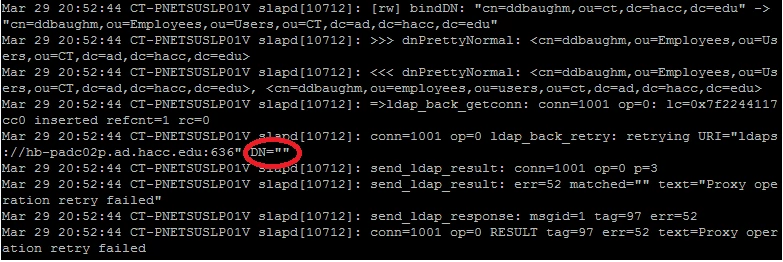
found that the application is dropping the DN during the conversion from Exposed DN to Real DN. Anyone else having this issue.


Forum|alt.badge.img+4
  • Contributor
  • April 26, 2016

Can't login with default accounts to setup. Is this no longer webadmin?

My bad: The first splash page that loaded mentioned that account and so I assumed it was the account for shell access. Found the right account in the readme guide. Thanks.


dan-snelson
Forum|alt.badge.img+30
  • Honored Contributor
  • April 26, 2016

@rmcdonald Whenever I can't login via the GUI, it's because the hard drive is full.

Can you access it via SSH and purge?

sudo /var/lib/reposado/repoutil --purge-product all-deprecated

Forum|alt.badge.img+8
  • Contributor
  • April 26, 2016

@rmcdonald I had the same issue and discovered that the NetSuS harddrive was full. Check to see how much free space you have left.


Forum|alt.badge.img+4
  • Contributor
  • April 27, 2016

I'm having issues connecting to the SUS. Not sure if it's the URL or what. I'm just using Casper Management settings for SUS and applying via Network Segments in the network organization section using the base URL with port 80.

The netboot is visible but AppStore just says it cannot connect to the SUS.

Update: Okay so for anyone else looking for a resolution it seems that in my particular case (OS X 10.11.x client) I had to use the default writes command to get it to find the SUS. Just adding the web address in Casper management doesn't seem to take even though that worked fine when pointing it to my xserve.

The command I used was

sudo defaults write /Library/Preferences/com.apple.SoftwareUpdate CatalogURL http://sus.mycompany.corp/content/catalogs/others/index-10.11-10.10-10.9-mountainlion-lion-snowleopard-leopard.merged-1_<branch_name>.sucatalog

Replacing the website with my own base url and the name of the branch I created. Although, when using the SUS settings in JSS I didn't use that URL I just put the base URL (http://sus.mycompany.corp) and used port 80. Perhaps that was where I was mistaken? Any who, if anyone else has thoughts I'd be happy to hear. Otherwise I guess I'll just have to push the command out via policy.


Forum|alt.badge.img+9
  • Valued Contributor
  • May 19, 2016

Hi folks, does the server need to be on the same subnet as the machines it will be netbooting and serving updates for? It doesn't specifically say so in the instructions, but I thought I'd ask.

Will it be OK on a different subnet with a FQDN? In my environment, all servers are on a different subnet from our client machines.