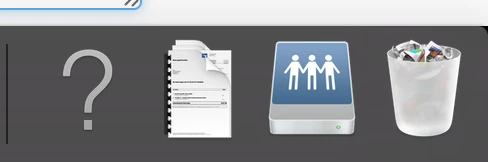
I am using an app I built in automator to mount the user home folder and a launchagent that runs it at login to make sure it is that user that is referenced for everything. It isn't very elegant and will not check if the mount is present if someone disconnects it. The mount part is written in Applescript and is part of the built in templates of automator, but here is the embedded script :
-------------------------------
--- User Information

-- Get the logged in users username
set loggedInUser to do shell script "whoami"

-- Get the Users account UniqueID
set accountType to do shell script "dscl . -read /Users/" & loggedInUser & " | grep UniqueID | cut -c 11-"

-- Get the nodeName from the Users account
set nodeName to do shell script "dscl . -read /Users/" & loggedInUser & " | awk '/^OriginalNodeName:/,/^Password:/' | head -2 | tail -1 | cut -c 2-"

-- Get the Users group membership from AD
set ADGroups to do shell script "dscl " & quoted form of nodeName & " -read /Users/" & loggedInUser & " | awk '/^dsAttrTypeNative:memberOf:/,/^dsAttrTypeNative:msExchHomeServerName:/'"

-- Get the Users AD Home Folder
set ADHome to do shell script "dscl " & quoted form of nodeName & " -read /Users/" & loggedInUser & "| grep SMBHome: | cut -c 10- | sed 's/\\\\/\\//g' "

-- Checks to see if account is an AD Account, if its not exit
if accountType is less than 1000 then
    tell me to quit
end if

--- Drives
--Home Folder -- Maps the drive specified in the profile field for the AD User continue if user has no profile path set
try

    mount volume "smb:" & ADHome

on error

end try

-- Restart the dock ---------
tell application "Dock"
    quit
end tell
and here is the launchagent:
<?xml version="1.0" encoding="UTF-8"?>
<!DOCTYPE plist PUBLIC "-//Apple//DTD PLIST 1.0//EN" "http://www.apple.com/DTDs/PropertyList-1.0.dtd">
<plist version="1.0">
<dict>
    <key>Label</key>
    <string>com.nethome.mount</string>
    <key>Program</key>
    <string>/Library/Application Support/JAMF/Repository/homefolder.app/Contents/MacOS/applet</string>
    <key>RunAtLoad</key>
    <true/>
</dict>
</plist>
I had to make sure that the built in AD plugin home folder mount was not part of the binding or I ended up with two dock items (one was a question mark) for the user network home folder. Note that this is installed in the root Library folder and not the user library. I am thinking a combination of this and your mount checking script might take you the direction you want to go.
Can someone make this pretty? :)