

I like to automate "All The Things". In order to do that, certain pieces of data need to be collected so as to make informed, logical decisions.
Part of my NoMAD rollout requires me to streamline my deployment process. In order to do that, I need to know which machines have a certain version of NoMAD Login+ and NoMAD Pro so I can install and update/upgrade accordingly.
I have written 5 unique Jamf Extension Attributes that provide me with the details I need in order to create a fully automated deployment and update/upgrade lifecycle for NoMAD Login+ and NoMAD Pro.
Once the Jamf Extension Attributes are properly configured, each device record, upon inventory collection (ie Recon), will provide the following details:
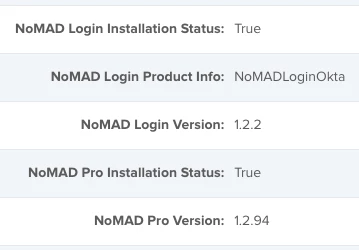
These details can be scoped against within Smart Groups, Advanced Searches, etc.
Without further ado, I give you my extension attributes in XML format, so you can upload directly into your Jamf instance.
NoMAD Login Installation Status.xml
<?xml version="1.0" encoding="UTF-8"?><extensionAttribute>
<displayName>NoMAD Login Installation Status</displayName>
<description/>
<dataType>string</dataType>
<scriptContentsMac>#!/bin/bash
# Jamf Extension Attribute to acquire NoMAD Login+ Installation Status
# NoMAD_Login_Installation_Status.sh
# Written by Caine Hörr
# Written on 2018-09-20
if [ -e "/Library/Security/SecurityAgentPlugins/NoMADLoginOkta.bundle" ]; then
/bin/echo "<result>True</result>"
else
/bin/echo "<result>False</result>"
fi
exit
</scriptContentsMac>
</extensionAttribute>NoMAD Login Product Info.xml
<?xml version="1.0" encoding="UTF-8"?><extensionAttribute>
<displayName>NoMAD Login Product Info</displayName>
<description/>
<dataType>string</dataType>
<scriptContentsMac>#!/bin/bash
# Jamf Extension Attribute to aquire NoMAD Login+ Product Info
# NoMAD_Login_Product_Info.sh
# Written by Caine Hörr
# Written on 2018-09-20
if [ -e "/Library/Security/SecurityAgentPlugins/NoMADLoginOkta.bundle" ]; then
productInfo=`/usr/bin/plutil -p /Library/Security/SecurityAgentPlugins/NoMADLoginOkta.bundle/Contents/Info.plist | /usr/bin/grep -i "CFBundleExecutable" | /usr/bin/awk '{ print $3 }' | /usr/bin/tr -d '"'`
/bin/echo "<result>$productInfo</result>"
else
/bin/echo "<result>N/A</result>"
fi
exit
</scriptContentsMac>
</extensionAttribute>NoMAD Login Version.xml
<?xml version="1.0" encoding="UTF-8"?><extensionAttribute>
<displayName>NoMAD Login Version</displayName>
<description/>
<dataType>string</dataType>
<scriptContentsMac>#!/bin/bash
# Jamf Extension Attribute to aquire NoMAD Login+ Version
# NoMAD_Login_Version.sh
# Written by Caine Hörr
# Written on 2018-09-20
if [ -e "/Library/Security/SecurityAgentPlugins/NoMADLoginOkta.bundle" ]; then
version=`/usr/bin/plutil -p /Library/Security/SecurityAgentPlugins/NoMADLoginOkta.bundle/Contents/Info.plist | /usr/bin/grep -i "CFBundleShortVersionString" | /usr/bin/awk '{ print $3 }' | /usr/bin/tr -d '"'`
/bin/echo "<result>$version</result>"
else
/bin/echo "<result>N/A</result>"
fi
exit
</scriptContentsMac>
</extensionAttribute>NoMAD Pro Installation Status.xml
<?xml version="1.0" encoding="UTF-8"?><extensionAttribute>
<displayName>NoMAD Pro Installation Status</displayName>
<description/>
<dataType>string</dataType>
<scriptContentsMac>#!/bin/bash
# Jamf Extension Attribute to acquire NoMAD Pro Installation Status
# NoMAD_Pro_Installation_Status.sh
# Written by Caine Hörr
# Written on 2018-06-04
if [ -e "/Applications/NoMAD Pro.app" ]; then
/bin/echo "<result>True</result>"
else
/bin/echo "<result>False</result>"
fi
exit
</scriptContentsMac>
</extensionAttribute>NoMAD Pro Version.xml
<?xml version="1.0" encoding="UTF-8"?><extensionAttribute>
<displayName>NoMAD Pro Version</displayName>
<description/>
<dataType>string</dataType>
<scriptContentsMac>#!/bin/bash
# Jamf Extension Attribute to aquire NoMAD Pro Version
# NoMAD_Pro_Version.sh
# Written by Caine Hörr
# Written on 2018-09-20
if [ -e "/Applications/NoMAD Pro.app" ]; then
version=`/usr/bin/plutil -p /Applications/NoMAD Pro.app/Contents/Info.plist | /usr/bin/grep -i "CFBundleShortVersionString" | /usr/bin/awk '{ print $3 }' | /usr/bin/tr -d '"'`
/bin/echo "<result>$version</result>"
else
/bin/echo "<result>N/A</result>"
fi
exit</scriptContentsMac>
</extensionAttribute>Enjoy!
For those who would just prefer the raw shell scripts without all the crazy Jamf Pro Extension Attribute xml markup, here you go...
NoMAD_Login_Installation_Status.sh
#!/bin/bash

# Jamf Extension Attribute to acquire NoMAD Login+ Installation Status
# NoMAD_Login_Installation_Status.sh

# Written by Caine Hörr
# Written on 2018-09-20

if [ -e "/Library/Security/SecurityAgentPlugins/NoMADLoginOkta.bundle" ]; then
  /bin/echo "<result>True</result>"
else
  /bin/echo "<result>False</result>"
fi

exit
NoMAD_Login_Product_Info.sh
#!/bin/bash

# Jamf Extension Attribute to aquire NoMAD Login+ Product Info
# NoMAD_Login_Product_Info.sh

# Written by Caine Hörr
# Written on 2018-09-20

if [ -e "/Library/Security/SecurityAgentPlugins/NoMADLoginOkta.bundle" ]; then
  productInfo=`/usr/bin/plutil -p /Library/Security/SecurityAgentPlugins/NoMADLoginOkta.bundle/Contents/Info.plist | /usr/bin/grep -i "CFBundleExecutable" | /usr/bin/awk '{ print $3 }' | /usr/bin/tr -d '"'`
  /bin/echo "<result>$productInfo</result>"
else
  /bin/echo "<result>N/A</result>"
fi

exit
NoMAD_Login_Version.sh
#!/bin/bash

# Jamf Extension Attribute to aquire NoMAD Login+ Version
# NoMAD_Login_Version.sh

# Written by Caine Hörr
# Written on 2018-09-20

if [ -e "/Library/Security/SecurityAgentPlugins/NoMADLoginOkta.bundle" ]; then
  version=`/usr/bin/plutil -p /Library/Security/SecurityAgentPlugins/NoMADLoginOkta.bundle/Contents/Info.plist | /usr/bin/grep -i "CFBundleShortVersionString" | /usr/bin/awk '{ print $3 }' | /usr/bin/tr -d '"'`
  /bin/echo "<result>$version</result>"
else
  /bin/echo "<result>N/A</result>"
fi

exit
NoMAD_Pro_Installation_Status.sh
#!/bin/bash

# Jamf Extension Attribute to acquire NoMAD Pro Installation Status
# NoMAD_Pro_Installation_Status.sh

# Written by Caine Hörr
# Written on 2018-06-04

if [ -e "/Applications/NoMAD Pro.app" ]; then
  /bin/echo "<result>True</result>"
else
  /bin/echo "<result>False</result>"
fi

exit
NoMAD_Pro_Version.sh
#!/bin/bash

# Jamf Extension Attribute to aquire NoMAD Pro Version
# NoMAD_Pro_Version.sh

# Written by Caine Hörr
# Written on 2018-09-20

if [ -e "/Applications/NoMAD Pro.app" ]; then
  version=`/usr/bin/plutil -p /Applications/NoMAD Pro.app/Contents/Info.plist | /usr/bin/grep -i "CFBundleShortVersionString" | /usr/bin/awk '{ print $3 }' | /usr/bin/tr -d '"'`
  /bin/echo "<result>$version</result>"
else
  /bin/echo "<result>N/A</result>"
fi

exit



