

Question

Office 2016 default Save dialog mode

  • September 22, 2015
  • 49 replies
  • 163 views

AVmcclint
Forum|alt.badge.img+21

We have the volume license version of Office 2016 and I've come to really hate the default Save dialog box that is just a few blank columns with no real indication of what the user is looking at and it is very confusing for them to know what to do next.
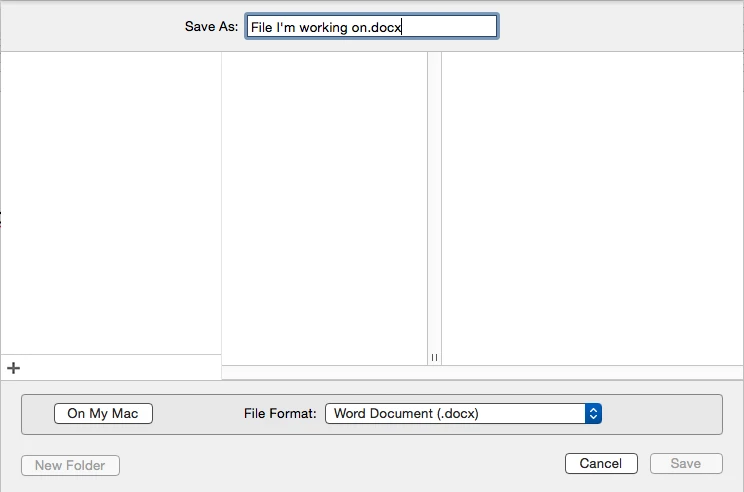
Yes, there is the "On My Mac" button there in the lower left but if the user needs to save a file to our file server, that's not "On My Mac". This is a horrible design by MS and I will register my complaint with them accordingly.

To avoid the inevitable questions that this will generate, is there a "default" command that I can roll into a Policy and set the save dialog box to "On My Mac" mode instead of "Online Locations" mode?

49 replies

Forum|alt.badge.img+13
  • Contributor
  • September 22, 2015

It is recorded in ~/Library/Group Containers/UBF8T346G9.Office/MicrosoftRegistrationDB.reg file.

1) Click "On My Mac" and Save a document ~/Documents folder and also Open a document for your computer so it will remember "On My Mac" setting.

2) Create a .dmg of ~/Library/Group Containers/UBF8T346G9.Office/MicrosoftRegistrationDB.reg using Composer and then push it with FEU and FUT ticked so all existing users and User Template will get it.


Forum|alt.badge.img+10
  • New Contributor
  • September 23, 2015

yep its in the SQLite DB, along with all other user customisable settings

If you have access to MS Premiere support please log a ticket so we can put some pressure on them to change this behaviour.

Creating the DB and then sending it out to all users is horrible, the DB contains a lot of other info you may not want to move between users or machines, so make sure you test thoroughly even have a look at the data in the DB with something like sqlitebrowser and perhaps test sanitising any user specific details.


Forum|alt.badge.img+4
  • Contributor
  • October 2, 2015

So, I have been digging into the MicrosoftRegistrationDB.reg and have found the entry that controls this setting. If I use a GUI SQLite editor (DB Browser for SQLite) , I can successfully change the value and get consistent results.

Details:

Table: HKEY_CURRENT_USERS_values
node_id: 485
name: OpenSaveLocally
type: 4
value: 0 -or- 1

By default the value is 0, this will cause show the "Online Locations" as the default save location. If you change the value to 1 it will show "On My Mac" as the default save location.

Does anyone know how we can script this change?


bpavlov
Forum|alt.badge.img+18
  • Esteemed Contributor
  • October 2, 2015

What you want is this:
https://developer.apple.com/library/mac/documentation/Darwin/Reference/ManPages/man1/sqlite3.1.html

It's built into OS. Back at the PSU Mac Admins conference @talkingmoose had a good talk covering Office 2016. When the subject of this database came up, I mentioned that one should really not copy the entire database but rather manipulate it using the appropriate tools so that you can script accordingly. Perhaps that's more than some people may want to get into. But it's certainly worthwhile picking up and learning. Because I imagine if you copy the entire database you will be getting certain preferences that are very specific to the user you were working under.

I'd look more into it myself but we're not on Office 2016 yet.


Forum|alt.badge.img+4
  • Contributor
  • October 2, 2015

@bpavlov I actually listened to that whole presentation and heard someone mention sqlite3 which gave me hope that this could be done.

I was hoping that someone else more experienced with the sqlite3 command could offer some insight.


Forum|alt.badge.img+4
  • Contributor
  • October 14, 2015

Hello All,

So I have been working with the sqlite3 command and have come up with a short script that will edit the OpenSaveLocally parameter. This will change the default File->Open and File->Save behavior to show the On My Mac option instead of the Online Locations. Though, the Online Locations button will still be available to the user.

Note: Since this database is per-user and not per-computer, the user you want to change logged in when the script is ran.

#!/bin/bash

####
# sqlite3 script to change the default OpenSaveLocally from false (0) to true (1).
# By Tim Arnold
# 10/13/15
####


#Gather Information

loggedInUser=$(id -un)

path="/Users/"$loggedInUser"/Library/Group Containers/UBF8T346G9.Office/MicrosoftRegistrationDB.reg"

#Read value of current key
currentKey=$(echo 'SELECT * FROM HKEY_CURRENT_USER_values WHERE name="OpenSaveLocally";'| sqlite3 "$path")
echo "CurrentKey is $currentKey"

#Update or insert key as needed
if [ "$currentKey" = "" ]; then
    echo "No Key Present. Setting."
    echo 'INSERT INTO HKEY_CURRENT_USER_values VALUES(485,"OpenSaveLocally",4,1);' | sqlite3 "$path"

elif [ $currentKey = "485|OpenSaveLocally|4|0" ]; then
    echo "Key Present. Set to Online Locations. Changing to Local Default"
    echo 'UPDATE HKEY_CURRENT_USER_values SET value='1' WHERE name="OpenSaveLocally";' | sqlite3 "$path"

elif [ $currentKey = "485|OpenSaveLocally|4|1" ]; then
    echo "Key Present. Key is set to Save Locally."

fi

exit -0

Please let me know if you see anything that could be improved.


donmontalvo
Forum|alt.badge.img+36
  • Hall of Fame
  • October 14, 2015

@tim.c.arnold wow, just the thing to bookmark at breakfast here at #JNUC2015. Kudos!


bpavlov
Forum|alt.badge.img+18
  • Esteemed Contributor
  • October 14, 2015

@tim.c.arnold Glad to see you rose to the occasion and tackled it. Good job. You could probably combine this script with a launch agent so it launches for each user.


AVmcclint
Forum|alt.badge.img+21
  • Author
  • Esteemed Contributor
  • October 14, 2015

I can't wait to try it out


Forum|alt.badge.img+16
  • Valued Contributor
  • October 14, 2015

@tim.c.arnold It doesn't work if it creates a new key, the reason for this is the node value actually changes every time the value is first created and if you precreate it then Word just creates another node with the value in it instead of honouring the one you created.
You can change an already created one but creating a new one doesn't work.


Forum|alt.badge.img+10
  • New Contributor
  • October 15, 2015

What @Look said.

Borrowed from Eric Holtman's discoveries:

"HKEY_CURRENT_USER_values" links to the "HKEY_CURRENT_USER" entry and the "HKEY_CURRENT_USER" entry links to a parent_id in the database. - Discovery of the parent_id is done by 'SELECT node_id from HKEY_CURRENT_USER WHERE name = 'Common' ORDER BY node_id LIMIT 1' but that only works if the apps have been launched and the database populated.

Forum|alt.badge.img+4
  • Contributor
  • October 15, 2015

Good catch, I was only working with a pre-populated database. There is still more work to be done to make this deploy-able.

@calumhunter I have not seen that post from Eric Holtman. Do you have a link?


Forum|alt.badge.img+2
  • New Contributor
  • October 24, 2015

I am Eric Holtam, the one @calumhunter is referencing.
I did some rudimentary discovery back in August attempting to manipulate the .reg database prior to any users launching Office apps to have the default location not be OneDrive. It didn't go so well.

If the database exists due to a first launch of an Office app the values can be manipulated to set the default save location, but I wasn't able to pre-crate the database and settings in a way that the apps would use. If I create the database and values, the first launch will still just create its own values.

I've basically given up on this. If anyone wants to pick it up and run have at it.

Notes I took while doing the discover are on my gist

-Eric


Forum|alt.badge.img+1
  • New Contributor
  • October 28, 2015

Bumping this back up.

Thought I'd be clever and run a check to see if Word is running, then trigger the next policy to run the SQLite command. We have check-in every five minutes so there's a good window of opportunity to catch as many users as I can before they try to save a document.

I'm no expert at bash, that's for sure. It nearly worked, but it fails because it tries to edit the DB at /Users/root/Library.

I'm not sure how to edit the script to change this or even if it can be changed. Any ideas?

Check if word is running...

#!/bin/sh
process="Word"
processrunning=$(pgrep -i $process)

if [ $processrunning != "" ] 
then
     echo $process " is running. Run policy with notification to user that Firefox will be shut down."
     jamf policy -id 44
else
     echo $process " is NOT running. Run policy without notification.
     jamf policy -id #####
fi
exit 0

Then make the DB changes...

#!/bin/bash

####
# sqlite3 script to change the default OpenSaveLocally from false (0) to true (1).
# By Tim Arnold
# 10/13/15
####


#Gather Information

loggedInUser=$(id -un)

path="/Users/"$loggedInUser"/Library/Group Containers/UBF8T346G9.Office/MicrosoftRegistrationDB.reg"

#Read value of current key
currentKey=$(echo 'SELECT * FROM HKEY_CURRENT_USER_values WHERE name="OpenSaveLocally";'| sqlite3 "$path")
echo "CurrentKey is $currentKey"

#Update or insert key as needed
if [ "$currentKey" = "" ]; then
    echo "No Key Present. Setting."
    echo 'INSERT INTO HKEY_CURRENT_USER_values VALUES(485,"OpenSaveLocally",4,1);' | sqlite3 "$path"

elif [ $currentKey = "485|OpenSaveLocally|4|0" ]; then
    echo "Key Present. Set to Online Locations. Changing to Local Default"
    echo 'UPDATE HKEY_CURRENT_USER_values SET value='1' WHERE name="OpenSaveLocally";' | sqlite3 "$path"

elif [ $currentKey = "485|OpenSaveLocally|4|1" ]; then
    echo "Key Present. Key is set to Save Locally."

fi

exit -0

Forum|alt.badge.img+10
  • New Contributor
  • October 28, 2015

Modifying the database, WHILE word is open or any MS application scares me.
Would not do that.

If you "REALLY" want to change it, open word, change the default save location
package up the database and deploy it as a FUT FEU package


Forum|alt.badge.img+1
  • New Contributor
  • October 28, 2015

It's a test laptop, I don't mind if I break it. :)

It's been reimaged a dozen times in the last few days.

I'll give what you suggested a try. We aren't rolling these out until 2016 so hopefully we can find a way around it by then.


Forum|alt.badge.img+10
  • New Contributor
  • October 29, 2015

MS aren't likely to "fix" this or provide a method to set this preference.
They've already made the design decision in the applications to use this new database for preferences

You're best most supportable method of action is client/customer education.

But good luck! Post back any wins you have :)


Forum|alt.badge.img+9
  • Valued Contributor
  • December 12, 2015

I just started following this discussion because we're getting ready to deploy Office 2016 this coming week, and we saw this particular behavior as a potential issue for our users.

Am I understanding correctly that @tim.c.arnold 's script only works if one of the apps has been launched? If that is so, and it keeps the change going forward, then we do have a partial solution. Yes, it'd be nice to pre-create this BEFORE the user (or the admin setting up a new user) logs in. But if the only requirement is that you launch one of the apps first, I think I can live with that for now.


Forum|alt.badge.img+2
  • New Contributor
  • December 12, 2015

Correct, the only way to change the setting with a script is after the application creates it on first launch.

There are talks with a Microsoft developer about this in the mac admins slack instance (http://macadmins.org) and he's being very receptive to suggestions and changes. This was one item that topped the list to change. They are aware and will investigate making this setting pre-configurable. Granted it won't help you and here's no timeframe for this change but they are aware.


Forum|alt.badge.img+9
  • Valued Contributor
  • December 15, 2015

@eholtam: Thanks, for the confirmation.

I'm wondering if other settings that used to be in plists are also now saved in the SQLite DB.

For example:
- Skip document gallery
- Save AutoRecover info interval

When I do a defaults read on the individual Office apps' plists, I don't see these keys. They used to be saved in the com.microsoft.office.plist file, but that file doesn't exist anymore.

@calumhunter Regarding your fear of changing the db while one of the apps is running, isn't that what we're doing anyway when we change any settings in the Preferences window of any of the apps? Or, in this particular case, the Save/Open dialog?

I don't think it'll hurt to test it out.


Forum|alt.badge.img+4
  • Contributor
  • December 17, 2015

I wanted to update everyone here:

First, I couldn't find any new solution for this problem. I kept running into the same wall -- having to launch an application to initialize the DB before running the script to edit the DB key.

Second, It looks like this problem may go away with the January release of Microsoft Office 2016.
From the Mac Admins - Slack group:

Already scheduled for 15.18 mid-January Release (i.e. work currently in progress)*​
1.    New plist preference to control default save location

Here's to having a great Holiday, and then coming back to a resolution from Microsoft!!


Forum|alt.badge.img+10
  • New Contributor
  • December 18, 2015

@itupshot

@calumhunter Regarding your fear of changing the db while one of the apps is running, isn't that what we're doing anyway when we change any settings in the Preferences window of any of the apps? Or, in this particular case, the Save/Open dialog?

Yes, but the applications would be using their own API to interface with the database. If you modify the DB outside of this bad things could happen.


Forum|alt.badge.img+14
  • Contributor
  • December 18, 2015

Another update to this.

15.18 should be out by January 12-14th. Dates are subject to change.


Forum|alt.badge.img+4
  • Contributor
  • January 11, 2016

Even though 15.18 is not currently released to the public. Here is the command to have office default to Open and Save Locally instead of OneDrive once it is released:

defaults write /Users/$userShortName/Library/Group Containers/UBF8T346G9.Office/com.microsoft.officeprefs.plist DefaultsToLocalOpenSave -bool TRUE

This is a user preference and not a computer wide preference, so it needs to be run for each user.

Credit goes to Paul Bowden (Software engineer for Office for Mac/iOS at Microsoft) for this becoming a pref instead of only in the MicrosoftRegistrationDB.


Forum|alt.badge.img+13
  • Honored Contributor
  • January 23, 2016

I can confirm this works on 15.18. Rather than a login hook or outset, I converted the plist to a profile that is installed at the user level and it works flawlessly.

LSinNY

