
Solved

Office 2016 for Mac: Disable cloud services (OneDrive, Sharepoint)

  • July 19, 2016
  • 3 replies
  • 45 views

Forum|alt.badge.img+7

Is there any way to disable cloud services in Office 2016 for Mac, specifically the OneDrive, OneDrive for Business, and Sharepoint?

Specifically, management wants the Save As panel to disable the button for "Online Locations":

If disabling that button in the Save As panel isn't possible, is it possible to disable the ability to "Add a Place":
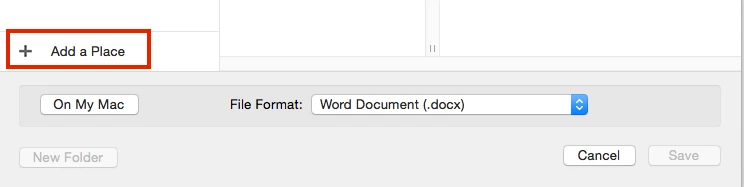
And if that isn't possible, can we at least disable the builtin cloud storage locations:
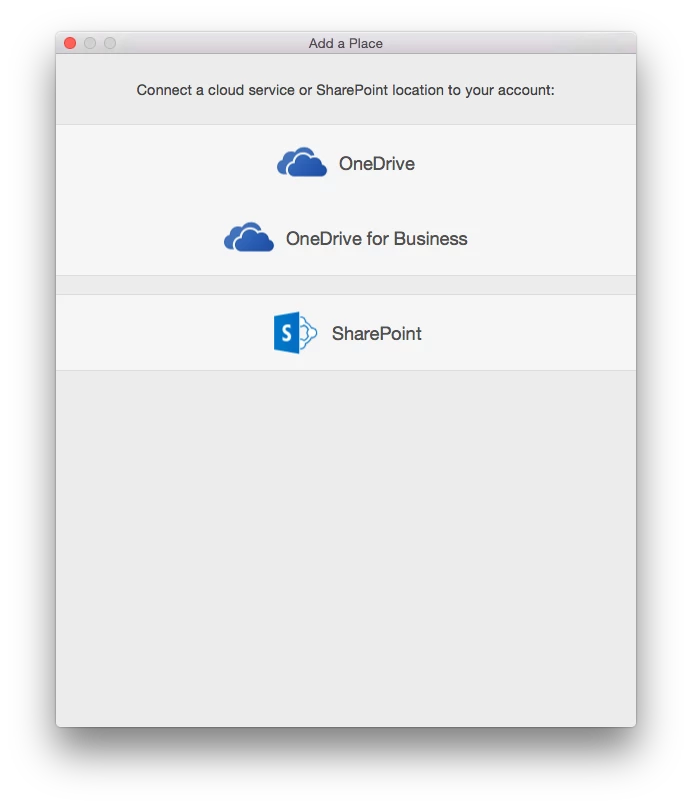
Any ideas? We're still using Managed Preferences, but Configuration Profiles could work too.

Thanks!

Best answer by boberito

#!/bin/sh
getUser=`ls -l /dev/console | awk '{ print $3 }'`
defaults write /Users/$getUser/Library/Group Containers/UBF8T346G9.Office/com.microsoft.officeprefs.plist DefaultsToLocalOpenSave -bool TRUE
chmod -R 700 /Users/$getUser/Library/Group Containers/UBF8T346G9.Office/
chown -R $getUser: /Users/$getUser/Library/Group Containers/UBF8T346G9.Office/

I have this script set to run when a user installs Office 2016 through self service. It sets the default save to local.

3 replies

boberito
Forum|alt.badge.img+22
  • Jamf Heroes
  • Answer
  • July 19, 2016
#!/bin/sh
getUser=`ls -l /dev/console | awk '{ print $3 }'`
defaults write /Users/$getUser/Library/Group Containers/UBF8T346G9.Office/com.microsoft.officeprefs.plist DefaultsToLocalOpenSave -bool TRUE
chmod -R 700 /Users/$getUser/Library/Group Containers/UBF8T346G9.Office/
chown -R $getUser: /Users/$getUser/Library/Group Containers/UBF8T346G9.Office/

I have this script set to run when a user installs Office 2016 through self service. It sets the default save to local.


Forum|alt.badge.img+7
  • Author
  • Valued Contributor
  • July 19, 2016

@boberito Thank you.

It turns out there is more information in this thread:

https://jamfnation.jamfsoftware.com/discussion.html?id=17045


boberito
Forum|alt.badge.img+22
  • Jamf Heroes
  • July 19, 2016

Yup yup. Been all over that thread. That's probably where I find the fix I suggested.