Question

Office 2016 for Mac released?

  • July 9, 2015
  • 12 replies
  • 50 views

Forum|alt.badge.img+9

Just got an email and it looks like it's out of beta. Anyone get their hands on it yet?

12 replies

mm2270
Forum|alt.badge.img+24
  • Legendary Contributor
  • July 9, 2015

See here: https://jamfnation.jamfsoftware.com/discussion.html?id=15029
Only the Office365 version is out. The standalone release is not available yet. But there are some posts from those using the '365 version that you may want to look at.


Forum|alt.badge.img+12
  • Contributor
  • July 9, 2015

@timkalee If you have Volume Licensing that's going to be available in August to license holders:

http://www.zdnet.com/article/microsoft-makes-office-2016-for-mac-available-first-for-office-365-users/


Forum|alt.badge.img+9
  • Author
  • Contributor
  • July 9, 2015

Thanks @dferrara, good info there. Doesn't look like it's posted yet in the O365 portal yet. I'll see what I can find out.


Forum|alt.badge.img+12
  • Contributor
  • July 10, 2015

I have it, it comes as version 15.11.2

It actually came from MS's O365 download area as a PKG. Apparently no need to use Composer and do snapshots.

This PKG install is working fine when installing from Self Service policy, but I have noticed when including the pkg as part of imaging in Casper Imaging, and then on first launch of any Office 16 app (word, excel, outlook, etc), get an error message saying Office 16 needs to be re-installed.

Issue with Office 16 and Casper Imaging 9.72 app?


Forum|alt.badge.img+10
  • Contributor
  • July 10, 2015

Just downloaded MS Office 2016 from my Office365 portal. The .pkg installer installs fine at imaging time. Word just asks me to sign in on launch. Haven't tested installing from a Self Service policy!

I'm still using Casper v9.61.


Forum|alt.badge.img+9
  • Contributor
  • July 14, 2015

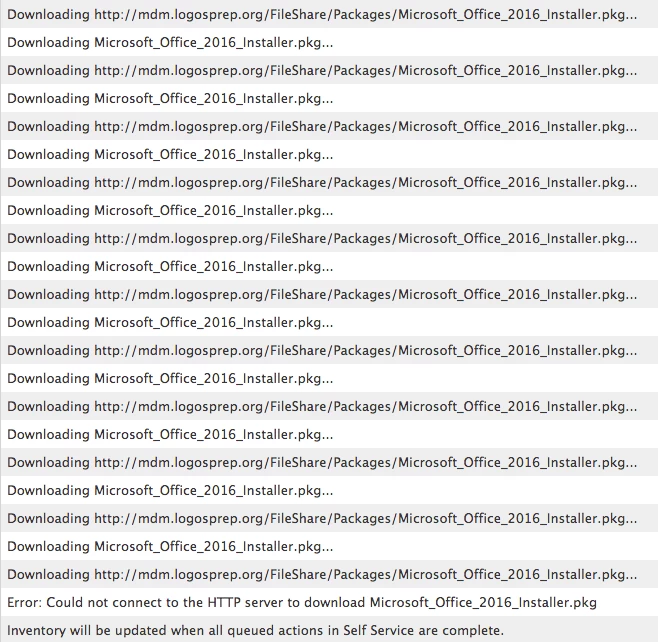
I am using Casper v9.72 and I am getting the following error.

I just downloaded the PKG from the Microsoft website and deployed that to my test machines. All of my other applications are installing on the same computer and they do not have an issue connecting to the server.


bpavlov
Forum|alt.badge.img+18
  • Esteemed Contributor
  • July 14, 2015

Perhaps try to re-upload that package. Looks like it's having issues downloading it via HTTP from your server.


Forum|alt.badge.img+11
  • Contributor
  • July 15, 2015

Having the same issue as lpadmin and it's not a corrupt package because installing manually is possible and downloading it 3 times even one a different machine and coping across normally still doesn't yield the correct results.


Forum|alt.badge.img+3
  • New Contributor
  • July 15, 2015

I would love to see a solution to this,

I'm having this issue as well, only I cannot install via Self Service policy. I get this:

[STEP 2 of 2]
Copying Microsoft_Office_2016_Installer.pkg...
Installing Microsoft_Office_2016_Installer.pkg...
Installation failed. The installer reported:

Installer works fine, downloaded from MS a few minutes ago, opened, indexed.


Forum|alt.badge.img+9
  • Author
  • Contributor
  • July 15, 2015

You should be able to get some more info from installer.log , but also try installing via command line to see if there's any hints as well.


Forum|alt.badge.img+10
  • Contributor
  • July 15, 2015

What about cacheing the package first, then installing the cached package? Does this make any difference?


Forum|alt.badge.img+14
  • Contributor
  • July 17, 2015

It's working fine for me from an SMB share and a Self Service policy.