Question

Office 2016 for Mac updating

  • January 27, 2016
  • 16 replies
  • 41 views

anickless
Forum|alt.badge.img+9

I am wondering if anyone has any success with automating the updating of office 2016. What work flow is working for people as I am struggling in getting something pushed to all of our Mac computers, Office 2016 for us is so buggy the IT director is ready to roll back to office 2011

16 replies

Forum|alt.badge.img+11
  • Valued Contributor
  • January 27, 2016

I cache the .pkg for each Office application update to the Macs. A smart group is set to update Self Service when all the packages have finished caching. The end users receive a notification from Self Service that the update is available to install. No issues reported by users. with the 15.18 update

Corbin


dpertschi
Forum|alt.badge.img+19
  • Contributor
  • January 27, 2016

@corbinmharris how are you dealing with quitting the applications prior to update?


bpavlov
Forum|alt.badge.img+18
  • Esteemed Contributor
  • January 27, 2016

@anickless What do you mean 2016 is so buggy?

Also, I've always liked this method of deploying Office:
https://derflounder.wordpress.com/2016/01/14/creating-an-office-2016-15-18-0-installer/

But you don't need to re-package it that way. You can push out the individual installers and then the volume license installer if you are doing VL. There's a long thread covering this on JAMF Nation if you do a search for Office 2016. Deployment of it has gotten easier since it was introduced as many of the bugs it initially had have been fixed.


Forum|alt.badge.img+11
  • Valued Contributor
  • January 27, 2016

@dpertschi In the Self Service policy, users are instructed to quit all apps before installing. Most end users are compliant. A before script to "killall Word", etc also works.


Forum|alt.badge.img+7
  • Contributor
  • January 27, 2016

Found this helpful link on here (forgot from who).

http://macadmins.software

I've been downloading each package and having a policy that includes Word, Outlook, Excel, Powerpoint, and OneNote.

Works with Self Service as well.


Forum|alt.badge.img+16
  • Honored Contributor
  • January 27, 2016

@dpertschi So far I haven't had any issues pushing the Office updates while the programs themselves are open. On the next open, it is the new version. This started being the case after 14.5 if memory serves. Do your own testing, but you shouldn't need to make sure programs are closed when you push them out.


Forum|alt.badge.img+16
  • Valued Contributor
  • January 27, 2016

Microsoft developers on the MacAdmins slack #microsoftoffice channel recommended against updating with the applications open, even if it typically does work. I just use killall scripts before updating, notifying the user the apps are going to quit and they should save their work and preemptively quit the applications.


anickless
Forum|alt.badge.img+9
  • Author
  • Contributor
  • January 27, 2016

@bpavlov Office is crashing on a constant basis. Users are on 15.18 and I cannot figure it out.


donmontalvo
Forum|alt.badge.img+36
  • Hall of Fame
  • January 28, 2016

My favorite, stolen adapted from some posts on this forum (thank you!).

#!/bin/bash

PROCESSES=("My Fancy App")
APPLICATION="/Application/MyFancyApp.app"

# Kill process(es)
for PROC in "${PROCESSES[@]}"; do
    RUNNING_PROCESSES=$(ps axc | grep -i "$PROC" | awk '{print $1}')
    if [[ $RUNNING_PROCESSES ]]; then
        echo "Found running process $PROC with PID: ${RUNNING_PROCESSES}. Killing it..."
        kill $RUNNING_PROCESSES
    else
        echo "$PROC not found running..."
    fi
done

# Remove application
/bin/rm -rf "$APPLICATION" 2> /dev/null

exit 0

talkingmoose
Forum|alt.badge.img+36
  • Community Manager
  • January 29, 2016

@anickless, are you needing help with crashing issues as well as deploying updates for Office 2016? You've said "Office 2016 for us is so buggy" and "Office is crashing on a constant basis" but haven't mentioned anything specific.

Folks here can definitely help with deployment issues. If you're needing assistance troubleshooting application issues then I encourage you to post details in the #microsoft-office channel in Slack (if you have time for a chat back and forth with folks) or ask for assistance on Microsoft's Community forums for Mac.

Office 2016 is working great for many of us. There's no reason we shouldn't be able to find out what's happening in your environment.


Forum|alt.badge.img+20
  • Valued Contributor
  • May 10, 2016

Hey @corbinmharris when you cache these packaged installers, how do you determine which Macs are to receive the cached installers? I ask because I am trying to build a smart group that finds our Macs with Office 2016 installed but not at the latest version which now, is 15.22.xxx.something. So far I am having a heck of time with the criteria for the smart group.

Thanks!

Mick


Forum|alt.badge.img+11
  • Valued Contributor
  • May 10, 2016

@mconners I made my smart group where "App Title = Word" and "App version was like 15." and "App version was not 15.21.xx" Then repeat for the other 3 products and update the version number each month. I have not discovered the trick for "app version = latest" yet.

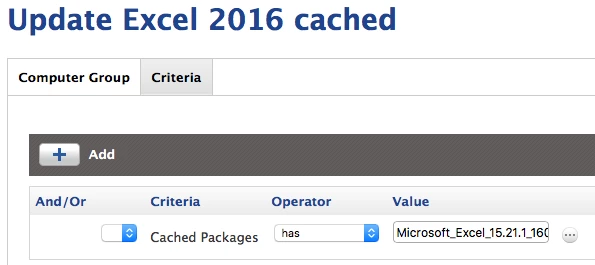
Then use that group to cache the file. Then make a smart group to detect the cached file and have it install it.

Would love to hear if there is a better way.


Forum|alt.badge.img+20
  • Valued Contributor
  • May 11, 2016

Thank you @swhps that helps me quite a bit. I was also looking back on @corbinmharris post and he mentioned "The end users receive a notification from Self Service that the update is available to install."

I have not had much luck with self service notifying our users of a new title being added. I guess what I was hoping for in self service is a badge displaying over the icon, much like the mail.app notification of new mail.

Perhaps someone knows of a better way to alert users of a new version. At this point, this is all related to our employee computers. Lab computers I am simply going to run the updates overnight anyhow.

Thanks again!!

Mick


donmontalvo
Forum|alt.badge.img+36
  • Hall of Fame
  • May 11, 2016

You can cache the installer and alert the user when it is ready to install, check User Interaction. The user then goes to Self Service and installs the software.

With the right scoping only users who meet requirements and are entitled will see it, and then once installed they shouldn't see it again.

Also with the right scoping you won't overwrite newer versions than you are deploying.


Forum|alt.badge.img+20
  • Valued Contributor
  • May 11, 2016

Thanks @donmontalvo I was starting down that path. This has been helpful and helps reinforce my initial thoughts. Sometimes I way over think things and get lost in the detail of a problem.


donmontalvo
Forum|alt.badge.img+36
  • Hall of Fame
  • May 11, 2016

Unfortunately JSS's built in scoping capabilities are limited (hoping it gets better with JSS 10).

So there is some work involved to create granular Smart Computer Groups (SCG) that enable easy adjustment when a new version comes out.

Granular SCG makes scoping, including targeting/excluding easy peasy. Think Lego blocks. :)