Question

Office for Mac 2016 15.19 - really?

  • February 10, 2016
  • 34 replies
  • 79 views

mhasman
Forum|alt.badge.img+22

JAMF's Office for Mac 2016 page has been updated with version info 15.19: here

Microsoft AutoUpdate does not show this update available, also there is no info about 15.19 on Microsoft Support portal.

Is that official release, or the Insider Preview build available for Office Insider program only?

@cybermac Would you provide the update info page, please? The only available is about 15.18: here

34 replies

Forum|alt.badge.img+7
  • Contributor
  • February 10, 2016

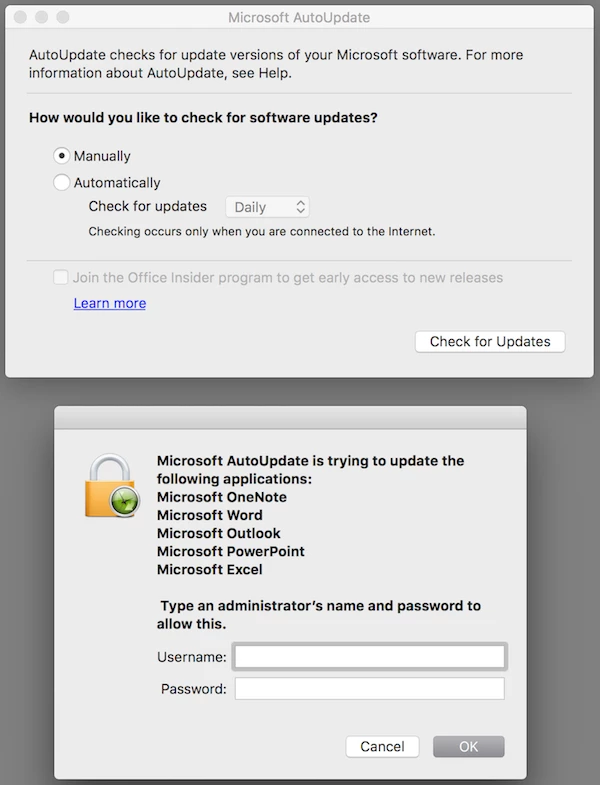
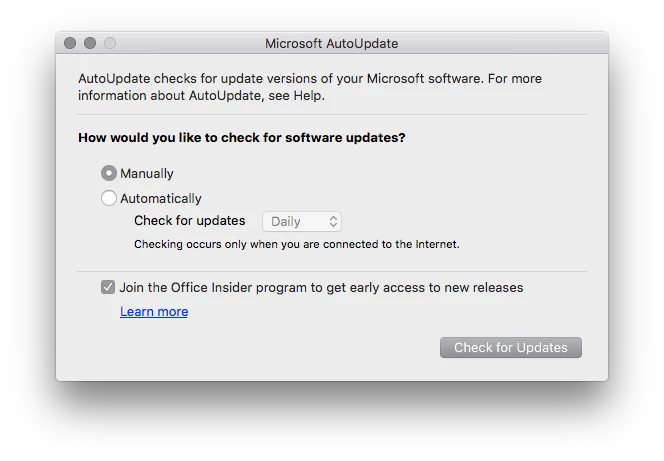
It's for the insider preview only. If you open the Microsoft AutoUpdate and check the Join the Office Insider program button and then check for updates it's available. Uncheck it, not available.


Forum|alt.badge.img+8
  • Valued Contributor
  • February 10, 2016

Why is it not marked as a Beta? JAMF please mark 15.19 as beta to avoid confusion.


Forum|alt.badge.img+7
  • Contributor
  • February 10, 2016

Just ran into this same issue today.

I had a user ask why they weren't being prompted for the update because they saw online that version 15.19 was available.

As soon as I opened MS Update and clicked the join insider program option I was prompted to update all apps to 15.19.0.


Forum|alt.badge.img+5

Microsoft needs to mark this as an Insider Preview-only release in AutoUpdate. When it appeared in AutoUpdate, it looked like a general release. I don't recall seeing any text indicating it's an Insider Preview release.


bpavlov
Forum|alt.badge.img+18
  • Esteemed Contributor
  • February 10, 2016

Join other Mac Admins on Slack. There's channel there with Microsoft engineers who are really responsive to feedback.

http://macadmins.org
#microsoft-office


Forum|alt.badge.img+14
  • Contributor
  • February 10, 2016

Updated: https://jamfnation.jamfsoftware.com/viewProduct.html?id=383&view=info

This is a Microsoft Office Insider Preview update.


acodega
Forum|alt.badge.img+15
  • Valued Contributor
  • February 10, 2016

JAMF alone does not edit the Third-Party Software pages, other users do as well.


mhasman
Forum|alt.badge.img+22
  • Author
  • Valued Contributor
  • February 10, 2016

To everyone who updates Third-Party Products - please make sure to update info with release versions only. Thanks!


Forum|alt.badge.img+16
  • Valued Contributor
  • February 10, 2016

While we are at it, might be nice to split it into.
Office for Mac 2016 (Volume License)
Office for Mac 2016 (365 License)
They seem to update on slightly different schedules.
Alternatively work out a way to both versions within the one page.


bpavlov
Forum|alt.badge.img+18
  • Esteemed Contributor
  • February 10, 2016

@Look that doesn't sound right. office is office is office. as far as we're concerned the only bits that change are related to licensing.


Forum|alt.badge.img+8
  • Valued Contributor
  • February 10, 2016

@bpavlov Office 365, Office 2016 Stand alone, Office 2016 Volume License and now Office Insider are all actually different products and update on different schedules. 365 and Stand alone are usually a similar schedule, but the VL is often behind and Insider is early. Makes it difficult for an Enterprise admin to keep on top of.


Forum|alt.badge.img+16
  • Valued Contributor
  • February 10, 2016

Yep as @jason.bracy said, the VL version has been on 19.17 until pretty recently, then just a couple of apps were moved to 19.18 available through Microsoft update, now it looks they all have moved, however when we downloaded the VL suite installer a couple of days ago that was still 19.17. Yet the retail version has been 19.18 for some time.
One assumes at some point in the future Microsoft will merge them, but certainly for the moment there appear to be seperate streams if you follow Microsofts intended process.


Forum|alt.badge.img+16
  • Valued Contributor
  • February 10, 2016

We're on the volume license and have never seen any difference – in my experience there has been no separate update schedule. There is a different schedule for posting new full installers on VLSC, but that isn't in any way required for users get the newest security updates (either through AutoUpdate or just getting the packages from Microsoft's support site).


bpavlov
Forum|alt.badge.img+18
  • Esteemed Contributor
  • February 10, 2016

@Look @jason.bracy Those are different things. You're talking about the VL installer being updated on the Microsoft VLSC. The app updates are still applicable regardless of what licensing you're using. There is a release schedules for early access to the updates which does dictate how soon you get the updates, but that has nothing to do with the licensing model you're using (VL or 365).

In fact, you can deploy the full standalone apps and use the VL serializer and be done with it. No need to wait for the VLSC to post a new ISO with the new app updates. Technically speaking there's no difference. It's all in the licensing.


Forum|alt.badge.img+10
  • New Contributor
  • February 11, 2016

+1 what @bpavlov said
@Look @jason.bracy there is no difference in code between the 15.19 version of 0365, VL, Update, Standalone
The release date is the same.
The only difference is the time it takes for the release of a new version of the office pkg to make it to the VLSC site. Thats not a "release" date issue, its simply an internal microsoft issue.

The sooner people that are VL, get the VL serialiser package and use that to licence the 0365 or Sku-less installer packages made available from MS the better.

No more waiting to get the latest installer from the VLSC site.

If you have say 15.17 from the VLSC installed already on a machine when 15.19 drops it will be available to that machine via MAU at the same time as everything else.

I think a lot of people here are confusing themselves and making it out to be a lot harder than it actually is.

Keep it simple guys


Forum|alt.badge.img+20
  • Contributor
  • February 11, 2016

I just have started installing Office 2016 VL 15.17 via Casper, when running WORD/PPOINT, going to the HELP menu and checking for updates I get 'THERE ARE NO UPDATES AVAILABLE FOR YOUR MICROSOFT SOFTWARE AT THIS TIME. PLEASE CHECK AGAIN LATER'

I have a seperate computer with Office 2016 VL 15.17 installed that I use to check for updates
my installs does not install the AUTO UPDATE portion. I manage client Office 2016 updates through policies when updates are available.

should i be seeing any updates ?


donmontalvo
Forum|alt.badge.img+36
  • Hall of Fame
  • February 13, 2016

Catching up on JAMF threads, apologies in advance if this was already answered, but this is what we are doing to disable the option.

Notice below, if the box was already enabled, and we uncheck and grey it out, it doesn't actually disable the function. Will circle back and update this if I find out how to really disable it.

This should do it, if user hasn't already enabled it.

#!/bin/sh
# Users above UID 500
over500=`dscl . list /Users UniqueID | awk '$2 > 500 { print $1 }'`

## Disable early adapter checkbox at Local level
/usr/bin/defaults write /Library/Preferences/com.microsoft.autoupdate2 DisableInsiderCheckbox -bool "true" 2>/dev/null
/usr/bin/killall cfprefsd

## Disable early adapter checkbox for all users
for u in $over500 ;
do
/usr/bin/defaults write /Users/"$u"/Library/Preferences/com.microsoft.autoupdate2 DisableInsiderCheckbox -bool "true" 2>/dev/null
/usr/sbin/chown "$u" /Users/"$u"/Library/Preferences/com.microsoft.autoupdate2.plist 2>/dev/null
/usr/bin/killall cfprefsd
done

exit 0

(yea, the killall cfprefsd is prolly redundant but doesn't hurt)

If your users don't have admin rights it's a moot issue anyway...

HTH,
Don


bentoms
Forum|alt.badge.img+35
  • Hall of Fame
  • February 13, 2016

@donmontalvo A profile will suffice.

I am guessing that you tried that & then tried defaults to read the plist.

Well, defaults won't read the keys from profiles too.

You'll need to use CFPreferences to properly composite when profiles are applied.

Try the below (borrowed from @clburlison):

python -c "from Foundation import CFPreferencesCopyAppValue; print CFPreferencesCopyAppValue('ChannelName', 'com.microsoft.autoupdate2')"

mhasman
Forum|alt.badge.img+22
  • Author
  • Valued Contributor
  • February 17, 2016

MS Office does not show 15.19.1 as available release, but as Insider Preview-only release.
@bkerns Brandon, when updating product information, would you please make sure to add insider preview releases info in to Beta Version, not to Current Version? Thanks!


Forum|alt.badge.img+18
  • Honored Contributor
  • February 17, 2016

I suggest you guys hang out in the #microsoft-office Slack channel for all the latest and greatest :)


Forum|alt.badge.img+8
  • Contributor
  • February 17, 2016

@mhasmen 15.19.1 is not a beta/preview release. It is a security update for Office 2016 that was released yesterday evening (I received the security bulletin 2/16 4:59 PM). https://support.microsoft.com/en-us/kb/3134241

Office 2011 has a similar security update also available. https://support.microsoft.com/en-us/kb/3137721


mm2270
Forum|alt.badge.img+24
  • Legendary Contributor
  • February 17, 2016

Well, that may be true, but Microsoft AutoUpdate.app is still showing only 15.8.0 as the latest update(s). This is because the xml feed that the application checks has not been updated with any new information. This isn't the first time MS has been laggards on getting that feed updated, but if you want to stick with only what would show up in AutoUpdate, then the 15.9.1 release isn't appearing there yet, at least not for me.


Forum|alt.badge.img+14
  • Contributor
  • February 17, 2016

From Paul Bowden at Microsoft:

Sorry for the slow response here. The release team is struggling with two independent issues relating to getting the 15.19.1/14.16.1 bits live. First up, the CDN cache refuses to purge, which is why the installers are still downloading as 15.18.0. Second, the MAU feeds on microsoft.com are refusing to update. Sigh. The 15.19.1 bits are physically available on the CDN, so I’ll go ahead and update macadmins.software with the links (will take me 5 mins), but just know that MAU won’t report the new version in the feed yet.

mm2270
Forum|alt.badge.img+24
  • Legendary Contributor
  • February 17, 2016

Lovely. Thanks for the info @Abdiaziz. Seems like MS has to sort out some issues with these updates. Technology can be such a pain sometimes.


Forum|alt.badge.img+8
  • Contributor
  • February 17, 2016

@mm2270 I've noticed the same. I've seen many occasions where the update is announced and released for Direct Download well before it shows up in the AutoUpdate applications. So, I tend to consider the MS Bulletins as the master source for whether it is "released" or not. Perhaps thats just me, but I do see the point of confusion given the whole 15.9 preview thing just not too long ago.